| Bytes | Lang | Time | Link |
|---|---|---|---|
| nan | I have seen your website | 250218T075645Z | gamesupd |
| 287 | AppleScript with Safari | 160706T031634Z | Allison |
| 403 | Python 3.5 with Selenium Webdriver | 160706T002130Z | R. Kap |
| 127 | Javascript with jQuery | 160706T021203Z | user4594 |
| 684 | Java 8 with Selenium Webdriver | 160707T092743Z | R. Kap |
| 380 | Swift 2.2 on iOS | 160706T153419Z | JAL |
I have seen your website, and it explains golf games very well. But please do visit my website too Join local or online Golf game competitions with cash prizes or Use a club to hit the ball towards the hole. Teach beginners and earn by sharing your skills.
AppleScript with Safari, 269 287 bytes
tell application "Safari"
activate
tell window 1
set current tab to (make new tab with properties {URL:"http://codegolf.stackexchange.com/q/84546"})
delay 5
do JavaScript "$('a')[66].click();$('textarea')[0].val('1234567890123456');$('input')[5].click()" in current tab
end tell
end tell
To use this you need to enable Safari Developer Settings and then enable Allow JavaScript from Apple Events. I'm not sure if it's cheating or not to use the existing keychain + cookies but oh well.
I also managed to do this in OSX's Automator by just automating the clicks and keystrokes however I didn't think it stayed true to the idea of the challenge
Python 3.5 with Selenium Webdriver, 485 427 469 461 449 414 403 bytes:
from selenium.webdriver import*;import time;D=Chrome();I=lambda k:D.find_element_by_name(k);C='comment';D.get('http://www.codegolf.stackexchange.com/users/login');I('email').send_keys(U);Z=I('password');Z.send_keys(P);Z.submit();D.get('http://www.codegolf.stackexchange.com/questions/84546');D.find_element_by_link_text('add a '+C).click();E=I(C);E.send_keys('1234567890123456');time.sleep(1);E.submit()
A full program utilizing a simple Python selenium web driver solution. Works in Chrome, although it needs ChromeDriver installed to work. Works by renaming U and P to the user's Stack Exchange email and password, respectively. However, if there are any issues getting ChromeDriver installed, here is a FireFox solution that gets executed in the exact same manner as the above solution and does not need any drivers, although it is currently 1 byte longer at 414 404 bytes:
from selenium.webdriver import*;import time;D=Firefox();I=lambda k:D.find_element_by_name(k);C='comment';D.get('http://www.codegolf.stackexchange.com/users/login');I('email').send_keys(U);Z=I('password');Z.send_keys(P);Z.submit();D.get('http://www.codegolf.stackexchange.com/questions/84546');D.find_element_by_link_text('add a '+C).click();E=I(C);E.send_keys('1234567890123456');time.sleep(1);E.submit()
Also, if a function is wanted, here is a solution using an anonymous lambda function, currently standing at 513 455 497 489 477 449 431 bytes and using Chrome as the browser.
lambda U,P:exec("from selenium.webdriver import*;import time;D=Chrome();I=lambda k:D.find_element_by_name(k);C='comment';D.get('http://www.codegolf.stackexchange.com/users/login');I('email').send_keys(U);Z=I('password');Z.send_keys(P);Z.submit();D.get('http://www.codegolf.stackexchange.com/questions/84546');D.find_element_by_link_text('add a '+C).click();E=I(C);E.send_keys('1234567890123456');time.sleep(1);E.submit()",locals())
However, if there are, again, any issues regarding ChromeDriver, here is the same type of solution but this time using Firefox, currently standing at 442 432 bytes:
lambda U,P:exec("from selenium.webdriver import*;import time;D=Firefox();I=lambda k:D.find_element_by_name(k);C='comment';D.get('http://www.codegolf.stackexchange.com/users/login');I('email').send_keys(U);Z=I('password');Z.send_keys(P);Z.submit();D.get('http://www.codegolf.stackexchange.com/questions/84546');D.find_element_by_link_text('add a '+C).click();E=I(C);E.send_keys('1234567890123456');time.sleep(1);E.submit()",locals())
You call these lambda functions by simply renaming the function as anything valid and then calling with your email and password like a normal function. For instance, if the function were named H, you would call it like H(Email, Password).
Javascript with jQuery, 127 bytes
$.post("//codegolf.stackexchange.com/posts/84546/comments",{comment:"1234567890123456",fkey:StackExchange.options.user.fkey})
Thanks to Ismael Miguel and nicael for a few bytes.
The fkey parameter is unique to your account, and can be found by examining local storage contents of your browser with a StackExchange page open. This code must be run in a browser with an open StackExchange session present. It automatically loads the fkey parameter from the browser's local storage (previous versions of this submission required it to be manually entered).
Unfortunately, the ppcg.lol URL can't be used, because it doesn't pass POST requests through.
Fun fact: if you attempt to run this code without the proper fkey value, you get an HTTP 418 response:

Example of how to find the fkey value in Chrome:
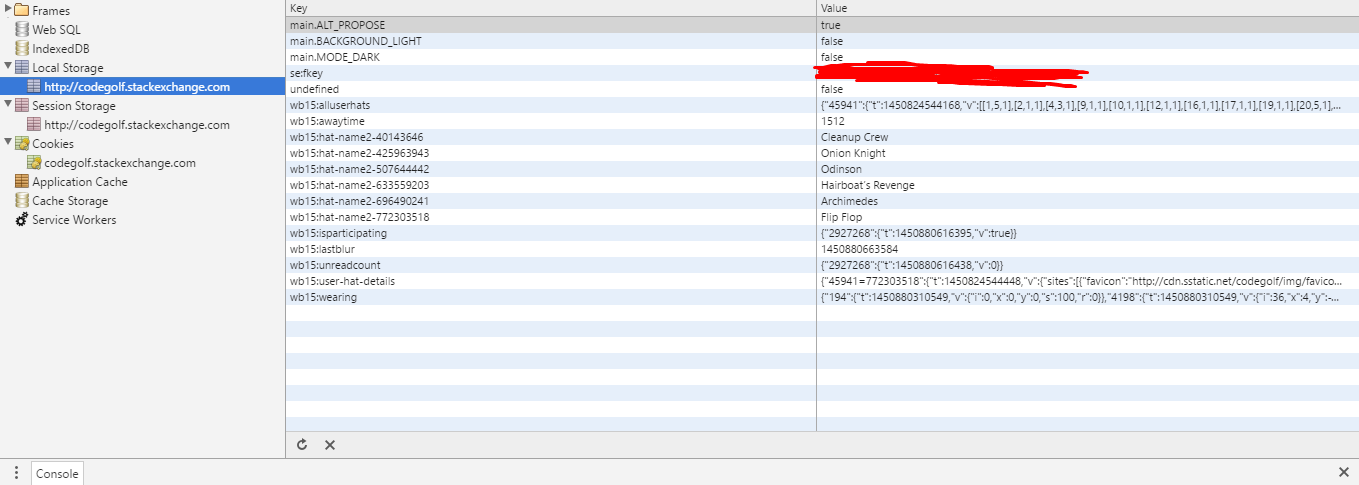
Apparently Winterbash stuff is still being stored. Neat.
For reference, the same thing in vanilla Javascript would be 314 bytes (thanks again to Ismael Miguel and nicael for some bytes off):
with(new XMLHttpRequest()){
open("POST","//codegolf.stackexchange.com/posts/84546/comments",1)
setRequestHeader("Content-type","application/x-www-form-urlencoded")
setRequestHeader("Content-length",62)
setRequestHeader("Connection","close")
send("comment=1234567890123456&fkey="+StackExchange.options.user.fkey}))}
Java 8 with Selenium Webdriver, 684 bytes:
import java.util.*;import org.openqa.selenium.*;import org.openqa.selenium.firefox.*;class Leave_a_Comment_PPCG_Challenge_Golfed_Version_1{static void Y(String U,String P){WebDriver D=new FirefoxDriver();D.get("http://www.codegolf.stackexchange.com/users/login");D.findElement(By.name("email")).sendKeys(U);WebElement Z=D.findElement(By.name("password"));Z.sendKeys(P);Z.submit();D.get("http://www.codegolf.stackexchange.com/questions/84546");D.findElement(By.linkText("add a comment")).click();WebElement V=D.findElement(By.name("comment"));V.sendKeys("1234567890123456");D.findElement(By.xpath("//input[@value='Add Comment']")).click();}public static void main(String[]a){Scanner I=new Scanner(System.in);Y(I.next(),I.next());}}
A direct adaptation in Java 8 of my second full program answer in Python. Works perfectly in Firefox and asks for space separated email and password input immediately when the program starts. In other words, the input is in the format Email Password where the space in between the two is needed.
Swift 2.2 on iOS, 380 bytes
let r = NSMutableURLRequest(URL:NSURL(string:"http://codegolf.stackexchange.com/posts/84546/comments")!)
r.HTTPMethod = "POST"
r.HTTPBody = try!NSJSONSerialization.dataWithJSONObject(["comment":"1234567890123456","fkey":UIWebView().stringByEvaluatingJavaScriptFromString("localstorage.getItem('se:fkey')")!],options:[])
NSURLSession.sharedSession().dataTaskWithRequest(r).resume()
Assumes the user is logged in to Code Golf with Safari and has cookies enabled. Also assumes UIKit is implicitly imported and available. JSON serialization is so verbose in Cocoa... Might update this with a Swift 3 solution and optionally macOS/Linux testable answers.