| Bytes | Lang | Time | Link |
|---|---|---|---|
| nan | 250203T164333Z | ais523 | |
| nan | 230312T061725Z | Unrelate | |
| nan | 240806T141821Z | Unrelate | |
| nan | 220410T235912Z | PurkkaKo | |
| nan | 220212T165016Z | lynn | |
| nan | 180225T210629Z | dylnan | |
| nan | 210803T225637Z | Unrelate | |
| nan | 210711T174037Z | hyperneu | |
| nan | 201015T014340Z | caird co | |
| nan | 210310T155408Z | caird co | |
| nan | 210210T190431Z | caird co | |
| nan | 190519T072730Z | Jelly Ba | |
| nan | 160203T153156Z | lynn | |
| nan | 171225T150700Z | user2027 | |
| 003 | There are several nonobvious ways to check properties of an argument using Ƒ. Below are a few. I left out plenty of uses of this quick E.g. AƑ | 180529T215052Z | dylnan |
| nan | 171014T195324Z | caird co | |
| nan | 161020T035239Z | Dennis | |
| nan | 170622T082650Z | user6213 | |
| nan | 170531T222655Z | user6213 | |
| nan | 161231T063649Z | Sherlock | |
| nan | If TMTOWTDI | 160722T033438Z | Dennis |
| nan | 160229T110556Z | user4853 | |
| nan | 160229T165819Z | Sp3000 | |
| nan | 160204T003657Z | lynn | |
| nan | 160205T203855Z | lynn | |
| nan | 160203T134204Z | lynn | |
| nan | 160204T014100Z | lynn |
Short-range scoping quicks can be used as a way to reuse values
Suppose you've calculated an intermediate value while running a link and want to use it twice. As a toy example, let's say that the program needs to run-length-decode a list using Œṙ, and then prepend the sum of the decoded list to the decoded list, an operation that requires using the list twice (once as something to sum and once as something to append).
Some possible ways to implement this are:
Œṙ©S®;      store the list in the variable, sum it, prepend the variable
ŒṙS;Œṙ      write the run-length-decode twice
ŒṙµS;       break the chain after calculating the list
              (thus changing the implicit right argument to ;)
Most Jelly programs use the third option here, because it's the shortest in cases where the reused value is nontrivial to calculate, but it has an issue – because it ends with a dyad, you can't place a monad immediately after it without changing the way it parses. If the program needed to reverse the resulting list, for example, it would have to write ŒṙµS;¹U because ŒṙµS;U would parse incorrectly.
In order to solve that problem, it's possible to take a fourth option, and do this:
ŒṙS;$ apply an "append sum" chain S; to the list
Normally, $ is used to specify the size of a loop body (or more generally the volume of code that's within the scope of a quick), but nothing forces you to apply quicks to it – it can just be used standalone, and has the effect of restricting what values the operations inside the $ can see. That in turn means that the tacit inputs to the builtins inside the $ will generally be the argument to the $, rather than the argument to the chain as a whole, and in particular the same input will generally be chosen multiple times, allowing you to reuse values.
The same trick can be used with Ɗ and Ʋ as well, in order to reuse values from slightly further back in the code.
(I didn't come up with this trick myself: I first learned this trick when I saw @Jonathan Allan suggest it as a golf to one of my answers. But it's generally useful enough that I thought it should be documented.)
Many quick-link monads get a free {
Quicks that expect dyads typically error when run on monads, because most atomic monads have their underlying call as a lambda accepting only one argument. However, most quicks that emit monads--whether conditionally or unconditionally--implement the emitted monad's call as a lambda accepting up to two arguments, with the only exceptions being Ɲɼ`⁺.
This is completely useless unless you're already severely abusing one of the handful of quicks that strictly require a dyad, but it can come up. I could also see this coming up with \ in some obscure circumstance.
Further note that it doesn't even meaningfully work with the otherwise promising grouping quicks $ƊƲ or line-reference quicks ÇÑĿ--they further use an underlying call to variadic_chain, so being passed a right argument causes them to actually evaluate their bodies with dyadic chaining, making $/ equivalent to ¥/ rather than ${/.
Head/tail after vectorizing operations
Credit to Jonathan Allan for this trick--it just so happens that he taught it to me on the very same solution that inspired my previous tip.
Jelly's one-byte builtins for the first and last element of a list, Ḣ and Ṫ, (in)famously mutate the list they're given to remove the element they return. This is usually of no consequence since the list is often not reused, and it also comes in handy when manually removing the element later would cost at least one byte (often more due to grouping/chaining), but sometimes you really don't want it.
Costing an extra byte, ḷ/ or ị1 are non-mutating substitutes for Ḣ and likewise ṛ/ and ị0 for Ṫ, but sometimes a little rearranging can bypass the mutations for free by forcibly operating on a different list than the one you intend to reuse.
Take the monadic (1),(2,1) chain Ṃ=Ṫ for example. "Is the minimum equal to the last element?" Here, Ṫ operates directly on the argument and mutates it, so if it's undesirable to mutate then your first instinct might be to rewrite it as Ṃ=ṛ/, spending a byte to make the same tail operation non-mutating. or even the (2,0),(2,1) chain ị0=Ṃ. However, since = vectorizes, a byte can be saved by rearranging it into the (2,1),(1) chain =ṂṪ: compare every element to the minimum, then take the last comparison from the resulting new list.
This is often easier with dyadic chaining, since the Ḣ/Ṫ can't end up accidentally forming a (2,1) chain. With a list on the left and a scalar on the right, mutation is the only difference between Ḣ+ and +Ḣ!
Jelly IDE/Debugger
After struggling a lot with Jelly's codepage, parsing, error messages and debugging, I decided to build a IDE/debugger for Jelly. This has been in the works for a very long time, but I finally decided to finish most of the features.
Installation instructions are in the repo README. You may need to install the DejaVu Sans Mono font (included) to your system to allow Tkinter to find it.
Features
Tkinter-based GUI
Run as python -m jellyide [filename].
- Code editor
- UTF-8 and Jelly codepage support
- Code suggestion with keyword search (press Ctrl+Space)
- Windowed output console
- Jelly runs in a separate thread and can be killed/restarted
- Notably missing: command line arguments
Augmented Jelly CLI with most of the features
Run as python -m jellyide.jelly [--opts] <jelly args...>. Use --help for more instructions.
Supports debugging, nice stack traces and everything the Jelly CLI supports.
Code visualization (links, quicks, chains, arities)
Only in the GUI, determines the links used and visualizes how they are parsed and executed.
- Block colors indicate arity of link/chain
- Bunched-together blocks indicate chain execution steps (
+1,1+,+Fand so on)

Step-by-step debugging
- Break/continue (via GUI or using Ctrl-C in CLI)
- Start program with stepping (via GUI or
--stepin CLI) - Step to next entry/return of an atom/quick
- Step to return of current atom/quick
- Shows args or return value in console
--- PAUSED ---
Ḥç€
^^^
left arg: [1, 2, -1, -2]
right arg: 3
[s]tep, step to [r]eturn, [c]ontinue, [q]uit?
--- PAUSED ---
Ḥç€
^
arg: [1, 2, -1, -2]
[s]tep, step to [r]eturn, [c]ontinue, [q]uit?
--- PAUSED ---
Ḥç€
^
return: [2, 4, -2, -4]
[s]tep, [c]ontinue, [q]uit?
--- PAUSED ---
Ḥç€
 ^^
left arg: [2, 4, -2, -4]
right arg: 3
[s]tep, step to [r]eturn, [c]ontinue, [q]uit?
--- PAUSED ---
ç€
^
left arg: 2
right arg: 3
[s]tep, step to [r]eturn, [c]ontinue, [q]uit?
Error stack traces with Jelly code locations
I'll let the results speak for themselves. I'm sure you've seen Jelly's built-in error messages.
in Æs
,Æs
 ^^
arg: -2

in ,Æs$
,Æs$×
^^^^
arg: -2

in ,Æs$×
,Æs$×
^^^^^
left arg: -2
right arg: 3

in ç
ç€
^
left arg: -2
right arg: 3

in ç€
Ḥç€
 ^^
left arg: [2, 4, -2, -4]
right arg: 3

in Ḥç€
Ḥç€
^^^
left arg: [1, 2, -1, -2]
right arg: 3

ValueError: n must be a positive integer
Chain shapes
Here are all the possible chain shapes of nilads 1234, monads FGHJ and dyads +*%& up to length 4.
Each is given with its monadic and dyadic behaviors in a non-tacit Ruby-like syntax, where (x+y).F applies/calls F on x+y.
For example, we wish to parse P+€Tọ. We know that P is a monad, +€ is a dyad, T is a monad, and ọ is a dyad. So we look up F+G* in the below table and see that it's ((a.F+a.G)*a), and we can understand the program as ((a.Product +€ a.Truthy) ọrder a).
Code   Monadic (arg=a)     Dyadic (args=x,y)
==================================================
   1   1                   1
   F   a.F                 x.F
   +   (a+a)               (x+y)
  1+   (1+a)               (1+x)
  FG   a.F.G               x.F.G
  F+   (a.F+a)             (x.F+y)
  +1   (a+1)               (x+1)
  +F   (a+a.F)             (x+y).F
  +*   ((a+a)*a)           (x+(x*y))
 1+F   (1+a).F             (1+x).F
 1+*   ((1+a)*a)           ((1+x)*y)
 F1+   (1+a.F)             (1+x.F)
 FGH   a.F.G.H             x.F.G.H
 FG+   (a.F.G+a)           (x.F.G+y)
 F+1   (a.F+1)             (x.F+1)
 F+G   (a.F+a.G)           (x.F+y).G
 F+*   ((a.F+a)*a)         (x.F+(x*y))
 +1F   (a+1).F             (x+1).F
 +1*   ((a+1)*a)           ((x+1)*y)
 +FG   (a+a.F).G           (x+y).F.G
 +F*   ((a+a.F)*a)         ((x+y).F*y)
 +*1   ((a+a)*1)           ((x+y)*1)
 +*F   ((a+a)*a.F)         (x+(x*y)).F
 +*%   (((a+a)*a)%a)       ((x+y)*(x%y))
1+2*   (2*(1+a))           (2*(1+x))
1+FG   (1+a).F.G           (1+x).F.G
1+F*   ((1+a).F*a)         ((1+x).F*y)
1+*2   ((1+a)*2)           ((1+x)*2)
1+*F   ((1+a)*a.F)         ((1+x)*y).F
1+*%   (((1+a)*a)%a)       ((1+x)*(x%y))
F1+G   (1+a.F).G           (1+x.F).G
F1+*   ((1+a.F)*a)         ((1+x.F)*y)
FG1+   (1+a.F.G)           (1+x.F.G)
FGHJ   a.F.G.H.J           x.F.G.H.J
FGH+   (a.F.G.H+a)         (x.F.G.H+y)
FG+1   (a.F.G+1)           (x.F.G+1)
FG+H   (a.F.G+a.H)         (x.F.G+y).H
FG+*   ((a.F.G+a)*a)       (x.F.G+(x*y))
F+1G   (a.F+1).G           (x.F+1).G
F+1*   ((a.F+1)*a)         ((x.F+1)*y)
F+GH   (a.F+a.G).H         (x.F+y).G.H
F+G*   ((a.F+a.G)*a)       ((x.F+y).G*y)
F+*1   ((a.F+a)*1)         ((x.F+y)*1)
F+*G   ((a.F+a)*a.G)       (x.F+(x*y)).G
F+*%   (((a.F+a)*a)%a)     ((x.F+(x*y))%y)
+12*   (2*(a+1))           (2*(x+1))
+1FG   (a+1).F.G           (x+1).F.G
+1F*   ((a+1).F*a)         ((x+1).F*y)
+1*2   ((a+1)*2)           ((x+1)*2)
+1*F   ((a+1)*a.F)         ((x+1)*y).F
+1*%   (((a+1)*a)%a)       ((x+1)*(x%y))
+F1*   (1*(a+a.F))         (1*(x+y).F)
+FGH   (a+a.F).G.H         (x+y).F.G.H
+FG*   ((a+a.F).G*a)       ((x+y).F.G*y)
+F*1   ((a+a.F)*1)         ((x+y).F*1)
+F*G   ((a+a.F)*a.G)       ((x+y).F*y).G
+F*%   (((a+a.F)*a)%a)     ((x+y).F*(x%y))
+*1F   ((a+a)*1).F         ((x+y)*1).F
+*1%   (((a+a)*1)%a)       (1%(x+(x*y)))
+*FG   ((a+a)*a.F).G       (x+(x*y)).F.G
+*F%   (((a+a)*a.F)%a)     ((x+(x*y)).F%y)
+*%1   (((a+a)*a)%1)       (((x+y)*y)%1)
+*%F   (((a+a)*a)%a.F)     ((x+y)*(x%y)).F
+*%&   ((((a+a)*a)%a)&a)   (((x+y)*(x%y))&y)
The table demonstrates how the same program can parse very differently depending on the number of arguments. The following program has a *1 step in it when parsed monadically, but 1% when parsed dyadically:
+*1% (((a+a)*1)%a) (1%(x+(x*y)))
Use outer products to create useful integer matrices
Here is a gist I have created of this post with slightly nicer HTML table formatting.
The outer product quick þ can be attached to dyads and causes the dyad to act on each pair of elements in its left and right arguments. It is shorthand for €Ð€. For example if we had the code [1,2]+€Ð€[0,10] we could shorten it to [1,2]+þ[0,10] and they would both yield [[1,2],[11,12]]. I will refer to a dyad with þ applied (such as +þ) as an outer product dyad.
When an integer is one of the arguments of an outer product dyad, Jelly takes the range of that number first then uses the result as the argument. Knowing this, the above example can be further shortened to 2+þ[0,10]. This is true for both the left and right arguments of an outer product dyad.
Some outer product dyads when acting monadically on an integer yield certain integer matrices that can be useful in golfing (especially ASCII art challenges) but would take many bytes to otherwise construct. For example =þ when applied to an integer n yields an n×n identity matrix. Try =þ online!
Below is a table of dyads and the type of matrices they yield when turned into outer product dyads and acted monadically on an integer. Dyads listed in the same row will yield the same matrices. There are dyads I haven't included in the table like &, |, %, w, ẇ and ḍ that also produce integer matrices but their patterns are not as simple and would likely be useful in fewer situations. Try wþ online!
| Dyad | Resulting matrix | Example |
|---|---|---|
=, ⁼, i or ċ |
Identity matrix. | 1 0 00 1 00 0 1 |
> |
Elements above diagonal are 1, all other elements are 0. |
0 1 10 0 10 0 0 |
< |
Elements below diagonal are 1, all other elements are 0. |
0 0 01 0 01 1 0 |
n or ⁻ |
Diagonal elements are 0, off diagonal elements are 1. |
0 1 11 0 11 1 0 |
a, ị, ṛ or ȧ |
Row index of each element. | 1 1 12 2 23 3 3 |
o, ḷ or ȯ |
Column index of each element. | 1 2 31 2 31 2 3 |
_ |
Main diagonal is 0, upper diagonals are 1, 2..., lower diagonals are -1, -2... |
0 1 2-1 0 1-2-1 0 |
_@ |
Main diagonal is 0, upper diagonals are -1, -2, etc., lower diagonals are 1, 2, etc. The only dyad in this table that doesn't have a one byte alternative that results in a transposed matrix is _. |
0 -1-21 0 -12 1 0 |
ạ |
Main diagonal is 0, upper and lower diagonals are 1, 2, 3... |
0 1 21 0 12 1 0 |
+ |
Row index plus column index. | 2 3 43 4 54 5 6 |
« |
Minimum of row and column indices. | 1 1 11 2 21 2 3 |
» |
Maximum of row and column indices. | 1 2 32 2 33 3 3 |
Monads don't have to be monads
Not very frequently applicable, but in some cases where a series of monads (or dyad-nilad/nilad/dyad pairs, i.e. would be an LCC if there was a leading constant) grouped with $ƊƲ is to the right of a dyad in a monadic chain, but the (2,1) pattern is not desired, the grouping quick can be replaced with ¥ɗʋ without affecting its behavior at no cost. This pretty much only comes up if there's another quick applied to the group which inherits its operand's adicity, like Ƈ, and there's no monad to the right of that.
Optimal Integer / List Compression
An integer compressor exists for a single large integer already; however, there are many ways of representing integers and lists - basic literals, exponential literals, codepage index lists, long compressed numbers, and two-byte short compressed numbers. These are all mentioned in this thread, but this is a unified compression tool for all of them.
This is available of my site here (affiliation disclosure: I made this site. I don't get any money from it. It's just a project entirely for fun). In case my site ceases to exist (and also because this answer should be self-contained), you can use the following code snippet to compress any valid value (where a valid value is an integer or a list of valid values).
Note that this only compresses into literals. There are often shorter ways to represent certain numbers or lists using constants, base decompression, grade up / group indices, etc, but that is beyond what I have implemented for this, and this will always return a single literal representing the inputted value.
let codepage  = "¡¢£¤¥¦©¬®µ½¿€ÆÇÐÑ×ØŒÞßæçðıȷñ÷øœþ !\"#$%&'()*+,-./0123456789:;<=>?";
    codepage += "@ABCDEFGHIJKLMNOPQRSTUVWXYZ[\\]^_`abcdefghijklmnopqrstuvwxyz{|}~¶";
    codepage += "°¹²³⁴⁵⁶⁷⁸⁹⁺⁻⁼⁽⁾ƁƇƊƑƓƘⱮƝƤƬƲȤɓƈɗƒɠɦƙɱɲƥʠɼʂƭʋȥẠḄḌẸḤỊḲḶṂṆỌṚṢṬỤṾẈỴẒȦḂ";
    codepage += "ĊḊĖḞĠḢİĿṀṄȮṖṘṠṪẆẊẎŻạḅḍẹḥịḳḷṃṇọṛṣṭ§Äẉỵẓȧḃċḋėḟġḣŀṁṅȯṗṙṡṫẇẋẏż«»‘’“”";

function go() {
  var value = document.getElementById("value").value;
  console.clear();
  if (value.match(/^\s*$/)) {
    console.log();
  } else if (value.match(/^[\[\]\d\s,-]*$/)) {
    try {
      value = eval("[" + value.replace(/\d+/g, x => x + "n") + "]");
    } catch {
      console.log("not a valid value");
      return;
    }
    if (value !== undefined) {
      if (value.length == 1) value = value[0];
      console.log(compress(value));
    }
  }
}

function compress(value, surround_list = false) {
  var converted = "";
  for (var f of [trivial, exponential, cp_index_list, compressed_integer, short_compressed]) {
    var c = f(value);
    if (c && (converted == "" || c.length < converted.length)) {
      converted = c;
    }
  }
  if (Array.isArray(value)) {
    var list_form = value.map(function(sub) {
      return compress(sub, true);
    }).join(",");
    if (surround_list || value.length == 1) {
      list_form = "[" + list_form + "]";
    }
    if (list_form && (converted == "" || list_form.length < converted.length)) {
      converted = list_form;
    }
  }
  return converted;
}

function trivial(number) {
  if (Array.isArray(number)) return;
  if (number == -1n) {
    return "-";
  } else {
    return number.toString();
  }
}

function exponential(number) {
  if (Array.isArray(number)) return;
  var exp = 0n;
  while (number % 10n == 0n) {
    exp++;
    number /= 10n;
  }
  return (number == 1 ? "" : number == -1 ? "-" : number.toString()) + "ȷ" + (exp == 3 ? "" : exp.toString());
}

function cp_index_list(numbers) {
  if (!Array.isArray(numbers)) return;
  if (numbers.every(function(x) {
    return !Array.isArray(x) && 0n <= x && x < 250n;
  })) {
    return "“" + numbers.map(function(x) {
      return codepage[x];
    }).join("") + "‘";
  } else if (numbers.every(function(x) {
    return Array.isArray(x) && x.every(function(x) {
      return !Array.isArray(x) && 0n <= x && x < 250n;
    });
  })) {
    var k = numbers.map(function(x) {
      return "“" + x.map(function(x) {
        return codepage[x];
      }).join("");
    }).join("") + "‘";
    if (numbers.length == 1) {
      return "[" + k + "]";
    } else {
      return k;
    }
  }
}

function compressed_integer(number) {
  if (Array.isArray(number) && number.every(function(x) {
    return !Array.isArray(x) && x >= 0n;
  })) {
    k = number.map(function(e) {
      var string = compressed_integer(e);
      return string.substring(0, string.length - 1);
    }).join("") + "’";
    if (number.length == 1) {
      return "[" + k + "]";
    } else {
      return k;
    }
  } else if (!Array.isArray(number) && number >= 0n) {
    var builder = "’";
    while (number) {
      var digit = number % 250n;
      if (digit == 0n) digit = 250n;
      number -= digit;
      number /= 250n;
      builder = codepage[digit - 1n] + builder;
    }
    return "“" + builder;
  }
}

function short_compressed(number) {
  if (Array.isArray(number)) return;
  if (number < -31349n || (number > -100n && number < 1001n) || number > 32250n) return;

  if (number < 0) number += 62850n;
  else            number -= 750n;

  var last = number % 250n;
  if (last == 0n) last = 250n;
  number -= last;
  number /= 250n;

  return "⁽" + codepage[number - 1n] + codepage[last - 1n];
}
input {
padding: 5px;
font-family: monospace;
width: 100%;
}<input id="value" type="text" placeholder="Enter a valid integer/list here" />
<br /><br />
<button onclick="go()">Compress!</button>Consider using i rather than e
e: If x occurs in y, then 1, else 0i: Find the first index of element y in list x, or 0
The key thing here is that e and i take arguments in opposite orders. This can be exploited in two main cases:
The question allows you to return an inconsistent truthy value, and your answer works by generating a list and checking if the argument is in this list
For example, checking if a number is a Fibonacci number takes 5 bytes using
e:RÆḞe@But only 4 using
i, assuming any truthy value may be returned:RÆḞiUsing a filter quick (
ƇorÐḟ). Let’s say you have generated a list of lists and want to keep only those where the input is (or is not) contained in it. Asireturns a truthy value if the right argument is in the left, you can set up a dyadic linkiƇto remove lists that don’t contain the left argument, saving a byte overe@Ƈ
Generally, this tip works best for answers that generate a list, then test the left argument for membership in some way, allowing you to avoid the @ quick or using a “grouper” like $ or Ɗ
Ƒ combines very well with vectorising commands
For example: Ṡ returns the sign of an integer. If given an array, it applies Ṡ to each element and returns the corresponding array:
-3Ṡ = -1
1,2,-2,5,0Ṡ = 1,1,-1,1,0
Under Ṡ, only 1, 0 and -1 are unchanged. Therefore, ṠƑ returns true if its argument is one of 1, 0 or -1.
However, Ƒ doesn't vectorise over lists. This means that given a list and an atom that vectorises, it acts something similar to <atom>Ƒ€Ạ, which saves at least 2 bytes and potentially more if using filters and other quicks (<atom>Ƒ€Ạ$Ƈ vs <atom>ƑƇ). As an example, compare:
-,1,0,1,- ṠƑ
-,2,0,1,- ṠƑ
This works best with the following atoms. All of these vectorise with depth 0 unless stated otherwise, meaning they vectorise to all levels of nested arrays:
| Atom | What does <atom>Ƒ test? |
|---|---|
<nilad> |
All equal nilad |
A |
All are non-negative |
H, N, Ḥ, Ẓ ÷, %, : |
All zeros ÷%: only work if the right argument doesn't lead to a division by zero |
O |
All numbers (i.e. no strings) |
U |
All subarrays are palindromes. Note that due to the behaviour of ŒḂ on integers, this is different to ŒḂ€Ạ for flat arrays See below for a breakdown of the differences and more details on UƑ |
², Ḃ |
All elements are 1 or 0 |
Ị, İ, Ʋ |
Only contains 1. Can usually be replaced by Ȧ, but not always |
Ọ |
All strings (i.e. no numbers) |
Ċ, Ḟ |
All integers |
Ṡ |
All elements are -1, 0 or 1 |
× |
All elements are zero Or, the right argument is 1 |
+, _, ^ |
Is the right argument 0? |
a, & |
Are all elements 0 or equal to the right argument? |
o |
If the right argument is not zero, is the left argument all non-zero? If the right argument is zero, return 1 |
| |
If the right argument is zero, is the left argument all integers? If the right argument is non-zero, are all elements equal to the right argument? |
« |
Are all elements less than or equal to the right argument? |
» |
Are all elements greater than or equal to the right argument? |
For |^&, the arguments must only involve integers
UƑ
Due to U vectorising at depth 0 and ŒḂ not vectorising, UƑ, ŒḂ and ŒḂ€Ạ have very different behaviours in some cases (note that ŒḂ also checks if integers are palindromic by checking their digits):
If the argument is a flat list of integers/strings:
ŒḂreturns true if the list is palindromicŒḂ€Ạreturns true if all elements of the list are palindromicUƑreturns true if the list is palindromic
If the argument is a list containing integers and single nested lists (e.g.
[[0, 1], 2, 3, [4, 5, 6]]):ŒḂreturns true if the list is palindromic, ignoring if elements themselves are palindromicŒḂ€Ạreturns true if each element in the list is palindromic, ignoring whether the list as a whole is palindromic.UƑwill always return false
If the argument is a list containing single nested lists (e.g.
[[1, 2], [3, 4], [5]]):ŒḂreturns true if the list is palindromic, ignoring if elements themselves are palindromicŒḂ€Ạreturns true if each element in the list is palindromic, ignoring whether the list as a whole is palindromic.UƑacts the same asŒḂ€Ạ
If the argument is a list with multiple levels of nesting (e.g.
[2, [2, 2], [2, [2, 2]]]):ŒḂreturns true if the list is palindromic, ignoring if elements themselves are palindromicŒḂ€Ạreturns true if each first order element in the list is palindromic, ignoring whether the list as a whole is palindromic. This does not check the nested elements if they are palindromes, it just iterates through the first level elements and checks themUƑchecks each subarray at all depths and returns true iff all these subarrays are palindromes. AsUƑreturns false for integers, if the list contains any subarrays containing both integers and lists, it'll return false.
As an example, compare the behaviour of each will the following arguments:
Argument ŒḂŒḂ€ẠUƑ[[2], [2, 2], [[2], [2, 2]]]0 0 1 [2, [2, 2], [[2, 2], [2, 2]]]0 1 0 [[2, [2, 2]], [2, [2, 2]]]1 0 0 [[[2], [2, 2]], [[2], [2, 2]]]1 0 1
Some additional helpful uses of Ƒ:
ṄƑ,ȮƑandṘƑall print their argument and replace it with1if you need to output the argument and start a new chain with 1 as the argument. Saves bytes if the chain prevents using1as an unparseable niladFƑandẎƑboth test if their argument is a flat listfƑreturns true iff the left argument consists entirely of the right argument.ḟƑreturns true iff the left argument does not contain the right argumentṁƑtests if the left argument has the same "shape" as the right argument (i.e. length and depth of each element)tƑtests if the left argument begins or ends with the right argument (returning 1 if it does not)ÆṣƑtests if its argument is perfect, or, if a list, is all perfect numbers
The various uses of ị
ị, the "index into" command has some extended capabilities beyond the standard index into command in most languages. For example:
| Command | Functionality | TIO |
|---|---|---|
0ị |
Return the last element | Try it online! |
Lị |
Return the last element | Try it online! |
.ị |
Return the last and first elements | Try it online! |
-.ị |
Return the last two elements | Try it online! |
1.ị |
Return the first two elements | Try it online! |
ؽị |
Return the first two elements | Try it online! |
JŻị |
Prepend the final element | Try it online! |
JŻ‘ị |
Append the first element | Try it online! |
Ø+ị |
Return the first and penultimate elements | Try it online! |
L‘Hị |
Return the middle elements (2 if even length, else 1) |
Try it online! |
L‘HịṢ |
Return the median of the array | Try it online! |
Tị |
Remove all falsey elements | Try it online! |
¬Tị |
Remove all truthy elements | Try it online! |
Mị |
Remove all but the maximal elements | Try it online! |
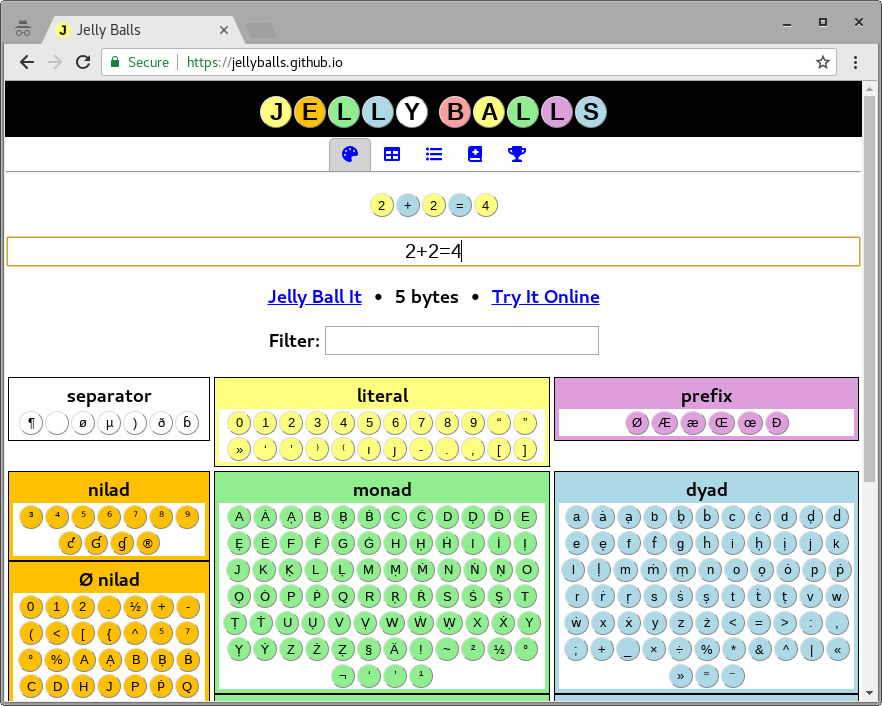
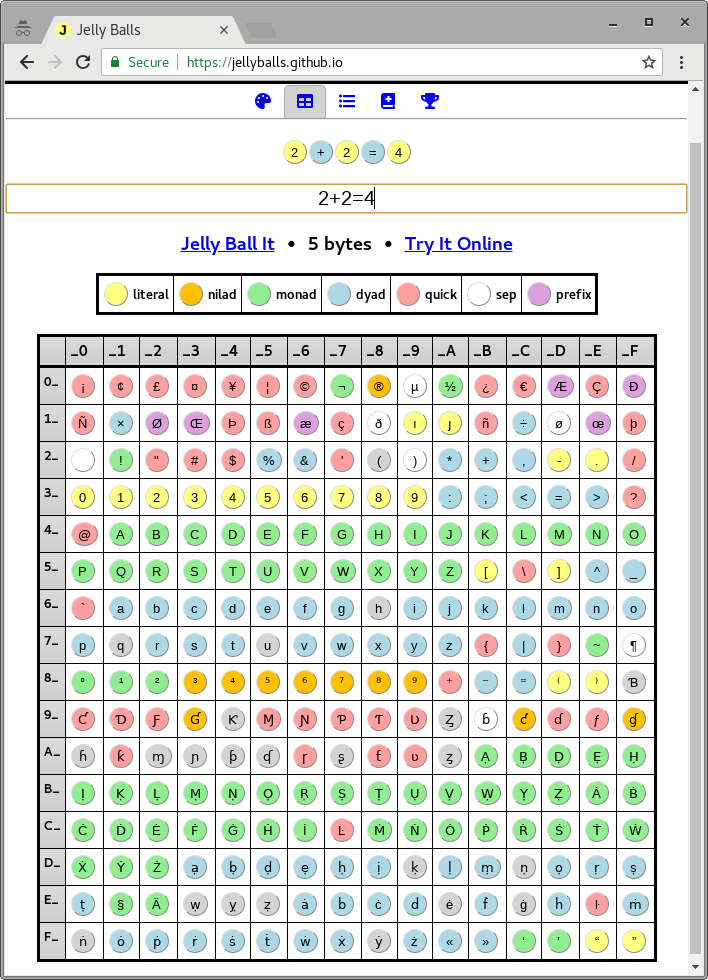
You may want to try an online editor Jelly Balls designed to easily build code in Jelly Language.
The features include:
- Command palette with all atoms and syntax characters organized by type
- Online parser recognizing literals and 2-byte atoms in the code
- Simplified in-browser Jelly interpreter to run your Jelly code on the webpage in javascript
- Direct links for transferring the code into TIO or another Jelly Balls session
- Automatic hints
- Optimised for mobile devices
Give it a try: https://jellyballs.github.io
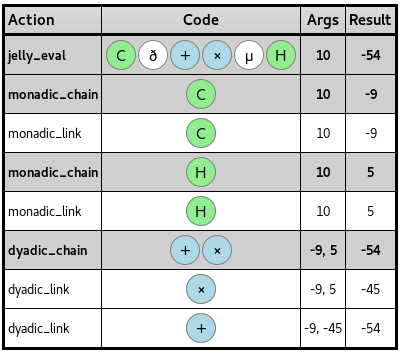
- Detailed trace report showing arguments and results of every executed step
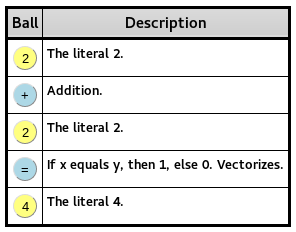
- Code report showing description of every step
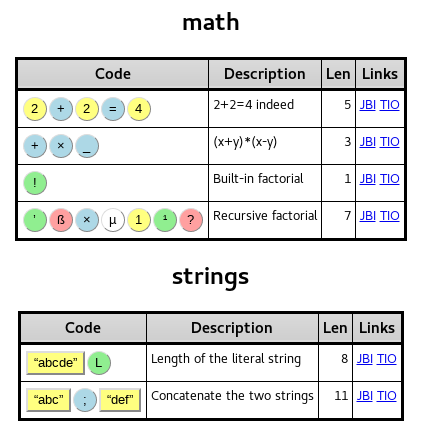
- Recipes page with Jelly examples
- Interactive code page of 256 Jelly characters
String compression
If you're looking for a more optimized/automatic string compressor, try this one.
A compressed string looks like “...», where the dots are a chunk of base-250-encoded data. The decompression algorithm is a bit complicated: the chunk is interpreted as a “mixed-base” integer, with divmod breaking off various parts of this integer and constructing a string out of them.
I’ve created a little Python 3 interface to compress Jelly strings:
import dictionary
code_page = '''¡¢£¤¥¦©¬®µ½¿€ÆÇÐÑ×ØŒÞßæçðıȷñ÷øœþ !"#$%&'()*+,-./0123456789:;<=>?@ABCDEFGHIJKLMNOPQRSTUVWXYZ[\]^_`abcdefghijklmnopqrstuvwxyz{|}~¶°¹²³⁴⁵⁶⁷⁸⁹⁺⁻⁼⁽⁾ƁƇƊƑƓƘⱮƝƤƬƲȤɓƈɗƒɠɦƙɱɲƥʠɼʂƭʋȥẠḄḌẸḤỊḲḶṂṆỌṚṢṬỤṾẈỴẒȦḂĊḊĖḞĠḢİĿṀṄȮṖṘṠṪẆẊẎŻạḅḍẹḥịḳḷṃṇọṛṣṭụṿẉỵẓȧḃċḋėḟġḣŀṁṅȯṗṙṡṫẇẋẏż«»‘’“”'''

class Compress(list):
    def character(self, c):
        if c in '\n\x7f¶':
            o = 95
        elif ' ' <= c <= '~':
            o = ord(c)-32
        else:
            raise ValueError(c + " is neither printable ASCII nor a linefeed.")
        self += [lambda z: 3*z+0, lambda z: 96*z+o]; return self
    def string(self, s):
        for c in s: self.character(c)
        return self
    def dictionary(self, w):
        ts = bool(self)
        if w[:1] == ' ': w = w[1:]; ts = not ts
        dct = dictionary.short if len(w) < 6 else dictionary.long
        W, sc = (w, 0) if w in dct else (w[:1].swapcase() + w[1:], 1)
        if W not in dct: raise ValueError(w + " isn't in the dictionary.")
        f = ts or sc; j = (2 if sc else 1) if ts else 0; i = dct.index(W)
        self += [lambda z: 3*z+2, lambda z: 3*z+j] if f else [lambda z: 3*z+1]
        self += [lambda z: 2*z+int(len(w) < 6), lambda z: len(dct)*z+i]
        return self
    def go(self):
        compressed = []; z = 0
        for f in self[::-1]: z = f(z)
        while z:
            c = z % 250
            if c == 0: c = 250
            z = (z - c) // 250
            compressed.append(code_page[c - 1])
        return '“{0}»'.format(''.join(compressed[::-1]))
Use the compressor as follows.
print(Compress()
      .dictionary('public')
      .dictionary(' static')
      .dictionary(' boolean')
      .string(' is')
      .dictionary('Power')
      .string('Of')
      .dictionary('Ten')
      .string('(')
      .dictionary('long')
      .dictionary(' input')
      .string(') {\n ')
      .dictionary(' return')
      .string('\n   ')
      .dictionary(' input')
      .string(' ==')
      .go())
Compress is a string builder:
.string(s)will insert raw, printable ASCII characters into the string.(Each character costs about 0.827 compressed bytes.)
.dictionary(w)will look up a string in Jelly’s built-in dictionaries. You may begin the string with a single space, if you want one. If this needs to deviate from the normal string-adding behavior, or flip the capitalization of a dictionary word, it’ll add flags accordingly.(Costs about 1.997 bytes for short words, 2.433 bytes for long words; if there are flags, add 0.199 bytes.)
Optimal string compressor
Recently I asked Erik the Outgolfer to add the optimized string compressor to JHT references page, but they said that
sorry, but that compressor doesn't seem to be fully implemented
it says“ugtestslug”is the shortest possible forugtestslug, while“#ṀȮụḄPƇ»also does the job
So I decide to implement the optimal string compressor.
Simple approach, but guarantee to find the smallest possible value (and hence byte count)
Take input from stdin, output to stdout. Just like the original compressor, ¶ or
(literal newline character) can be entered as newline.
Trying to run it with a lot of punctuation (for example, input ¶-----¶) will output the uncompressed string.
Of course, a lot of credit for this goes to Lynn for creating the original compressor.
There are several nonobvious ways to check properties of an argument using Ƒ. Below are a few. I left out plenty of uses of this quick (E.g. AƑ, ŒuƑ, 3Ƒ) because they are already the most straightforward methods of achieving their behavior.
OƑ  Is number?
ỌƑ  Is character? (errors on negative numeric input)
ḂƑ  Between 0 and 2? 0<=x<2 (python). <2aAƑƊ or of course ⁼Ḃ$ in Jelly.
ḞƑ  Is integer?
UƑ  Like `ŒḂ`, but checks if all sublists of depth 1 are palindromes.
ṠƑ  Is one of -1, 0, 1? (e-r1¤$)
Feel free to edit this to add more interesting cases.
Optimised string compressor
Lynn's post details what compressed strings are exactly, along with having a compressor that will produce these compressed strings. However, while tinkering around with a program in Jelly, I found it tiring to have to combine .dictionary and .string along with the correct placements of spaces and so on and so forth, in order to achieve the shortest possible string.
Therefore I decided to create an extension to Lynn's script that would take user input, and find the shortest way it can be compressed without the user having to do any work. The script is quite long, and so I've added in a TIO link, rather than the code itself.
The way the program works is by compressing using 3 different methods and determining which is shortest:
Method 1 simply encodes each byte of the input at a time, which tends to produce the longest result, as compared to the others. Even when the input is very short, it still manages to create rather long alternatives. For example, the shortest way that
testcan be compressed is“¡ḌY», whereas this method returns“¡⁷ƑKʂ»(2 bytes longer). As a general rule, this only works if the string is less than 4 characters longThe second method breaks the string into words and punctuation, as the two are added to the compressor in different ways. Words that are part of the dictionary are added with the
.dictionarymethod of Lynn's code, which compresses them more than if they were simply added by code points. Punctuation however has to be added by code point as, unfortunately, they aren't part of the dictionary.Punctuation includes spaces, which is where method number 3 comes into play, but first and evaluation of method 2: let's compare methods one and two compressing the string
Hello, World!(contains words, punctuation and spaces, so is perfect). Compressing character by character results in the final string of“ŒCdẉa÷¹ṂȤƓ(Ẋ)»(15 bytes long), which, as it turns out, is longer than the easier way to output Hello, World!:“Hello, World!. Now lets take a look at method two. This produces the compressed string“Ọƥ⁷Ƭė3⁶»which weighs in at 9 bytes, a great improvement over the old one. However, the shortest Hello, World! program in Jelly is 8 bytes, so something can be improvedHere comes method 3, making it even shorter. As expected, output for Hello, World is, of course,
“3ḅaė;œ»which is the shortest possible program. So what does method 3 do, that method 2 doesn't? Method 3 combines lone spaces into leading spaces, which the Jelly decompressor has a flag for. In the code for both the compressor and the decompressor, you can see code likeif flag_space: word = ' ' + word, showing that leading spaces are a) supported and b) byte-saving. Therefore, the string splitter from method two is adapted so that spaces by themselves are combined into the string directly after is, to create leading strings. This means thatHello, World!is parsed as["Hello", ",", " World", "!"], which when compressed is only 6 bytes (8 when including delimiters). This is almost always the shortest method of compression, excluding the "extension" I added,
This is the bulk of the program, but there are a few more options that help it compress data even more.
- The program checks whether or not each compressed version is correct, by using Dennis' sss decompressor that Jelly uses (go straight to the source)
- You can see all different compressed strings by making the first command line argument
--debug, which, rather than simply showing the shortest compressed string, shows all 3 along with a "This is the shortest" copy - The program handles "non-words"
Non-words
I started work on Lynn's compressor after seeing this message, took a crack at it and got frustrated at the fact that I couldn't find the shortest way to compress it (it's 29 or 32 bytes for the record). However, while testing my improvements, I found that words such as knowns aren't in Jelly's dictionary. Therefore, I set out to find a way to compress these "non-words" in the shortest Jelly code possible.
I created a function (trim) that splits the string as a point where at least one of the parts of the string are words. For example knowns would be split into ["known", "s"] and have the program add the first word via a dictionary add (.dictionary) and the second part of the word via a .string call. But this still leaves two edge cases: strings which have no words in them (such as ajdl) and non-words which have words at the end, such as abctest, which wouldn't get split by the trim function.
As there is no way of finding words in a string which has no words in it, the simplest and shortest way to handle these is by adding them in character by character via a .string call. So ajdl would get added by .string('ajdl'). Whereas non-words which end with recognised words, essentially implements the trimmer but in reverse, and applying .dictionary and .string the other way round to the forwards trimmer.
As it turns out, trimming the string, either from the start or the end is, of course, shorter than adding each character to the compressor, as demonstrated by an input of abctest this string, which produces a debug output of
Original        : abctest this string

Optimised       : “¡J+v(p⁸ụƘ$,»
Seperate spaces : “Ç⁴ṭḍµḄ7oeṂdḷp»
No trimmer      : “¤ɦ?Ɓ¢#fḲOạ⁾¶ɼȥƬ»
All characters  : “µẓþ"Y7_ḣṗḢ))9Þ⁴⁺Ẉ²)ɱ»
Non-compressed  : “abctest this string
Shortest        : “¡J+v(p⁸ụƘ$,»
=====
The different between the optimal output (which uses the trimmer) and the one which doesn't is a whopping (for Jelly) 4 bytes. Finally, there are occasions where the string itself is shorter than any compressed version, which has now been factored in.
Of course, a lot of credit for this goes to Lynn for creating the original compressor
Abuse string bugs
Credits go to Adnan for taking advantage of this first in Write a program to elasticize strings.
Jelly is supposed to get character arithmetic one day, but until that happens, we can take advantage of the fact that Python overloads most arithmetic operators and that Jelly does no type checking.
For example
“abcd”Ḥ
isn't supposed to do anything useful right now, but since Ḥ (unhalve) is implemented as
lambda z: z * 2
and arithmetic atoms vectorize at depth 0 (i.e., they operate on numbers or characters), the above Jelly code yields
['aa', 'bb', 'cc', 'dd']
Careful that this produces actual Python strings (a type Jelly isn't supposed to have), so this won't be usable in all situations.
Likewise, +/ can be useful to concatenate strings, with the same caveats.
Integer compression
String compression is useful when producing text in English, but if you need to compress other sorts of data, it's fairly ineffective. As such, most of the time you want to store a large fixed constant in your program, it's best to store it as an integer.
Now that Jelly has its own code page as a constant, the compression algorithm for integers is most simply expressed in Jelly itself:
ḃ250ịØJ”“;;”’ṄV
(The above program also contains a check to show the value that the integer decompresses to.)
In addition to just using an integer as an integer, you can also use it to create a string via doing base conversion on it, then indexing into an alphabet of characters. The ṃ atom automates this process, and is fairly useful because it can describe the entire process of decompression (other than the alphabet being decompressed into) in a single byte.
It's sometimes worthwhile to read from standard input when there are exactly two inputs
Jelly is optimized for taking input from command-line arguments. However, it's also optimized for writing monads rather than dyads; with dyads there are so many possible meanings for each builtin that you often need to spend characters to disambiguate, whereas with monads there are typically many ways to say the same thing.
As such, if you use one of two inputs only once, and the problem is such that it can't easily be implicitly read from ⁴ (i.e. you either need to make the ⁴ explicit, or else spend a character on }, @, or the like), consider reading it from standard input with Ɠ rather than placing it on the command line; that lets you precisely place the input right where you need it via the placement of your Ɠ, whilst ensuring that every other implicit input will be taken from your other input. That costs a byte and saves a byte, and depending on the problem, may well save a second byte by giving you more scope to reorder the code.
List commands and literals
If you attempt to use many of the non-vectorizing list commands on a literal n or a list of literals z, the list command will first convert to a list of some sort and then carry out the command on that list.
These commands appear use calls to the iterable function in jelly.py.
def iterable(argument, make_copy = False, make_digits = False, make_range = False):
    the_type = type(argument)
    if the_type == list:
        return copy.deepcopy(argument) if make_copy else argument
    if the_type != str and make_digits:
        return to_base(argument, 10)
    if the_type != str and make_range:
        return list(range(1, int(argument) + 1))
    return [argument]
Here are some incomplete lists of what those list commands will do.
Wraps in a list
The simplest return from iterable to wrap the argument in a list, and return that to be processed by the function. This happens if the argument is not already a list, is a string, and iterable's arguments don't call for other methods.
-------------------------------------------------------------------------------
| Command | Description     | Process                       | Effect          |
-------------------------------------------------------------------------------
| F       | Flattens a list | 4953F -> [4953]F -> [4953]    | Same as W       |
-------------------------------------------------------------------------------
| G       | Format a list   | 4953G -> [4953]G -> [4953]    | Same as W       |
|         | as a grid       |                               |                 |
-------------------------------------------------------------------------------
| I       | Increments      | 4953I -> [4953]I -> <nothing> | Empty list      |
-------------------------------------------------------------------------------
| S       | Sums a list     | 4953S -> [4953]S -> 4953      | Same as ¹       |
-------------------------------------------------------------------------------
| Ṭ       | Boolean array,  | 4Ṭ -> [4]Ṭ -> [0, 0, 0, 1]    | n-1 zeroes,     |
|         | 1s at indices   |                               | 1 at end        |
-------------------------------------------------------------------------------
| Ụ       | Sort indices by | 4Ụ -> [4]Ụ -> [1]             | Yields [1]      |
|         | by their values |                               |                 |
-------------------------------------------------------------------------------
| Ė       | Enumerate list  | 4Ė -> [4]Ė -> [[1, 4]]        | Yields [[1, n]] |
-------------------------------------------------------------------------------
| Ġ       | Group indices   | 4Ġ -> [4]Ġ -> [[1]]           | Yields [[1]]    |
|         | by values       |                               |                 |
-------------------------------------------------------------------------------
| Œr      | Run-length      | 4Œr -> [4]Œr -> [[4, 1]]      | Yields [[n, 1]] |
|         | encode a list   |                               |                 |
-------------------------------------------------------------------------------
Convert to base 10
The functions here call iterable to converts to a number to a list of its digits D, and then run on those digits.
-------------------------------------------------------------------------
| Command | Description     | Process                      | Effect     |
-------------------------------------------------------------------------
| Q       | Unique elements | 299Q -> [2, 9, 9]Q -> [2, 9] | Unique     |
|         | ordered by      |                              | digits     |
|         | appearance      |                              | of n       |
-------------------------------------------------------------------------
| Ṛ       | Non-vectorized  | 4953Ṣ -> [4, 9, 5, 3]Ṛ       | Reverses D |
|         | reverse         | -> [3, 5, 4, 9]              |            |
-------------------------------------------------------------------------
| Ṣ       | Sort a list     | 4953Ṣ -> [4, 9, 5, 3]Ṣ       | Sorts D    |
|         |                 | -> [3, 4, 5, 9]              |            |
-------------------------------------------------------------------------
Convert to list with range
The functions here convert a number to the range R = [1 ... n], and then run on that range.
-----------------------------------------------------------------------------------------
| Command | Description       | Process                             | Effect            |
-----------------------------------------------------------------------------------------
| X       | Random element    | 4R -> [1 ... 4]X -> 2               | Random element    |
|         |                   |                                     |  of R             |
|         |                   |                                     |                   |
-----------------------------------------------------------------------------------------
| Ḋ       | Dequeue from list | 4R -> [1 ... 4]Ḋ -> [2, 3, 4]       | Range [2 ... n]   |
-----------------------------------------------------------------------------------------
| Ṗ       | Pop from list     | 4Ṗ -> [1 ... 4]Ṗ -> [1, 2, 3]       | Range [1 ... n-1] |
-----------------------------------------------------------------------------------------
| Ẇ       | Sublists of list  | 4Ẇ -> [1 ... 4]Ẇ                    | All sublists of R |
|         |                   | -> [[1], [2], [3], [4], [1, 2],     |                   |
|         |                   |     [2, 3], [3, 4], [1, 2, 3],      |                   |
|         |                   |     [2, 3, 4], [1, 2, 3, 4]]        |                   |
-----------------------------------------------------------------------------------------
| Ẋ       | Shuffle list      | 4Ẋ -> [1 ... 4]Ẋ -> [2, 1, 3, 4]    | Shuffles R        |
-----------------------------------------------------------------------------------------
| Œ!      | All permutations  | 3Œ! -> [1, 2, 3]Œ!                  | All permutations  |
|         | of a list         | -> [[1, 2, 3], [1, 3, 2],           | of R              |
|         |                   |     [2, 1, 3], [2, 3, 1],           |                   |
|         |                   |     [3, 1, 2], [3, 2, 1]]           |                   |
-----------------------------------------------------------------------------------------
| ŒḄ      | Non-vectorized    | 4ŒḄ -> [1 ... 4]ŒḄ                  | Bounces R         |
|         | bounce,           | -> [1, 2, 3, 4, 3, 2, 1]            |                   |
|         | z[:-1] + z[::-1]  |                                     |                   |
-----------------------------------------------------------------------------------------
| Œc      | Unordered pairs   | 4Œc -> [1 ... 4]Œc                  | Unordered pairs   |
|         | of a list         | -> [[1, 2], [1, 3], [1, 4], [2, 3], | of R              |
|         |                   |     [2, 4], [3, 4]]                 |                   |
-----------------------------------------------------------------------------------------
| Œċ      | Unordered pairs   | 4Œċ -> [1 ... 4]Œċ                  | Unordered pairs   |
|         | with replacement  | -> [[1, 1], [1, 2], [1, 3], [1, 4], | with replacement  |
|         | of a list         |     [2, 2], [2, 3], [2, 4], [3, 3], | of R              |
|         |                   |     [3, 4], [4, 4]]                 |                   |
-----------------------------------------------------------------------------------------
| ŒP      | Powerset of       | 3ŒP -> [1 ... 3]                    | Powerset of R     |
|         | a list            | -> ['', [1], [2], [3], [1, 2],      |                   |
|         |                   |     [1, 3], [2, 3], [1, 2, 3]]      |                   |
-----------------------------------------------------------------------------------------
| Œp      | Cartesian         | 4,2Œp -> [[1 ... 4], [1 ... 2]]Œp   | Cartesian product |
|         | product of z's    | -> [[1, 1], [1, 2], [2, 1], [2, 2], | of [1 ... z[i]]   |
|         | items             |     [3, 1], [3, 2], [4, 1], [4, 2]] | for i in z        |
-----------------------------------------------------------------------------------------
If TMTOWTDI, pick the one that fits your chain.
One of the advantages of a tacit language is that you usually can get away without using variable references. However, this works only if the links in your chain have the right arities.
For example, the straightforward way of taking the sum of all arrays in a 2D array is
S€
which maps the sum atom over all elements of the array.
Now say you have a monadic chain that consists of the atom
*
which maps each x of a 2D array to xx. For example, for A = [[1, 2], [3, 1], [2, 3]], calling the chain would yield [[1, 4], [27, 1], [4, 27]].
Now, we want to take the sum of each pair. Unfortunately,
*S€
doesn't work since * doesn't act like a hook anymore (using A itself as right argument), but as a fork, meaning that S€ gets applied to A first, and the result is the right argument of *.
Fixing this is easy enough:
*¹S€
*⁸S€
Both produce the desired result: *¹ is a fork where ¹ is the identity function, and *⁸ is an atop, where ⁸ is a reference to the chain's left argument (A).
However, there's a way to save a byte! The atop ḅ1 (convert from unary to integer) also computes the sum of each array in AA, but unlike S€, ḅ is a dyadic link.
The chain
*ḅ1
returns [5, 28, 31] (as desired); since ḅ is dyadic, * hooks instead of forking
You can use superscript three to nine (³⁴⁵⁶⁷⁸⁹) to golf some usually used
values, but this depends on the amount of command line arguments, and in case of links, on the arguments of the links.
³returns 100, and works only if there's no input.⁴returns 16, and works only if there's at most one input.⁵returns 10, and works only if there's at most two inputs.⁶returns a space if there's at most three inputs.⁷returns a new line if there's at most four inputs.
If there are five inputs, however, you're out of luck.
Recently, a new version of the language lowered the value of ³ to 100, and introduced some new atoms that return values or (for links) their arguments.
⁸returns a blank list everywhere except links which have a left argument passed to them.⁹returns 256 everywhere except links which have a right argument passed to them.
If you're in a link, and have arguments from both sides passed to it, however, you're out of luck.
Special-cased numeric values
Here are some special cases for Jelly's numerics parser:
-evaluates to-1.evaluates to0.5ȷevaluates to1000(ȷis for scientific notation, e.g.2ȷ6is2000000)ıevalulates to1j(ıis for complex numbers, e.g.2ı3is2+3j)
It's also worth noting that something like 4ı is actually 4+1j, rather than 4.
You can mix and match these, e.g.:
-.is-0.5and-ȷis-1000-ıis-1+1j,ı-is-1jand-ı-is-1-1j.ȷis500.0.ıis0.5+1j,ı.is0.5jand.ı.is0.5+0.5jȷıis1000+1j,ıȷis1000jandȷıȷis1000+1000j
Note that ȷ- is 0.1, but that doesn't save any bytes over .1. Then there's also the following, which can already be done in the corresponding number of bytes by using the builtin variable for 10 (⁵), but might be useful in the rare case that the builtin is unavailable or to save on needing to use ¤:
ȷ.issqrt(10) ~ 3.162277,.ȷ.issqrt(10)/2 ~ 1.5811andȷ-.is1/sqrt(10) ~ 0.31162
This is part of what became the Jelly wiki tutorial.
Tacit programming
Jelly is a tacit programming language. This means you define links (functions) by composing existing links into a chain, without explicitly talking about the arguments involved. Which way the arguments “flow” through this composition is defined by the pattern the links are arranged in. An example of this will be given soon, but first we’ll need to introduce some concepts.
The arity of a link is a very crucial concept. All of the atoms – the built-ins, like + and ½ – have fixed arities. Links are sorted into three categories, depending on their arity:
Nilads take no arguments (arity 0); other than some I/O and stateful commands, they mostly represent constant values. For example, the literal
3is a nilad.Monads take one argument (arity 1). (There’s no connection to functional programming monads here.) For example,
½(square root) is a monad.Dyads take two arguments (arity 2): a left and a right argument. For example,
+is a dyad.(Using adjectives, we say that a link is niladic, monadic, or dyadic.)
So what’s the arity of the links we define when writing a program? By default, they are variadic – that is, it’s up to the caller to specify how many arguments to use, and in the case of the main link, it depends on how many arguments the program is passed.
As an example, +½ is a chain of + (addition) and ½ (square root). As the respective arities of the elements of this chain are 2 and 1, we call it a 2,1-chain. The interpreter has specific rules for breaking down chains, based on their arities: those rules dictate that, given an input n, this new link computes n + sqrt(n). (You can read +½ as “... plus its square root.”)
Jelly programming, then, is essentially the art of learning these rules well, and composing clever chains that get the job done, tacitly.
This is part of what became the Jelly wiki tutorial.
Multi-chain links
Remember when I wrote that you define a link by making a chain of other links? I wasn’t telling the whole truth: in reality, it’s a two-layer process. A link is a chain of chains, and by default, the outer chain simply has unit length.
Consider this program:
C+H
That’s complement plus half. It takes an input value n and calculates (1-n)+(n/2). Not too exciting, I know. But the structure is really like this:

The link we wrote is, itself, actually a chain containing a single chain.
Suppose that we want to calculate (1-n)+(1-n)(n/2) instead. The dyadic chain +× would work: by the chaining rules, it calculates λ+(λ×ρ), which looks a lot like what we need. However, simply replacing + by +× in our program won’t do: C+×H is a 1,2,2,1-chain – complement, then add (the argument), then multiply by half – computing ((1-n)+n)×(n/2).
We want Jelly to treat +× as a unit, and make a 1,2,1-chain of the sub-chains C, +×, and H. Multi-chain links let us do just that! To construct them, we use the chain separators øµð: in the image above, they would introduce a new blue rectangle, of arity 0, 1 and 2, respectively. In our case, we can group the chains the way we want by writing Cð+×µH:

There’s no way to nest these things even further. You’ll have to define multiple links, instead.
This is part of what became the Jelly wiki tutorial.
Program structure
Each line in a Jelly program is a link definition. Links are basically functions. The bottom line represents “main”: it's the link that gets evaluated using the arguments passed on the command line.
All links but the last one, then, are function definitions: you can refer to them using actors. For example, ç is “the link above this one, as a binary operator (dyad)”. Consider this example program, which computes the square of the sum of its arguments:
+
ç²
This is sort of like the pseudocode:
define f:
    the built-in link +
define main:
    apply the dyad f
    square the result
This is part of what became the Jelly wiki tutorial.
Chains
(This is sort of a follow-up to Tacit programming.)
How does Jelly evaluate a chain? As explained before, there are three cases to consider: whether this chain was called niladically, monadically, or dyadically.
1. Niladic chains
These are the easiest of the bunch. To evaluate a niladic chain that starts with a nilad, like α f g h, evaluate the monadic chain f g h at that nilad α. (Caveats: if the whole chain is empty, 0 is returned instead. If α isn’t a nilad, replace use α=0 instead.)
For example, 4½ is just ½ evaluated at 4, which is 2.
2. Monadic chains
Monadic chains are broken down from left to right, until there are no links left to consider. Also, we’re passed some argument ω here. There are two questions to answer:
What’s the starting value for this left-to-right evaluation?
If our chain starts with a nilad
α, and is followed by zero or more monads (like½), dyad-nilad pairs (like+2), and nilad-dyad pairs (like4*): we start by evaluatingα, and then consider the rest of the chain.Otherwise, we start from the argument passed to this chain,
ω, and consider the entire chain.
How do we walk down the chain?
Let’s call V the current value – initially, it’s the value described above, but it gets update as we go through the chain – and denote
- nilads using digits,
- monads using lowercase letters,
- dyads using operator symbols
+,×,÷.
Then the following patterns are matched against, from top to bottom:
                                 ┌───────────┬─────────┐
                                 │ old chain │ new V   │
                                 ╞═══════════╪═════════╡
                                 │ + × 1 ... │ (V+ω)×1 │ *
                                 │ + f ...   │ V+f(ω)  │
                                 │ + 1 ...   │ V+1     │
                                 │ 1 + ...   │ 1+V     │
                                 │ + ...     │ V+ω     │
                                 │ f ...     │ f(V)    │
                                 └───────────┴─────────┘
      (* Only if `...` consists of monads, dyad-nilad pairs, and nilad-dyad pairs.)
Let’s try this out on the chain
+²×.
+isn’t a nilad, so we start out atV = ω.- Then, we chop off
+², matching the second pattern, and getV = ω+ω².- Then, we chop off
×, matching the fifth pattern, and getV = (ω+ω²)×ω.- The chain is now empty, so
(ω+ω²)×ωis our final result.
3. Dyadic chains
These are basically like monadic chains, but this time, there are two arguments, λ (left) and ρ (right).
What’s the starting value?
If the chain starts with three dyads like
+ × %, we start atλ+ρ, and consider the chain× % ...next.Otherwise, we start from
λ, and consider the entire chain.
How do we walk down the chain?
This time, the patterns are
                                 ┌───────────┬─────────┐
                                 │ old chain │ new V   │
                                 ╞═══════════╪═════════╡
                                 │ + × 1 ... │ (V+ρ)×1 │ *
                                 │ + × ...   │ V+(λ×ρ) │
                                 │ + 1 ...   │ V+1     │
                                 │ 1 + ...   │ 1+V     │
                                 │ + ...     │ V+ρ     │
                                 │ f ...     │ f(V)    │
                                 └───────────┴─────────┘
      (* Only if `...` consists of monads, dyad-nilad pairs, and nilad-dyad pairs.)
Let’s try this out on the chain
+×÷½.
- The chain starts with three dyads, so we start at
V = λ+ρ, and throw away the+.- Then, we chop off
×÷, matching the second pattern, and getV = (λ+ρ)×(λ÷ρ).- Then, we chop off
½, matching the sixth pattern, and getV = sqrt((λ+ρ)×(λ÷ρ)).- The chain is now empty, so we’re done.