| Bytes | Lang | Time | Link |
|---|---|---|---|
| 065 | Go | 241204T141930Z | bigyihsu |
| 067 | tcl | 170107T142834Z | sergiol |
| 004 | HP‑41C series | 230319T145529Z | Kai Burg |
| 096 | Pure bash | 160517T195447Z | F. Hauri |
| 006 | Snap | 151128T142646Z | user4616 |
| 040 | x8616 DOS .COM executable FreeDOS 1.3 | 221104T212309Z | EasyasPi |
| 039 | Phooey | 221104T193543Z | EasyasPi |
| 144 | Pascal | 221103T221627Z | Kai Burg |
| 029 | Factor | 221104T001553Z | chunes |
| nan | mIRC 7.49 16 Bytes | 160531T100403Z | O S |
| 050 | VBA | 170710T210217Z | Taylor R |
| 046 | MOO | 170710T194712Z | The Fift |
| 006 | QBIC | 170607T172607Z | steenber |
| 016 | Dyalog APL | 151210T013110Z | Adá |
| 020 | Fourier | 160827T092226Z | Beta Dec |
| 140 | Clojure | 170107T232226Z | Carcigen |
| 020 | Bash | 151128T022519Z | Liam |
| 016 | QBasic | 151209T180550Z | steenber |
| 016 | *><> | 170107T105614Z | Erik the |
| 021 | Mathematica | 160531T010132Z | DavidC |
| 008 | Tellurium | 160518T113907Z | m654 |
| 054 | Nim | 160826T214902Z | Copper |
| 095 | Elixir | 160827T234632Z | Flow |
| 013 | 05AB1E | 160826T230147Z | acrolith |
| 034 | PHP | 160826T221117Z | YetiCGN |
| 102 | C# | 160826T221925Z | Scepheo |
| 024 | K | 160731T172322Z | Chromozo |
| 011 | MATL | 160124T045444Z | Luis Men |
| 021 | Batch Windows | 160531T003927Z | Drew Chr |
| 051 | Lua | 160531T123317Z | Katenkyo |
| 025 | Rebol | 160519T140227Z | draegtun |
| 015 | Scratch | 160518T195624Z | weatherm |
| 053 | Python | 160518T112145Z | m654 |
| 008 | Jelly | 160330T044629Z | Dennis |
| 011 | Pylongolf | 160330T161308Z | user4701 |
| 043 | Factor | 160330T144142Z | cat |
| 098 | F# | 160202T214101Z | Roujo |
| 030 | Perl 6 | 160130T211323Z | cat |
| 008 | Japt | 151128T160338Z | ETHprodu |
| 042 | Matlab | 151127T230701Z | flawr |
| 056 | Lua | 160105T224534Z | MemoryPe |
| 048 | Python 3 | 151130T194447Z | jfs |
| 047 | Python 2 | 151128T001356Z | user4594 |
| 012 | Unix Shell + procps | 151222T200245Z | cat |
| 027 | Perl | 151127T231619Z | steve |
| 035 | bash | 151216T134916Z | ormaaj |
| 037 | Groovy | 151216T142038Z | Fels |
| 083 | Emacs Lisp | 151213T233359Z | Lord Yuu |
| 4339 | Javascript ES6 | 151127T230923Z | SuperJed |
| 085 | Python 2 | 151210T011934Z | TheIniti |
| 084 | Mouse2002 | 151210T004824Z | cat |
| 045 | AppleScript | 151209T135803Z | Addison |
| 011 | Vitsy + bash | 151209T132349Z | Addison |
| 069 | VBA | 151202T152228Z | JimmyJaz |
| 072 | Prolog SWI | 151202T134829Z | Emigna |
| 059 | PureBasic | 151201T101226Z | Fozzedou |
| 073 | C | 151130T190014Z | jfs |
| 124 | Java | 151128T144750Z | cat |
| 099 | Python 3 | 151130T182628Z | Ashwin G |
| 007 | sh + top | 151130T152741Z | user1921 |
| 024 | PHP | 151130T154135Z | insertus |
| 043 | Hassium | 151130T151753Z | Jacob Mi |
| 011 | sh + watch | 151128T181138Z | user1921 |
| 037 | PHP | 151127T231254Z | nicael |
| 125 | C# | 151130T094053Z | gamesmad |
| nan | Batch 34 | 151128T235027Z | GiantTre |
| 112 | Ceylon | 151128T193807Z | Paŭlo Eb |
| 007 | Jolf | 151128T033712Z | Conor O& |
| 085 | Haskell | 151128T212005Z | Craig Ro |
| 024 | Ruby | 151128T023247Z | a spaghe |
| 018 | QBasic | 151129T155626Z | lynn |
| 036 | Dyalog APL | 151129T134841Z | marinus |
| 159 | C on Linux x64 | 151128T143152Z | Gamerdog |
| 027 | Arcyóu | 151128T205338Z | jqkul |
| 019 | Powershell | 151128T002229Z | Danko Du |
| 7815 | Minecraft 1.8.7 | 151127T231028Z | Addison |
| 1325 | 𝔼𝕊𝕄𝕚𝕟 | 151129T004545Z | Mama Fun |
| 068 | Processing | 151128T213641Z | 6infinit |
| 045 | SpecBAS | 151128T144407Z | Brian |
| 079 | Go | 151128T052711Z | cat |
| 021 | CJam | 151128T131113Z | Dennis |
| 036 | Mathematica | 151127T230508Z | LegionMa |
| 050 | AutoHotkey | 151128T064051Z | errorsev |
| 038 | R | 151128T063546Z | Sven Hoh |
| 029 | TIBASIC | 151128T063029Z | lirtosia |
| 033 | PHP | 151128T044331Z | primo |
| 029 | Perl 6 | 151128T045312Z | Brad Gil |
| 024 | Perl | 151128T032458Z | primo |
| 016 | Pyth | 151127T225725Z | Maltysen |
| 032 | JavaScript | 151128T004530Z | intrepid |
| 044 | Vimscript | 151128T023955Z | a spaghe |
| 035 | AppleScript | 151127T230117Z | Addison |
| 219 | C/C++ | 151128T013150Z | Liam |
| 035 | JavaScript | 151127T231811Z | user8165 |
| 053 | Befunge 98 | 151127T233458Z | The Fift |
Go, 65 bytes
import."time"
func f(){print(Now().Format(Stamp));Sleep(1e9);f()}
Prints the current UTC time to STDERR, with no separation between prints. Prints in the format Jan _2 15:04:05, in 24-hour time with additional month and date. This was chosen because Go's Time.Format() method requires some format string. Out of the existing builtin format strings, Stamp and ANSIC are the shortest format strings that contain the time. Using ANSIC gives the same byte count.
This will eventually stop due to a stack overflow. The below solution will run forever:
Go, 66 bytes
import."time"
func f(){for{print(Now().Format(Stamp));Sleep(1e9)}}
tcl, 67
while 1 {puts [clock format [clock seconds] -format %T];after 1000}
can be tested on: http://tpcg.io/_MQDV24
HP‑41C series, 4 Bytes
This requires an HP‑41CX or an HP‑41C/CV with a time module plugged in.
CLKT    2 Bytes  select time-only display for CLOCK (default)
CLOCK   2 Bytes  displays clock, refreshes every second
NB:
CLOCK is effectively OFF if the system flag 49 (“low battery”) is set.
Pure bash, 116 113 96 bytes
Using bash version >= 5.0, there is a new EPOCHREALTIME variable:
for((;;)){
IFS=. read s m<<<$EPOCHREALTIME
printf '%(%c)T\n'
sleep .$[(3000000-10#$m)%1000000]
}
This will output something like:
mar 03 jan 2023 10:28:27
mar 03 jan 2023 10:28:28
mar 03 jan 2023 10:28:29
...
Note: In order to save 3 byte, I've done something to not do: mixing time() (printf '%()T') and gettimeofday() ($EPOCHREALTIME). See: WARNING! About mixing $EPOCHSECONDS and $EPOCHREALTIME (better line 3 would be: printf '%(%c)T.%s\n' $s)!!
With a little more precision:
for((;;)){
IFS=. read s m<<<$EPOCHREALTIME
printf '%(%c)T.%s\n' $s $m
read -rn1 -t .$[(3000000-10#$m)%1000000] _
}
Will output something like:
mar 03 jan 2023 10:52:44.183297
mar 03 jan 2023 10:52:45.000324
mar 03 jan 2023 10:52:46.000424
mar 03 jan 2023 10:52:47.000300
mar 03 jan 2023 10:52:48.000341
...
Snap, 8 7 6 blocks
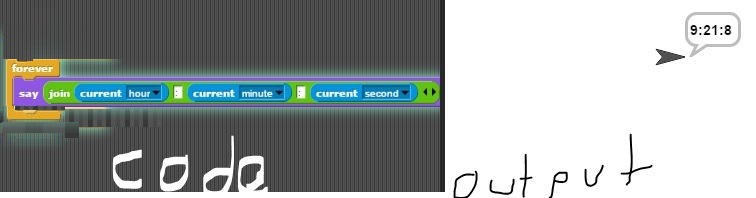
(source: cubeupload.com)
(Yes, I changed it in MS Paint because I was too lazy to make another screenshot. So what? At least it's readable.)
click the script to run
24-hour clock.

x86-16 DOS .COM executable (FreeDOS 1.3), 40 bytes
00000000: b4 2c cd 21 38 f3 74 f8 88 f3 88 e8 e8 07 00 91  .,.!8.t.........
00000010: e8 03 00 88 d8 56 d4 0a 05 30 30 86 c4 cd 29 88  .....V...00...).
00000020: e0 cd 29 b0 3a cd 29 c3                          ..).:.).
Assembly source code:
    ; NASM syntax
    [org 0x100]
start:
    ; Note: The first second may be a little off due to synchronizing to the time
.loop:
    ; Int 21:2C: get time
    ; Return:
    ;    CH = hour
    ;    CL = minute
    ;    DH = second
    ;    DL = 1/100 seconds
    mov   ah, 0x2C
    int   0x21
    ; If seconds is the same as before, try again.
    cmp   bl, dh
    jz    .loop
.loop.end:
    ; Save last seconds
    mov   bl, dh
    ; Print hours
    mov   al, ch
    call  print
    ; Print minutes
    ; mov al, cl
    xchg  ax, cx
    call  print
    ; print seconds
    mov al, bl
    ; Assume SI = 0x0100, push that as a return address
    ; and fall through to loop
    push  si

    ; Converts AL to 2 digit ASCII and prints, followed by :
print:
    ; AL = AL % 10
    ; AH = AL / 10
    aam   10
    ; Convert to ASCII
    add   ax, '00' ; 0x3030
    ; Byteswap to get tens in AL, save ones in AH
    xchg  al, ah
    ; Print tens with int 29h
    int   0x29
    ; Then ones
    mov   al, ah
    int   0x29
    ; Then colon
    mov   al, ':'
    int   0x29
    ; Return from function
    ret
Like my other answer it isn't pretty but it does the job. It prints a : between each time.
Output on FreeDOS 1.3 on QEMU

Phooey, 39 bytes
[1@_1~t/1000@/60@/60%24[_1%60$i":"&]#1]
It's not pretty. It prints the time followed by another colon, with no newline in between.
In order to see the output you probably need to use stdbuf -i0 -o0 -e0 to set it to unbuffered, as I don't print newlines. The output is always in UTC time.
Explanation:
[1            // While tape value is not 1 (it will either be 0 the first time or -1 the second)
  @_1         // Push sentinel of negative 1
  ~t          // tape = millis since epoch
  /1000       // Divide tape by 1000 to get seconds
  @           // Push tape value to save the seconds
  /60         // Divide by 60 to get minutes
  @           // Push tape to save minutes
  /60         // Divide by 60 to get hours
  %24         // Modulo by 24 to hour of the day
              // Stack: -1, seconds, minutes
              // Tape: hours
  [_1         // While tape is not -1 sentinel
     %60      //   modulo tape by 60 (redundant for hours)
     $i       //   print as number
     ":"      //   print separator
     &        //   Pop to tape
  ]           // Loop if tape == tape (nop condition)
  #1          // sleep 1 second
]             // End loop
Note: 2:58 PM EST = 18:58 UTC
Excuse the low quality, the attachment feature has a stupid requirement of 2 MB which is not easy for GIFs to reach...

Pascal, 144 B
This program requires a processor complying to the ISO standard 10206 “Extended Pascal”, e. g. the GNU Pascal Compiler (GPC).
It’s doing a busy wait until the time changes.
The second line of the entire output will probably be printed in significantly less than a 1 second interval.
program t(output);var t:timeStamp;s:string(8);begin s:='';repeat getTimeStamp(t);if s<>time(t)then begin s:=time(t);writeLn(s)end until 6=9 end.
The code does not check timeStamp.timeValid, so on a system without a clock this program will print just a single line representing midnight, getTimeStamp’s default value if timeStamp.timeValid is set to false.
The return value of time is implementation-defined.
It may be in an AM/PM format, military time, or something else.
Thus it’s not guaranteed that the challenge’s specifications are met.
At any rate, the GPC’s implementation returns something in the style of 22:00:42.
This fits into a string(8).
A different Pascal implementation may require more characters in order to detect a change in time.
Also, if you don’t mind a preceding empty line, you can use this 134 B program:
program t(output);var x:timeStamp;s:string(8);begin s:='';repeat getTimeStamp(x);if s<>time(x)then writeLn(s);s:=time(x)until 6=9 end.
Factor, 29 bytes
[ now hh:mm:ss nl ] 1e9 every
Normally you'd give every a duration for more readability: [ ... ] 1 seconds every but if you just give it a number, it'll interpret it as nanoseconds.
mIRC 7.49 20 16 Bytes
/timer 0 1 $time
VBA, 50 Bytes
Anonymous VBE immediate window function that takes no input and outputs to the VBE immdiate window
Do:DoEvents:?Now:Application.Wait 1/864E2+Now:Loop
MOO, 46 bytes
while(!suspend(!player:tell(ctime())))endwhile
Sleeps for one second between outputs, regardless of execution time (and it's impossible to know sub-second timings anyway
QBIC, 6 bytes (nc)
{_C?_d
QBIC is newer than this challenge. In fact, this challenge is the reason QBIC has a _C command (for CLS - Clear the screen) and the _d/_D commands (for TIME$ and DATE$ resp).
Explanation
{        Start infinite loop
 _C      Clear screen
   ?     PRINT
    _d   TIME$ (which holds the system's time in QBasic)
Dyalog APL, 27 18 16 bytes
':',¨⎕TS⋄→≢⎕DL 1
⎕TS Y M D h m s t
':',¨ prepend : to each
⋄ new statement
⎕DL 1 wait a second and return actual waited time; 1.0something seconds
≢ tally the actual waited time, giving 1
→ go to line (1 = this line)
Fourier, 46 20 bytes
This is a fairly simple program which loops infinitely, using the newly added date functions, delay function and clear screen function.
This does not show a leading zero on the minutes or the seconds value when either are less than ten.
(@2do58a1do58a0do1;)
Note: this program will not work on http://fourier.tryitonline.net due to differences in the way interpreters work.
Clojure, 140 bytes
(loop[l 0](let[c(System/nanoTime)](recur(if(>=(- c l)1e3)(do(println(.format(java.text.SimpleDateFormat."h:m:s a")(java.util.Date.)))c)l))))
Full program. Loops continually; keeping track of the last time it printed. If 1000ms have passed, it prints, then resets the time.
Java interop really bloats this up, but not much can be done about that.
Ungolfed:
(defn current-time []
  (loop [last-ns 0]
    (let [current-time (System/nanoTime)]
      (recur
        (if (>= (- current-time last-ns) 1e3)
          (do
            (println (.format (java.text.SimpleDateFormat. "h:m:s a") (java.util.Date.)))
            current-time)
          last-ns)))))
Using sleep (which seems to be of questionable validity), 100 bytes
(while[](Thread/sleep 1e3)(println(.format(java.text.SimpleDateFormat."h:m:s a")(java.util.Date.))))
Ungolfed:
(defn current-time []
  (while []
    (Thread/sleep 1e3)
    (println (.format (java.text.SimpleDateFormat. "h:m:s a") (java.util.Date.)))))
Bash, 51 31 24 21 20 bytes
Thanks to @quartata for some very helpful comments. Thank you @Dennis for clarifications and for chopping off even more bytes. Thank you @VoteToClose for clarifying the rules (which apparently I am bad at reading) further reducing the bytes.
date displays the the full date with a 24 hour clock. sleep 1 sleeps for a second. exec $0 loops the script infinitely.
date;sleep 1;exec $0
QBasic, 16 bytes
Shamelessly stole (and imporoved upon) Mauris' design:
CLS:?TIME$:RUN
Previous version: 24 bytes
EDIT: Only just saw that I don't have to SLEEP 1 if I continuously clear the screen and print the time. That's 4 bytes shorter:
DO:CLS:PRINT TIME$:LOOP
Previous entry (28 bytes)
DO:PRINT TIME$:SLEEP 1:LOOP
Nothing fancy, not too shabby.
*><>, 16 bytes
'::'hnomnosnaoaS
Note: it sometimes skips a second (e.g. 12:34:6 → 12:34:8), because you can't wait exactly a second with total accuracy. Unfortunately there isn't any way to fix this.
Mathematica, 27 21 bytes
With 2 bytes saved thanks to Xavier.
Dynamic@{Now,Clock[]}
Tellurium, 8 bytes
[i|t^¨]
The code that is after the | and before the ] is run forever (i).
It changes the value of the current cell to the current time (t), outputs the current cell's value using ^, and waits for 1 second (¨) before continuing.
Nim, 55 54 bytes
import os,times
while on:echo getClockStr();sleep 1000
on is an alias for true. Prints the result of the times module's getClockStr proc, which formats the time nicely in 24-hour format, then uses the os module's sleep proc to sleep a second.
Elixir, 95 bytes
def f, do: 1000|>Stream.interval|>Enum.each(&(&1&&DateTime.utc_now|>DateTime.to_time|>IO.puts))
05AB1E, 13 bytes
[žažbžc)':ý,w
Should work, but I don't have Python 3, so I can't test.
PHP, 36 34 bytes
a:echo'
'.date(r);sleep(1);goto a;
The line break can be \n but it's nicer to convert the script to the old Macintosh line format and make it \r, then the time is neatly updated on the same line.
Updates:
- Removed short open tag as per this meta answer
C#, 102 bytes
using System;class P{static void Main(){for(var s="";;)if(s!=(s=DateTime.Now+"\n"))Console.Write(s);}}
An infinite loop that prints whenever the time changes. Default precision for C# date printing is to the second, so that works out nicely.
K, 25 24 Bytes
Removed semicolon from the end of the func!
      .z.ts:{-1@$18h$x}
      \t 1000
  13:11:44
  13:11:45
  13:11:46
  13:11:47
  13:11:48
  ...


.z.ts is called every 1000 milliseconds.
x is the time.
18$x casts the time to the appropriate format.
$ - strings the result.
-1@(stringed result) - prints the string to the console.
*Edit Below is less but I wasn't sure whether the time format was allowed;
    .z.ts:{-1($x)}
    \t 1000
2016.08.01D00:35:37.392683000
MATL, 11 bytes
`Z'0XOD1Y.T
Explanation
`         % do...while loop
  Z'      %   get current date and time
  0XO     %   string representation of date and time, with format 'dd-mmm-yyyy HH:MM:SS'
  D       %   convert to string and display
  1Y.     %   pause for 1 second
  T       %   push "true" value as loop condition to create infinite loop
          % implicitly end loop
Batch (Windows), 21 bytes
t.bat
echo %time%
timeout 1
t
Shows the time, delays for 1 second, then recursively calls itself. This is run as t.bat in the same directory.
Lua, 51 Bytes
Since the previous owner of this answer in 56 Bytes doesn't update anymore when suggested improvments, here's a 51 Bytes solution heavily based on his:
v=1::a::v=os.date'%c'l=v~=l and print(v)or v goto a
Rebol, 25 bytes
forever[print now wait 1]
This prints day & time (24 hour HH:MM:SS). For an extra 5 bytes you can make it print just the time: forever[print now/time wait 1]
Scratch, 15 bytes

(scoring used)
This script is essentially what it says. It joins the hour value, then a colon, then the minute value, then a colon, then the second value. The downside is that Scratch reads 01 as 1, so it might not be valid without making the script longer.
Python, 53 bytes
This one prints the date and year as well as the time, so I don't know if it's allowed.
import time
while 1:print(time.ctime());time.sleep(1)
EDIT: J.F.Sebastian made a shorter one.
Jelly, 8 bytes
7ŒTṄœS1ß
How it works
7ŒTṄœS1ß  Main link. No arguments.

7         Yield 7 (or 111 in binary).
 ŒT       Time; return hours, minutes and seconds (lower three bits).
   Ṅ      Print, followed by a linefeed.
      1   Yield 1.
    œS    Sleep for 1 second, return the time.
       ß  Call the main link recursively.
Pylongolf, 11 bytes
>}~.1000w.<
}~ pushes the current time into the stack and then prints it.
. the dots reset the stack.
1000w pushes 1000 into the stack and then waits that time.
Factor, 43 bytes
[ [ t ] [ now "%c" strftime print ] while ]
An anoymous function. Use it like ~quotation~ call.
F#, 101 98 bytes
open System;while 1=1 do(DateTime.Now.ToString"HH:MM:ss"|>printfn"%s";Threading.Thread.Sleep 1000)
Pretty straightforward: print the current time in the correct format, wait a second, then repeat. Forever.
Credit to @VoteToClose and @RikerW for the help.
Perl 6, 34 30 bytes
Perl 6 is looooong, but I like it. Yes, all the whitespace is needed.
sleep 1 while say DateTime.now
Hooray for postfix syntax!
Japt, 8 bytes
Japt is a shortened version of JavaScript.
1e3i@OpÐ
How it works
1e3i@       // Repeat this function every 1e3 milliseconds:
     OpÐ    //  Output new Date(), followed by a newline.
Note that this also outputs a seemingly random integer when the code is run. To get rid of this, use this code:
1e3i@OpÐ};P
On my computer, the time is formatted as 2015-11-28T16:00:18.013Z. If you don't like that, try this code instead:
1e3i@OpÐ s8};P
Which will lovingly print your time in the format 11:00:18 AM.
Matlab, 50 42 bytes
while 1;pause(1);disp(datestr(now,13));end
Lua, 56 bytes
Lua is pretty hard to golf...
v=1
while 1 do v=os.date'%c' l=v~=l and print(v)or v end
There are few online interpreters that allow infinite loops; one of the few I've found is this one. This repeatedly converts the current system time to a date-time string and outputs that string when it's different from the last.
Ungolfed:
current = 1
while 1 do
    current = os.date('%c')
    last = current ~= last and print(current) or current
end
Python 3, 48 bytes
from time import*
while[sleep(1)]:print(ctime())
It is a @Mego's Python 2 solution tweaked to work on Python 3.
Here's Jupyter notebook to see the results and try it.
Python 2, 47 bytes
from time import*
while[sleep(1)]:print ctime()
No online link because ideone times out (huehuehue) before printing anything.
Thanks to @xsot for the while[sleep(1)] trick and the ctime trick.
Prints out the current date and time like so: Fri Nov 27 21:23:02 2015
Unix Shell + procps, 12 bytes
procps is a package providing CLI utils for browsing procfs, a virtual filesystem generated by the kernel to provide information about processes.
The watch command reruns a command every on an interval, that defaults to 2. Set it to 1, and run ., and voilá, watch suppresses stderr.
watch -n1 .
The time is in the upper right.
incidentally, watch is very handy for spying on the progress of a lengthy dd or cp.
Perl, 99 81 75 51 40 36 29 27 bytes
sleep(print gmtime.$/);do$0
bash, 35 bytes
Just for kicks
yes|mapfile -tc1 -C'date;sleep 1 #'
Also 35,
x='x[`date>&2;sleep 1`${!x}]'<${!x}
I think it's unlikely there's anything shorter than exec $0.
Groovy, 40 37 bytes
Not very golfable :(, thanks to FlagAsSpam for for(;;) :)
for(;;){print(new Date());sleep 1000}
Emacs Lisp, 83 bytes
(run-with-timer 1 1(lambda()(message(format-time-string"%H:%M:%S"(current-time)))))
Javascript ES6, 43 39 bytes
setInterval(_=>console.log(Date()),1e3)
Works with my current time settings (which have not been changed for some time, thank you), at least.
4 bytes saved by Conor O'Brien.
Python 2, 85 bytes
import time;while 1:print __import__('datetime').datetime.now().time();time.sleep(1)
import time;time.sleep() has 2 fewer bytes than __import__('time').sleep(), while import datetime;datetime.datetime.now() has 2 more bytes than __import__('datetime').datetime.now().
Mouse-2002, 84 bytes
Mouse is cool, but it's not the golfiest stack based language on the planet (well, not until I update it in a reimplementation -- then it will be better.)
0&FIX 2&WIDTH "!"(&HOUR &!DEC ":"&MIN &!DEC ":"&SEC &!DEC 8!'8!'8!'8!'8!'8!'8!'8!')$
The 8!' prints the character with ASCII code 8, or backspace. You probably need an ANSI terminal to run this; it updates in place by backspacing over itself and writing the new time once per second.
sample use:
$ mouse clock2.mou

19:47:34
Based on this, but golfed.
AppleScript, 112 93 45 bytes
repeat
delay 1
log(do shell script"date")
end
This repeats in a loop, does the bash script date, gets its returned string, and outputs it to the Messages pane. Why I didn't do this at first, I'll never know.
Using Node:
Let's have a odd useless combination, shall we?
This was inspired by my Vitsy answer, which also uses JS to get the date.
tell app"System Events"
tell app"Terminal"to activate
keystroke"node
"
repeat
delay 1
keystroke"Date()
"
end
end
What I do here is I tell the System Events application to get terminal as the front window, then enter node with the terminal by telling System Events to simulate keystrokes of n, o, d, e, followed by a newline. It then enters a loop in which it delays for a second, tells node to do Date() by the same method, then going back to the top of the loop.
This answer is mostly to demonstrate the odd things that Applescript allows you to do.
Vitsy + bash, 13 11 bytes
This language feature was made after this question, but not for this question.
<w1Z,'date'
<           Loop leftwards in the code.
            Rest of code is written in reverse for "readability".
 'etad'     Push 'date' to the stack.
       ,    Do the shell script for what's in the stack.
        Z   Output the result.
         1w Wait a second.
Or, using eval...
<w1Zn"Date()"
<             Go leftwards through this code in order to loop infinitely.

              Rest of code is written in reverse for "readability".

 ")(etaD"     Push "Date()" to the stack.
         n    Eval through JS.
          Z   Output everything.
           1w Delay for one second.
VBA, 69 Bytes
Getting the Time is easy, now() Only outputting every 1 second.... MUCH more verbose.
This is the "Right" way of waiting 1 second in VBA. 78 Bytes
Sub a():Debug.Print Now():Application.Wait Now()+TimeValue("0:0:1"):a:End Sub
Or if you want to Cut some Corners and only being right 86% of the time is good enough 63 Bytes
adding one SigFig take you to 95% accurate and a third will get you to 99.36%
Sub a():Debug.Print Now():Application.Wait Now()+1e-5:a:End Sub
If you want to get the above method to 100% then you need 69 Bytes (1/86400)
Sub a():Debug.Print Now():Application.Wait Now()+(1/86400):a:End Sub
All of these methods would stumble on a leap second Beacuse they do not wait for 1 second, But wait untill 1 second. At midnight when the clocks fall back an hour this clock will stop for 1 hour and then pick up where it left off.
VBA does allow for the Sleep Method but your byte couter is Ruined. 97 Bytes
Declare Sub Sleep Lib "kernel32" (ByVal k as Long)
Sub a():Debug.Print Now():Sleep(1e3):a:End Sub
Prolog (SWI), 72 bytes
Formating to user_output stops working when using sleep, so I had to save the time to a variable and print it explicitly.
Code:
p:-repeat,get_time(T),format_time(atom(X),'%T',T),write(X),sleep(1),1=0.
Explained:
p:-repeat,                      % loop until success
   get_time(T),                 % Get current timestamp
   format_time(atom(X),'%T',T), % Format timestamp as HH:mm:ss
   write(X),                    % Print time
   sleep(1),                    % Sleep 1 second
   1=0.                         % Fail and go back to repeat
PureBasic, 64 59 bytes
Not much to say, infinite loop, output time to the debug window with a 1000 millisecond delay
a:
Debug FormatDate("%hh:%ii:%ss",Date())
Delay(1e3)
Goto a
C, 74 73 bytes
#include<time.h>
main(){for(time_t t;!sleep(1);time(&t))puts(ctime(&t));}
The code can work even without #include <stdio.h> and #include <unistd.h>, see live code example on ideone.com -- note: the sleep is zero there, to generate some output before the time limit has been exceeded.
The first output line should be ignored ("Extra output doesn't really matter, as long as the program at some point continuously outputs time.").
Java, 300 166 137 125 124 bytes
Nearly More than halved thanks to VoteToClose, Paülo Ebermann and janschweizer!
interface A{static void main(String[]a)throws Exception{for(;;Thread.sleep(1000))System.out.println(new java.util.Date());}}
Ungolfed:
interface A {
    static void main(String[] a) throws Exception {
        for (;; Thread.sleep(1000)) System.out.println(new java.util.Date());
    }
}
Python 3, 99 Bytes
Apologies if it formats the code weird, doing this from an ipad. (dont ask). I know this code is big considering some of the other answers, but I didn't see a python one yet so I wanted to add it in.
import time
import datetime
while(True):
 print(datetime.datetime.now().time())
 time.sleep(1)
sh (+ top), 7 bytes
Script (Debian8):
top -d1
Script (NetBSD7):
top -s1
(both without trailing newline)
Output (1st line only, Debian8):
top - 16:25:15 up 3 days, 8:56, 4 users, load average: 0,97, 1,10, 1,03
Output (1st line only, NetBSD7, different time zone):
load averages: 1.46, 1.28, 1.22; (SPACES) up 44+08:52:28 (SPACES) 15:22:06
The amount of spaces depends on the terminal width.
PHP, 24 bytes
for(;;)echo date("\rr");
\r clears the current line before printing the date/time using the r flag. Therefor it doesn't have to wait or delay the output for a second. Also the cursor is always positioned behind the output, which would be different for r\r where it would overlay the first character of the output.
sh (+ watch), 11 bytes
Script:
watch -n1 .
(no trailing newline)
Output:
Every 1,0s: . (SPACES) Sat Nov 28 19:07:51 2015
The amount of spaces depends on the terminal width.
Tested on Debian8 and NetBSD7.
PHP, 37 bytes
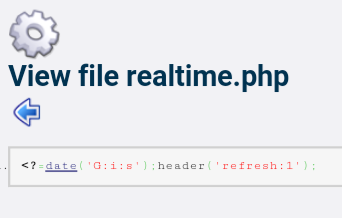
<?=date('G:i:s');header('refresh:1');
Outputs the formatted server time and sets the page to refresh every second.
Of course, it depends on your internet connection and how fast-repsonding your server is :)
C#, 129 125 bytes
using System;using System.Threading;class P{static void Main(){for(;;){Console.WriteLine(DateTime.Now);Thread.Sleep(1000);}}}
Ungolfed:
using System;
using System.Threading;

class Program
{
    static void Main()
    {
        for (;;)
        {
            Console.WriteLine(DateTime.Now);
            Thread.Sleep(1000);
        }
    }
}
Batch - 34 40 bytes
I love built-in variables:
:A                    //Set label A
echo %time%           //Print the time in 24 hour format
timeout 1    //Wait 1 second (thanks DavidPostill)
goto A                //Jump back to A and repeat
There definitely needs to be some sleep command in Batch anytime soon.
Ceylon, 126 112 bytes
import ceylon.time{now}void p(){for(e in{now().time().string[0:8]}.cycled.paired){if(e[0]!=e[1]){print(e[1]);}}}
This uses the ceylon.time library for getting the current time (in the default timezone) and formatting it (the .string function for time outputs something like 22:33:45.234, so I just take the first 8 characters of it).
Unfortunately, there seems to be no sleep function in Ceylon (because it is not easy to implement in JavaScript), therefore I'm doing a busy loop here, comparing each formatted string to the previous one and printing only when there is a change.
Here is a formatted version of the second version, which uses a for-loop over an infinite iterable:
// print the current time (each second).
//
// Question:  http://codegolf.stackexchange.com/q/65020/2338
// My answer: http://codegolf.stackexchange.com/a/65130/2338

import ceylon.time {
    now
}

void p() {
    for(e in { now().time().string[0:8] }.cycled.paired) {
        if(e[0]!=e[1]) {
            print(e[1]);
        }
    }
}
Using a < instead of != would save a character, but then the program would stop working as soon as the clock hits midnight.
This was the original, more functional, version resulting in 112 characters:
import ceylon.time {
    now
}

void p() {
    { now().time().string[0:8] }
        .cycled
        .paired
        .map((e) => e[0] != e[1] then e[1])
        .coalesced
        .each(print);
}
Jolf, 14 8 7 bytes
Crossed out 14 is a striked 1? Naw, it will never catch on ;)
Try it here! Click run, do not click on anything else ^_^ the page is highly... explosive. Yes. Fixed output system with update.
TaD#`~2
(I added some constants, and ~1 to ~4 are powers of 10.)
Explanation
setInterval("alert(Date())",1000);
     T         a      D#   ` ~2
Haskell, 98 96 85 bytes
import GHC.Conc
import Data.Time
m@main=getCurrentTime>>=print>>threadDelay(10^6)>>m
Alternate version using do notation:
main = do
  time <- getCurrentTime
  print time
  threadDelay 1000000
  main
Gets the current time with getCurrentTime from the Data.Time library, then pipes it into print, waits 1,000,000 microseconds (1 second) and calls itself.
Thanks to nimi and Mauris!
Ruby, 25 24 bytes
Thanks @manatwork for golfing off a byte :P
loop{puts`date;sleep 1`}
Not bad.
QBasic, 18 bytes
?TIME$
SLEEP 1
RUN
Dyalog APL, 36 bytes
Not very short this time.
{⎕←1↓∊'⊂:⊃,ZI2'⎕FMT 3↑3↓⎕TS⋄∇⎕DL 1}1
This outputs 24-hour time, i.e.:
14:37:44
14:37:45
14:37:46
...
Explanation:
{...}1: define a function and call it (the argument is ignored, but we need the function in order to call it recursively)⎕TS: a system function that returns the current date and time, in the format year - month - day - hour - minute - second - millisecond. (⎕TS= timestamp)3↑3↓: drop the first 3 items (i.e. year - month - day) and then take the first 3 items that are left (hour - minute - second).'⊂:⊃,ZI2'⎕FMT: format each number as a two-digit integer (I2) with leading zeroes (Z), prefixed by a colon (⊂:⊃). (This results in a matrix.)∊: Get all the elements in the matrix, in row order. (This gives a vector, in this case a string.)1↓: drop the first character (which is an extra:)⎕←: output it⎕DL 1: then wait one second (⎕DL= delay)∇: call the function recursively
C (on Linux x64), 179 177 175 168 159 bytes
#include<time.h>
#include<sys/time.h>
main(){struct timeval a;char b[9];for(;;){gettimeofday(&a,0);strftime(b,9,"%T",localtime(&a.tv_sec));puts(b);sleep(1);}}
Ungolfed:
#include <time.h>
#include <sys/time.h>
main(){
  struct timeval a;
  char b[9];
  for(;;){
    gettimeofday(&a, 0);
    strftime(b, 9, "%T",localtime(&a.tv_sec));
    puts(b);
    sleep(1);
  }
}
Only tested on, and likely only functions on, linux x64 (x32 might work, but other platforms probably won't).
The main difference between this program and the other posted C program is the use of linux-exclusive function calls, which, while terrible practice for real software, saves quite a few bytes...if you ignore all the compiler warnings.
Arcyóu, 27 bytes
(@ t(pn(zz 1)(p(st %H:%M:%S
I had to kludge together two new functions for this challenge, zz and st.
pn: Exactly like Lisp's progn.
zz: Direct link to Python's time.sleep.
st: Direct link to Python's time.strftime.
Normally, quotes would be necessary around the format string, but since there are no spaces, it's parsed as a symbol. The interpreter evaluates undefined symbols as themselves, so we get a string.
Powershell, 19 bytes
for(){date;sleep 1}
Minecraft 1.8.7, 7 + 8 = 15 blytes (bytes + blocks)
Only one command block involved:
xp 1 @p
Output goes to the client console like so:
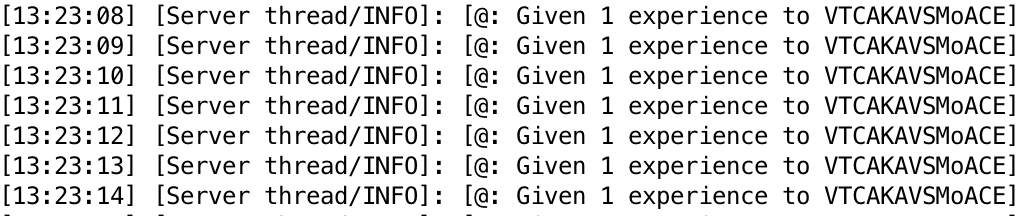
As part of the normal output.
This is the system:
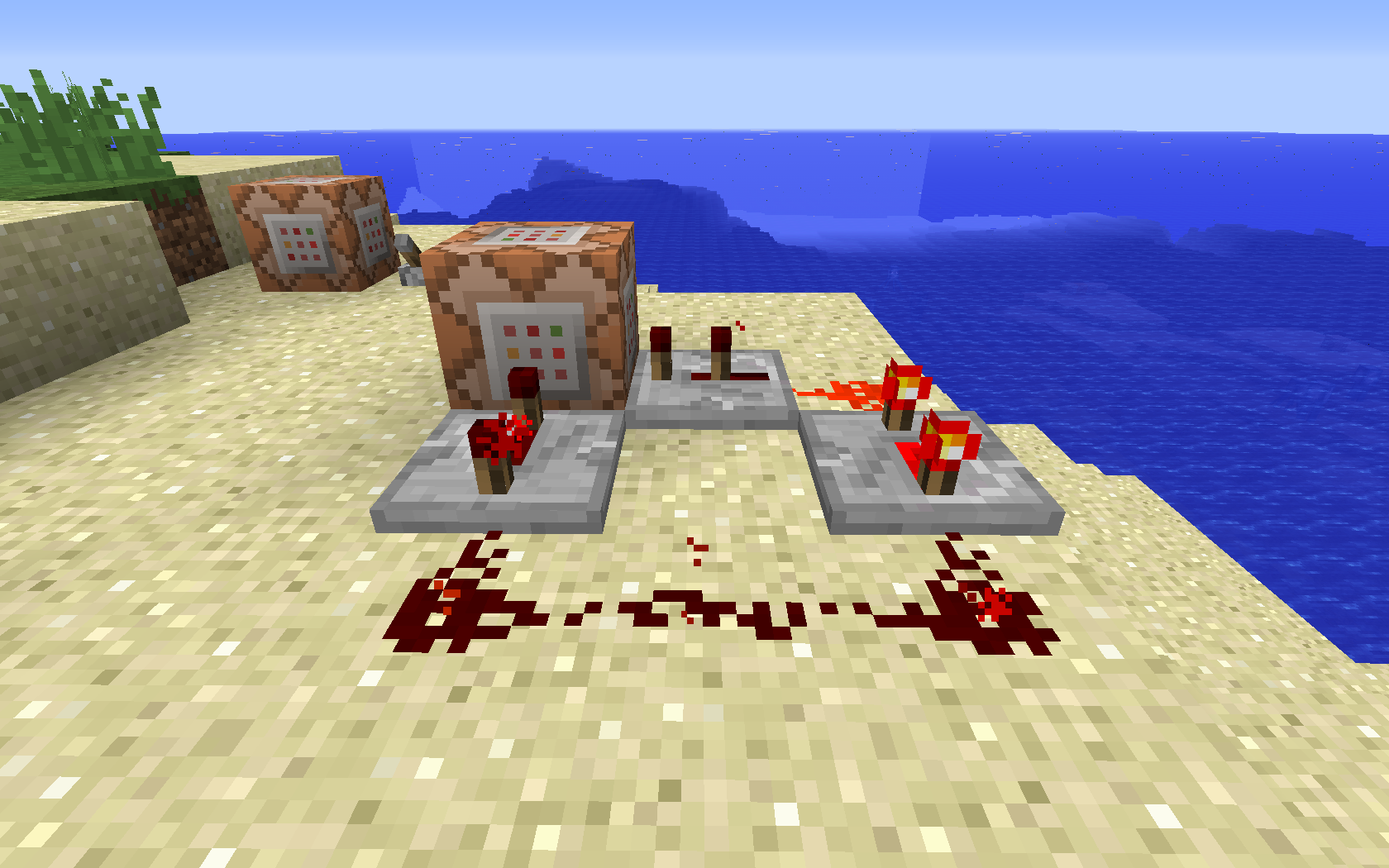
xp gives a specified amount of experience to a specified player with the syntax xp <amount> <player>. I'm pretty sure this is the smallest command that has singular output that I can get, now.
Processing, 68 bytes
void draw(){frameRate(1);println(hour()+":"+minute()+":"+second());}
Easy one I have to admit. In processing there is the draw() method which is called at a specific frequency that can be modified during the execution.
SpecBAS - 45 bytes
Prints in the upper left corner for a continuously updating 24 hour clock. Pressing Esc stops it running.
1 TEXT AT 0,0;TIME$(TIME,"hh:mm:ss"): GO TO 1
Go, 64 69 79 bytes
Go isn't very golfy.
package main;import(."fmt";."time");func main(){for{Println(Now());Sleep(1e9)}}
You could try it here or on another online interpreter however, for{} is an infinite loop and those are disallowed for obvious reasons. I haven't actually tested thisthere are no go interpreters for my android ): but it should work in theory.
Running it locally might cause your CPU fan to speed up, but it won't hog memory. If it crashes with some sort of OOM-error or panic: runtime out of bound, just change it to for x:=0;x<9999;x++{ ... }.
CJam, 21 bytes
L{et6<':*_@={_oNo}|}h
Try it online! Note that the online interpreter will kill the program after one minute.
Same idea, but with pretty output:
L{et6<3>"%02d:"fe%sW<_@={_oNo}|}h
Mathematica, 41 36 bytes
While[1>0,Echo@DateString[];Pause@1]
Works as a script.
AutoHotkey, 50 bytes
x::Send,% a!=A_Sec? A_Hour ":" A_Min ":" a:=A_Sec:
Notes:
- Requires you to hold x for continuous output.
- Remove your finger from x to interrupt and end the output.
- Output is in 24-hour format.
R, 38 bytes
repeat{Sys.sleep(1);print(Sys.time())}
This outputs the current time in the following format:
[1] "2015-11-28 07:34:01 CET"
TI-BASIC, 29 bytes
While 1
Output(1,1,getTimeStr(24)+":
Output(1,7,sum(getTime,3
End
TI-BASIC has a built-in getTimeStr, but it doesn't display seconds! How to fix this? Just display the seconds over the empty space after the minutes. (It would be much easier if there were a way to convert numbers to strings.)
Outputs in 24-hour mode.
PHP, 33 bytes
<?for(;;)sleep(print date("r
"));
Output is similar to Sat, 28 Nov 2015 11:25:16 +0700, i.e. RFC 2822.
Perl 6, 29 bytes
The right way to do this:
Supply.interval(1).tap: -> $ {
  say join ':',.hour,.minute,.whole-second given DateTime.now
}
await Promise.new; # halt this thread indefinitely
22:21:58
22:21:59
22:22:0
22:22:1
22:22:2
…
The golfed version
loop {sleep say join ':',now.polymod(1,60,60,24)[3…1]} # 56 bytes
3:59:26
3:59:27
3:59:28
3:59:29
…
Since the output doesn't have to be restricted to just the time, I can make it quite a bit shorter.
loop {sleep say DateTime.now} # 29 bytes
2015-11-27T22:18:10-06:00
2015-11-27T22:18:11-06:00
2015-11-27T22:18:12-06:00
2015-11-27T22:18:13-06:00
…
Perl, Command Line, 24 bytes
sleep(say)while$_=gmtime
This must be run from the command line, as perl -E'sleep(say)while$_=gmtime' (on windows, use double quotes instead). The date will be output along with the time, which seems to be allowed.
Perl, 25 bytes
sleep print$/.gmtime;do$0
In a scalar context, gmtime will return a string similar to Sat Nov 28 10:23:05 2015. The result from print, always 1, is used as the parameter for sleep. do$0 is used to execute the script again, after the timer has finished.
Pyth, 19 16 bytes
It takes the relevant part of the datetime list and joins by colons. Then it passes till the second changes, with the entire thang wrapped in an infinite loop.
#j\:KP.d2WqeK.d8
While it obviously doesn't work online, you can check its main idea here.
JavaScript, 32 bytes
setInterval("alert(Date())",1e3)
Uses the fact that setInterval evaluates code. This is not recommended, but when was that a concern in code golf?
Date() returns the current time and date in a format like this (may vary per system).
Wed Jul 28 1993 14:39:07 GMT-0600 (PDT)
Vimscript, 44 bytes
while 1
echo strftime("%T")
sleep 1
endwhile
Run like so:
vim -c ":so FILE"
AppleScript, 51 35 bytes
repeat
log current date
delay 1
end
Pretty dang obvious. Prints the current date, which contains the time, delays a second, then continues.
C/C++, 219 Bytes
Here is a first pass attempt. It is written in C++ but uses only C functionalities, so it could be used as C code with only changes to the include statements (I think).
#include<stdio.h>
#include<ctime>
time_t r;struct tm*x;int main(){char c[9],b[9];time(&r);x=localtime(&r);strftime(c,9,"%T",x);puts(c);for(;;){time(&r);x=localtime(&r);strftime(b,9,"%T",x);if(b[7]!=c[7]){break;} }main();}
I think everything is pretty straightforward. It takes the time at the beginning of the main function, then it continues getting time until one second has passed. It then calls itself.
Ungolfed:
#include<stdio.h>
#include<ctime>
time_t r;struct tm*x;
int main(){
    char c[9];char b[9];
    time(&r);
    x=localtime(&r);
    strftime(c,9,"%T",x);
    puts(c);
    for(;;){
        time(&r);
        x=localtime(&r);
        strftime(b,9,"%T",x);
        if(b[7]!=c[7]){break;} // break when the 'second' changes
    }
    main();
}
JavaScript, 47 38 35 bytes
for(p=1;t=Date();p=t)t!=p&&alert(t)
Explanation
Continuously checks if the time has changed then alerts if it has.
for(
  p=1;
  t=Date();
  p=t
)
  t!=p
    &&alert(t)
Befunge 98, 53 bytes
 v
v>"EMIT"4(>H.8,':,M.8,':,S:.8,d,
>:S-    !!k^
Notes:
- This program does not zero-pad the numbers it prints.
- This program prints a space and then a backspace character after every number, as the
.command prints an implicit space at the end. - The size of the stack in this program grows every second, and thus it will eventually run out of memory.
- This program will overwrite the previous time when it prints a new one. To make it print each time on a new line, change the
don the first line to ana