| Bytes | Lang | Time | Link |
|---|---|---|---|
| 002 | True | 241113T104006Z | Gleb |
| 032 | AArch64 machine code Linux | 250607T045434Z | 鳴神裁四点一号 |
| 080 | SAKO | 250320T065813Z | Acrimori |
| 073 | Bespoke | 250115T182322Z | Josiah W |
| 013 | 257wrap brainfuck | 250305T110848Z | 鳴神裁四点一号 |
| 001 | UNAI | 241121T195321Z | Gleb |
| 023 | Rewriten 4ME | 241024T202149Z | Gleb |
| 038 | Positionally | 250211T033013Z | Mukundan |
| 000 | Bitwise Cyclic Tag | 180417T030056Z | Khuldrae |
| 1437 | Redirection A | 181223T071107Z | ais523 |
| nan | Positionally | 230722T185914Z | Dadsdy |
| 515 | Emotinomicon | 160115T022404Z | Conor O& |
| 011 | BrainChild ASM | 241128T214613Z | ATaco |
| 002 | AWK | 241126T214638Z | xrs |
| 006 | ibe | 241121T200647Z | madeforl |
| 004 | YASEPL | 240208T200519Z | madeforl |
| 006 | x86 assembly 16bit | 180811T012856Z | Obsequio |
| 018 | Uiua | 231223T013923Z | Adelie |
| 009 | Rec | 230804T132317Z | D.. |
| 013 | [Matlab] | 230728T143152Z | Ferro Lu |
| 008 | Trilangle | 230214T165143Z | Bbrk24 |
| 045 | Swift | 230722T225546Z | macOSist |
| nan | 230531T052014Z | Dadsdy | |
| 006 | K oK | 230614T212410Z | Boris Ka |
| 038 | 05AB1E | 210603T165641Z | Makonede |
| 003 | Desmoslang Assembly | 230530T050652Z | Dadsdy |
| 000 | Thunno | 230212T162310Z | The Thon |
| 001 | GAIA | 230424T091126Z | Ferro Lu |
| 137 | Logically | 230423T232752Z | ATaco |
| 019 | x86 assembly 32bit Linux | 230211T234259Z | qwr |
| nan | Emmy | 230112T225857Z | joyofori |
| 010 | Seed | 220218T015830Z | autumn |
| nan | Fig | 220927T014041Z | Seggan |
| 008 | Trianguish | 220729T230623Z | naffetS |
| 037 | C clang | 220722T165701Z | c-- |
| 076 | C# | 220722T005352Z | Eric Xue |
| 003 | RASEL | 220721T190715Z | Nakilon |
| 000 | Vyxal | 220416T221757Z | Seggan |
| 014 | Spice | 220413T065635Z | Slord6 |
| 006 | Ruby | 220411T132004Z | oeuf |
| 003 | makina | 220411T122148Z | Ginger |
| 078 | unsure | 200412T180832Z | rydwolf |
| 016 | Plumber | 191209T160201Z | rydwolf |
| 014 | Python | 220205T170749Z | Oliver |
| 022 | KonamiCode | 211201T152857Z | Ginger |
| 012 | NLRNIS | 211119T014757Z | Fmbalbue |
| 229 | INTERCAL CINTERCAL | 210925T130512Z | user1004 |
| 082 | CLCINTERCAL | 210925T010055Z | user1004 |
| 005 | Lost | 210830T131709Z | Dorian |
| 036 | CSASM v2.5.1 | 210827T012601Z | absolute |
| 010 | Mascarpone | 210822T223306Z | Soup Gir |
| 091 | Java | 210325T220850Z | Unmitiga |
| 027 | Arduino | 210813T043834Z | Bbrk24 |
| 006 | brainbox | 210708T152110Z | Aaroneou |
| 002 | Dis | 210624T095543Z | user1004 |
| 005 | Locksmith | 210621T171539Z | Jay Ryan |
| 001 | Vyxal | 210616T182314Z | math sca |
| 004 | Alice | 210604T090655Z | SjoerdPe |
| 007 | Jellyfish | 210506T122856Z | Razetime |
| 005 | v³ | 210122T183623Z | Bo_Tie |
| 070 | Pinecone | 210420T163212Z | wasif |
| 005 | Numberwang | 210416T134200Z | Cinaski |
| 009 | Unlambda | 210416T095324Z | Emil Jeř |
| 010 | Sandwich | 210415T153329Z | karx |
| 002 | Duocentehexaquinquagesimal | 210414T200420Z | Makonede |
| 009 | Grok | 210412T180045Z | Aaroneou |
| 011 | M4 | 210408T123119Z | user1004 |
| nan | Pxem | 210326T002937Z | user1004 |
| 181 | vJASS Warcraft 3 | 200423T042223Z | ネルマン |
| 039 | C gcc | 210204T211134Z | anotherO |
| 008 | ThumbGolf | 210204T183908Z | EasyasPi |
| 018 | ARM Thumb2 machine code Linux | 210122T135359Z | EasyasPi |
| 000 | BRASCA | 210122T093755Z | SjoerdPe |
| 037 | Rockstar | 200924T143046Z | Shaggy |
| 009 | Windows Batch | 200821T154601Z | GMills |
| 007 | MAWP | 200725T115532Z | Dion |
| 7148 | Turing Machine Language | 190927T111807Z | ouflak |
| 071 | Brainetry 0.1 | 200624T214448Z | RGS |
| 017 | Grass | 200509T225604Z | ascheple |
| 018 | Ral | 200423T070500Z | Endenite |
| 011 | I like frog | 200421T154836Z | user9275 |
| 016 | 4 | 200401T095638Z | Uriel |
| 001 | Stax | 200220T175700Z | Nanajnai |
| 053 | Reflections | 200217T162831Z | wastl |
| 000 | W | 191217T095946Z | user8505 |
| 299 | Jasmin | 151102T014128Z | ankh-mor |
| 016 | C | 190813T045956Z | dingledo |
| 002 | Gol><> | 180509T074811Z | Bubbler |
| 013 | 1+ | 190924T113435Z | Twilight |
| 008 | Starry | 191001T153932Z | Twilight |
| 006 | Cascade | 190924T142429Z | Edgex42 |
| 008 | Keg | 190810T085407Z | Edgex42 |
| 002 | 05AB1E | 190824T093903Z | mekb |
| 006 | @ | 190819T020111Z | user8505 |
| 116 | Pyramid Scheme | 170806T175745Z | Conor O& |
| 419 | Turing Machine But Way Worse | 190516T101636Z | u-ndefin |
| 133 | Java | 190324T214636Z | Benjamin |
| 012 | Tamsin | 190323T044527Z | Esolangi |
| 014 | Grocery List | 190102T063012Z | u-ndefin |
| 2420 | x86 assembly | 181228T174154Z | Doorknob |
| 013 | !@#$%^&*_+ | 181228T031306Z | Conor O& |
| 003 | Brainflub | 181223T165705Z | snorepio |
| 046 | Common Lisp | 181223T070844Z | Renzo |
| 010 | Beam | 181116T010233Z | MilkyWay |
| 019 | Clojure | 181110T041758Z | TheGreat |
| 040 | Scratch scratchblocks2 | 181110T040707Z | Silas Re |
| nan | Dots | 181030T014318Z | MilkyWay |
| 002 | Backhand | 180916T042630Z | Jo King |
| 016 | bit | 180908T144857Z | kepe |
| 006 | Flobnar | 180810T071224Z | Jo King |
| 011 | SNUSP Modular | 180811T222233Z | mrFooble |
| 007 | Z80Golf | 180810T062349Z | Bubbler |
| 123 | PUBERTY | 180717T020248Z | Yhprum |
| 008 | Pepe | 180328T191833Z | RedClove |
| 079 | 2DFuck | 180507T175651Z | wastl |
| 006 | Ahead | 180616T032106Z | snail_ |
| 096 | Shakespeare Programming Language | 180529T025826Z | Jo King |
| 000 | Reality | 180509T064033Z | Muhammad |
| 033 | Procedural Footnote Language | 180504T172932Z | vasilesc |
| 001 | Stax | 180328T202420Z | Weijun Z |
| 002 | Implicit | 170906T000349Z | MD XF |
| 000 | Canvas | 180316T201219Z | hakr14 |
| 016 | Ly | 180316T194731Z | weatherm |
| 052 | rk | 180222T041355Z | MD XF |
| 018 | Momema | 180212T073549Z | Esolangi |
| 006 | Wumpus | 180210T195442Z | Martin E |
| 010 | TIBasic | 151030T200341Z | DanTheMa |
| 003 | Pyt | 180201T052013Z | qqq |
| 502 | Malbolge | 161231T184616Z | Riker |
| 010 | FALSE | 151031T013943Z | lynn |
| 040 | Icon | 180126T145829Z | ovs |
| 001 | Retina | 151030T192612Z | Martin E |
| 059 | Rust | 180113T123637Z | null |
| 028 | Funky | 180102T034533Z | ATaco |
| 002 | 05AB1E | 161007T114716Z | Geno Rac |
| 012 | Cubically | 170804T184857Z | MD XF |
| 022 | Whispers | 171210T142532Z | caird co |
| 002 | Bash | 171124T211650Z | ბიმო |
| 119 | Thotpatrol | 170905T171710Z | Mr. Negi |
| 041 | Nhohnhehr | 170928T133444Z | Erik the |
| 010 | shortC | 170923T012534Z | MD XF |
| 027 | Bitwise | 170922T232606Z | MD XF |
| 000 | Samau | 151224T035448Z | alephalp |
| 000 | Changeling | 151031T051820Z | Dennis |
| 617 | Excel VBA | 170904T161932Z | Taylor R |
| 000 | sed | 151030T163147Z | Digital |
| 000 | rs | 151030T162211Z | kirbyfan |
| 000 | gs2 | 151030T162337Z | lynn |
| 000 | FRACTRAN | 151031T053255Z | Sp3000 |
| 108 | Ceylon on JVM | 151031T223306Z | Paŭlo Eb |
| 007 | O | 151114T083250Z | Hipe99 |
| 174 | HTML + JavaScript | 151116T211912Z | user1526 |
| 087 | Visual Basic.NET | 151031T000307Z | lynn |
| 000 | Stack Cats | 160610T234317Z | Martin E |
| 001 | Clora | 160926T201423Z | OPSXCQ |
| 000 | FEU | 161008T143649Z | TuxCraft |
| 033 | BrainFlak | 161021T161912Z | Erik the |
| 000 | TeaScript | 151030T161953Z | Downgoat |
| 000 | Unwanted | 170719T134805Z | faso |
| 025 | var'aq | 170903T154745Z | Zongor |
| 005 | #* | 170903T151802Z | caird co |
| 004 | Evil | 170102T174836Z | user6280 |
| 003 | Forked | 170808T004217Z | MD XF |
| 004 | Ly | 170807T010050Z | LyricLy |
| 074 | Zucchini | 170719T183941Z | ABot |
| 010 | Caker | 170719T175506Z | ABot |
| 024 | Emmental | 170719T174307Z | ABot |
| 007 | Lean Mean Bean Machine | 170718T105901Z | Mayube |
| nan | MOO | 170709T235857Z | The Fift |
| 005 | Foam | 170708T182407Z | Esolangi |
| 056 | CPU16 assembly | 170618T170403Z | TuxCraft |
| 006 | Triangular | 170611T001338Z | MD XF |
| 006 | Hexagony | 151030T204553Z | Martin E |
| 261 | LOLCODE | 170602T160627Z | Robert F |
| 026 | Whitespace | 170527T140201Z | Ephphath |
| 033 | GWBASIC | 170530T181132Z | MD XF |
| 028 | Python 2 | 170527T153211Z | Luatic |
| 004 | Alice | 170411T120501Z | Sp3000 |
| 012 | OIL | 170411T124406Z | L3viatha |
| 005 | Aceto | 170411T124850Z | L3viatha |
| 022 | Javascript | 151030T175741Z | Shelvacu |
| 016 | Chip | 170131T170707Z | Phlarx |
| 013 | SmileBASIC | 170130T043404Z | 12Me21 |
| 014 | Del|m|t | 170122T233952Z | MercyBea |
| 1314 | Perl | 170114T171115Z | BenGoldb |
| 025 | Perl 6 | 170114T161544Z | smls |
| 007 | Seriously | 151116T020559Z | user4594 |
| 017 | tcl | 170111T173202Z | sergiol |
| 006 | Actually | 170111T123121Z | Erik the |
| 004 | NewbieFuck | 161230T110230Z | FlipTack |
| 003 | Casio FX7000G | 161203T102735Z | FlipTack |
| 068 | D | 161122T014132Z | Ray |
| 002 | Arcyóu | 161118T181415Z | Erik the |
| 113 | Gaot++ | 161030T093619Z | Erik the |
| 035 | Racket | 161007T034925Z | rnso |
| 004 | Ouroboros | 151031T043706Z | DLosc |
| 050 | Common Lisp Lispworks | 161011T040708Z | sadfaf |
| 028 | TCL | 161009T121343Z | Grax32 |
| 002 | Lolo | 161009T114209Z | user4701 |
| 014 | R | 161009T112508Z | rturnbul |
| 020 | pb | 161009T110514Z | Erik the |
| 079 | C# | 161008T002347Z | Grax32 |
| 000 | V | 160623T204731Z | DJMcMayh |
| 016 | Emotinomicon | 161006T183638Z | Linnea G |
| 004 | QBIC | 160927T165609Z | steenber |
| 003 | Piet | 160115T021424Z | Mama Fun |
| 004 | ABCR | 161006T090605Z | Steven H |
| 002 | reticular | 161005T171107Z | Conor O& |
| 005 | Jelly | 160928T153428Z | Erik the |
| 002 | Pyke | 160927T181014Z | Blue |
| 021 | Python 3 | 160927T163233Z | Oliver N |
| 031 | Addict | 160927T162118Z | ETHprodu |
| 052 | Racket | 160926T063444Z | Winny |
| 016 | Haskell | 151030T163112Z | nimi |
| 005 | Cubix | 160315T195902Z | ETHprodu |
| 171 | Gaot++ | 160723T175855Z | Leaky Nu |
| 001 | Sesos | 160716T052440Z | Dennis |
| 007 | Seed | 160711T181704Z | univalen |
| 109 | C++ 109 Bytes | 160625T013446Z | user5420 |
| 018 | Clojure | 160604T200923Z | user8397 |
| 022 | BruhScript | 160628T145416Z | TuxCraft |
| 007 | Fith | 160626T231531Z | jqkul |
| 014 | J | 160625T024629Z | miles |
| 029 | Apps Script + Google Sheets | 160617T182333Z | weatherm |
| 002 | Tellurium | 160515T122010Z | m654 |
| 137 | Omam | 160616T100620Z | Erik the |
| 617 | Wat | 160613T132609Z | TuxCraft |
| 133 | INTERCALL | 160612T201154Z | TuxCraft |
| 010 | 0815 | 160608T105456Z | Erik the |
| 006 | APL | 160516T110137Z | Adá |
| 019 | Archway 2 | 160524T052512Z | user5340 |
| 007 | Archway | 160524T052253Z | user5340 |
| 031 | CoffeeScript/LiveScript/etc. Node.js | 160520T020438Z | Claudia |
| 015 | Javascript browser | 160520T010802Z | AAM111 |
| 003 | Fuzzy Octo Guacamole | 160318T222744Z | Riker |
| 030 | Lua | 160411T124312Z | Katenkyo |
| 001 | Jelly | 160403T214753Z | Ven |
| 004 | Reng v.1.2 | 160320T210646Z | Conor O& |
| 000 | Lazy K | 151030T171701Z | lynn |
| 064 | SPARC V9 assembly | 160316T200155Z | Fox |
| 000 | Gogh | 160316T172431Z | Zach Gat |
| 004 | NTFJ | 160302T023435Z | ETHprodu |
| 020 | Shtriped | 160219T050405Z | Calvin&# |
| 004 | Y | 160218T173726Z | Conor O& |
| 002 | AnnieFlow | 160203T211007Z | Fricativ |
| 000 | PlatyPar | 160115T022354Z | Cyoce |
| 039 | WhoScript | 151230T193925Z | MCS-Kaij |
| 043 | Mathematica | 151030T234958Z | LegionMa |
| 005 | ROOP | 151224T030608Z | DarkPhan |
| 003 | LabVIEW | 151222T154448Z | Eumel |
| 029 | Emotinomicon | 151222T134200Z | LegionMa |
| 004 | Templates Considered Harmful | 151116T151906Z | feersum |
| 002 | Chaîne | 151116T020602Z | Conor O& |
| 015 | Motorola MC14500B Machine Code | 151115T080630Z | Zach Gat |
| nan | Perl 5 | 151101T193806Z | nwellnho |
| 005 | Minkolang | 151030T163337Z | El'e |
| 009 | Aubergine | 151114T031226Z | quintopi |
| 036 | ResPlicate | 151114T030049Z | quintopi |
| 066 | Go | 151113T173818Z | tomasz |
| 009 | Fishing | 151113T024114Z | Arcturus |
| 005 | DStack | 151111T014251Z | DarkPhan |
| 044 | Brian & Chuck | 151110T204353Z | Martin E |
| 027 | Acc! | 151105T200755Z | The Fift |
| 080 | GOTO++ | 151109T173525Z | arjanen |
| 024 | 𝔼𝕊𝕄𝕚𝕟 | 151101T233504Z | Mama Fun |
| 019 | Rail | 151105T132820Z | Martin E |
| 007 | ಠ_ಠ | 151105T050701Z | Mama Fun |
| 056 | Gnu Forth | 151102T204530Z | ninjalj |
| 9312 | HalfBroken Car in Heavy Traffic | 151104T092505Z | Sp3000 |
| 001 | Japt | 151103T221202Z | ETHprodu |
| 025 | LiveScript | 151103T211220Z | Zane Mar |
| 001 | Carrot version ^3 | 151102T180640Z | user4180 |
| 039 | Groovy | 151103T035934Z | n̴̖̋h̷͉̃ |
| 006 | Befunge93 | 151030T164731Z | El'e |
| 120 | Java | 151102T020421Z | ankh-mor |
| 016 | DarkBASIC Classic/Pro | 151102T180823Z | BMac |
| 037 | X86_64 | 151102T044407Z | hibbarnt |
| 001 | Universal Lambda | 151030T172718Z | lynn |
| 031 | Cat | 151101T150506Z | lynn |
| 001 | awk | 151031T001959Z | user5308 |
| 011 | Marbelous | 151031T105123Z | overacto |
| 007 | ngn APL | 151101T053811Z | Dennis |
| 123 | Pip | 151031T021747Z | DLosc |
| 061 | C++ | 151030T170303Z | lynn |
| 041 | Mornington Crescent | 151030T182550Z | The Fift |
| 182 | Ziim | 151031T174437Z | Martin E |
| 016 | Funciton | 151031T143852Z | Timwi |
| 005 | Prelude | 151031T142621Z | Martin E |
| 011 | MarioLANG | 151031T141302Z | Martin E |
| 026 | Glass | 151031T124938Z | lynn |
| 006 | K Kona | 151031T124223Z | lynn |
| 003 | jq | 151031T122159Z | lynn |
| 002 | Vitsy | 151030T163150Z | Addison |
| 020 | Emmental | 151031T013112Z | lynn |
| 004 | Fission | 151031T112827Z | Martin E |
| 020 | PHP | 151031T051842Z | Niet the |
| 004 | TECO | 151031T051351Z | Mark |
| 015 | QBasic | 151031T045920Z | DLosc |
| 001 | FlogScript | 151031T041235Z | lynn |
| 053 | Nim | 151031T035258Z | lynn |
| 035 | Julia | 151031T011302Z | lynn |
| 068 | Rust | 151031T004218Z | lynn |
| 019 | Ruby | 151031T000005Z | daniero |
| 074 | F# | 151031T002357Z | lynn |
| 038 | PDP11 Unix Assembly | 151030T210751Z | Random83 |
| 052 | Python 2 | 151030T162041Z | Blue |
| 083 | C# | 151030T234252Z | lynn |
| 094 | D | 151030T232552Z | lynn |
| 007 | ><> | 151030T191455Z | DanTheMa |
| 031 | Lua | 151030T230158Z | lynn |
| 002 | sh + binutils | 151030T162057Z | kirbyfan |
| 015 | Snowman 1.0.2 | 151030T205726Z | Doorknob |
| 005 | Brainfuck | 151030T162515Z | lynn |
| 044 | Macaroni 0.0.2 | 151030T210549Z | Doorknob |
| 030 | PowerShell | 151030T192915Z | AdmBorkB |
| 045 | Julia | 151030T190746Z | Alex A. |
| 038 | lua for windows | 151030T194924Z | Alex All |
| 002 | Simplex v.0.7 | 151030T195144Z | Conor O& |
| 005 | Kipple | 151030T185058Z | Addison |
| 008 | Beam | 151030T182217Z | MickyT |
| 108 | Erlang | 151030T182050Z | Lloyd Ma |
| 118 | Java | 151030T175843Z | Pokechu2 |
| 109 | Oberon | 151030T172841Z | kirbyfan |
| 064 | Pascal | 151030T172353Z | kirbyfan |
| 007 | FireType | 151030T171941Z | kirbyfan |
| 028 | Pyth | 151030T171440Z | kirbyfan |
| 016 | Frege | 151030T171234Z | lynn |
| 070 | X86 assembly | 151030T171138Z | kirbyfan |
| 001 | Burlesque | 151030T171102Z | lynn |
| 016 | Curry | 151030T170830Z | lynn |
| 022 | Ruby | 151030T170020Z | lynn |
| 050 | AppleScript | 151030T164046Z | Addison |
| 050 | Python 3 | 151030T163112Z | Blue |
| 018 | Perl | 151030T165221Z | lynn |
| 014 | osascript | 151030T164409Z | Addison |
| 004 | Befunge98 | 151030T163909Z | lynn |
| 002 | Labyrinth | 151030T162917Z | Martin E |
| 171 | C | 151030T163616Z | kirbyfan |
| 003 | GolfScript | 151030T162944Z | lynn |
| 040 | C | 151030T162833Z | Dennis |
| 001 | CJam | 151030T162724Z | lynn |
True, 2 bytes
,.
Decided to make a better interpreter becuase the old one sucked.
Also this raises an EOFError to not cause index error becuase of an empty input list.
And if error termination is unallowed, then we have a problem considreing there is no way to do a try/except in the langauge
AArch64 machine code (Linux), 32 bytes
Port of ARM Thumb-2 expect SYS_read and SYS_write are 63 and 64.
Exits with Bad system call.
Disassembly of section .text:
0000000000000000 <_start>:
   0:   910003e1        mov     x1, sp
   4:   d2800022        mov     x2, #0x1                        // #1
   8:   d28007e8        mov     x8, #0x3f                       // #63
   c:   d100fd00        sub     x0, x8, #0x3f
  10:   d4000001        svc     #0x0
  14:   9b007d08        mul     x8, x8, x0
  18:   d2401908        eor     x8, x8, #0x7f
  1c:   17fffffc        b       c <_start+0xc>
Original source
.globl _start

_start:
mov x1,sp  // Stores one-character input
mov x2,1   // Length of to input/output
mov x8,63  // SYS_read

// Main loop
1:
sub x0,x8,63  // 63-63=0 for fd_stdin; 64-63=1 for fd_stdout
              // (OBTW 127-63=64)
svc 0         // system call
              // read() sets 1 or 0 to x0 to indicate number of bytes read
              // write() sets 1 to x0; I don't think other values would be set
mul x8,x8,x0  // sets x8 to either 64 or 63 or 0
eor x8,x8,127 // takes XOR: 63 to 64; 64 to 63; 0 to 127
b 1b
Obtw AArch64 system call number 127 is sched_rr_get_interval; its synopsis is:
int sched_rr_get_interval(pid_t pid, struct timespec *tp);
On my Termux it had resulted in Bad system call; hope some other users of AArch64 Linux let me know what would happen on your machine for this program.
History
Began with 36+1=37 bytes
-5 bytes by porting from Thumb-2 answer
SAKO, 80 bytes
CALKOWITE:*A,B
BLOK(9):A
1)A(=B)=0
CZYTAJWIERSZ:A
DRUKUJWIERSZ:A
SKOCZDO1
KONIEC
There's not much to explain.
- Create an array of integers
- Set all elements to zero
- Read into it our input
- Print it. Go to point 2.
The limit of characters here is ten, but can be increased by changing the number in BLOK(9):A
Bespoke, 103 88 73 bytes
-15 bytes by checking that ch + 1 is nonzero, instead of checking that ch < 0 is false.
-15 bytes by taking ch to the power of itself, which errors out upon EOF.
PLAYFUL FELINES DIARY
up at five
at nine:fiercely eat
at eleven:litter,aw
Bespoke is a new esoteric programming language I created near the start of 2025. It's similar to my earlier esolang Poetic, in that word lengths are converted to instructions. This time, however, the instructions are part of a stack-based language, with arbitrary-precision signed integers and loop breaking/continuing and functions and everything!
Here is this program in "pseudocode" (which is able to run as Bespoke code - in fact, it's equivalent to the given code!):
CONTROL DOWHILE
    INPUT CH
    DO COPY
    DO COPY
    STACKTOP POW
    DO SWITCH
    OUTPUT CH
Basically, for each character, it tries taking its Unicode codepoint value to the power of itself (if EOF has been reached, this "codepoint" will be -1). For anything besides EOF, this will result in a positive value, the character will be outputted, and the main loop will continue.
A "negative power", however, has a special meaning in Bespoke: a root will be taken instead. So for EOF, the program will attempt to calculate the "1th root" of -1, which fails because Bespoke doesn't allow roots of negative numbers to be taken.
(Normally each block would end in something like CONTROL END, but the ends of blocks are automatically filled in if they're at the end of the program!)
257-wrap brainfuck, 13 bytes
Designed by @l4m2. Uses 256 as EOF and merges , into .; trying to write EOF value results in reading a byte.
Modified from the original post; reading the specifications carefully:
-.+[-.[-]-.+]
Bitwise Cyclic Tag, 1 bit, 0* bytes
*It's actually 0.125 bytes but the leaderboard doesn't take decimals
0
This will delete bits from the data tape (taking the starting data configuration as input) in order until there are none remaining to delete, at which point the program exits gracefully.
I'm on a phone now, but when I get the chance, I'll write an interpreter and post a TIO link.
Re:direction -A, 1 byte(Codepage 437)
◄
The -A option allows Re:direction to interpret the input as the list of its character codes, rather than trying to parse numbers from it.
Explanation
In Re:direction, an arrow on a line by itself is a halt command. Arrows also change the command queue, but leftwards and upwards arrows don't have an effect on how the command queue is interpreted as I/O.
The input specifies the initial command queue, and the output is taken from the final command queue. So if we don't change it at all before halting (or change it only by adding leftwards or upwards arrows), the output will be the same as the input.
Re:direction also supports a more efficient character encoding than codepage 437, but the program wouldn't be any shorter.
Positionally, 102 76 \$71\log_{256}(3)\approx\$ 14 bytes
Actually it's 14.07 bytes, but the leaderboard doesn't take decimals
        >      ^
      @ ^
> . :  v
v      <      ;<
\ s            /
\$\log_{256}3\$ is because each character is either a space, a newline, or non-whitespace.
Emotinomicon, 5 chars / 15 bytes
⏫⏪⏬⏫⏩
Press "cancel" to exit the loop. Try it here!
⏫   ⏪   ⏬   ⏫   ⏩   explanation
⏫                        take one character as input, push it to the stack
     ⏪                   open loop
          ⏬              pops and outputs top of stack as character
                ⏫        take one character as input, push it to the stack
                     ⏩   close loop
BrainChild ASM, 11 bytes
asm {
    reada
    inca
    jnza oup
    halt
oup:deca
    writea
    jmpb
}
Hex-dump of bytecode
           0  1  2  3  4  5  6  7  8  9  A  B  C  D  E  F
00000000: 27 15 0D 00 00 00 02 01 17 29 0C                | '........).
Naïve solution, checks if the input is a EOF, if it isn't, outputs and repeats. Loops by jumping to the b register, which defaults to 0.
x86 assembly (16-bit, DOS), 6 bytes
Machine code:
b4 01 cd 21 eb fa
Source:
     mov $1, ah
.L1: int $0x21
     jmp .L1
Runs forever copying stdin to stdout, until you kill it.
Uiua, 18 bytes SBCS
These take advantage of &sc returning 0 upon reaching EOF.
⍢&pf(≠0⊡0⇌utf.&sc)
This version errors since upon reaching EOF, Uiua then tries to index a non-existent first element of the utf array, which in that case is empty (has length 0).
⍢&pf(≠0⊡0⇌utf.&sc)
               &sc  # Read a line from stdin
              .     # Duplicate
           utf      # Convert to array of UTF-8 bytes
          ⇌         # Reverse array
       ⊡0           # Index the first element of said array
     ≠0             # Is not equal to 0?
    (             ) # Enclose as function
⍢&pf                # Print to stdout while function condition is true (without trailing newline)
Non-erroring, 20 bytes SBCS
⍢&pf(≠0⊡0⇌⊂0utf.&sc)
This version does not error since it takes 2 more bytes to join a 0 to the utf array before indexing.
⍢&pf(≠0⊡0⇌⊂0utf.&sc)
                 &sc  # Read a line from stdin
                .     # Duplicate
             utf      # Convert to array of UTF-8 bytes
           ⊂0         # Join a 0 to said array
          ⇌           # Reverse array
        ⊡0            # Index the first element of array
      ≠0              # Is not equal to 0?
     (              ) # Enclose as function
⍢&pf                  # Print to stdout while function condition is true (without trailing newline)
[Matlab], 13 bytes
input('','s')
Trilangle, 14 8 bytes
<>i,@##o
Try it on the online interpreter!
The interpreter loads this into a triangular grid and adds trailing .s as necessary. When expanded, this program becomes:
   <
  > i
 , @ #
# o . .
The IP starts on the north corner headed southwest.

Starting on the red path, the interpreter hits the following instructions:
<: Redirect the IP left, where it wraps around to the right side of the next rowi: Read a single character from input>: Branch
When it hits the branch instruction, the IP changes direction depending on the sign of the character read. EOF is -1 and all other characters are positive, so it branches on EOF.
When it reads EOF, it continues on the green path, and quickly hits @, terminating the program. Otherwise, it continues on the blue path:
o: Output a character,: Pop from the stack#: Skip the next instruction (twice)
After this, it reaches the <, where it merges with the red path.
The , instruction is necessary to keep memory bounded when fed an infinite input stream (e.g. when piping yes into it).
Swift, 45 bytes
Seriously? It's been 8 years and no one's uploaded a Swift answer?
print(CommandLine.arguments[1],terminator:"")
Okay, fine, I'll admit, there's nothing special about this thing.
(,), 14 Chars or \$14\times \log_{256}(3)\approx2.77\$ Bytes
(,,,((())),())
Terminating version: 23 Chars or 4.56 Bytes
(,,,(()),((),((()()))))
05AB1E, 50 38 bytes
[“€¬((a=IO.‚Ø 9)!=:eof)€· IO.‡í€…„–“.E
Try it online or test an infinite stream.
Explanation
This is probably the first real 05AB1E cat posted here. While my previous answer (?) mostly worked...
If it is at all possible in your language to support an arbitrary infinite input stream (i.e. if you can start printing bytes to the output before you hit EOF in the input), your program has to work correctly in this case.
And while there seems to be no way of doing this in 05AB1E, making ? the shortest possible answer, there is one not very commonly used command that does the trick. .E pops a string and runs it as an Elixir program.
In this case, we use the following Elixir code:
a = IO.read(x)
if a != :eof do
    IO.write(a)
end
…where x is the number of bytes to read each time — the greater it is, the faster the program runs. It can be anything but :all, as that would be equivalent to my previous submission, invalidating it.
We can golf this down to:
if((a=IO.read x)!=:eof)do IO.write a end
By now, you might've realized that this program only ever outputs the first x bytes of input. But running the Elixir code isn't the only thing the program does. It runs it over and over in an infinite loop ([)!
The weird symbols you see in the 05AB1E program are dictionary compression – compressing English words or other common letter combinations into just two bytes each. By substituting in 9 for x in the Elixir program (making the program as fast as it can be while not raising the bytecount), we get the final program!
Desmoslang Assembly, 3 Bytes
EIO
Thunno, 0 bytes
Yet another golflang with implicit input/output.
Also works in Thunno 2: Attempt This Online!
GAIA, 1byte
p
p prints the input to the output
Alternative: 1byte
@
@ pushes input to stack (and it's printed by default)
The catch is that since the input itself doesn't support new lines, they cannot be printed.
I don't think the language supports null bytes either. For infinite sequences it works but the output will be cut with a warning at some point just for displaying reasons.
Logically, 137 bytes
@R:i:p:b_HIGH;NOT(i)(b)AND(i,b)(p)
@D:i:o:9d;COPY(i,9d)(9d,o)
@M:c,r,d,e,8i;R(h)(r)OR(r,c)(d)D(d)(c)READ(c)(e,8i)WRITE(c,8i)()HALT(e)()
Ungolfed
@RisingEdge
: in;
: pulse;
: bar_HIGH;
NOT (in)      (bar)
AND (in, bar) (pulse)

@Delay
: in;
: out;
: 9d;
COPY (in, 16d) (16d, out)

@Main
: clock, risingPulse, delayIn, eof;
RisingEdge      (H)                     (risingPulse)
OR              (risingPulse, clock)    (delayIn)
Delay           (delayIn)               (clock)
READ            (clock)                 (eof, 8i)
WRITE           (clock, 8i)             ()
HALT            (eof)                   ()
Starts by combing a simple rising pulse and a delay to act as a clock, which then reads and writes characters each clock cycle. when eof is reached, halt is pulled.
x86 assembly (32-bit Linux), 19 bytes
Turned out almost identical to Doorknob's answer, so I'm not sure where the one byte saved came from. Uses same tricks: registers start zeroed and syscalls don't clobber any registers besides eax. (Probably) segfaults on EOF.
global _start

section .text
_start:
        inc     edx         ; set edx = 1
        mov     ecx, esp    ; read/write to sp
loop:
        mov     al, 3       ; read call number 3
                            ; ebx: read from stdin (fd=0)
                            ; edx: read 1 char
        int     0x80        ; syscall

        test    eax, eax    ; check if byte read
        jz      exit

        mov     al, 4       ; write call number
        inc     ebx         ; write to stdout (fd=1)
                            ; ecx: use char in buf
                            ; edx: write 1 char
        int     0x80        ; syscall

        dec     ebx         ; ebx = 0
        jmp     loop

exit:
                            ; segfault instead of exiting
Objdump:
08049000 <_start>:
 8049000:   42                      inc    edx
 8049001:   89 e1                   mov    ecx,esp

08049003 <loop>:
 8049003:   b0 03                   mov    al,0x3
 8049005:   cd 80                   int    0x80
 8049007:   85 c0                   test   eax,eax
 8049009:   74 08                   je     8049013 <exit>
 804900b:   b0 04                   mov    al,0x4
 804900d:   43                      inc    ebx
 804900e:   cd 80                   int    0x80
 8049010:   4b                      dec    ebx
 8049011:   eb f0                   jmp    8049003 <loop>
Emmy, 13834 bytes
Emmy Emmy Emmy Emmy Emmy Emmy Emmy Emmy Emmy Emmy Emmy Emmy Emmy Emmy Emmy Emmy Emmy Emmy Emmy Emmy Emmy Emmy Emmy Emmy Emmy Emmy Emmy Emmy Emmy Emmy Emmy Emmy Emmy Emmy Emmy Emmy Emmy Emmy Emmy Emmy Emmy Emmy Emmy Emmy Emmy Emmy Emmy Emmy Emmy Emmy Emmy Emmy Emmy Emmy Emmy Emmy Emmy Emmy Emmy Emmy Emmy Emmy Emmy Emmy Emmy Emmy Emmy Emmy Emmy Emmy Emmy Emmy Emmy Emmy Emmy Emmy Emmy Emmy Emmy Emmy Emmy Emmy Emmy Emmy Emmy Emmy Emmy Emmy Emmy Emmy Emmy Emmy Emmy Emmy Emmy Emmy Emmy Emmy Emmy Emmy Emmy Emmy Emmy Emmy Emmy Emmy Emmy Emmy Emmy Emmy Emmy Emmy Emmy Emmy Emmy Emmy Emmy Emmy Emmy Emmy Emmy Emmy Emmy Emmy Emmy Emmy Emmy Emmy Emmy Emmy Emmy Emmy Emmy Emmy Emmy Emmy Emmy Emmy Emmy Emmy Emmy Emmy Emmy Emmy Emmy Emmy Emmy Emmy Emmy Emmy Emmy Emmy Emmy Emmy Emmy Emmy Emmy Emmy Emmy Emmy Emmy Emmy Emmy Emmy Emmy Emmy Emmy Emmy Emmy Emmy Emmy Emmy Emmy Emmy Emmy Emmy Emmy Emmy Emmy Emmy Emmy Emmy Emmy Emmy Emmy Emmy Emmy Emmy Emmy Emmy Emmy Emmy Emmy Emmy Emmy Emmy Emmy Emmy Emmy Emmy Emmy Emmy Emmy Emmy Emmy Emmy Emmy Emmy Emmy Emmy Emmy Emmy Emmy Emmy Emmy Emmy Emmy Emmy Emmy Emmy Emmy Emmy Emmy Emmy Emmy Emmy Emmy Emmy Emmy Emmy Emmy Emmy Emmy Emmy Emmy Emmy Emmy Emmy Emmy Emmy Emmy Emmy Emmy Emmy Emmy Emmy Emmy Emmy Emmy Emmy Emmy Emmy Emmy Emmy Emmy Emmy Emmy Emmy Emmy Emmy Emmy Emmy Emmy Emmy Emmy Emmy Emmy Emmy Emmy Emmy Emmy Emmy Emmy Emmy Emmy Emmy Emmy Emmy Emmy Emmy Emmy Emmy Emmy Emmy Emmy Emmy Emmy Emmy Emmy Emmy Emmy Emmy Emmy Emmy Emmy Emmy Emmy Emmy Emmy Emmy Emmy Emmy Emmy Emmy Emmy Emmy Emmy Emmy Emmy Emmy Emmy Emmy Emmy Emmy Emmy Emmy Emmy Emmy Emmy Emmy Emmy Emmy Emmy Emmy Emmy Emmy Emmy Emmy Emmy Emmy Emmy Emmy Emmy Emmy Emmy Emmy Emmy Emmy Emmy Emmy Emmy Emmy Emmy Emmy Emmy Emmy Emmy Emmy Emmy Emmy Emmy Emmy Emmy Emmy Emmy Emmy Emmy Emmy Emmy Emmy Emmy Emmy Emmy Emmy Emmy Emmy Emmy Emmy Emmy Emmy Emmy Emmy Emmy Emmy Emmy Emmy Emmy Emmy Emmy Emmy Emmy Emmy Emmy Emmy Emmy Emmy Emmy Emmy Emmy Emmy Emmy Emmy Emmy Emmy Emmy Emmy Emmy Emmy Emmy Emmy Emmy Emmy Emmy Emmy Emmy Emmy Emmy Emmy Emmy Emmy Emmy Emmy Emmy Emmy Emmy Emmy Emmy Emmy Emmy Emmy Emmy Emmy Emmy Emmy Emmy Emmy Emmy Emmy Emmy Emmy Emmy Emmy Emmy Emmy Emmy Emmy Emmy Emmy Emmy Emmy Emmy Emmy Emmy Emmy Emmy Emmy Emmy Emmy Emmy Emmy Emmy Emmy Emmy Emmy Emmy Emmy Emmy Emmy Emmy Emmy Emmy Emmy Emmy Emmy Emmy Emmy Emmy Emmy Emmy Emmy Emmy Emmy Emmy Emmy Emmy Emmy Emmy Emmy Emmy Emmy Emmy Emmy Emmy Emmy Emmy Emmy Emmy Emmy Emmy Emmy Emmy Emmy Emmy Emmy Emmy Emmy Emmy Emmy Emmy Emmy Emmy Emmy Emmy Emmy Emmy Emmy Emmy Emmy Emmy Emmy Emmy Emmy Emmy Emmy Emmy Emmy Emmy Emmy Emmy Emmy Emmy Emmy Emmy Emmy Emmy Emmy Emmy Emmy Emmy Emmy Emmy Emmy Emmy Emmy Emmy Emmy Emmy Emmy Emmy Emmy Emmy Emmy Emmy Emmy Emmy Emmy Emmy Emmy Emmy Emmy Emmy Emmy Emmy Emmy Emmy Emmy Emmy Emmy Emmy Emmy Emmy Emmy Emmy Emmy Emmy Emmy Emmy Emmy Emmy Emmy Emmy Emmy Emmy Emmy Emmy Emmy Emmy Emmy Emmy Emmy Emmy Emmy Emmy Emmy Emmy Emmy Emmy Emmy Emmy Emmy Emmy Emmy Emmy Emmy Emmy Emmy Emmy Emmy Emmy Emmy Emmy Emmy Emmy Emmy Emmy Emmy Emmy Emmy Emmy Emmy Emmy Emmy Emmy Emmy Emmy Emmy Emmy Emmy Emmy Emmy Emmy Emmy Emmy Emmy Emmy Emmy Emmy Emmy Emmy Emmy Emmy Emmy Emmy Emmy Emmy Emmy Emmy Emmy Emmy Emmy Emmy Emmy Emmy Emmy Emmy Emmy Emmy Emmy Emmy Emmy Emmy Emmy Emmy Emmy Emmy Emmy Emmy Emmy Emmy Emmy Emmy Emmy Emmy Emmy Emmy Emmy Emmy Emmy Emmy Emmy Emmy Emmy Emmy Emmy Emmy Emmy Emmy Emmy Emmy Emmy Emmy Emmy Emmy Emmy Emmy Emmy Emmy Emmy Emmy Emmy Emmy Emmy Emmy Emmy Emmy Emmy Emmy Emmy Emmy Emmy Emmy Emmy Emmy Emmy Emmy Emmy Emmy Emmy Emmy Emmy Emmy Emmy Emmy Emmy Emmy Emmy Emmy Emmy Emmy Emmy Emmy Emmy Emmy Emmy Emmy Emmy Emmy Emmy Emmy Emmy Emmy Emmy Emmy Emmy Emmy Emmy Emmy Emmy Emmy Emmy Emmy Emmy Emmy Emmy Emmy Emmy Emmy Emmy Emmy Emmy Emmy Emmy Emmy Emmy Emmy Emmy Emmy Emmy Emmy Emmy Emmy Emmy Emmy Emmy Emmy Emmy Emmy Emmy Emmy Emmy Emmy Emmy Emmy Emmy Emmy Emmy Emmy Emmy Emmy Emmy Emmy Emmy Emmy Emmy Emmy Emmy Emmy Emmy Emmy Emmy Emmy Emmy Emmy Emmy Emmy Emmy Emmy Emmy Emmy Emmy Emmy Emmy Emmy Emmy Emmy Emmy Emmy Emmy Emmy Emmy Emmy Emmy Emmy Emmy Emmy Emmy Emmy Emmy Emmy Emmy Emmy Emmy Emmy Emmy Emmy Emmy Emmy Emmy Emmy Emmy Emmy Emmy Emmy Emmy Emmy Emmy Emmy Emmy Emmy Emmy Emmy Emmy Emmy Emmy Emmy Emmy Emmy Emmy Emmy Emmy Emmy Emmy Emmy Emmy Emmy Emmy Emmy Emmy Emmy Emmy Emmy Emmy Emmy Emmy Emmy Emmy Emmy Emmy Emmy Emmy Emmy Emmy Emmy Emmy Emmy Emmy Emmy Emmy Emmy Emmy Emmy Emmy Emmy Emmy Emmy Emmy Emmy Emmy Emmy Emmy Emmy Emmy Emmy Emmy Emmy Emmy Emmy Emmy Emmy Emmy Emmy Emmy Emmy Emmy Emmy Emmy Emmy Emmy Emmy Emmy Emmy Emmy Emmy Emmy Emmy Emmy Emmy Emmy Emmy Emmy Emmy Emmy Emmy Emmy Emmy Emmy Emmy Emmy Emmy Emmy Emmy Emmy Emmy Emmy Emmy Emmy Emmy Emmy Emmy Emmy Emmy Emmy Emmy Emmy Emmy Emmy Emmy Emmy Emmy Emmy Emmy Emmy Emmy Emmy Emmy Emmy Emmy Emmy Emmy Emmy Emmy Emmy Emmy Emmy Emmy Emmy Emmy Emmy Emmy Emmy Emmy Emmy Emmy Emmy Emmy Emmy Emmy Emmy Emmy Emmy Emmy Emmy Emmy Emmy Emmy Emmy Emmy Emmy Emmy Emmy Emmy Emmy Emmy Emmy Emmy Emmy Emmy Emmy Emmy Emmy Emmy Emmy Emmy Emmy Emmy Emmy Emmy Emmy Emmy Emmy Emmy Emmy Emmy Emmy Emmy Emmy Emmy Emmy Emmy Emmy Emmy Emmy Emmy Emmy Emmy Emmy Emmy Emmy Emmy Emmy Emmy Emmy Emmy Emmy Emmy Emmy Emmy Emmy Emmy Emmy Emmy Emmy Emmy Emmy Emmy Emmy Emmy Emmy Emmy Emmy Emmy Emmy Emmy Emmy Emmy Emmy Emmy Emmy Emmy Emmy Emmy Emmy Emmy Emmy Emmy Emmy Emmy Emmy Emmy Emmy Emmy Emmy Emmy Emmy Emmy Emmy Emmy Emmy Emmy Emmy Emmy Emmy Emmy Emmy Emmy Emmy Emmy Emmy Emmy Emmy Emmy Emmy Emmy Emmy Emmy Emmy Emmy Emmy Emmy Emmy Emmy Emmy Emmy Emmy Emmy Emmy Emmy Emmy Emmy Emmy Emmy Emmy Emmy Emmy Emmy Emmy Emmy Emmy Emmy Emmy Emmy Emmy Emmy Emmy Emmy Emmy Emmy Emmy Emmy Emmy Emmy Emmy Emmy Emmy Emmy Emmy Emmy Emmy Emmy Emmy Emmy Emmy Emmy Emmy Emmy Emmy Emmy Emmy Emmy Emmy Emmy Emmy Emmy Emmy Emmy Emmy Emmy Emmy Emmy Emmy Emmy Emmy Emmy Emmy Emmy Emmy Emmy Emmy Emmy Emmy Emmy Emmy Emmy Emmy Emmy Emmy Emmy Emmy Emmy Emmy Emmy Emmy Emmy Emmy Emmy Emmy Emmy Emmy Emmy Emmy Emmy Emmy Emmy Emmy Emmy Emmy Emmy Emmy Emmy Emmy Emmy Emmy Emmy Emmy Emmy Emmy Emmy Emmy Emmy Emmy Emmy Emmy Emmy Emmy Emmy Emmy Emmy Emmy Emmy Emmy Emmy Emmy Emmy Emmy Emmy Emmy Emmy Emmy Emmy Emmy Emmy Emmy Emmy Emmy Emmy Emmy Emmy Emmy Emmy Emmy Emmy Emmy Emmy Emmy Emmy Emmy Emmy Emmy Emmy Emmy Emmy Emmy Emmy Emmy Emmy Emmy Emmy Emmy Emmy Emmy Emmy Emmy Emmy Emmy Emmy Emmy Emmy Emmy Emmy Emmy Emmy Emmy Emmy Emmy Emmy Emmy Emmy Emmy Emmy Emmy Emmy Emmy Emmy Emmy Emmy Emmy Emmy Emmy Emmy Emmy Emmy Emmy Emmy Emmy Emmy Emmy Emmy Emmy Emmy Emmy Emmy Emmy Emmy Emmy Emmy Emmy Emmy Emmy Emmy Emmy Emmy Emmy Emmy Emmy Emmy Emmy Emmy Emmy Emmy Emmy Emmy Emmy Emmy Emmy Emmy Emmy Emmy Emmy Emmy Emmy Emmy Emmy Emmy Emmy Emmy Emmy Emmy Emmy Emmy Emmy Emmy Emmy Emmy Emmy Emmy Emmy Emmy Emmy Emmy Emmy Emmy Emmy Emmy Emmy Emmy Emmy Emmy Emmy Emmy Emmy Emmy Emmy Emmy Emmy Emmy Emmy Emmy Emmy Emmy Emmy Emmy Emmy Emmy Emmy Emmy Emmy Emmy Emmy Emmy Emmy Emmy Emmy Emmy Emmy Emmy Emmy Emmy Emmy Emmy Emmy Emmy Emmy Emmy Emmy Emmy Emmy Emmy Emmy Emmy Emmy Emmy Emmy Emmy Emmy Emmy Emmy Emmy Emmy Emmy Emmy Emmy Emmy Emmy Emmy Emmy Emmy Emmy Emmy Emmy Emmy Emmy Emmy Emmy Emmy Emmy Emmy Emmy Emmy Emmy Emmy Emmy Emmy Emmy Emmy Emmy Emmy Emmy Emmy Emmy Emmy Emmy Emmy Emmy Emmy Emmy Emmy Emmy Emmy Emmy Emmy Emmy Emmy Emmy Emmy Emmy Emmy Emmy Emmy Emmy Emmy Emmy Emmy Emmy Emmy Emmy Emmy Emmy Emmy Emmy Emmy Emmy Emmy Emmy Emmy Emmy Emmy Emmy Emmy Emmy Emmy Emmy Emmy Emmy Emmy Emmy Emmy Emmy Emmy Emmy Emmy Emmy Emmy Emmy Emmy Emmy Emmy Emmy Emmy Emmy Emmy Emmy Emmy Emmy Emmy Emmy Emmy Emmy Emmy Emmy Emmy Emmy Emmy Emmy Emmy Emmy Emmy Emmy Emmy Emmy Emmy Emmy Emmy Emmy Emmy Emmy Emmy Emmy Emmy Emmy Emmy Emmy Emmy Emmy Emmy Emmy Emmy Emmy Emmy Emmy Emmy Emmy Emmy Emmy Emmy Emmy Emmy Emmy Emmy Emmy Emmy Emmy Emmy Emmy Emmy Emmy Emmy Emmy Emmy Emmy Emmy Emmy Emmy Emmy Emmy Emmy Emmy Emmy Emmy Emmy Emmy Emmy Emmy Emmy Emmy Emmy Emmy Emmy Emmy Emmy Emmy Emmy Emmy Emmy Emmy Emmy Emmy Emmy Emmy Emmy Emmy Emmy Emmy Emmy Emmy Emmy Emmy Emmy Emmy Emmy Emmy Emmy Emmy Emmy Emmy Emmy Emmy Emmy Emmy Emmy Emmy Emmy Emmy Emmy Emmy Emmy Emmy Emmy Emmy Emmy Emmy Emmy Emmy Emmy Emmy Emmy Emmy Emmy Emmy Emmy Emmy Emmy Emmy Emmy Emmy Emmy Emmy Emmy Emmy Emmy Emmy Emmy Emmy Emmy Emmy Emmy Emmy Emmy Emmy Emmy Emmy Emmy Emmy Emmy Emmy Emmy Emmy Emmy Emmy Emmy Emmy Emmy Emmy Emmy Emmy Emmy Emmy Emmy Emmy Emmy Emmy Emmy Emmy Emmy Emmy Emmy Emmy Emmy Emmy Emmy Emmy Emmy Emmy Emmy Emmy Emmy Emmy Emmy Emmy Emmy Emmy Emmy Emmy Emmy Emmy Emmy Emmy Emmy Emmy Emmy Emmy Emmy Emmy Emmy Emmy Emmy Emmy Emmy Emmy Emmy Emmy Emmy Emmy Emmy Emmy Emmy Emmy Emmy Emmy Emmy Emmy Emmy Emmy Emmy Emmy Emmy Emmy Emmy Emmy Emmy Emmy Emmy Emmy Emmy Emmy Emmy Emmy Emmy Emmy Emmy Emmy Emmy Emmy Emmy Emmy Emmy Emmy Emmy Emmy Emmy Emmy Emmy Emmy Emmy Emmy Emmy Emmy Emmy Emmy Emmy Emmy Emmy Emmy Emmy Emmy Emmy Emmy Emmy Emmy Emmy Emmy Emmy Emmy Emmy Emmy Emmy Emmy Emmy Emmy Emmy Emmy Emmy Emmy Emmy Emmy Emmy Emmy Emmy Emmy Emmy Emmy Emmy Emmy Emmy Emmy Emmy Emmy Emmy Emmy Emmy Emmy Emmy Emmy Emmy Emmy Emmy Emmy Emmy Emmy Emmy Emmy Emmy Emmy Emmy Emmy Emmy Emmy Emmy Emmy Emmy Emmy Emmy Emmy Emmy Emmy Emmy Emmy Emmy Emmy Emmy Emmy Emmy Emmy Emmy Emmy Emmy Emmy Emmy Emmy Emmy Emmy Emmy Emmy Emmy Emmy Emmy Emmy Emmy Emmy Emmy Emmy Emmy Emmy Emmy Emmy Emmy Emmy Emmy Emmy Emmy Emmy Emmy Emmy Emmy Emmy Emmy Emmy Emmy Emmy Emmy Emmy Emmy Emmy Emmy Emmy Emmy Emmy Emmy Emmy Emmy Emmy Emmy Emmy Emmy Emmy Emmy Emmy Emmy Emmy Emmy Emmy Emmy Emmy Emmy Emmy Emmy Emmy Emmy Emmy Emmy Emmy Emmy Emmy Emmy Emmy Emmy Emmy Emmy Emmy Emmy Emmy Emmy Emmy Emmy Emmy Emmy Emmy Emmy Emmy Emmy Emmy Emmy Emmy Emmy Emmy Emmy Emmy Emmy Emmy Emmy Emmy Emmy Emmy Emmy Emmy Emmy Emmy Emmy Emmy Emmy Emmy Emmy Emmy Emmy Emmy Emmy Emmy Emmy Emmy Emmy Emmy Emmy Emmy Emmy Emmy Emmy Emmy Emmy Emmy Emmy Emmy Emmy Emmy Emmy Emmy Emmy Emmy Emmy Emmy Emmy Emmy Emmy Emmy Emmy Emmy Emmy Emmy Emmy Emmy Emmy Emmy Emmy Emmy Emmy Emmy Emmy Emmy Emmy Emmy Emmy Emmy Emmy Emmy Emmy Emmy Emmy Emmy Emmy Emmy Emmy Emmy Emmy Emmy Emmy Emmy Emmy Emmy Emmy Emmy Emmy Emmy Emmy Emmy Emmy Emmy Emmy Emmy Emmy Emmy Emmy Emmy Emmy Emmy Emmy Emmy Emmy Emmy Emmy Emmy Emmy Emmy Emmy Emmy Emmy Emmy Emmy Emmy Emmy Emmy Emmy Emmy Emmy Emmy Emmy Emmy Emmy Emmy Emmy Emmy Emmy Emmy Emmy Emmy Emmy Emmy Emmy Emmy Emmy Emmy Emmy Emmy Emmy Emmy Emmy Emmy Emmy Emmy Emmy Emmy Emmy Emmy Emmy Emmy Emmy Emmy Emmy Emmy Emmy Emmy Emmy Emmy Emmy Emmy Emmy Emmy Emmy Emmy Emmy Emmy Emmy Emmy Emmy Emmy Emmy Emmy Emmy Emmy Emmy Emmy Emmy Emmy Emmy Emmy Emmy Emmy Emmy Emmy Emmy Emmy Emmy Emmy Emmy Emmy Emmy Emmy Emmy Emmy Emmy Emmy Emmy Emmy Emmy Emmy Emmy Emmy Emmy Emmy Emmy Emmy Emmy Emmy Emmy Emmy Emmy Emmy Emmy Emmy Emmy Emmy Emmy Emmy Emmy Emmy Emmy Emmy Emmy Emmy Emmy Emmy Emmy Emmy Emmy Emmy Emmy Emmy Emmy Emmy Emmy Emmy Emmy Emmy Emmy Emmy Emmy Emmy Emmy Emmy Emmy Emmy Emmy Emmy Emmy Emmy Emmy Emmy Emmy Emmy Emmy Emmy Emmy Emmy Emmy Emmy Emmy Emmy Emmy Emmy Emmy Emmy Emmy Emmy Emmy Emmy Emmy Emmy Emmy Emmy Emmy Emmy Emmy Emmy Emmy Emmy Emmy Emmy Emmy Emmy Emmy Emmy Emmy Emmy Emmy Emmy Emmy Emmy Emmy Emmy Emmy Emmy Emmy Emmy Emmy Emmy Emmy Emmy Emmy Emmy Emmy Emmy Emmy Emmy Emmy Emmy Emmy Emmy Emmy Emmy Emmy Emmy Emmy Emmy Emmy Emmy Emmy Emmy Emmy Emmy Emmy Emmy Emmy Emmy Emmy Emmy Emmy Emmy Emmy Emmy Emmy Emmy Emmy Emmy Emmy Emmy Emmy Emmy Emmy Emmy Emmy Emmy Emmy Emmy Emmy Emmy Emmy Emmy Emmy Emmy Emmy Emmy Emmy Emmy Emmy Emmy Emmy Emmy Emmy Emmy Emmy Emmy Emmy Emmy Emmy Emmy Emmy Emmy Emmy Emmy Emmy Emmy Emmy Emmy Emmy Emmy Emmy Emmy Emmy Emmy Emmy Emmy Emmy Emmy Emmy Emmy Emmy Emmy Emmy Emmy Emmy Emmy Emmy Emmy Emmy Emmy Emmy Emmy Emmy Emmy Emmy Emmy Emmy Emmy Emmy Emmy Emmy Emmy Emmy Emmy Emmy Emmy Emmy Emmy Emmy Emmy Emmy Emmy Emmy Emmy Emmy Emmy Emmy Emmy Emmy Emmy Emmy Emmy Emmy Emmy Emmy Emmy Emmy Emmy Emmy Emmy Emmy Emmy Emmy Emmy Emmy Emmy Emmy Emmy Emmy Emmy Emmy Emmy Emmy Emmy Emmy Emmy Emmy Emmy Emmy Emmy Emmy Emmy Emmy Emmy Emmy Emmy Emmy Emmy Emmy Emmy Emmy Emmy Emmy Emmy Emmy Emmy Emmy Emmy Emmy Emmy Emmy Emmy Emmy Emmy Emmy Emmy Emmy Emmy Emmy Emmy Emmy Emmy Emmy Emmy Emmy Emmy Emmy Emmy Emmy Emmy Emmy Emmy Emmy Emmy Emmy Emmy Emmy Emmy Emmy Emmy Emmy Emmy Emmy Emmy Emmy Emmy Emmy Emmy Emmy Emmy Emmy Emmy Emmy Emmy Emmy Emmy Emmy Emmy Emmy Emmy Emmy Emmy Emmy Emmy Emmy Emmy Emmy Emmy Emmy Emmy Emmy Emmy Emmy Emmy Emmy Emmy Emmy Emmy Emmy Emmy Emmy Emmy Emmy Emmy Emmy Emmy Emmy Emmy Emmy Emmy Emmy Emmy Emmy Emmy Emmy Emmy Emmy Emmy Emmy Emmy Emmy Emmy Emmy Emmy Emmy Emmy Emmy Emmy Emmy Emmy Emmy Emmy Emmy Emmy Emmy Emmy Emmy Emmy Emmy Emmy Emmy Emmy Emmy Emmy Emmy Emmy Emmy Emmy Emmy Emmy Emmy Emmy Emmy Emmy Emmy Emmy Emmy Emmy Emmy Emmy Emmy Emmy Emmy Emmy Emmy Emmy Emmy Emmy Emmy Emmy Emmy Emmy Emmy Emmy Emmy Emmy Emmy Emmy Emmy Emmy Emmy Emmy Emmy Emmy Emmy Emmy Emmy Emmy Emmy Emmy Emmy Emmy Emmy Emmy Emmy Emmy Emmy Emmy Emmy Emmy Emmy Emmy Emmy Emmy Emmy Emmy Emmy Emmy Emmy Emmy Emmy Emmy Emmy Emmy Emmy Emmy Emmy Emmy Emmy Emmy Emmy Emmy Emmy Emmy Emmy Emmy Emmy Emmy Emmy Emmy Emmy Emmy Emmy Emmy Emmy Emmy Emmy Emmy Emmy Emmy Emmy Emmy Emmy Emmy Emmy Emmy Emmy Emmy Emmy Emmy Emmy Emmy Emmy Emmy Emmy Emmy Emmy Emmy Emmy Emmy Emmy Emmy Emmy Emmy Emmy Emmy Emmy Emmy Emmy Emmy Emmy Emmy Emmy Emmy Emmy Emmy Emmy Emmy Emmy Emmy Emmy Emmy Emmy Emmy Emmy Emmy Emmy Emmy Emmy Emmy Emmy Emmy Emmy Emmy Emmy Emmy Emmy Emmy Emmy Emmy Emmy Emmy Emmy Emmy Emmy Emmy Emmy Emmy Emmy Emmy Emmy Emmy Emmy Emmy Emmy Emmy Emmy Emmy Emmy Emmy Emmy Emmy Emmy Emmy Emmy Emmy Emmy Emmy Emmy Emmy Emmy Emmy Emmy Emmy Emmy Emmy Emmy Emmy Emmy Emmy Emmy Emmy Emmy Emmy Emmy Emmy Emmy Emmy Emmy Emmy Emmy Emmy Emmy Emmy Emmy Emmy Emmy Emmy Emmy Emmy Emmy Emmy Emmy Emmy Emmy Emmy Emmy Emmy Emmy Emmy Emmy Emmy Emmy Emmy Emmy Emmy Emmy Emmy Emmy Emmy Emmy Emmy Emmy Emmy Emmy Emmy Emmy Emmy Emmy Emmy Emmy Emmy Emmy Emmy Emmy
Emmy machine:
inp out
Fig, \$1\log_{256}(96)\approx\$ 0.823 bytes
x
Fig only implicitly inputs if there is a need, so we have to explicitly input here.
C#, 76 bytes
for(int c=Console.Read();c!=-1;c=Console.Read())Console.Write((char)c);
Vyxal, 0 bytes
Implicitly inputs then implicitly outputs. Stretching the rules a teeny bit. Specifically the following rule:
The only exception being if your language absolutely always prints a trailing newline after execution.
In Vyxal, "printing after execution" (implicit, not explicit printing) always prints with a newline.
Spice, 14 bytes
;n@REA n;OUT n
Explanation:
;n@     Declare 'n'
REA n;  Read input into 'n'
OUT n   Output value of 'n'
makina, 6 3 bytes
I misread the requirements as needing a loop, whoops
Because makina is written in Python and uses Python's I/O methods, the information from the Python answer also applies to this answer.
P
i
unsure, 78 bytes
hm um err wait oops but um yeah err heh wait then well but oops okay well wait
I just invented this esolang, which is based off brain-flak. This program abuses a lot of control flow tricks, such as omitting the first but, which should start the first loop. It basically copies all of the input to the other stack (there's an active and non-active stack), and then outputs it all.
hm        Take input
um        Push 1 to the stack
err       Push the sum of the top 2 items
wait    Repeat if not 0
oops    Discard the top of the stack
but     Start another loop
um        Push 1 to the stack
yeah      Negate
err       Push the sum of the top 2 items
heh       Pop the active stack, push to the other one
wait    Repeat
then    Swap active stack
well    Push stack length
but     Start another loop
oops      Discard the top of the stack
okay      Output the top of the stack
well      Push the stack length
wait    Repeat
unsure, 22 bytes (doesn't work with null bytes)
hm uh okay um err wait
This one repeatedly takes input, duplicates it, outputs it, and increments it (as EOF is -1, and the wait will only stop when the top of the stack is 0).
Plumber, 16 bytes
[]=[[]
 [[[[=
][][
First answer in my new esolang!
Programs in plumber are divided into 2 character wide units, each of which performs a certain function. All [] units on the top row will drop a packet containing the value 0. The one on the right will hit the [=, which will pop input and push it left into a right-facing branch dropper ([[). Branch droppers push in the direction they are facing, and also drop the value. When the value is pushed into the [=, it is outputted.
Plumber uses -1 for EOF, and outputting a negative value does nothing. When the value drops into the ][][, it moves upward on the far left, passes through an increment ( [) operator, and is picked up by the []. If it is not 0, is passes through the conditional (=[), and is dropped by the [] on the right. This continues until the input is -1.
Python, 14 bytes
print(input())
Print input... couldn't be more self-explanatory.
KonamiCode, 22 bytes
>>>(>)L(^)<<>((>))B(^)
This crashes with an InvalidMemoryAddress error, however I have also made a version that is 4 bytes longer but does not crash:
>>v(>)>(>)L(^)<<>((>))B(^)
Explanation for the no-crash version:
>>: Inputs the string to echo
v(>): Writes a zero to memory directly after the inputted string. This is the part that is removed in the crashing program.
>(>): Sets the address pointer back to 0
L(^): A loop marker
<<: Prints the character at the current address
>((>)): Advances the memory pointer
B(^): A loop instruction. This will go back to the loop marker and repeat until we reach the 0 value in memory. Becuase the comparison buffer is set to 0 by default, this terminates the program.
NLRNIS, 12 bytes
&m>x
"_*m*x@
Explanation:
&#
Store input to m
>x
"
x = newline
_
if EOF then halt
*m*x
print variable m with newline
@
Repeat
INTERCAL (C-INTERCAL), 303 236 229 bytes
- Forgot one more PLEASEDO to replace with PLEASE.
- Also .2<-.4~#255 to .2<-.4.
DO,1<-#1DOCOMEFROM#3DOWRITEIN,1(1)DO.1<-,1SUB#1DO.2<-.4DO(1000)NEXTDO.4<-.3PLEASE.3<-!3~#15'$!3~#240'DO.3<-!3~#15'$!3~#240'DO.2<-!3~#15'$!3~#240'PLEASE.1<-.5DO(1010)NEXTDO.5<-.2DO,1SUB#1<-.3(3)PLEASEREADOUT,1PLEASECOMEFROM.1~#256
Previous
Seeing original code, I noticed that program should end when .1 (,1SUB#1) has #256, so I erased some NEXT and RESUME statements to replace with (1)DO.1<-... and PLEASECOMEFROM.1~#256. It works, even the expression .1~#256 evaluates to zero when not reached to EOF. Additionally, replacing .1 with ',1SUB#1' worked; this is opposed to CLC-INTERCAL. This is really a golfing tip.
Also I almost forgot that every variable is initialized with zero.
DO,1<-#1DOCOMEFROM#3DOWRITEIN,1(1)DO.1<-,1SUB#1DO.2<-.4DO(1000)NEXTDO.4<-.3~#255PLEASEDO.3<-!3~#15'$!3~#240'DO.3<-!3~#15'$!3~#240'DO.2<-!3~#15'$!3~#240'PLEASE.1<-.5DO(1010)NEXTDO.5<-.2DO,1SUB#1<-.3(3)PLEASEREADOUT,1PLEASECOMEFROM.1~#256
Prev.: 303 bytes.
Yesterday I showed you making a short cat program in CLC-INTERCAL is easy; but it's not really in C-INTERCAL, due to its I/O system.
The following program originates Louis Howell's; I reduced the code for this golf problem. This seemed to be the shortest one that satisfies politeness check.
DO,1<-#1DO.4<-#0DO.5<-#0DOCOMEFROM#3DOWRITEIN,1DO.1<-,1SUB#1DO(1)NEXTDO_(2)PLEASERESUME'?.1$#256'~'#256$#256'(1)DO(2)NEXTDOFORGET#1PLEASE.2<-.4DO(1000)NEXTDO.4<-.3~#255PLEASEDO.3<-!3~#15'$!3~#240'DO.3<-!3~#15'$!3~#240'DO.2<-!3~#15'$!3~#240'PLEASE.1<-.5DO(1010)NEXTDO.5<-.2DO,1SUB#1<-.3(3)PLEASEREADOUT,1
CLC-INTERCAL, 82 bytes.
DO;2<-#1DOCOMEFROM#9DOWRITEIN;2(1)DO:1<-;2SUB#1DDOCOMEFROM':1~:1'~#1(9)DOREADOUT;2
Copy and paste to try it online!
How it works
DONOTE it shall have at most one byte
DO;2<-#1

DOCOMEFROM#9
   DONOTE similar to getchar() but not really
   DOWRITEIN;2
   DONOTE checks if EOF
   (1)DO:1<-;2SUB#1
   DONOTE error exit
   D
   DONOTE come here unless EOF
   DOCOMEFROM':1~:1'~#1
   DONOTE no need to modify the array before outputting
   (9)DOREADOUT;2
How I/O works in CLC-INTERCAL
- Has four methods but I know only three.
- Numeric I/O. Applied for spot and two-spot variables, almost as in INTERCAL-72 and C-INTERCAL.
- Input is done for each line. Each digit spelled. E.g.
ONE THREE TWO. - Output is done for each line, in Roman number. Instead of overlines, backslashes are used to indicate "times 1M".
- Input is done for each line. Each digit spelled. E.g.
- Baudot I/O. Applied for tail. Input is done like
gets(); outputs likeputs()so it's done every line.- It uses extended Baudot character set; a character
`is missing.
- It uses extended Baudot character set; a character
- Binary I/O. Applied for hybrid array.
- How WRITE IN works: if an array to be WRITTEN has N items, then N bytes are WRITTEN.
- Let io=172 and i=1.
- If i>N; then end.
- Let c=getchar().
- If c is EOF, then i-th item will be #0.
- If c is not EOF, then i-th item will be interleave(select(c,io),select(~c,~io)). In this expression c and io have 8 bits.
- If c is not EOF, then io=c.
- If c is not EOF, then most significant 16 bits of i-th item will be randomized so that at least one bit of them will be 1.
- Increment i. Go to step 2.
- READING OUT is done in reverse way.
- Variable "io" is initialized to 172 every time you WRITEIN and READOUT.
- How WRITE IN works: if an array to be WRITTEN has N items, then N bytes are WRITTEN.
Lost, 5 bytes
%@
@%
Lost is a 2D Language, where the position and direction of the instruction pointer is random. So from any starting point, going into any direction, the instructions are:
implicitly read the input into the stack.
% turn off "safe mode", so the program will end at the next @
@ end the program and implicitly print the contents of the stack
The ip will wrap around edges and it will ignore @ as long as the safe mode is active
CSASM v2.5.1, 36 bytes
func main:
ink ""
print
call main
ret
end
Waits for a key to be pressed, then prints that key (the input key is also printed by ink due to how it's coded) forever.
Explanation:
ink prompts the user with whatever string is used as its operand -- an empty string in this case -- then gets the input from the user and pushes it to the stack as a char value.
print prints the str representation of whatever value is on the stack and does not append a newline.
The code will then call main, causing infinite recursion. Eventually, it will stop due to a StackOverflowException but it will work just fine up until that point. The program can be halted by doing Ctrl + X.
Java, 91 bytes
interface M{static void main(String[]a)throws Exception{System.in.transferTo(System.out);}}
Java, 101 bytes
interface M{static void main(String[]a)throws Exception{System.out.write(System.in.readAllBytes());}}
Java, 119 bytes
interface M{static void main(String[]a)throws Throwable{for(int i;(i=System.in.read())>-1;)System.out.print((char)i);}}
Java, 120 bytes
interface M{static void main(String[]a){System.out.print(new java.util.Scanner(System.in).useDelimiter("\\A").next());}}
Arduino, 45 27 + ? bytes
This is a pretty standard diagnostic test for Arduino serial ports, just golfed down a little.
void setup(){}void loop(){}
After testing, it turns out the Serial.begin(300); is totally unnecessary, making this code the same as the shortest infinite loop.
The ? is because this requires a physical wire connecting pin 0 to pin 1, and I have no clue how to count that. For completeness' sake, here's a version that doesn't require that, which is 95 91 bytes:
#define S Serial
void setup(){S.begin(300);}void loop(){S.available()&&S.write(S.read());}
Or, cleaned up a little:
#define S Serial

void setup() {
  S.begin(300);
}

void loop() {
  S.available() &&
    S.write(S.read());
}
The S.available() check is necessary because Serial.read() returns -1, not 0, when there are no bytes available to read.
brainbox, 6 bytes
-],.]!
This program makes use of the fact that if a ] doesn't have a pointer to jump back to, it jumps back to before the beginning of the program, or coordinates (0,0). This sets the memory cell to 0 before each character is inputted, then gets the input, outputs it, and checks if it is 0. If it is not, it goes back to the beginning, and if it is, the program terminates.
You can pipe the input, or use console input, with Esc acting as EOF.
Non-terminating, 2 bytes
,.
Since the pointer wraps when it hits the edge of the program, this will input then output over and over forever.
Dis, 2 bytes.
}{
Olmstead's cat program is too long, and it does not do really use the features of the language; just use that non-commands are NOP and the program counter loops over! Though the output would be slow, but this is pretty simple.
Locksmith, 5 bytes
85986
8      Push input to stack
 5  6  Repeat until top of stack is zero
  9    Pop from stack to output
   8   Push input
Alice, 8 4 bytes
-4 bytes thanks to Martin Ender
It's my first time trying out Alice, and it's a pretty fun language to use so far.
Unlike Sp3000's answer, this one doesnt error out on EOF, at the cost of some bytes.
It also uses Ordinal mode. It's not the golfiest answer, but variety is fun.
\ o
@i
Explanation
\      - Enter ordinal mode, the IP now moves south-east.
 i     - Push STDIN to the stack as string
  o    - Print it
   i   - Grab STDIN again, but it reads nothing cause only EOF remains.
    \  - Go back to cardinal mode, the IP now moves south.
     @ - Terminate
Jellyfish, 7 bytes
PJ-1
 5
The trailing newline is unavoidable since matrix print is the only printing function which keeps the input as is.
A jellyfish program is effectively a huge function which takes args via its branches that move down and to the right. So, effectively, this is what it parses to:
P         (J    (-1,5))
print_grid(input(-1,5))
-1 tells J to take input till EOF is reached.
v³, 5 bytes
No interpreter yet, but:
#@$,*
When unfolded into a cube, it adds a no-op:
  #
@ $ , *
  .
The IP starts in the top cell (#) and "falls" downwards, into the $. I'll try to explain the code the best I can (which is not very well):
#   Later acts as "ground," not letting the IP pass through it. However, the IP checks for ground AFTER running commands, so '#' does nothing here.
    (The IP falls downwards after running each command.)
$   Ignores the next command if the current memory cell is 0. The memory cells all start at 0, and since the memory has not been changed at all, it ignores the next command.
.   No-op, does not count as command.
    (If the IP goes out of the area, it goes to a corresponding cell and rotates its direction and , as if the code were written on the faces of a cube.)
*   Prints the output from the current memory cell. However, this is not run, because '$' ignored this command.
    (If the IP falls or moves into '#', it snaps back to its previous position and moves in its given direction. It starts facing right, however after leaving the cube's map, it now faces left, so the IP now moves left and continues to do this for the rest of the program's runtime.)

,   ("Actual" start of program) Inputs next ASCII character in input to the current memory cell.
$   Ignores next command if the end has been reached (EOF returns 0).
@   Terminates the program if the end has been reached.
*   Output ASCII character from the current memory cell.

(Program continues from last ',')
I don't think it's possible to golf it into 4 bytes, but I hope I'm wrong.
Pinecone, 70 bytes
s:String.input;r:"";i:s.len-1|i>=0|i:i-1@(g:s.sub:i,i+1;r:r+g);print:r
Explanation coming soon TM
Unlambda, 9 bytes
``ci`c`@|
This works much the same way as https://codegolf.stackexchange.com/a/223645.
Sandwich, 10 bytes
lv<i:
p$v
Sandwich is comprised of opcodes. The first character of every line is the opcode, and everything else is the arguments passed to the opcode.
Above code with comments:
lv<i: # Prompt with "i: ", read input, and assign input to variable v.
p$v # Print out value of variable v.
Pxem, 13 bytes (filename) + 0 bytes (content) = 13 bytes.
- Filename (escaped unprintable):
.w.o.i.c\001.+.a - Content: empty
With comments
XX.z
.a.wXX.z # while empty || pop!=0; do
  .a.oXX.z # if !empty; then putchar pop; fi
  .a.iXX.z # push getchar (* NOTE EOF IS -1 *)
  .a.c\001.+XX.x # dup; push 1; push pop+pop
.a.aXX.z # done
.a
vJASS (Warcraft 3), 202 181 bytes
Using //! import zinc "<code_path>" command to exclude //! zinc and //! endzinc.
library a{trigger t=CreateTrigger();function onInit(){TriggerRegisterPlayerChatEvent(t,Player(0),"",false);TriggerAddAction(t,function(){BJDebugMsg(GetEventPlayerChatString());});}}
Readable Version:
library a{
   trigger t = CreateTrigger();

   function onInit(){
      // Create an INPUT EVENT
      TriggerRegisterPlayerChatEvent(t, Player(0), "", false);
      TriggerAddAction(t, function(){BJDebugMsg(GetEventPlayerChatString());});
   }
}
ThumbGolf, 8 bytes
de10 de18 d0fc 4770
Assembly
        // Include ThumbGolf wrapper macros
        .include "thumbgolf.inc"

        // Who said you had to start at the top?
.Lloop:
        // Print the byte in r0 to stdout
        putc    r0 // udf #0020
        // Fallthrough

        .globl main
        .thumb_func
        // Entry point is here
main:
        // Read a byte from stdin to r0.
        // This sets the Z flag on success,
        // allowing us to easily detect EOF.
        getc    r0 // udf #0030
        // If successful, go to the top to print
        beq     .Lloop
        // EOF or error, return
        // this actually returns zero as a plus
        bx      lr
ThumbGolf is a brand new, very WIP golfing extension to Thumb-2 I am making out of boredom.
It takes what I see as a RISC approach to a golfing language, giving you the tools to write the algorithm instead of giving you the algorithm itself.
I decided to make its initial debut with the classic cat program.
It doesn't have an online interpreter yet, but you can compile it yourself, and run it on ARM Linux (including Termux) or with qemu-arm.
ARM Thumb-2 machine code (Linux, no libc), 18 bytes
This version exits quite impolitely by crashing with Bad system call.
However, the program itself doesn't print anything to stderr, the shell does. 😏
Machine code:
4669 2201 2703 1ef8 df00 4347 f087 0707
e7f9
Commented assembly:
        .syntax unified
        .arch armv6t2
        .thumb
        .globl _start
        .thumb_func
        // cat program (exits with SIGSYS)
        // read = syscall 3, write = syscall 4
_start:
        // use sp as a pointer for read/write
        mov     r1, sp
        // one byte
        movs    r2, #1
        // start with read (3)
        movs    r7, #3
.Lloop:
        // read (3) - 3 = 0 = stdin, write (4) - 3 = 1 = stdout
        subs    r0, r7, #3
        // syscall
        svc     #0
        // We multiply the syscall by r0.
        // On an error, r0 will be zero or negative, setting r7 to that
        muls    r7, r0
        // If r0 was 1, flip between read (3) and write (4) with xor.
        // Otherwise, any negative or zero value will set this to a
        // bad syscall, raising a SIGSYS.
        // Yes, ARM doesn't have syscall 7.
        eor.w   r7, r7, #7
        // loop indefinitely
        b       .Lloop
If read and write return 1, the syscall will be multiplied by 1, doing nothing, and the eor.w will flip it between read (3) and write (4) by XORing 7.
If read or write returns zero, the multiply will set r7 to 0 XOR 7, so it will try to run syscall 7, which, for some reason, doesn't exist on ARM. Therefore it crashes with a bad system call.
If it returns negative, well, there obviously aren't any negative syscalls, and it also crashes with a bad system call.
Otherwise, it is a fairly standard read/write loop, aside from using syscall arithmetic to swap between stdin and stdout.
No errors, 22 bytes
Machine code:
4669 2201 2703 1ef8 df00 2801 bf14 2701
f087 0707 e7f7
Commented assembly:
        .syntax unified
        .arch armv6t2
        .thumb
        .globl _start
        .thumb_func
        // cat program (clean exit)
        // AFAIK, there is nothing that is smaller than 22 bytes that
        // exits nicely.
        // exit = syscall 1, read = syscall 3, write = syscall 4
_start:
        // use sp as a pointer for read/write
        mov     r1, sp
        // one byte
        movs    r2, #1
        // start with read (3)
        movs    r7, #3
.Lloop:
        // read (3) - 3 = 0 = stdin, write (4) - 3 = 1 = stdout
        // exit doesn't really matter
        subs    r0, r7, #3
        // syscall
        svc     #0
        // On an error, r0 will not be 1.
        cmp     r0, #1
        ite     ne
        // If we failed, set the syscall to exit (1).
        movne   r7, #1
        // Otherwise, flip between read (3) and write (4) with xor.
        eoreq.w r7, r7, #7
        // loop indefinitely
        b       .Lloop
This is roughly the same thing, only it wastes 4 bytes setting the syscall to exit when the syscall fails.
I had an epic fail when writing this.
I thought "oh, I can switch between read and write by XORing 1".
And so I tried it, and it didn't work.
I ran echo "test" | ./a.out aaaaaand my phone froze.
3 XOR 1 == 2. Syscall 2 is fork. I accidentally fork bombed my phone because I can't do math. 😂
ARM Thumb-2 Linux ELF executable, 52 bytes
We can actually pack the first version into an ELF executable quite nicely using the muppet labs method, for a full program at 52 bytes:
xxd -g1 :
00000000: 7f 45 4c 46 01 00 00 00 00 00 00 00 00 00 01 22  .ELF..........."
00000010: 02 00 28 00 1b 00 01 22 1b 00 01 22 04 00 00 00  ..(...."..."....
00000020: 03 27 f8 1e 69 46 00 df 47 43 20 00 01 00 87 f0  .'..iF..GC .....
00000030: 07 07 f6 e7                                      ....
Assembly with comments (le ugly hack intensifies):
// Adaptation of
//    https://www.muppetlabs.com/~breadbox/software/tiny/teensy.html
// for an ARM cat program.
// $ arm-none-eabi-as -march=armv6t2 -mthumb cat-arm.s -o cat-arm.o
// $ arm-none-eabi-ld -Ttext 0x22010000 cat-arm.o -o cat-arm.elf
// $ arm-none-eabi-objcopy -O binary cat-arm.elf cat-arm

        .text              // A lie.
        .arch   armv6t2    // Set architecture version
        .thumb             // Needs to be Thumb to fit. ARM is too thicc.
        .syntax unified
        .org    0          // Start at offset 0
Elf32_Ehdr:
        .byte   0x7F,'E','L','F'              // e_ident
Elf32_Phdr:
        .word   1                                             // p_type
        .word   0                                             // p_offset
        // squeeze an instruction into the start offset
        // 0x2201 -> movs r2, #1
        .word   0x22010000 // same as -Ttext                  // p_vaddr
        .short  2          // ET_EXEC        // e_type        // p_paddr
        .short  40         // EM_ARM         // e_machine
        .word   _start + 2                   // e_version     // p_filesz
        .thumb_func
        .globl _start
_start:
        // start halfway into this word, it will be an instruction
        // movs r2, #1     // len = 1
        .word  _start + 2                    // e_entry       // p_memsz
        // 0004 0000 -> just messing with r4 and r0, harmless
        .word   4          // Elf32_Phdr     // e_phoff       // p_flags
        // start with r7 == write (3)
        movs    r7, #3     // write          // e_shoff       // p_align
.Lloop:
        subs    r0, r7, #3 // fd (0 or 1)
        mov     r1, sp     // buffer is sp   // e_flags
        swi     #0         // do syscall
        // We multiply the syscall by r0.
        // On an error, r0 will be zero or negative.
        muls    r7, r0                       // e_ehsize
        // finish the ELF header. This is basically harmless.
        // movs r0, r4
        .short  0x20                        // e_phentsize
        // movs r1, r0
        .short  1                           // e_phnum
        // If r0 was 1, flip between read (3) and write (4) with xor.
        // Otherwise, any negative or zero value will set this to a
        // bad syscall, raising a SIGSYS.
        // Yes, ARM doesn't have syscall 7.
        eor.w   r7, r7, #7
        // loop indefinitely
        b       .Lloop
One cool thing is that we don't need to branch over any header fields: 00xx is a simple movs, which we can deal with easily.
I actually start halfway into e_entry itself, using a custom p_vaddr which acts as an instruction, and ignoring the next two instructions.
I don't have a way to make an interactive demo yet until someone adds QEMU to TIO.
BRASCA, 0 bytes
I wasn't sure if I should post this one, but since there's a lot of 0-byters here, it should be fine, right?
Explanation
<implicit input>   - Push STDIN to the stack
<implicit output>  - Output the stack in reverse
Language Link
Rockstar, 37 bytes
listen to S
while S
say S
listen to S
Try it here (Code will need to be pasted in)
Windows Batch, 9 bytes
@type con
The type command is intended for reading files, but is perfectly capable of reading from STDIN.
MAWP, 7 bytes
|0~[;].
Explanation:
|      Push input to stack
0      Add a zero to stack
~      Reverse stack
[;]    Output each character from stack until 0
.      Terminate program
Turing Machine Language, 7148 bytes
0 * * l 2 ;
1 _ _ l 2 ;
2 _ ( r 3 ;
3 _ _ r 4 ;
4 _ _ l 3) ;
4 * * r 2 ;
3) _ ) l 5 ;
3 * * r 3 ;
5 ( ( * 0 ;
5 * * l 5 ;
6 _ _ l 7 ;
7 _ ] r 8 ;
8 ) ) l 9 ;
8 * * r 8 ;
9 0 @ l c0 ;
9 1 @ l c1 ;
9 2 @ l c2 ;
9 3 @ l c3 ;
9 4 @ l c4 ;
9 5 @ l c5 ;
9 6 @ l c6 ;
9 7 @ l c7 ;
9 8 @ l c8 ;
9 9 @ l c9 ;
9 a @ l a ;
9 A @ l A ;
9 b @ l b ;
9 B @ l B ;
9 c @ l c ;
9 C @ l C ;
9 d @ l d ;
9 D @ l D ;
9 e @ l e ;
9 E @ l E ;
9 f @ l f ;
9 F @ l F ;
9 g @ l g ;
9 G @ l G ;
9 h @ l h ;
9 H @ l H ;
9 i @ l i ;
9 I @ l I ;
9 j @ l j ;
9 J @ l J ;
9 k @ l k ;
9 K @ l K ;
9 l @ l l ;
9 L @ l L ;
9 m @ l m ;
9 M @ l M ;
9 n @ l n ;
9 N @ l N ;
9 o @ l o ;
9 O @ l O ;
9 p @ l p ;
9 P @ l P ;
9 q @ l q ;
9 Q @ l Q ;
9 r @ l r ;
9 R @ l R ;
9 s @ l s ;
9 S @ l S ;
9 t @ l t ;
9 T @ l T ;
9 u @ l u ;
9 U @ l U ;
9 v @ l v ;
9 V @ l V ;
9 w @ l w ;
9 W @ l W ;
9 x @ l x ;
9 X @ l X ;
9 y @ l y ;
9 Y @ l Y ;
9 z @ l z ;
9 Z @ l Z ;
c0 ] ] l c0a ;
c0 * * l c0 ;
c0a _ 0 r @0 ;
c0a * * l c0a ;
@0 @ 0 l nC ;
@0 * * r @0 ;
c1 ] ] l c1a ;
c1 * * l c1 ;
c1a _ 1 r @1 ;
c1a * * l c1a ;
@1 @ 1 l nC ;
@1 * * r @1 ;
c2 ] ] l c2a ;
c2 * * l c2 ;
c2a _ 2 r @2 ;
c2a * * l c2a ;
@2 @ 2 l nC ;
@2 * * r @2 ;
c3 ] ] l c3a ;
c3 * * l c3 ;
c3a _ 3 r @3 ;
c3a * * l c3a ;
@3 @ 3 l nC ;
@3 * * r @3 ;
c4 ] ] l c4a ;
c4 * * l c4 ;
c4a _ 4 r @4 ;
c4a * * l c4a ;
@4 @ 4 l nC ;
@4 * * r @4 ;
c5 ] ] l c5a ;
c5 * * l c5 ;
c5a _ 5 r @5 ;
c5a * * l c5a ;
@5 @ 5 l nC ;
@5 * * r @5 ;
c6 ] ] l c6a ;
c6 * * l c6 ;
c6a _ 6 r @6 ;
c6a * * l c6a ;
@6 @ 6 l nC ;
@6 * * r @6 ;
c7 ] ] l c7a ;
c7 * * l c7 ;
c7a _ 7 r @7 ;
c7a * * l c7a ;
@7 @ 7 l nC ;
@7 * * r @7 ;
c8 ] ] l c8a ;
c8 * * l c8 ;
c8a _ 8 r @8 ;
c8a * * l c8a ;
@8 @ 8 l nC ;
@8 * * r @8 ;
c9 ] ] l c9a ;
c9 * * l c9 ;
c9a _ 9 r @9 ;
c9a * * l c9a ;
@9 @ 9 l nC ;
@9 * * r @9 ;
a ] ] l aa ;
a * * l a ;
aa _ a r @a ;
aa * * l aa ;
@a @ a l nC ;
@a * * r @a ;
A ] ] l Aa ;
A * * l A ;
Aa _ A r @A ;
Aa * * l Aa ;
@A @ A l nC ;
@A * * r @A ;
b ] ] l ba ;
b * * l b ;
ba _ b r @b ;
ba * * l ba ;
@b @ b l nC ;
@b * * r @b ;
B ] ] l Ba ;
B * * l B ;
Ba _ B r @B ;
Ba * * l Ba ;
@B @ B l nC ;
@B * * r @B ;
c ] ] l ca ;
c * * l c ;
ca _ c r @c ;
ca * * l ca ;
@c @ c l nC ;
@c * * r @c ;
C ] ] l Ca ;
C * * l C ;
Ca _ C r @C ;
Ca * * l Ca ;
@C @ C l nC ;
@C * * r @C ;
d ] ] l da ;
d * * l d ;
da _ d r @d ;
da * * l da ;
@d @ d l nC ;
@d * * r @d ;
D ] ] l Da ;
D * * l D ;
Da _ D r @D ;
Da * * l Da ;
@D @ D l nC ;
@D * * r @D ;
e ] ] l ea ;
e * * l e ;
ea _ e r @e ;
ea * * l ea ;
@e @ e l nC ;
@e * * r @e ;
E ] ] l Ea ;
E * * l E ;
Ea _ E r @E ;
Ea * * l Ea ;
@E @ E l nC ;
@E * * r @E ;
f ] ] l fa ;
f * * l f ;
fa _ f r @f ;
fa * * l fa ;
@f @ f l nC ;
@f * * r @f ;
F ] ] l Fa ;
F * * l F ;
Fa _ F r @F ;
Fa * * l Fa ;
@F @ F l nC ;
@F * * r @F ;
g ] ] l ga ;
g * * l g ;
ga _ g r @g ;
ga * * l ga ;
@g @ g l nC ;
@g * * r @g ;
G ] ] l Ga ;
G * * l G ;
Ga _ G r @G ;
Ga * * l Ga ;
@G @ G l nC ;
@G * * r @G ;
h ] ] l ha ;
h * * l h ;
ha _ h r @h ;
ha * * l ha ;
@h @ h l nC ;
@h * * r @h ;
H ] ] l Ha ;
H * * l H ;
Ha _ H r @H ;
Ha * * l Ha ;
@H @ H l nC ;
@H * * r @H ;
i ] ] l ia ;
i * * l i ;
ia _ i r @i ;
ia * * l ia ;
@i @ i l nC ;
@i * * r @i ;
I ] ] l Ia ;
I * * l I ;
Ia _ I r @I ;
Ia * * l Ia ;
@I @ I l nC ;
@I * * r @I ;
j ] ] l ja ;
j * * l j ;
ja _ j r @j ;
ja * * l ja ;
@j @ j l nC ;
@j * * r @j ;
J ] ] l Ja ;
J * * l J ;
Ja _ J r @J ;
Ja * * l Ja ;
@J @ J l nC ;
@J * * r @J ;
k ] ] l ka ;
k * * l k ;
ka _ k r @k ;
ka * * l ka ;
@k @ k l nC ;
@k * * r @k ;
K ] ] l Ka ;
K * * l K ;
Ka _ K r @K ;
Ka * * l Ka ;
@K @ K l nC ;
@K * * r @K ;
l ] ] l la ;
l * * l l ;
la _ l r @l ;
la * * l la ;
@l @ l l nC ;
@l * * r @l ;
L ] ] l La ;
L * * l L ;
La _ L r @L ;
La * * l La ;
@L @ L l nC ;
@L * * r @L ;
m ] ] l ma ;
m * * l m ;
ma _ m r @m ;
ma * * l ma ;
@m @ m l nC ;
@m * * r @m ;
M ] ] l Ma ;
M * * l M ;
Ma _ M r @M ;
Ma * * l Ma ;
@M @ M l nC ;
@M * * r @M ;
n ] ] l na ;
n * * l n ;
na _ n r @n ;
na * * l na ;
@n @ n l nC ;
@n * * r @n ;
N ] ] l Na ;
N * * l N ;
Na _ N r @N ;
Na * * l Na ;
@N @ N l nC ;
@N * * r @N ;
o ] ] l oa ;
o * * l o ;
oa _ o r @o ;
oa * * l oa ;
@o @ o l nC ;
@o * * r @o ;
O ] ] l Oa ;
O * * l O ;
Oa _ O r @O ;
Oa * * l Oa ;
@O @ O l nC ;
@O * * r @O ;
p ] ] l pa ;
p * * l p ;
pa _ p r @p ;
pa * * l pa ;
@p @ p l nC ;
@p * * r @p ;
P ] ] l Pa ;
P * * l P ;
Pa _ P r @P ;
Pa * * l Pa ;
@P @ P l nC ;
@P * * r @P ;
q ] ] l qa ;
q * * l q ;
qa _ q r @q ;
qa * * l qa ;
@q @ q l nC ;
@q * * r @q ;
Q ] ] l Qa ;
Q * * l Q ;
Qa _ Q r @Q ;
Qa * * l Qa ;
@Q @ Q l nC ;
@Q * * r @Q ;
r ] ] l ra ;
r * * l r ;
ra _ r r @r ;
ra * * l ra ;
@r @ r l nC ;
@r * * r @r ;
R ] ] l Ra ;
R * * l R ;
Ra _ R r @R ;
Ra * * l Ra ;
@R @ R l nC ;
@R * * r @R ;
s ] ] l sa ;
s * * l s ;
sa _ s r @s ;
sa * * l sa ;
@s @ s l nC ;
@s * * r @s ;
S ] ] l Sa ;
S * * l S ;
Sa _ S r @S ;
Sa * * l Sa ;
@S @ S l nC ;
@S * * r @S ;
t ] ] l ta ;
t * * l t ;
ta _ t r @t ;
ta * * l ta ;
@t @ t l nC ;
@t * * r @t ;
T ] ] l Ta ;
T * * l T ;
Ta _ T r @T ;
Ta * * l Ta ;
@T @ T l nC ;
@T * * r @T ;
u ] ] l ua ;
u * * l u ;
ua _ u r @u ;
ua * * l ua ;
@u @ u l nC ;
@u * * r @u ;
U ] ] l Ua ;
U * * l U ;
Ua _ U r @U ;
Ua * * l Ua ;
@U @ U l nC ;
@U * * r @U ;
v ] ] l va ;
v * * l v ;
va _ v r @v ;
va * * l va ;
@v @ v l nC ;
@v * * r @v ;
V ] ] l Va ;
V * * l V ;
Va _ V r @V ;
Va * * l Va ;
@V @ V l nC ;
@V * * r @V ;
w ] ] l wa ;
w * * l w ;
wa _ w r @w ;
wa * * l wa ;
@w @ w l nC ;
@w * * r @w ;
W ] ] l Wa ;
W * * l W ;
Wa _ W r @W ;
Wa * * l Wa ;
@W @ W l nC ;
@W * * r @W ;
x ] ] l xa ;
x * * l x ;
xa _ x r @x ;
xa * * l xa ;
@x @ x l nC ;
@x * * r @x ;
X ] ] l Xa ;
X * * l X ;
Xa _ X r @X ;
Xa * * l Xa ;
@X @ X l nC ;
@X * * r @X ;
y ] ] l ya ;
y * * l y ;
ya _ y r @y ;
ya * * l ya ;
@y @ y l nC ;
@y * * r @y ;
Y ] ] l Ya ;
Y * * l Y ;
Ya _ Y r @Y ;
Ya * * l Ya ;
@Y @ Y l nC ;
@Y * * r @Y ;
z ] ] l za ;
z * * l z ;
za _ z r @z ;
za * * l za ;
@z @ z l nC ;
@z * * r @z ;
Z ] ] l Za ;
Z * * l Z ;
Za _ Z r @Z ;
Za * * l Za ;
@Z @ Z l nC ;
@Z * * r @Z ;
Sp ] ] l Sp1 ;
Sp * * l Sp ;
Sp1 _ ~ r @Sp ;
Sp1 * * l Sp1 ;
@Sp @ _ l nC ;
@Sp * * r @Sp ;
nC _ @ l Sp ;
nC 0 0 * 9 ;
nC 1 1 * 9 ;
nC 2 2 * 9 ;
nC 3 3 * 9 ;
nC 4 4 * 9 ;
nC 5 5 * 9 ;
nC 6 6 * 9 ;
nC 7 7 * 9 ;
nC 8 8 * 9 ;
nC 9 9 * 9 ;
nC - - * 9 ;
nC a a * 9 ;
nC A A * 9 ;
nC b b * 9 ;
nC B B * 9 ;
nC c c * 9 ;
nC C C * 9 ;
nC d d * 9 ;
nC D D * 9 ;
nC e e * 9 ;
nC E E * 9 ;
nC f f * 9 ;
nC F F * 9 ;
nC g g * 9 ;
nC G G * 9 ;
nC h h * 9 ;
nC H H * 9 ;
nC i i * 9 ;
nC I I * 9 ;
nC j j * 9 ;
nC J J * 9 ;
nC k k * 9 ;
nC K K * 9 ;
nC l l * 9 ;
nC L L * 9 ;
nC m m * 9 ;
nC M M * 9 ;
nC n n * 9 ;
nC N N * 9 ;
nC o o * 9 ;
nC O O * 9 ;
nC p p * 9 ;
nC P P * 9 ;
nC q q * 9 ;
nC Q Q * 9 ;
nC r r * 9 ;
nC R R * 9 ;
nC s s * 9 ;
nC S S * 9 ;
nC t t * 9 ;
nC T T * 9 ;
nC u u * 9 ;
nC U U * 9 ;
nC v v * 9 ;
nC V V * 9 ;
nC w w * 9 ;
nC W W * 9 ;
nC x x * 9 ;
nC X X * 9 ;
nC y y * 9 ;
nC Y Y * 9 ;
nC z z * 9 ;
nC Z Z * 9 ;
nC ( ( * fC ;
fC ] ] l fC1 ;
fC * * l fC ;
fC1 _ [ * cl ;
fC1 * * l fC1 ;
cl [ _ r cl ;
cl ] _ r cl ;
cl ~ _ r cl ;
cl ( _ r clO ;
clO ) _ * halt-accept ;
clO * _ r clO ;
cl ) ) * halt-accept ;
cl * * r cl ;
Only handles alphanumerics at the moment. But can be extended rather trivially to handle any characters of most UTF sets.
Brainetry 0.1, 71 bytes
The golfed version is followed by the original reference program.
a b c d e f
a b c d e f g h
a b c d e f g
a b c d e f
a b c d e f g h i
To try this online head over to this link, paste the code in the btry/replit.btry file and hit the green "Run" button.
Ungolfed:
This program you are currently reading
has the particularity of explaining itself. In fact,
this program has one simple mission :
Take some input provided by you
and throw it right back at your face !!!
Grass, 17 bytes
wWWWWWwWWWwWWWwww
Defines one function, which in Lua would look like:
function Main(arg)
    local c = In(arg)
    Out(c)
    return arg(arg)
end
The interpreter will call this Main function with itself as its argument. When EOF is reached, In returns its argument, which is Main. Passing the non-character Main to Out is an error, terminating the program.
Ral, 18 bytes
,:1-1:+:+:+:+?.10?
Explanation
,                  Input a character n, zero if end of file is reached
 :1-1:+:+:+:+?     Jump to opcode 16 if n ≤ 0.
                   If we didn't jump:
              .     Output n
               10?  Jump to the start
                   If we did jump:
                0?  Jump to the start if false (don't jump)
I like frog, 11 bytes
like i
like
like i takes the input
like prints all cells that were written to at any time by the program.
4, 16 bytes
3.70080050070094
3.   |
7 00 | grid[0] = getc()
8 00 | while grid[0]:
5 00 |     putc(grid[0])
7 00 |     grid[0] = getc()
4    |
Stax, 1 bytes
m
Explaination
m as the first character uses the rest of the program to map input to output. A blank program just directly maps it. A blank stax program only outputs the first line of input.
Reflections, 61 53 bytes
\ v0):v+\
*/;++ ^;/
0 >~\
  |:^+|
#@_
\ ^  0\
 \   */
Can handle infinite input (check the "Interactive" box), but not null bytes.
As Reflections takes linewise input, but doesn't preserve the newlines, getting those right was the first problem. Basically, a newline is printed before every line but the first.
Another problem was empty lines. An empty stack is falsy, just like a stack containing a 0 indicating end-of-file. Therefor stack size is explicitly checked.
Check the "Time between steps" box to see the messy control flow. Not that messy anymore.
W, 0 bytes
Indeed just a boring built-in.
Pretty obvious. Execute the program like this:
python W.py code.w ['your-string']
Remember to escape non-alphanumeric characters.
Jasmin, 355 331 299 bytes
The resulting class file needs to be invoked with java -noverify.
This code works for infinite inputs and can handle null bytes.
.class C
.super java/io/PrintStream
.method public static main([Ljava/lang/String;)V
T:
getstatic java/lang/System/out Ljava/io/PrintStream;
getstatic java/lang/System/in Ljava/io/InputStream;
invokevirtual java/io/InputStream/read()I
dup
ifge $+4
return
invokevirtual C/print(C)V
goto T
.end method
Golfing it almost 4 years later
- Removed
i2cbefore invoking print (-4 bytes) - Removed
.limit stack 2(-15 bytes) - Extend
PrintStreaminstead ofObjectto shorten invocation of print (-15 bytes) - Return in the middle of the method instead of end. This makes on the the branch offsets shorter making the next change possible
- Make one of the branches a relative offset. This only saves a byte when the relatice offset is less than or equal to 9 (-1 byte)
- Store input byte on the stack instead of going through a local variable
C, 17, 16 bytes
main(){tee(0,1);}
This only works on certain compilers (such as tutorialspoint which uses GCC), but it's really short.
main(){tee(1j);}
Edit: Now down to 16 bytes! j is a GNU suffix which acts as a complex
number. Basically tee(1j) == tee(0,1). This trick also only works in rare cases.
Gol><>, 2 bytes
credit to Jo King
io
Errors out on EOF. The error message goes to stderr.
How it works
io

i   Push an input char
 o  Pop and print; error if last input hit EOF
    Repeat indefinitely
Gol><>, 4 bytes
iE;o
No-error version.
How it works
iE;o

i     Push an input char
 E;   Halt on EOF
   o  Pop and print
      Repeat indefinitely
1+, 13 bytes
1##,";1+1<1+#
Assuming EOF returns 0.
If error-terminating is allowed, it becomes fairly trivial:
1+, 7 bytes
1##,;1#
Cascade, 7 6 bytes
?.
;,^
Basically works by going in a loop outputting an input character until EOF is reached
I didn't realise the starting point wasn't required, -1 byte
Keg, 0 8 bytes
{?(,)\
,
Supports multi-line input now. Halts in an error, which is allowed by default
05AB1E, 2 bytes
I?
Blank program is not allowed since OP specified "You should write a full program which reads..."
Pyramid Scheme, 199 116 bytes
Saved 83 bytes thanks to Khuldraeseth na'Barya! Clever idea to use the "nameless" variable, an empty triangle.
   ^
  /d\
 / o \
^-----^
-    ^-^
    ^-/ \
   ^-/out\
  / \-----^
 /set\    -
^-----^
-    /l\
    /ine\
    -----
Old version (functionally equivalent)
      ^
     / \
    /do \
   ^-----^
  /A\   / \
  ---  /   \
      /     \
     /       \
    ^---------^
   / \       / \
  /set\     /out\
 ^-----^   ^-----
/A\   /l\ /A\
---  /ine\---
     -----
Explanation
This might look like this in a scheme/lisp-like language:
(do (pair (set A read-line) (print A)) A)
Or, in a C-like language:
do {
    A = gets();
    puts(A);
} while(A);
Turing Machine But Way Worse, 419 bytes
0 0 0 1 1 0 0
1 0 1 1 A 0 0
0 1 0 1 2 0 0
1 1 1 1 a 0 0
0 2 0 1 3 0 0
1 2 1 1 b 0 0
0 3 0 1 4 0 0
1 3 1 1 c 0 0
0 4 0 1 5 0 0
1 4 1 1 d 0 0
0 5 0 1 6 0 0
1 5 1 1 e 0 0
0 6 0 1 7 0 0
1 6 1 1 f 0 0
0 7 0 1 7 0 1
1 7 1 1 7 0 1
0 A 0 1 a 0 0
1 A 1 1 a 0 0
0 a 0 1 b 0 0
1 a 1 1 b 0 0
0 b 0 1 c 0 0
1 b 1 1 c 0 0
0 c 0 1 d 0 0
1 c 1 1 d 0 0
0 d 0 1 e 0 0
1 d 1 1 e 0 0
0 e 0 1 f 0 0
1 e 1 1 f 0 0
0 f 0 1 0 1 0
1 f 1 1 0 1 0
Full cat program.
Java, 133 bytes
No external libraries for me!
interface A{static void main(String[]a)throws Exception{for(;;)if(System.in.available()>0)System.out.print((char)System.in.read());}}
Grocery List, 14 bytes
*but it doesn't look like a grocery list
h

i
l
p
i
e
t
Explanation:
Title

i nput
l oop
p op and print
i nput
e nd loop if nonzero
t erminate
x86 assembly, 24 bytes (or 20 bytes)
Machine code:
42 b0 03 8d 0c 24 cd 80 3c 01 75 08 b0 04 43 cd 80 4b eb ed b0 01 cd 80
Source (AT&T syntax):
.section .text
.globl _start

_start:
    leal (%esp), %ecx  # read to (%esp)
    incl %edx          # read one byte

loop:
    movb $3, %al       # read (this is safe because %eax is initially 0)
    int $0x80          # %ebx starts at 0, so we're reading from stdin

    cmpb $1, %al       # exit if we didn't get exactly one byte
    jne quit

    movb $4, %al       # write (this is safe because return value of read is 1)
    incl %ebx          # stdout
    int $0x80
    decl %ebx          # back to stdin

    jmp loop

quit:
    movb $1, %al
    int $0x80
This program exits cleanly (with an exit code of 0, as a happy accident). A version that exits unpredictably (most likely with a segfault) can be produced by deleting the last four bytes, resulting in a 20 byte solution.
Tricks used:
Since
%eaxis only ever used to store bytes, and it is initially zero at the start of the program, we can treat%alas its own 8-bit register and never have to worry about the upper bits. This saves bytes with e.g.movinstructions, sincemovlwith a constant takes up 5 bytes (1 for the instruction and 4 for the constant) whereasmovbonly takes 2 (1 for the instruction and 1 for the constant).Similarly, instead of
movl $1, %edx(5 bytes),incl %edxis only 1 byte and has the same effect, since%edxis initially zero.We can take advantage of the fact that syscalls only clobber
%eaxby using the same values of the other registers for calls tosys_readas calls tosys_write. The only difference is the file descriptor, which we adjust from STDIN to STDOUT by a simpleincland change back afterwards withdecl.
!@#$%^&*()_+, 13 bytes
*!^(!_++@*!^)
Explanation
*!^(!_++@*!^)
*                add input to top of stack
 !               duplicate
  ^              increment
   (        )    while not zero (while not EOF):
    !_++         pop incremented entry (duplicate, negate, add twice)
        @        output original input
         *       add input to top of stack
          !      duplicate
           ^     increment
Common Lisp, 46 bytes
This is another, shorte, solution:
(loop while(setq x(read-char t()))do(princ x))
Note in that Common Lisp every output on standard output always produces a newline at end (due to its nature as interactive language). If the program above is run on a different output stream, the file does not contains the final newline if this is not present in the input stream.
Beam - 10 bytes
>r@v
^? <
Explanation:
|   >    When it loops around, > makes it go right
|   r    Reads a character from STDIN
|   @    Prints the character
|   v    Sends the pointer down
|   <    Sends the pointer left
|   ?    Bounces if EOF (which is supposed to cause a loop, but it stops the program I guess)
|   ^    Sends the pointer up, which makes a loop
Scratch (scratchblocks2), 40 bytes
when gf clicked
ask[]and wait
say(answer
Dots, 43453 bytes
....................................................................................................................................................................................................................................................................................................................................................................... and so on until 43453 bytes
I'll golf this later Nevermind, this is the least possible number of bytes, unless we assume that STDIN is one character long
Backhand, 2 bytes
io
Seems obvious that i gets a character from the input and o outputs that character. However, the control flow is different from normal 2D languages in that it doesn't wrap around. Instead, the pointer moves three spaces, reflecting off the sides twice for each instruction.
bit, 16 bytes
IN
PRINT
PRINTLN
Explanation:
IN $$ Take input from user and push to stack
PRINT $$ add to printing queue
PRINTLN $$ Print the printing queue with a trailing newline
Bit is my own language, get the interpreter from GitHub and run:
java -jar bit.jar filename.bit
Flobnar, 6 bytes
~,_@
e
Suggested by Esolanging Fruit, this solution is much shorter, but ends in an error. Thanks!
Below is my old solution, which terminates correctly, but doesn't handle EOF correctly.
Flobnar, 15 bytes
|\<@:
:~
,0
_ ^
Explanation:
We start at the @, going left. The \ evaluates below it, and stores it in the call stack. This is either the next byte of input from ~, or 0 if it is EOF. Next, it passes through the | to check if the top value of the call stack (:) is non-zero. If it is not, the pointer goes down from the | and returns the top value of the call stack. Otherwise, it goes up and wraps around to the _. This is also a conditional, which first evaluates printing (,) the top of the call stack. Printing always returns 0, so it goes right to the ^ which starts the loop all over again.
SNUSP (Modular), 11 bytes
/$\
. ,
\?/
Please note that the TIO doesn't work with input correctly, but the program is correct. In SNUSP, the instruction pointer starts at the $ moving right, and bounces off of slashes. When the IP goes over a ,, it reads a character from STDIN to the current memory cell. The ? tests whether or not the current value is 0. If it is, then then IP jumps over the next instruction (the \) and goes off the end of the program, terminating. Otherwise, the IP goes onto the \, reflects, and hits the ., printing the current value as a character to STDOUT. When the IP goes over the $ again, it doesn't do anything.
Z80Golf, 7 bytes
00000000: cd03 8030 0176 d5 ...0.v.
Disassembly
start:
  call $8003
  jr nc, skip
  halt
skip:
  push de
call $8003: Callsgetchar. It sets carry flag on EOF, otherwise writes a byte to registera.jr nc, skip: If carry flag is not set, jump toskip:. Otherwise the program hitshaltand terminates.push de: Pushes two zero bytes to the stack. The program runs through the NOPs in memory until it hitsputcharat address$8000. Then the value in the registerais printed, and the program returns to the popped address, which is zero (start of the program).
This happens to be a slightly modified version of the one on the Esolangs page, where the position of push de is different. Using bc or hl instead of de equally works.
PUBERTY, 123 bytes
It is May 1st, 2019, 4:21:09 AM.Y is in his bed, bored.His secret kink is J.Soon the following sounds become audible.oh yes
The first 3 sentences are the required header as short as possible. Puberty only supports inputs of one character so this program only reads and outputs one character
The oh command stores the character in the current register, and the yes command prints the ASCII char corresponding to the value of the current register.
2DFuck, 79 bytes
!x>>>>>>>>vxvx[^^r![<r!]v![,x>r!]^![<r!]vr![>r!]vr![^^r![<r!]vv![^r.x>vr!]<]r!]
Explanation:
!x>>>>>>>>vxvx         Set [0|0], [8|1], [8|2] to true
[                      While the accumulator is true:
    ^^r![<r!]v           Go back to [0|1]
    ![,x>r!]             Read rightwards until first 1 ([8|1]) -> 8 bits
    ^![<r!]v             Go back to [0|1]
    r![>r!]              Find first one bit. This is [8|1] if we get a null byte (EOF)
    vr![                 If the bit below is 0:
        ^^r![<r!]v         Go back to [0|1]
        v![^r.x>vr!]<      Print everything til the first 1 in row 2 ([8|2]),
                             clearing all bits on row 1 before it. Stop at [7|2]
    ]r!                  Read and flip (so, exit if we have a 1 -> null byte)
]
Ahead, 6 bytes
~oi@j~
~ causes the head to ignore all commands and keep moving until it encounters another ~. This means the head moves to the right edge of the board at the beginning. It then bounces off the edge and begins traveling left on its next movement step. When the head goes back to the left side and encounters the ~, it bounces off the left edge and travels right, skipping cells, and the cycle continues.
~  keep moving, ignoring commands until next ~
o  pop and print character
i  read character from stdin, bounce back if no input
@  end program
j  skip next cell
~
Shakespeare Programming Language, 96 bytes
,.Ajax,.Page,.Act I:.Scene I:.[Exeunt][Enter Page and Ajax]Ajax:Open mind!Speak thy!Let usAct I!
Some nice and weird grammer. Terminates in an error.
Shakespeare Programming Language, 125 bytes
,.Ajax,.Page,.Act I:.Scene I:.[Exeunt][Enter Page and Ajax]Ajax:Open mind!Be you nicer a pig?If sospeak thy!If solet usAct I!
Non-erroring version. I especially liked constructing the sentence If solet usact I!
Reality, 0 bytes
This assumes that input is given (if it is not it will output something else)
Procedural Footnote Language, 33 bytes
[1]
[PFL1.0]
[1] [INPUT]
[PFLEND]
This program simply defines the body of the document as a reference to footnote [1], then defines the footnote as the value of the input from STDIN. The evaluated body of the document is printed as a result.
Stax, 1 byte
_
Null-bytes are always converted to spaces upon output. There are no ways to override this.
Multiple newlines are handled correctly. No extra trailing newlines if there are no trailing newlines in the input.
The language does not support infinite stream input.
Implicit, 10 2 bytes
©"
© reads all input to the stack as ASCII characters, " turns the entire stack into a string.
A proper version
~.(-1@~.)&
Try it online! Explanation:
~+1(-1@;~+1)&
~            read character
 +1          increment
   (....     do
    -1        decrement
      @       print
       ~      read character
        +1    increment
          )  while top of stack truthy
           & exit (no implicit output)
All that incrementing and decrementing is to get the loop to exit on EOF (0).
Canvas, 0 bytes
Canvas automatically adds the input to the stack before doing anything else, and also automatically prints the object at the top of the stack once all other instructions have been completed. Therefore, an empty program functions as an implicit cat.
rk, 52 bytes
read: key #
while # > -1 do
print: #
read: #
done
Requires the -e flag (remove necessity for rk:start). Try it online!
Ungolfed:
rk:start
  key #
  read: #

  while # > -1 do
    print: #
    read: #
  done
rk:end
Momema, 18 bytes
z1-9*0z00*-9z=+1*0
Explanation
                                                                  #  var a
z   1      #  label z0: jump past label z1                        #  loop body (initially skip this):
-9  *0     #            print chr [0]                             #    print chr a
z   0      #  label z1: jump past label z1 (no-op)                #  end loop body
0   *-9    #            [0] = read chr                            #    a = read chr
z   =+1*0  #  label z2: jump past label z((!!([0] + 1) + 2) % 3)  #  if a != -1, go to loop body
Wumpus, 6 bytes
i=)
o%
Explanation
First, to understand the control flow, we'll need to look at the actual program grid. Wumpus uses a triangular grid, so characters are alternatingly placed in upward and downward triangles. Furthermore, as opposed to many other Fungeoids, Wumpus does not use a wrapping grid. Instead, the instruction pointer (IP) is reflected off the boundary of the grid. That leads to the following flow through the grid:

Hence, Wumpus simply loops through the entire code (going right to left on the second line), i.e.
i=)%o
A single loop iteration is simple enough:
i   Read one byte N from STDIN and push it to the stack. EOF gives -1.
=   Duplicate.
)   Increment. Gives 0 at EOF.
%   Compute N % (N+1). At EOF this ends the program due to the division by zero.
    Otherwise, this just results in N itself.
o   Print the byte to STDOUT.
TI-Basic, 12 10 bytes
While 1
Input Str1
Disp Str1
Malbolge, 9,502 bytes
Only included here for the sake of completeness, not my code. Here is the author's page.
FALSE, 10 bytes
[^$1+][,]#
FALSE is a stack-based language that aims to have a very small compiler.
[condition][body]# is a while loop; this program is essentially just:
while((c = getchar()) + 1) { putchar(c); }
Specifically, ^ tries to read a byte and push it; on EOF, it pushes -1. $1+ duplicates the result and adds 1 to it: the result is 0 only on EOF. , prints the original character.
12Me21 saved a byte.
Retina, 3 1 byte
That's a single linefeed.
The empty Retina program would count the number of matches of the empty regex in the input, so it can't compete with rs and sed here. There are several ways to implement a cat program, the shortest being a Replace stage that doesn't actually replace anything.
Retina cannot handle infinite streams (as it waits for EOF before starting any processing).
Rust, 59 bytes
use std::io::*;fn main(){copy(&mut stdin(),&mut stdout());}
A glob import can be used to shorten previous Rust solution.
Funky, 28 bytes
io.stdin().pipe(io.stdout())
Shouldn't be too surprising. Just pipes STDIN to STDOUT.
05AB1E, 4 2 bytes (not working)
|»
Golfed from 4 to 2 bytes thanks to @daHugLenny!
Explanation
|       Takes input as array separated by breaks
 »      Join input array by newline
        Implicitly print
Cubically, 13 12 bytes
(~-1/1=&6@7)
Cubically can finally do this! Yay! We've been working on adding input/conditionals/loops for a while and just got it finished. Explanation:
(             open loop (can be looped unconditionally)
 ~            read character as input
  -1/1        set notepad to -1 (EOF)
      =       compare with input buffer (implicit = defaults to =7)
       &6     if truthy, quit
         @7   print character
           )  loop infinitely
Thotpatrol, 119 bytes
📡JACKING IN📡
💦DM💦 THAUGHTY JO
🕵 📧🍆 JO
🕵 🍑📧 JO
🇺🇸REPORT UNPATRIOTIC ACTIVITY🇺🇸
Thotpatrol does not support support key-events outside of console input, so this is the most correct solution.
Link to implementation: https://github.com/MindyGalveston/thotpatrol-
Bitwise, 27 bytes
IN 1 &1 2
OUT 1 2
JMP &-3 2
Commented:
IN 1 &1 2   read a character from standard input into register 1 if literal 1 is nonzero, store result in 2
OUT 1 2     output the character in register 1 if register 2 is nonzero, discard result
JMP &-3 2   jump 3 (2) lines backwards if register 2 is nonzero
The proper program would look like this:
LABEL &1    create label 1
IN 1 &1 2   (same as previous)
OUT 1 2     (same as previous)
JMP @1 2    jump back to label 1 if register 2 is nonzero
Samau, 0 bytes
An empty program in Samau is a cat program. It simply pushes the input onto the stack as a string, and prints the top of the stack.
Since Samau is written in Haskell, it can handle infinite streams.
Changeling, 0 bytes
Automatic reading and printing are the only forms of I/O in Changeling, meaning that all Changeling programs cannot handle infinite inputs and will append a newline to the output.
Excel VBA, 6+1 = 7 Bytes
Since Excel VBA has no STDIN that handles input streams, the simplest way to address the prompt is to take input from a range on the ActiveSheet object (STDIN) and pass it onto the VBE immediate window (STDOUT)
?[A1];
Where [A1].Text has had ' preppended to its value (+1 Byte)
Alternative Version, 64 Bytes
To avoid the need for prepending the input with ', the user may instead check for an error or formula in [A1] and if so then return [A1].Formula else [A1] to the STDOUT in the VBE immediate window.
[B1]="=IsFormula(A1)":?IIf([IsErr(A1)]Or[B1],[A1].Formula,[A1]);
sed, 0
The empty sed program does exactly what is required here:
$ printf "abc\ndef" | sed ''
abc
def$
gs2, 0 bytes
The empty program echoes standard input. The language cannot possibly handle infinite streams.
FRACTRAN, 0 bytes
To quote the Wikipedia article, a FRACTRAN program is run by updating an input integer n using the following rules:
For the first fraction
fin the list for whichnfis an integer, replacenbynfRepeat this rule until no fraction in the list produces an integer when multiplied by
n, then halt.
Rule 2 applies immediately because, well, there's no list.
(Note: I'm assuming here that input/output refers to the input and output integers, which is the closest alternative.)
Ceylon (on JVM), 141 111 108
import java.lang{S=System,B=ByteArray}shared void run(){B a=B(1);while(0<S.\iin.read(a)){S.\iout.write(a);}}
This was my first try:
shared void run() {
    while(exists l = process.readLine()){
        print(l);
    }
}
After removing spaces, we get this 64-character program: shared void run(){while(exists l=process.readLine()){print(l);}}
But this will not work with the yes | tr -d \\n | pipe, failing in an OutOfMemory error on the JVM (and failing with process.readLine not supported on this platform. in JavaScript).
It turns out that there is no cross-platform way of accessing the standard input in a not line-based way.
On the JVM, we can use Java libraries (including the standard packages). So this program works (it needs an import java.base "7"; and an native("jvm") annotation in the module descriptor):
import java.lang {
    System {
        i=\iin,
        o=\iout
    },
    B=ByteArray
}

shared void run() {
    B a = B(1000);
    variable Integer s;
    while (0 < (s = i.read(a))) {
        o.write(a, 0, s);
    }
}
It simply takes the Streams in and out in java.lang.System, and uses the standard way of copying from one to the other. java.lang.ByteArray is nothing else than the Ceylon name for the Java type byte[].
I use alias imports to save some characters (a default trick when we have to import something anyways).
Without line breaks this is this 141-byte code:
import java.lang{System{i=\iin,o=\iout},B=ByteArray}shared void run(){B a=B(1000);variable Integer s;while(0<(s=i.read(a))){o.write(a,0,s);}}
In Java that would have been written this way (wrapped in a class, and with an import of IOException):
public static void cat() throws IOException {
    final byte[] a = new byte[1000];
    int s;
    while (0 < (s = System.in.read(a))) {
        System.out.write(a, 0, s);
    }
}
Of course, instead of allocating an array of size 1000 (which takes 4 bytes of source size), we can use 9, saving 3 bytes for some performance loss. Which brings us to the idea to get rid of the s variable – if the array has size 1, the result of read will be either 1 or -1 (and in the latter case we stop the loop). This gives us this loop (with the same imports as before):
shared void run() {
    B a = B(1);
    while (0 < i.read(a)) {
        o.write(a);
    }
}
It turns out that having just an integer variable instead of the byte-array is actually one byte longer (while we save the import, we need to declare the variable shared):
import java.lang {
    System {
        i=\iin,
        o=\iout
    }
}

shared void run() {
    variable Integer r;
    while (0 <(r= i.read())) {
        o.write(r);
    }
}
So we use the 111-byte variant:
import java.lang{System{i=\iin,o=\iout},B=ByteArray}shared void run(){B a=B(1);while(0<i.read(a)){o.write(a);}}
We can shorten it a tiny bit more by removing the imports for System.in and System.out, and using them directly in the code. Here is a commented version of the result:
// An implementation of a part of the functions of the standard unix utility `cat`.
// This program simply copies bytes from standard input to standard output, ignoring
// any command line arguments.
// Question: http://codegolf.stackexchange.com/q/62230/2338
// My answer: http://codegolf.stackexchange.com/a/62462/2338

// It turns out that there is no pure-Ceylon way of accessing standard input
// in a non-line-based way (which would break when given long input without
// line breaks).
// But when compiling for and running on the JVM, we can use Java's library.

// we need to import stuff from java.lang.
import java.lang {
    // this has the standard streams in and out.
    S=System,
    // this corresponds to `byte[]`.
    B=ByteArray
}

shared void run() {
    // create an array of size 1.
    B a = B(1);

    // As `in` is a keyword in Ceylon, we need to prefix it
    // with \i to be able to use it as an identifier. Same
    // for `out`. If used those more than once, using an
    // alias import would be better.

    // read one byte from System.in into the array.
    // if nothing was read (→ -1), we stop.
    while (0 < S.\iin.read(a)) {
        // write the written byte to stdout.
        S.\iout.write(a);
    }
}
After comment and space removal we get this 108 byte program:
import java.lang{S=System,B=ByteArray}shared void run(){B a=B(1);while(0<S.\iin.read(a)){S.\iout.write(a);}}
O, 7 bytes
1{io1}w
O is a new stack-based golfing language that aims to have as many 1-byte commands as possible. You can find O on GitHub.
1: pushes 1 for a truthy value.
{: begin code block (like ruby)
i: pushes input to stack
o: outputs top of stack
1: as above
}: ends code block
w: repeatedly does code block immediately before it while top of stack is truthy (pops top of stack)
HTML + JavaScript, 174 Bytes
min:
<input id="i"/><p id="o"></p><script>p=function(){o.textContent=i.value};o=document.getElementById('o');i=document.getElementById('i');i.addEventListener('keyup',p);</script>`
var pipe = function () { output.textContent = input.value; },
    output = document.getElementById('output'),
    input = document.getElementById('input');
input.addEventListener('keyup', pipe);
<input id="input"/>
<p id="output"></p>Visual Basic.NET, 87 bytes
Imports c=System.Console
Module A
Sub Main
c.Write(Chr(c.Read))
Main
End Sub
End Module
Similar to my C# answer. Here, a recursive call to Main (!) turned out to be the fastest way to loop. Microsoft's vbc doesn't complain, but I don't know if it's secretly filling the stack.
Stack Cats, 0 bytes
The language cannot handle infinite input/output streams (since the program doesn't start until EOF is encountered, and output is printed from a finite memory source at the end of the program). It does handle null bytes.
This is not a case of "let's assign a random task to the empty program as a special case for golfing". Instead, the fact that this works is actually a result of several design decisions and is completely consistent with the overall language semantics.
Mainly, Stack Cats is a very pure reversible programming language, which means that every piece of code can be cleanly undone within the language. I/O does not fit within this model, because once you've printed something to STDOUT you can't undo it. In theory you could undo reading input by pushing it back to some buffer, but for symmetry reasons, input and output are treated the same. To make I/O work, we read all input at the beginning of the program and push it onto the initial stack, and at the end of the program, the contents of the final stack are printed to STDOUT.
Secondly, to undo any piece of code, we simply mirror it (reverse characters, swap all brackets and slashes). Furthermore, every program has to be symmetric itself. This implies that every even-length program is a valid cat program, provided it terminates, since even-length programs necessarily consist of some code together with the code that inverts it. It just so happens that the shortest even-length program is empty.
Brain-Flak, 0 + 3 = 3 bytes
Needs the -c flag.
This language cannot possibly handle infinite input streams.
This language absolutely always appends a trailing newline to the output.
In the original Ruby interpreter, the input is a command-line arg instead of a STDIN stream. The online interpreter seems to have been modified.
TeaScript, 0 bytes
TeaScript is a concise golfing language compiled to JavaScript
In a recent update the input is implicitly added as the first property.
Alternatively, 1 byte
x
x contains the input in TeaScript. Output is implicit
Unwanted, Unnecessary, Opportunistic, 0 bytes
If the script is empty - Unwanted, Unnecessary, Opportunistic just prints the input.
var'aq, 25 bytes
~ Q { 'Ij cha' Q } pong Q
Explanation
A function named Q is pushed onto the stack which,'Ij - read from STDIN, cha' - write to STDOUT, and then calls itself recursively.
;#*:), 5 bytes
*:#*)
Input must be terminated by a NUL byte. Can handle infinite input stream, and terminates at NUL bytes.
How it works
*     - Take a character of input
 :  ) - While input is not a null byte...
  #   -     Print as character
   *  -     Take a character of input
Evil, 4 bytes
mrwb
This language can only handle 1 character of input at a time.
m: Serves as a marking character for b.
r: Reads a single character from stdin and stores it in the accumulator.
w: Writes the value of the accumulator to stdout.
b: Searches backwards for m and continues execution from there.
(My) interpreter in C++ here: https://github.com/xprogram/esolot/tree/master/lang/evil
Original interpreter in Java here: http://web.archive.org/web/20070906133127/http://www1.pacific.edu/~twrensch/evil/evil.java
Forked, 3 bytes
~,@
Yay, Forked is getting implemented!
~- read character as input,- exit if <= 0@- output as character- wrap around (infinite loop)
Here's another, more interesting one: 9 bytes
>~,v
^-@<
Uses these directionals and no-ops (self-explanatory):
>  v
^- <
So the code is an infinite-loop like this:
~,@
Here's one that utilizes the fork: 13 bytes
>~v
@ |
^-:-&
Directionals and no-ops:
> v
  |
^-:-
The fork will redirect the IP West if truthy and East if falsy. & is an exit.
Zucchini, 74 bytes
=0,1.12./.2.7./.3.6-/.4./.5./.1./.9,10.11+/.6.8./.9./.15./.13,/.13+/.12.0,
Emmental, 24 bytes
;#44#46#35#52#50#63#42!*
Lean Mean Bean Machine, 7 bytes
O
i
!
~
Marble spawns at O, i reads single character from STDIN to the marble's value, ! print's the marble's value as a Unicode character, ~ teleports the marble back up to the top.
MOO, 81/75/41/35 bytes
while(!player:tell(read(player)))endwhile
or, 36 byte version if being run with wizard permissions:
while(!player:tell(read()))endwhile
Each of these versions will wait for a newline before printing, unless set_connection_option(player, "binary", 1) (40 bytes long) is called previously, as that is the nature of the input system.
CPU-16 assembly, 56 bytes
load-a INPUT
write-flag EQ
cjmp EQ
write-extern A
jmp EQ
Needs a keyboard connected to the input port and a TTY to the output port.
Reads the input in a loop until it isn't zero, in which case it sends the input to the output and jumps back to the start of the program.
Triangular, 6 bytes
\@~/;<
Triangular is my first attempt at a two-dimensional language. It is stack-based and the playing field is organized into the shape of a triangle. The above source code shapes into:
  \
 @ ~
/ ; <
Each Triangular program starts at the top of the triangle with the IP moving Southwest.
- The
\command directs the IP to Southwest (the default direction but required for the loop). - The
~command reads a character from standard input and pushes it to the stack. - The
<command directs the IP to West. - The
;command terminates the program if the top of stack is< 1. - The
/command directs the IP Northeast - The
@command prints the top of stack as a character. - The IP hits
\and loops.
Note that since the stack is never popped, this has a finite size. However, Triangular has 30kb stack, so I think this will suffice for most normal files, and you shouldn't be cat-ing executables anyway! ;-)
However, here's a version that can handle infinite input:
(.~..;)p@<
This shapes into a larger triangle:
   (
  . ~
 . . ;
) p @ <
There are only three different commands (and no IP redirects):
(open a loopppop stack)go to the most recent loop if the top of stack is> 0
I may be able to golf this if I change how Triangular reacts to playing field edges.
Hexagony, 6 bytes
This used to be 3 bytes (see below), but that version no long works since the latest update of the language. As I never intentionally introduced the error that version made use of, I decided not to count it.
An error-free solution (i.e. one which works with the fixed interpreter) turns out to be much trickier. I've had some trouble squeezing it into a 2x2 grid, but I found one solution now, although I need the full 7 bytes:
<)@,;.(
After unfolding, we get:

Since the initial memory edge is 0, the < unconditionally deflects the instruction pointer into the North-East diagonal, where it wraps to the the grey path. The . is a no-op. Now , reads a byte, ) increments it such that valid bytes (including null bytes) are positive and EOF is 0.
So on EOF, the IP wraps to red path, where @ terminates the program. But if we still read a byte, then the IP wraps to the green path is instead where ( decrements the edge to the original value, before ; prints it to STDOUT. The IP now wraps unconditionally back to the grey path, repeating the process.
After writing a brute force script for my Truth Machine answer, I set it to find an error-free 6-byte solution for the cat program as well. Astonishingly, it did find one - yes, exactly one solution in all possible 6-byte Hexagony programs. After the 50 solutions from the truth machine, that was quite surprising. Here is the code:
~/;,@~
Unfolding:

The use of ~ (unary negation) instead of () is interesting, because a) it's a no-op on zero, b) it swaps the sides of the branch, c) in some codes a single ~ might be used twice to undo the operation with itself. So here is what's going on:
The first time (purple path) we pass through ~ it's a no-op. The / reflects the IP into the North-West diagonal. The grey path now reads a character and multiplies its character code by -1. This turns the EOF (-1) into a truthy (positive) value and all valid characters into falsy (non-positive) values. In the case of EOF, the IP takes the red path and the code terminates. In the case of a valid character, the IP takes the green path, where ~ undoes negation and ; prints the character. Repeat.
Finally, here is the 3-byte version which used to work in the original version Hexagony interpreter.
,;&
Like the Labyrinth answer, this terminates with an error if the input stream is finite.
After unfolding the code, it corresponds to the following hex grid:

The . are no-ops. Execution starts on the purple path.
, reads a byte, ; writes a byte. Then execution continues on the salmon(ish?) path. We need the & to reset the current memory edge to zero, such that the IP jumps back to the purple row when hitting the corner at the end of the second row. Once , hits EOF it will return -1, which causes an error when ; is trying to print it.
Diagrams generated with Timwi's amazing HexagonyColorer.
LOLCODE, 261 bytes
HAI 1.2
I HAS A s
I HAS A n ITZ 0
IM IN YR l
GIMMEH s
s,O RLY?
YA RLY
IM IN YR o UPPIN YR i TIL BOTH SAEM i AN n
VISIBLE ""
IM OUTTA YR o
VISIBLE s
n R 0
NO WAI
n R SUM OF 1 AN n
DIFFRINT n AN SMALLR OF n AN 9000,O RLY?
YA RLY
GTFO
OIC
OIC
IM OUTTA YR l
KTHXBYE
Cats aren't so simple after all. LOLCODE treats a blank line as falsey, and a "simple" cat program would stop and decide to take a nap as soon as it hits a blank line.
Given the 2008-era memes that spawned LOLCODE, I've decided that cats can't handle power levels over 9000, therefore this program will break if there are over 9000 empty lines. It also doesn't follow the rules about newlines (it will always print exactly one trailing newline, no matter how many trailing newlines the input had). I'm not sure any other way to do it in LOLCODE, since there's no way to differentiate between a blank line and the end of input.
Whitespace, 29 26 bytes
Continuously reads a character from STDIN and outputs it to STDOUT. Unprintable characters including NUL bytes are handled like any other character, only EOF will terminate the program.
Explanation
(s - space, t - tab, n - newline)
nssn # Label ''
sssn # Push 0 - stack: [0]
sns  # Duplicate the top item on the stack - stack: [0, 0]
tnts # Pop, read a character from STDIN and place it at the address given by the popped value - stack: [0] heap: [0:<char>]
ttt  # Pop, push the heap value at the address given by the popped value - stack: [<char>]
tnss # Pop, output the popped value as a character to STDOUT - stack: []
nsnn # Jump to label ''
GW-BASIC, 33 bytes
WHILE 1:INPUT "",X$:PRINT X$:WEND
Pretty simple:
WHILE 1is an infinite loopINPUT "",X$reads a string with no promptPRINT X$prints the stringWENDis the end of the while loop
Screenshot:
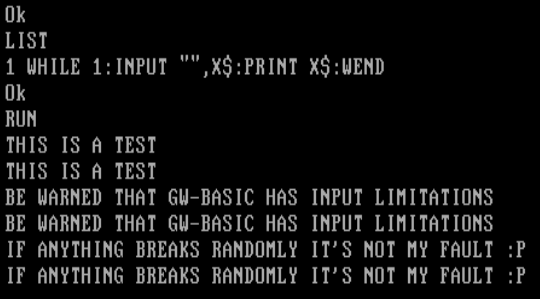
Alice, 4 bytes
i.To
Alice is a 2D language with two modes — Cardinal (i.e. up/down/left/right) which deals with integers and Ordinal (i.e. diagonal) which deals with strings. Here we only need Cardinal mode.
The naïve way would be
i.h%o
which would perform in a wraparound loop:
i        Read byte b, or produce -1 on EOF
.h%      Compute b%(b+1), erroring out for -1 or staying as b otherwise
         '.' here is duplication, 'h' is increment and '%' is mod
o        Output (b mod 256) as a byte
However, instead of .h%, the answer uses a shorter way of erroring out:
i        Read byte b, or produce -1 on EOF
.T       Duplicate and sleep for b milliseconds, erroring out if b is negative
o        Output (b mod 256) as a byte
Of course, this means that the higher the byte values in the input, the longer the program will take to run!
OIL, 12 bytes
Can handle infinite input, but the input has to be newline-terminated (any other way isn't possible in OIL currently).
5
9
4
9
11
6
Aceto, 5 bytes
When reading input, Aceto always waits for a newline, meaning input has to be \n-terminated.
pn
r<
In the current version, EOF will crash the program, but that only prints to STDERR.
Chip, 16 bytes
AabBCcdDEefFGghH
How it works:
Each capital letter corresponds to one bit of the input, and each lowercase letter to a bit of the output.
An input element, B will propagate its value to its immediate neighbors; in this case b and C. Being an output, b will take the value it has been given, and place that in the output. C will ignore B's signal, since input elements don't read the signals around them.
There won't be any cross-talk between output elements either, such as a and b, since neither produce any signal.
This isn't the only cat program, but all one-liners of this length will exhibit the wave-like pattern seen here. A 2D cat program (+3 bytes for newlines, but prettier imo) could be:
AabB
CcdD
EefF
GghH
SmileBASIC, 13 bytes
LINPUT S$?S$;
very simple.
Del|m|t, 14 bytes (non-competing)
7 / 1 3 > ? 9
No command line argument, because is the default
Explanation:
(7) 23    Gets the next char from input (-1 if its EOF)
(/) 15    Duplicate
()  0     Pushes 0 (there are no characters -> ASCII sum = 0)
(1) 17    Swap top 2 (Stack is [C, 0, C])
(3) 19    Pushes 0 if (C >= 0), 1 Otherwise (i.e. EOF)

(>) 30, (?) 31    If the EOF has been reached, exit the program

(9) 25    Print the character
          Repeat
Perl, 13 or 14 bytes, depending on whether -e counts
perl -pe'BEGIN{$/=\1}'
Although perl's -p switch normally reads a line at a time, and thus would require the input data either be finite, or have newlines in it, we can change the input record separator $/.
If $/ is reference to a number, it causes perl to read fixed length records.
This has to happen inside a BEGIN block, or else at least one newline would be required in the input.
Perl 6, 25 bytes
.print while $_=$*IN.getc
Supports null-bytes, and infinite streams without newlines.
If we were allowed to work on a line-by-line basis and always print a trailing newline, it would be only 14 bytes:
.say for lines
Seriously, 7 bytes
W+ W+R
Hexdump (reversible with xxd -r):
00000000: 0957 2b09 572b 52 .W+.W+R
Explanation (tabs are replaced with \t for clarity):
\tW+\tW+R
\t         read a single byte of input
  W+\tW    while TOS is truthy:
   +         append
    \t       read a single byte of input
       +R  append, reverse, and implicitly print
tcl, 17
puts [read stdin]
available to run on http://www.tutorialspoint.com/execute_tcl_online.php?PID=0Bw_CjBb95KQMeHVzQWNwMjZGZVk
To stop it from running, press Ctrl+D.
NewbieFuck, 4 bytes
[.,]
I guess this is non-competing I'm not aware of any working interpreter, but I found the spec online (esolangs.org).
If I understand correctly, this is the same as Brainfuck, but [ ... ] is actually do-while loop (always executes the first time).
So, although the Brainfuck answer needs to take input before entering the loop, ,[.,], this language can omit the first input and use [.,]
Note: as end of input is signified by 0 in brainfuck, this cannot handle null bytes. It will also prepend a null byte to the output.
Casio FX-7000G, 3 bytes
Due to the low amount of storage, the calculator's programming mode used a tokenized language to save space. This makes it somewhat competitive for code-golf...
Program:
?→X
Explanation:
?       # Take input from user
 →X     # Store in variable X
        # Implicit: Print last value
Note that although this is 5 UTF-8 bytes, the calculator uses its own encoding to store this in 3.
D, 65 71 68 bytes
import std.c.stdio;void main(){for(int c;c=~getchar,c;)putchar(~c);}
The original version couldn't handle infinitely long lines, but we should still do better than the existing D solution's 94 bytes, so here's the D version of Dennis' C solution.
std.c.stdio is deprecated in favor of core.stdc.stdio, as is this use of the comma operator, but both are still legal as of the current version.
Edit 2: Saved 3 bytes thanks to Zachary's suggestions
Arcyóu, 2 bytes
(q
Strange, a search for arcyóu inquestion:62230 doesn't seem to turn anything up.
Arcyóu has a strange behavior: if there isn't a trailing newline in the output, it will unavoidably append one. If there is a trailing newline, another one will not be appended. (p(q will not fix the problem, it will just forcibly append another \n.
This language cannot possibly handle infinite input.
Arcyóu is weird.
First Arcyóu answer of mine :D
Gaot++, 113 bytes
bleeeet bleeeeeet bleeeeeeeeeeeet bleeeet b bleeeeeeeeeeeeet bleeeet b bleeeeeeet bleeeet bleeeeeeeeeet bleeeeeet
In Compressed Gaot++ it's 25 bytes:
4e6e12e4eb13e4eb7e4e10e6e
Cannot terminate on the offline interpreter, EOF is not recognized by the language :(
Racket 35 bytes
(let l()(displayln(read-line))(l))
Ungolfed:
(define (f)
    (let loop()
      (displayln
       (read-line))
      (loop)))
To run:
(f)
Ouroboros, 9 4 bytes
i.)o
The program outputs the exact input, with no extraneous characters. It theoretically would work on null bytes and infinite streams, but as the only interpreter for the language is HTML/JavaScript and the input comes from a text box, neither concept is really applicable.
ireads a character code or -1 for end of input..duplicates it.)is an absolutely nasty hack.- Control flow in Ouroboros is accomplished via the
(and)commands, which swallow and regurgitate characters from the end of a line. The program ends when the instruction pointer is swallowed. Normally, this means you'll need a(instruction somewhere, or else the code is an infinite loop. However, in the current implementation, if you use a negative number as the argument to)(regurgitate), it actually swallows characters. (I.e., regurgitates backwards??) - So: if
iread a character and pushed its nonnegative character code,)regurgitates a number of characters equal to that value--which does nothing, because the snake is already at its maximum possible size. But ifihit EOF and pushed -1,)"regurgitates" -1 characters, meaning it actually swallows one. - On EOF, the
ogets swallowed. The program does not output anything and loops again;iagain gives -1, and another character is swallowed--this time, the). Now the program halts, since the instruction pointer was swallowed.
- Control flow in Ouroboros is accomplished via the
- If nothing was swallowed,
ooutputs the character from the stack. Control then loops back to the beginning of the line.
See it in action:
// Define Stack class
function Stack() {
this.stack = [];
this.length = 0;
}
Stack.prototype.push = function(item) {
this.stack.push(item);
this.length++;
}
Stack.prototype.pop = function() {
var result = 0;
if (this.length > 0) {
result = this.stack.pop();
this.length--;
}
return result;
}
Stack.prototype.top = function() {
var result = 0;
if (this.length > 0) {
result = this.stack[this.length - 1];
}
return result;
}
Stack.prototype.toString = function() {
return "" + this.stack;
}
// Define Snake class
function Snake(code) {
this.code = code;
this.length = this.code.length;
this.ip = 0;
this.ownStack = new Stack();
this.currStack = this.ownStack;
this.alive = true;
this.wait = 0;
this.partialString = this.partialNumber = null;
}
Snake.prototype.step = function() {
if (!this.alive) {
return null;
}
if (this.wait > 0) {
this.wait--;
return null;
}
var instruction = this.code.charAt(this.ip);
var output = null;
console.log("Executing instruction " + instruction);
if (this.partialString !== null) {
// We're in the middle of a double-quoted string
if (instruction == '"') {
// Close the string and push its character codes in reverse order
for (var i = this.partialString.length - 1; i >= 0; i--) {
this.currStack.push(this.partialString.charCodeAt(i));
}
this.partialString = null;
} else {
this.partialString += instruction;
}
} else if (instruction == '"') {
this.partialString = "";
} else if ("0" <= instruction && instruction <= "9") {
if (this.partialNumber !== null) {
this.partialNumber = this.partialNumber + instruction; // NB: concatenation!
} else {
this.partialNumber = instruction;
}
next = this.code.charAt((this.ip + 1) % this.length);
if (next < "0" || "9" < next) {
// Next instruction is non-numeric, so end number and push it
this.currStack.push(+this.partialNumber);
this.partialNumber = null;
}
} else if ("a" <= instruction && instruction <= "f") {
// a-f push numbers 10 through 15
var value = instruction.charCodeAt(0) - 87;
this.currStack.push(value);
} else if (instruction == "$") {
// Toggle the current stack
if (this.currStack === this.ownStack) {
this.currStack = this.program.sharedStack;
} else {
this.currStack = this.ownStack;
}
} else if (instruction == "s") {
this.currStack = this.ownStack;
} else if (instruction == "S") {
this.currStack = this.program.sharedStack;
} else if (instruction == "l") {
this.currStack.push(this.ownStack.length);
} else if (instruction == "L") {
this.currStack.push(this.program.sharedStack.length);
} else if (instruction == ".") {
var item = this.currStack.pop();
this.currStack.push(item);
this.currStack.push(item);
} else if (instruction == "m") {
var item = this.ownStack.pop();
this.program.sharedStack.push(item);
} else if (instruction == "M") {
var item = this.program.sharedStack.pop();
this.ownStack.push(item);
} else if (instruction == "y") {
var item = this.ownStack.top();
this.program.sharedStack.push(item);
} else if (instruction == "Y") {
var item = this.program.sharedStack.top();
this.ownStack.push(item);
} else if (instruction == "\\") {
var top = this.currStack.pop();
var next = this.currStack.pop()
this.currStack.push(top);
this.currStack.push(next);
} else if (instruction == "@") {
var c = this.currStack.pop();
var b = this.currStack.pop();
var a = this.currStack.pop();
this.currStack.push(c);
this.currStack.push(a);
this.currStack.push(b);
} else if (instruction == ";") {
this.currStack.pop();
} else if (instruction == "+") {
var b = this.currStack.pop();
var a = this.currStack.pop();
this.currStack.push(a + b);
} else if (instruction == "-") {
var b = this.currStack.pop();
var a = this.currStack.pop();
this.currStack.push(a - b);
} else if (instruction == "*") {
var b = this.currStack.pop();
var a = this.currStack.pop();
this.currStack.push(a * b);
} else if (instruction == "/") {
var b = this.currStack.pop();
var a = this.currStack.pop();
this.currStack.push(a / b);
} else if (instruction == "%") {
var b = this.currStack.pop();
var a = this.currStack.pop();
this.currStack.push(a % b);
} else if (instruction == "_") {
this.currStack.push(-this.currStack.pop());
} else if (instruction == "I") {
var value = this.currStack.pop();
if (value < 0) {
this.currStack.push(Math.ceil(value));
} else {
this.currStack.push(Math.floor(value));
}
} else if (instruction == ">") {
var b = this.currStack.pop();
var a = this.currStack.pop();
this.currStack.push(+(a > b));
} else if (instruction == "<") {
var b = this.currStack.pop();
var a = this.currStack.pop();
this.currStack.push(+(a < b));
} else if (instruction == "=") {
var b = this.currStack.pop();
var a = this.currStack.pop();
this.currStack.push(+(a == b));
} else if (instruction == "!") {
this.currStack.push(+ !this.currStack.pop());
} else if (instruction == "?") {
this.currStack.push(Math.random());
} else if (instruction == "n") {
output = "" + this.currStack.pop();
} else if (instruction == "o") {
output = String.fromCharCode(this.currStack.pop());
} else if (instruction == "r") {
var input = this.program.io.getNumber();
this.currStack.push(input);
} else if (instruction == "i") {
var input = this.program.io.getChar();
this.currStack.push(input);
} else if (instruction == "(") {
this.length -= Math.floor(this.currStack.pop());
this.length = Math.max(this.length, 0);
} else if (instruction == ")") {
this.length += Math.floor(this.currStack.pop());
this.length = Math.min(this.length, this.code.length);
} else if (instruction == "w") {
this.wait = this.currStack.pop();
}
// Any unrecognized character is a no-op
if (this.ip >= this.length) {
// We've swallowed the IP, so this snake dies
this.alive = false;
this.program.snakesLiving--;
} else {
// Increment IP and loop if appropriate
this.ip = (this.ip + 1) % this.length;
}
return output;
}
Snake.prototype.getHighlightedCode = function() {
var result = "";
for (var i = 0; i < this.code.length; i++) {
if (i == this.length) {
result += '<span class="swallowedCode">';
}
if (i == this.ip) {
if (this.wait > 0) {
result += '<span class="nextActiveToken">';
} else {
result += '<span class="activeToken">';
}
result += escapeEntities(this.code.charAt(i)) + '</span>';
} else {
result += escapeEntities(this.code.charAt(i));
}
}
if (this.length < this.code.length) {
result += '</span>';
}
return result;
}
// Define Program class
function Program(source, speed, io) {
this.sharedStack = new Stack();
this.snakes = source.split(/\r?\n/).map(function(snakeCode) {
var snake = new Snake(snakeCode);
snake.program = this;
snake.sharedStack = this.sharedStack;
return snake;
}.bind(this));
this.snakesLiving = this.snakes.length;
this.io = io;
this.speed = speed || 10;
this.halting = false;
}
Program.prototype.run = function() {
this.step();
if (this.snakesLiving) {
this.timeout = window.setTimeout(this.run.bind(this), 1000 / this.speed);
}
}
Program.prototype.step = function() {
for (var s = 0; s < this.snakes.length; s++) {
var output = this.snakes[s].step();
if (output) {
this.io.print(output);
}
}
this.io.displaySource(this.snakes.map(function (snake) {
return snake.getHighlightedCode();
}).join("<br>"));
}
Program.prototype.halt = function() {
window.clearTimeout(this.timeout);
}
var ioFunctions = {
print: function (item) {
var stdout = document.getElementById('stdout');
stdout.value += "" + item;
},
getChar: function () {
if (inputData) {
var inputChar = inputData[0];
inputData = inputData.slice(1);
result = inputChar.charCodeAt(0);
} else {
result = -1;
}
var stdinDisplay = document.getElementById('stdin-display');
stdinDisplay.innerHTML = escapeEntities(inputData);
return result;
},
getNumber: function () {
while (inputData && (inputData[0] < "0" || "9" < inputData[0])) {
inputData = inputData.slice(1);
}
if (inputData) {
var inputNumber = inputData.match(/\d+/)[0];
inputData = inputData.slice(inputNumber.length);
result = +inputNumber;
} else {
result = -1;
}
var stdinDisplay = document.getElementById('stdin-display');
stdinDisplay.innerHTML = escapeEntities(inputData);
return result;
},
displaySource: function (formattedCode) {
var sourceDisplay = document.getElementById('source-display');
sourceDisplay.innerHTML = formattedCode;
}
};
var program = null;
var inputData = null;
function showEditor() {
var source = document.getElementById('source'),
sourceDisplayWrapper = document.getElementById('source-display-wrapper'),
stdin = document.getElementById('stdin'),
stdinDisplayWrapper = document.getElementById('stdin-display-wrapper');
source.style.display = "block";
stdin.style.display = "block";
sourceDisplayWrapper.style.display = "none";
stdinDisplayWrapper.style.display = "none";
source.focus();
}
function hideEditor() {
var source = document.getElementById('source'),
sourceDisplay = document.getElementById('source-display'),
sourceDisplayWrapper = document.getElementById('source-display-wrapper'),
stdin = document.getElementById('stdin'),
stdinDisplay = document.getElementById('stdin-display'),
stdinDisplayWrapper = document.getElementById('stdin-display-wrapper');
source.style.display = "none";
stdin.style.display = "none";
sourceDisplayWrapper.style.display = "block";
stdinDisplayWrapper.style.display = "block";
var sourceHeight = getComputedStyle(source).height,
stdinHeight = getComputedStyle(stdin).height;
sourceDisplayWrapper.style.minHeight = sourceHeight;
sourceDisplayWrapper.style.maxHeight = sourceHeight;
stdinDisplayWrapper.style.minHeight = stdinHeight;
stdinDisplayWrapper.style.maxHeight = stdinHeight;
sourceDisplay.textContent = source.value;
stdinDisplay.textContent = stdin.value;
}
function escapeEntities(input) {
return input.replace(/&/g, '&').replace(/</g, '<').replace(/>/g, '>');
}
function resetProgram() {
var stdout = document.getElementById('stdout');
stdout.value = null;
if (program !== null) {
program.halt();
}
program = null;
inputData = null;
showEditor();
}
function initProgram() {
var source = document.getElementById('source'),
stepsPerSecond = document.getElementById('steps-per-second'),
stdin = document.getElementById('stdin');
program = new Program(source.value, +stepsPerSecond.innerHTML, ioFunctions);
hideEditor();
inputData = stdin.value;
}
function runBtnClick() {
if (program === null || program.snakesLiving == 0) {
resetProgram();
initProgram();
} else {
program.halt();
var stepsPerSecond = document.getElementById('steps-per-second');
program.speed = +stepsPerSecond.innerHTML;
}
program.run();
}
function stepBtnClick() {
if (program === null) {
initProgram();
} else {
program.halt();
}
program.step();
}
function sourceDisplayClick() {
resetProgram();
}.container {
width: 100%;
}
.so-box {
font-family:'Helvetica Neue', Arial, sans-serif;
font-weight: bold;
color: #fff;
text-align: center;
padding: .3em .7em;
font-size: 1em;
line-height: 1.1;
border: 1px solid #c47b07;
-webkit-box-shadow: 0 2px 2px rgba(0, 0, 0, 0.3), 0 2px 0 rgba(255, 255, 255, 0.15) inset;
text-shadow: 0 0 2px rgba(0, 0, 0, 0.5);
background: #f88912;
box-shadow: 0 2px 2px rgba(0, 0, 0, 0.3), 0 2px 0 rgba(255, 255, 255, 0.15) inset;
}
.control {
display: inline-block;
border-radius: 6px;
float: left;
margin-right: 25px;
cursor: pointer;
}
.option {
padding: 10px 20px;
margin-right: 25px;
float: left;
}
h1 {
text-align: center;
font-family: Georgia, 'Times New Roman', serif;
}
a {
text-decoration: none;
}
input, textarea {
box-sizing: border-box;
}
textarea {
display: block;
white-space: pre;
overflow: auto;
height: 100px;
width: 100%;
max-width: 100%;
min-height: 25px;
}
span[contenteditable] {
padding: 2px 6px;
background: #cc7801;
color: #fff;
}
#stdout-container, #stdin-container {
height: auto;
padding: 6px 0;
}
#reset {
float: right;
}
#source-display-wrapper , #stdin-display-wrapper{
display: none;
width: 100%;
height: 100%;
overflow: auto;
border: 1px solid black;
box-sizing: border-box;
}
#source-display , #stdin-display{
font-family: monospace;
white-space: pre;
padding: 2px;
}
.activeToken {
background: #f93;
}
.nextActiveToken {
background: #bbb;
}
.swallowedCode{
color: #999;
}
.clearfix:after {
content:".";
display: block;
height: 0;
clear: both;
visibility: hidden;
}
.clearfix {
display: inline-block;
}
* html .clearfix {
height: 1%;
}
.clearfix {
display: block;
}<!--
Designed and written 2015 by D. Loscutoff
Much of the HTML and CSS was taken from this Befunge interpreter by Ingo Bürk: http://codegolf.stackexchange.com/a/40331/16766
-->
<div class="container">
<textarea id="source" placeholder="Enter your program here" wrap="off">i.)o</textarea>
<div id="source-display-wrapper" onclick="sourceDisplayClick()"><div id="source-display"></div></div></div><div id="stdin-container" class="container">
<textarea id="stdin" placeholder="Input" wrap="off">Hello, World!</textarea>
<div id="stdin-display-wrapper" onclick="stdinDisplayClick()"><div id="stdin-display"></div></div></div><div id="controls-container" class="container clearfix"><input type="button" id="run" class="control so-box" value="Run" onclick="runBtnClick()" /><input type="button" id="pause" class="control so-box" value="Pause" onclick="program.halt()" /><input type="button" id="step" class="control so-box" value="Step" onclick="stepBtnClick()" /><input type="button" id="reset" class="control so-box" value="Reset" onclick="resetProgram()" /></div><div id="stdout-container" class="container"><textarea id="stdout" placeholder="Output" wrap="off" readonly></textarea></div><div id="options-container" class="container"><div class="option so-box">Steps per Second:
<span id="steps-per-second" contenteditable>10</span></div></div>Common Lisp (Lispworks), 50 bytes
(defun f()(let((x(read-char)))(format t"~A"x)(f)))
Usage:
    CL-USER 165 > (f)
    aabbccdd

    112233

    ddeeff
TCL, 28 bytes
puts -nonewline [read stdin]
Lolo, 2 bytes
Lo
Not very interesting for a language only made up of Ls and Os.
It's basically printing whats in the stack. Since there is nothing, it gets the input.
R, 14 bytes
Output stdin, nothing fancy.
cat(scan(,''))
If stdin consists solely of numbers, you can do it in 11 bytes with cat(scan()).
As far as I know, there's no way to handle infinite input.
pb, 20 bytes
^w[B!0]{t[B]vb[T]^>}
It will print an input prompt, but I can't do anything about it. This language has no way of supporting infinite input.
C#, 79 bytes
using x=System.Console;class P{static void Main(){x.Write(x.In.ReadToEnd());}}
Thanks Lynn for the hint about using alias vs using static.
V, 0 bytes
V's idea of "memory" is just a gigantic 2D array of characters. Before any program is ran, all input it loaded into this array (known as "The Buffer"). Then, at the end of any program, all text in the buffer is printed.
In other words, the empty program is a cat program.
Emotinomicon, 16 bytes
⏫😎⏪⏬⏩
Explanation:
⏫😎⏪⏬⏩
⏫             Get input
  😎           Reverse Stack
    ⏪  ⏩     Loop
      ⏬       Output one char
QBIC, 4 bytes
_??A
Unfortunately, QBasic (and by extension QBIC) doesn't handle input very well. Comma's are only allowed if quotes are used (which then get stripped from the output). Newlines are another no-go.

ABCR, 4 bytes
5cQx
Explanation:
5      while(peek(B)){  //Queue B peeks default to 1, so this infinite-loops
 c        dequeue(c)  // Queue C dequeues default to an input character if C is empty
  Q       print(c)   /* Prints peek at the queue, and peeks on an empty queue C
                        default to the register value, which was set by `c` */
   x    }
reticular, 2 bytes
ip
This exits with an error, but works fine. Try it online!
ip
i   take a line of input (no newline)
 p  print it with a newline after
Jelly, 5 bytes
ƈȮøL¿
This one is valid, unlike the other 1-byte one, which is 100% invalid:
¹
(command-line arg, not STDIN)
Python 3, 21 bytes
print(input(),end='')
Addict, 31 bytes
Addict is my new Turing-tarpit esolang, based on PRINDEAL. Addict has 5 commands: alias, decrement, increment, char, and take. See the GitHub repo for more details.
a I
 t c
 O
 d
a O
 c c
 I
 d
I
This basically defines a loop which repeatedly inputs a charcode and outputs it, until EOF is reached. Ungolfed version:
a input  # Define a command `input` that does the following:
 t char  #   Set variable `char` to the next charcode in the input.
 output  #   If there is a next charcode, run command `output`.
 d       #   Otherwise, just exit.

a output # Define a command `output` that does the following:
 c char  #   Output variable `char` as a charcode.
 input   #   Attempt to input again.
 d       #   (This line never gets run.)

input  # Run command `input`.
Racket, 52 bytes
A classical approach.
(copy-port(current-input-port)(current-output-port))
In Racket, default settings are stored in parameters which are invoked to obtain their value (or invoked with an argument to set them). This mechanism is also used to access/set the default input and output ports.
Haskell, 16 bytes
main=interact id
interact reads the input, passes it to the function given as its argument and prints the result it receives. id is the identity function, i.e. it returns its input unchanged. Thanks to Haskell's laziness interact can work with infinite input.
Cubix, 6 5 bytes
Now handles null bytes!
@_i?o
Cubix is a 2-dimensional, stack-based esolang. Cubix is different from other 2D langs in that the source code is wrapped around the outside of a cube.
Test it online! Note: there's a 50 ms delay between iterations.
Explanation
The first thing the interpreter does is figure out the smallest cube that the code will fit onto. In this case, the edge-length is 1. Then the code is padded with no-ops . until all six sides are filled. Whitespace is removed before processing, so this code is identical to the above:
  @
_ i ? o
  .
Now the code is run. The IP (instruction pointer) starts out on the far left face, pointing east.
The first char the IP encounters is _, which is a mirror that turns the IP around if it's facing north or south; it's currently facing east, so this does nothing. Next is i, which inputs a byte from STDIN. ? turns the IP left if the top item is negative, or right if it's positive. There are three possible paths here:
- If the inputted byte is -1 (EOF), the IP turns left and hits
@, which terminates the program. - If the inputted byte is 0 (null byte), the IP simply continues straight, outputting the byte with
o. - Otherwise, the IP turns right, travels across the bottom face and hits the mirror
_. This turns it around, sending it back to the?, which turns it right again and outputs the byte.
I think this program is optimal. Before Cubix could handle null bytes (EOF was 0, not -1), this program worked for everything but null bytes:
.i!@o
I've written a brute-forcer to find all 5-byte cat programs. Though it takes ~5 minutes to finish, the latest version has found 5 programs:
@_i?o   (works as expected)
@i?o_   (works in exactly the same way as the above)
iW?@o   (works as expected)
?i^o@   (false positive; prints U+FFFF forever on empty input)
?iWo@   (works as expected)
Gaot++, 171 bytes
bleeeeeeeeeeeet
bleeeet bleeeeeet
bleeeeeeeeeet bleeeet blet
bleeeeeeeeeeeet bleeeet blet
bleeeeeeeeeeeeet bleeeet blet
bleeeeeeeeeeeeet bleeeet blet
bleeeeeeeet bleeeeeet
Compressed: 12e 4e 6e 10e 4e 1e 12e 4e 1e 13e 4e 1e 13e 4e 1e 8e 6e
Explanation
X 4e 1e, where 1e (blet) is a nop, basically forms a pattern where if you go from left to right, X is executed, but not from right to left.
Alternatively, if you have X 4e Y, then X is executed when you go from left to right, and Y otherwise.
Sesos, 1 byte
Y
This program handles both infinite streams and null bytes.
Try it online! Check Debug to see the generated binary code.
How it works
The binary file above has been generated by assembling the following SASM code.
set mask ; Switch to unsigned 8-bit cells.

         ; (implicit jmp)
         ;     Set an entry marker and jump to the jne instruction.
    put  ; Print the byte in the current cell to STDOUT.
jnz      ; (implicitly promoted to jne)
         ;     Read a byte from STDIN and save it in the current cell.
         ;     If EOF has not been hit, jump to the previous instruction.
Seed, 7 Bytes
2 20093
Seed is a language which generates Befunge-93 with a length and a random seed. 2 is the length and 20093 is the random seed.
C++ (109 Bytes)
Thanks to Eʀɪᴋ ᴛʜᴇ Gᴏʟғᴇʀ for reducing 4 bytes.
#include <iostream>
#include <string>
using namespace std;main(){string A,W;while(cin>>A)W+=A;cout<<W<<endl;}
Clojure, 18 bytes
(print(read-line))
This 30-bytes program runs forever:
(while true(print(read-line)))
BruhScript, 22 bytes
Source:
↺₀1Λ₀⍈+⍰'
∇
Encoded version hexdump:
0000000: 0099 009a 003a 0087 009a 008f 0051 008e  .....:.......Q..
0000010: 0061 0000 0069                           .a...i
Explanation:
↺                While loop. Take two niladic functions as arguments.
 ₀1Λ             A function that always return 1
    ₀⍈+⍰'<LF>∇   `'<c>` is a shorthand for «<c>», so this code print (⍈) the input (⍰) + a newline ('<LF>), and return None (∇)
Fith, 7 bytes
read \.
read gets input from STDIN.
The language cannot handle infinite streams.
\. prints the string on top of the stack without a trailing newline.
J, 14 bytes
stdout]stdin''
Reads the entire input from stdin until EOF is reached and store it as an array of characters. Then output all of it to stdout. This will work when saved as a script to be run using jconsole, where scripts are programs for interpreted languages.
Apps Script + Google Sheets, 29 bytes
Script
function Q(s){return s}
Sheet
=q(B1)
Cell B1 is the input.
Tellurium, 2 bytes
i^
Pretty simple, eh?
What it does is get input from the user using the i command, and stores it in the tape in the currently selected item (in the code above, it's 0, the default).
After that, it prints the currently selected item's value using the ^ command. (whatever the user input).
Omam, 137 bytes
the screams all sound the same
though the truth may vary
don't listen to a word i say
the screams all sound the same
this ship will carry
Note that I haven't copied it. In fact, I added this code there today.
Wat, 6 + 1 = 7 bytes
åó#ÐÑÅ
(This code don't have any rapport with DNA)
Explanation:
åó#ÐÑÅ

å      Read a character
 ó     Duplicate the top of the stack
  #    Skip the next character
   Ð   End the program
    Ñ  If the top of the stack is 0, go backward (execute Ð and end the program), otherwise go forward
     Å Print the character on the top of the stack
       After, the IP wrap and the line is reexecuted
INTERCALL, 133 bytes
wat
INTERCALL IS A ANTIGOLFING LANGUAGE
SO THIS HEADER IS HERE TO PREVENT GOLFING IN INTERCALL
THE PROGRAM STARTS HERE:
READ
PRINT
GOTO I
0815, 10 bytes
(interpreter, don't let the pirate icon scare you)
}: :!~$^:
Note that there is a trailing space at the end. This one survives trimmers:
}:0:!~$^:0
They work the same.
Explanation
0815 has three memory registers: X, Y and Z. X is write-able, Z is read-able. Y cannot be directly accessed, but only with rotations. At start, X is 0x0, Y is 0x0 and Z is 0x0. 0815 only supports hexadecimal numbers. Labels point to a specific part in the code: the character after their definition. Here are the symbols used here:
}:::}defines a label,:starts its parameter (the label),:closes the parameter, thus creating the label at this point (char 5).!:!gets a byte from STDIN and stores it in X.~$:~is needed to rotate left, so that X is Y, Y is Z and Z is X. Then,$is used to print the character in Z to the screen.^:^jumps to the label specified if Z is not0x0. Note that closing is not required on this step, as this is the end of the program. This allows an un-copiable null byte to be printed.
APL, 6 bytes
⎕←⍞
→1
This has worked in all APLs since the beginning of time.
⍞ wait for input
⎕← Output that
→1 go to line 1
Archway 2, 19 bytes
   \
// .
  , /
+/\
Archway, 7 bytes
/.\
\,/
According to Esolangs, this is the only useful program that can be written in the original Archway language.
CoffeeScript/LiveScript/etc. (Node.js), 31 bytes
I'm not sure if any of those languages have been used yet, but here it is.
p=process;p.stdin.pipe p.stdout
Because it takes advantage of so few features, most of the CoffeeScript descendants with any notability would work with this code, including LiveScript, Coco, and IcedCoffeeScript.
Oh, and it does deal with infinite streams.
Javascript (browser), 16 15 bytes
alert(prompt())
Fuzzy Octo Guacamole, 3 bytes
(non-competing, FOG is newer than the challenge)
(^)
Looks emotish (that's totally a word).
The ^ gets input, the X pops it and prints it.
The ( and ) denote the start and end of an infinite loop.
4 byte solution with a for loop:
?[?^]
The [ and ] denote a for loop, and the ? increments the counter, so it never runs out.
Weird implicit outputs means it prints the outputs automatically.
Lua, 30 Bytes
Heavily base upon Lynn's answer, but as it is not updated anymore, I'll feel free ot post this 30 bytes answer.
::a::io.write(io.read())goto a
Jelly, 1 byte
¹
Simply the identity function.
Reng v.1.2, 4 bytes
is~o
This takes input, skips if not a negative one (i.e. no input found). When s find a regular character, it skips over the ~ and outputs the input with o. Otherwise, it meets the ~ and ends execution. Input is like "string1" "string2" ... "stringN". Try it here!
The following 13-byte program allows you to feed input more than once, but only yields correct output provided you feed it in at the right time.
>isvo
/$$>is!
Input "Meow":

Lazy K, 1 0 bytes
As CatsAreFluffy pointed out, the empty program has the same semantics as the program I. From the grammar:
  Program  ::= CCExpr                     CCExpr

  CCExpr   ::= CCExpr Expr                (CCExpr Expr)
             | epsilon                    (lambda (x) x)
Old explanation (1 byte)
I
A Lazy K program is a function on Church lists of Church numerals, expressed in SKI combinator logic. I is the identity function, which simply equates the output with the input. As such, a cat program is essentially the "simplest" Lazy K program. If your Lazy K interpreter is any good, it even handles infinite streams!
SPARC (V9) assembly, 64 bytes
This runs on NetBSD (I seem to be running version 6.1.5). Disassembly with objdump:
0000000000100078 <.text>:
  100078:   9c 23 a0 08     sub  %sp, 8, %sp
  10007c:   82 10 20 03     mov  3, %g1
  100080:   90 10 00 00     mov  %g0, %o0
  100084:   92 10 00 0e     mov  %sp, %o1
  100088:   94 10 20 01     mov  1, %o2
  10008c:   91 d0 20 00     ta  0
  100090:   02 ca 00 07     brz  %o0, 0x1000ac
  100094:   82 10 20 04     mov  4, %g1
  100098:   90 10 20 01     mov  1, %o0
  10009c:   92 10 00 0e     mov  %sp, %o1
  1000a0:   94 10 20 01     mov  1, %o2
  1000a4:   10 bf ff f6     b  0x10007c
  1000a8:   91 d0 20 00     ta  0
  1000ac:   9c 03 a0 08     add  %sp, 8, %sp
  1000b0:   82 10 20 01     mov  1, %g1
  1000b4:   91 d0 20 00     ta  0
Explanation (line-by-line):
First of all, the SPARC architecture has a ton of registers. You have access to 32 of them at a time, called %gX, %iX, %lX, and %oX for X in [0..7]. There are also %pc for the program counter and %sp for the stack pointer.
sub %sp, 8, %sp
The stack grows downward. I didn't want to include a .data section, so I'm using the stack as storage. This expands it by 8 bytes.
mov 3, %g1
mov %g0, %o0
mov %sp, %o1
mov 1, %o2
Getting ready to do a syscall. The ABI in use here requires the syscall number in %g1 and the arguments in %o0, %o1, etc. According to syscall.h, read is 3. Register %g0 is always 0, so these lines equate to read(0, sp, 1).
ta 0
Those familiar with x86 assembly might want int 0x80 to do the syscall. In SPARC, we use a user-mode trap, and in NetBSD specifically it is the first one. Thus, ta 0.
brz %o0, 0x1000ac
A conditional branch: jump to address 0x1000ac if %o0 contains zero. We sometimes have to be careful with instruction order though, because every time the program encounters a branch, the next instruction is executed as well. In this case it doesn't make a difference, but it will later.
mov 4, %g1
mov 1, %o0
mov %sp, %o1
mov 1, %o2
Just like with read before, except we're using write (4) and stdout (1).
b 0x10007c
ta 0
An unconditional branch. Remember that thing about branches being weird? This executes the ta 0 to call the write we just prepared, then jumps back to address 0x10007c (to prepare to read again).
add %sp, 8, %sp
The target of the first branch we saw, here we prepare to exit. Start by putting the stack pointer back where it was.
mov 1, %g1
ta 0
We know that %o0 contains zero, since that was the condition of the branch that got us here. We want to exit with that status, so we simply call exit (1).
Source:
.global _start
.section .text
_start:
sub %sp,8,%sp
1:
mov 3,%g1
mov %g0,%o0
mov %sp,%o1
mov 1,%o2
t 0
brz %o0,2f
mov 4,%g1
mov 1,%o0
mov %sp,%o1
mov 1,%o2
b 1b
t 0
2:
add %sp,8,%sp
mov 1,%g1
t 0
Gogh, 0 bytes
This is functional in a Gogh program with input.
Usage
$ ./gogh <standard-flags> <code-or-path> <input>
In this case:
$ ./gogh o "" <input>
NTFJ, 4 bytes
(*~^
An online interpreter can be found here.
NTFJ is an esoteric programming language, made by user @ConorO'Brien, intended to be a Turing tarpit. It is stack-based, and pushes bits to the stack, which can be later coalesced to an 8-bit number. The bytes of the input are pushed to the stack before the program is run, with the first byte on top. This particular program is fairly simple:
(      If top of stack is not 0:
 *      Pop byte, output as a character.
  ~     Push 0.
   ^    Pop bit/byte and jump to the instruction at the corresponding index.
        This moves us back to the beginning of the program, which is thus looped until the stack is empty.
Shtriped, 20 bytes
e )
"
 r )
 s )
 "
"
This cheekily demonstrates that nearly any printable ASCII string is a valid identifier in Shtriped.
How it works:
e )   \ declares a variable named )
"     \ defines a function with 0 arguments named "
 r )  \ gets a line of string input, saving it to )
 s )  \ prints ) as a string
 "    \ recursively calls ", effectively looping forever
"     \ calls " from the main scope to get things started
There's no real way to detect EOF, so this loops forever like the Python answer.
You can easily make it stop when an empty line is given though (30 bytes):
e )
"
 r )
 d ) \ tries to decrement ), if it was the empty string, aka 0, it can't, so 0 is returned all the way up
 i ) \ increment ) to put it back to normal after possibly decrementing
 s )
 "
"
Note that Shtriped I/O only supports printable ASCII, tabs, line feeds, carriage returns, vertical tabs, and form feeds (100 chars in total). This is because internally, strings are represented as non-negative arbitrary precision integers, and there must be a finite alphabet of characters to be able to encode all strings.
Y, 4 bytes
i:gF
Simple enough. This two-link program takes input characters and prints them out as you feed input. Input an empty string to terminate. Explanation:
i:g F
i      take input (string)
 :     duplicate
  g    print one item
    F  conditional link: pop N, and if N is zero (falsey), i.e. empty string, continue.
       otherwise, move to beginning of current link
AnnieFlow, 2 bytes
11
The first 1 indicates that the program accepts input, and the second 1 indicates that there is one stack. The output stack has no changeable behavior, so that's the only information the program needs. Because the output stack is always the first stack and the input stack is always the last stack, they coincide in this case, so when the input stack is filled, it outputs the same to STDOUT instead of storing it. In any program, after the input stack is filled it is popped to start the program. However, popping from the output stack halts the program. Therefore the program halts immediately after outputting the input. This was not an intended feature, it just happened to work out the way it does because of how the programming language works.
PlatyPar, 0 bytes
At the beginning of the program, input is implicitly pushed to the stack. At the end of the program, the stack is implicitly printed.
WhoScript, 39 bytes
1pr;v;#0 1;-;i;>;e;<;t=;ti;o;tl;pw;pr;d
I think its best explained by watching the stack change over time.
psychic_paper read          @ [input]
time_vortex                 @ [input]
  # 0 1                     @ [input, 0, 1]
  -                         @ [input, -1.0]
  integer                   @ [input, -1]
  pop                       @ [input]
  duplicate                 @ [input, input]
  push                      @ [input, input, -1]
  TARDIS =                  @ [input, input==-1]
  TARDIS if                 @ [input]
    opening                 @ [-1] (it won't come this far otherwise)
  TARDIS landing            @ [input | -1]
  psychic_paper write       @ []
  psychic_paper read        @ [input]
paradox                     @ Phew!
The program will accept any input so long as you don't find a character whose ASCII code is -1. The program works best if input is provided from the command line, else it will just take one character at a time until you quit providing new ones.
Mathematica, 43 bytes
While[a=!=EndOfFile,Print[a=InputString[]]]

Templates Considered Harmful, 4 bytes
A<1>
This is a language which is executed by having the C++ compiler figure out the type of a typedef in a template. The language only supports finite input.
A<1> refers to the first argument of an anonymous function. All user-defined functions are anonymous. A program is implicitly wrapped in Fun<>, so it defines a function that returns its first argument, which is the input.
Chaîne, 2 bytes
Because strings.
|i
|  ; perform next character as instruction
 i ; takes input to the stack
   ; implicit: output stack
Motorola MC14500B Machine Code, 1.5 bytes
Written in hexadecimal:
18F
Written in binary:
0001 1000 1111
Explanation
1   Read from I/O pin
8   Output to I/O pin
F   Loop back to start
The opcodes are 4 bits each.
Perl 5, 11 + 1 (-p flag) = 12 bytes
perl -pe 'INIT{$/=\1}'
Sets the input record separator in an INIT block to work with infinite streams without newlines.
Minkolang, 5 bytes
od?.O
Explanation
o reads in a character from input and pushes its ASCII code onto the stack (0 if the input is empty). d then duplicates the top of stack (the character that was just read in). ? is a conditional trampoline, which jumps the next instruction of the top of stack is not 0. If the input was empty, then the . is not jumped and the program halts. Otherwise, O outputs the top of stack as a character. The toroidal nature of Minkolang means that this loops around to the beginning.
Aubergine, 9 bytes
=ii=oo=ib
Aubergine in a nutshell
Aubergine has four variables and four 2-argument instructions. The variables a and b can be indirected as A and B to point to locations in the program, which can be read and written just like data, making it inherently self-modifying. The other variables are o, which refers to input or output depending on whether it is the second or first argument of the assignment instruction, and i, which is the instruction pointer. The four instructions are assignment (=), addition (+), subtraction (-), and conditional jump (:). The only constant literal available is 1. All variables are initialized to zero.
Ungolfed:
=ii                      NOP placeholder, since instruction pointer moves after jumps
=oo                      Read a character from stdin, print it to stdout.
=ib                      Send the instruction pointer to value of b, which is 0 by default
This version runs forever and must be killed manually. To make it so that it exits upon receiving a null byte, we must add 3 bytes:
=ii=ao=oa:ba
ResPlicate, 36 bytes
4 2 0 -1 4 2 4 2 4 2 4 2 4 2 1 0 0 0
This was one of the earliest examples I made after implementing this language, so I have simply copied it from the linked wiki article, which I largely wrote. As was mentioned there, this program does not halt on EOF, and will continue asking for input until the interpreter is killed by force.
ResPlicate in a nutshell
Programs in ResPlicate are all comprised of a list of integers, which are inserted into a queue in order. Each step, the first two integers are popped as x and y. Then a list of x integers is popped (and padded with zeros if the queue had fewer than x elements) and re-enqueued y times. This is quite sufficient to ensure Turing-completeness. Indeed, it is even Turing-complete in the limited case that y is not allowed to exceed 2.
This simple language is extended with I/O in the following way: If x is zero and y is positive, y is output as a character. If x is zero and y is negative, a character is read from input, y+1 is added to it, and the result is enqueued.
Ungolfed
4 2 [0 -1 4 2]                  Enqueue 0 -1 (read one character) followed by this command.
4 2 [4 2 4 2]                   Enqueue 4 2 followed by this command.
4 2 [1 0 0 0]                   Put two copies of 1 0 0 0 on the cue.
                                This sequence and the one preceding it can be considered
                                together to be a single command which appends
                                1 0 0 0 to itself.
After these commands, the queue looks like this:
0 -1 4 2 0 -1 4 2 4 2 4 2 4 2 4 2 1 0 0 0 1 0 0 0
In other words, the program has decompressed itself into a copy of itself with 0 -1 prepended and 1 0 0 0 appended, and since the program will eventually (and forever) return to this state, this could be considered the "real" cat program. The execution continues like so:
0 -1                            Get a character from stdin, append it to the queue.
4 2 [0 -1 4 2]
4 2 [4 2 4 2]
4 2 [1 0 0 0]                   As above.
1 0 [0]                         Pop and discard the zero.
0 (x)                           Print the inputted character x.
After which the program is once again in the state I said it would return to.
Go, 66 bytes
package main
import("io"
."os")
func main(){io.Copy(Stdout,Stdin)}
Go has an io.Copy function which writes what reads; until EOF.
Fishing, Dock length 2, 9 bytes
v+CC
  IP
I takes an input and P prints it. Note that N can be substituted for P to produce a trailing newline.
Brian & Chuck, 44 bytes
#{<{,+?+}_+{-?>}<?
_}>?>+<<<{>?_}>>.<+<+{<{?
I originally created this language for Create a programming language that only appears to be unusable. It turns out to be a very nice exercise to golf simple problems in it though.
The Basics: Each of the two lines defines a Brainfuck-like program which operates on the other program's source code - the first program is called Brian and the second is called Chuck. Only Brian can read and only Chuck can write. Instead of Brainfuck's loops you have ? which passes control to the other program (and the roles of instruction pointer and tape head change as well). An addition to Brainfuck is { and } which scan the tape for the first non-zero cell (or the left end). Also, _ are replaced with null bytes.
While I don't think this is optimal yet, I'm quite happy with this solution. My first attempt was 84 bytes, and after several golfing sessions with Sp3000 (and taking some inspiration from his attempts), I managed to get it slowly down to 44, a few bytes at a time. Especially the brilliant +}+ trick was his idea (see below).
Explanation
Input is read into the first cell on Chuck's tape, then painstakingly copied to the end of Brian's tape, where it's printed. By copying it to the end, we can save bytes on setting the previous character to zero.
The # is just a placeholder, because switching control does not execute the cell we switched on. {<{ ensures that the tape head is on Chuck's first cell. , reads a byte from STDIN or -1 if we hit EOF. So we increment that with + to make it zero for EOF and non-zero otherwise.
Let's assume for now we're not at EOF yet. So the cell is positive and ? will switch control to Chuck. }> moves the tape head (on Brian) to the + the _ and ? passes control back to Brian.
{- now decrements the first cell on Chuck. If it's not zero yet, we pass control to Chuck again with ?. This time }> moves the tape head on Brian two cells of the right of the last non-zero cell. Initially that's here:
#{<{,+?+}_+{-?>}<?__
                   ^
But later on, we'll already have some characters there. For instance, if we've already read and printed abc, then it would look like this:
#{<{,+?+}_+{-?>}<?11a11b11c__
                            ^
Where the 1s are actually 1-bytes (we'll see what that's about later).
This cell will always be zero, so this time ? won't change control. > moves yet another cell to the right and + increments that cell. This is why the first character in the input ends up three cells to the right of the ? (and each subsequent one three cells further right).
<<< moves back to the last character in that list (or the ? if it's the first character), and {> goes back to the + on Brian's tape to repeat the loop, which slowly transfers the input cell onto the end of Brian's tape.
Once that input cell is empty the ? after {- will not switch control any more. Then >}< moves the tape head on Chuck to the _ and switches control such that Chuck's second half is executed instead.
}>> moves to the cell we've now written past the end of Brian's tape, which is the byte we've read from STDIN, so we print it back with .. In order for } to run past this new character on the tape we need to close the gap of two null bytes, so we increment them to 1 with <+<+ (so that's why there are the 1-bytes between the actual characters on the final tape). Finally {<{ moves back to the beginning of Brian's tape and ? starts everything from the beginning.
You might wonder what happens if the character we read was a null-byte. In that case the newly written cell would itself be zero, but since it's at the end of Brian's tape and we don't care where that end is, we can simply ignore that. That means if the input was ab\0de, then Brian's tape would actually end up looking like:
#{<{,+?+}_+{-?>}<?11a11b1111d11e
Finally, once we hit EOF that first ? on Brian's tape will be a no-op. At this point we terminate the program. The naive solution would be to move to the end of Chuck's tape and switch control, such that the program termiantes: >}>}<?. This is where Sp3000's really clever idea saves three bytes:
+ turns Chuck's first cell into 1. That means } has a starting point and finds the _ in the middle of Chuck's tape. Instead of skipping past it, we simply close the gap by turning it into a 1 with + as well. Now let's see what the rest of Brian's code happens to do with this modified Chuck...
{ goes back to Chuck's first cell as usual, and - turns it back into a null-byte. That means that ? is a no-op. But now >}<, which usually moved the tape head to the middle of Chuck's tape, moves right past it to the end of Chuck's tape and ? then passes control to Chuck, terminating the code. It's nice when things just work out... :)
Acc!, 27 bytes
Also works in Acc!!.
Count q while 1 {
Write N
}
This code can handle null bytes, but will error when input runs out, as it is impossible to handle that case in Acc!
GOTO++, 80 bytes
§1
J=ENTRETONTEXTE()
GOTOPRINT()
GOTONONNULPOURLESNULS %1 entreestd@Fin() - *(1)
Well, GOTO++…As far as I can see, you can either read a line or a number but you can't read a string of a given length. Or just a character for that matter. So this program unfortunately needs linefeeds in its input if it is to ever output anything.
Rail, 19 bytes
$'main'
@-i\
  \o-@
Rail is such a pain to golf... :D
This terminates with an error upon hitting EOF but handles null bytes and infinite streams without an issue.
The execution path starts from the $ going South-East. On - the train turns East, i reads a character. On \ the train turns South-East, and on - East again. @ reverses movement direction. The train now moves West, where o outputs the character again. \ turns the train North-West, - turns it West and @ reverses it once more. At this point we're in a loop between the two @, which terminates when i tries to read the end of the stream.
With a properly tail recursive interpreter, there is an 18-byte solution as well, but I can't currently test whether the reference implementation could handle it (which I doubt):
$'main'
 -io{main}
Gnu Forth, 56 bytes
Gnu Forth has immediate control structure words, usable outside word definitions:
[begin] pad pad 1 stdin read-file + tuck type 1- [until]
The [until] can be dropped, and Gforth kindly assumes it was there:
[begin] pad pad 1 stdin read-file + tuck type 1-
Of course, invoking external programs is shorter:
sh dd
Half-Broken Car in Heavy Traffic, 9 + 3 = 12 bytes
#<
o^<
 v
Half-Broken Car in Heavy Traffic (HBCHT) takes input as command line args, so run like
py -3 hbcht cat.hbc -s "candy corn"
Note that the +3 is for the -s flag, which outputs as chars. Also, HBCHT doesn't seem handle NULs, as all zeroes are dropped from the output (e.g. 97 0 98 is output as two chars ab).
Explanation
In HBCHT, your car starts at the o and your goal is the exit #. ^>v< direct the car's movement, while simultaneously modifying a BF-like tape (^>v< translate to +>-<). However, as the language name suggests, your car can only turn right – any attempts to turn left are ignored completely (including their memory effects). Note that this is only for turning – your car is perfectly capable of driving forward/reversing direction.
Other interesting parts about HBCHT are that your car's initial direction is randomised, and the grid is toroidal. Thus we just need the car to make it to the exit without modifying the tape for all four initial directions:
Up and down are straightforward, heading directly to the exit.
For left, we wrap and execute
<and increment with^. We can't turn left at the next<so we wrap and decrement withv, negating out previous increment. Since we're heading downwards now we can turn right at the<and exit, having moved the pointer twice and modifying no cell values.For right, we do the same thing as left but skip the first
^since we can't turn left.
Edit: It turns out that the HBCHT interpreter does let you execute just a single path via a command line flag, e.g.
py -3 hbcht -d left cat.hbc
However, not only is the flag too expensive for this particular question (at least 5 bytes for " -d u"), it seems that all paths still need to be able to make it to the exit for the code to execute.
Japt, 1 byte
Japt (JavaScript shortened) is a language I published last night. Interpreter
N
Like TeaScript, all input is stored in a single variable (although here it's N). Also like TeaScript, output is implicit.
Side note: The first (up to) 6 items in the input are stored in variables U through Z. If we knew there was only one item in the input, this code would work just as well:
U
LiveScript, 25 bytes
while true
 alert prompt!
Carrot (version: ^3), 3 1 bytes
#
Explanation of code:
Basically prints the input to the output. The caret ^ is not needed because we do not wish to use any commands. Every instance of # is replaced with the input.
Carrot cannot handle infinite output yet as # is the only way to get the input in a string format.
Groovy, 39 bytes
System.in.eachByte{System.out.write it}
Since I wrote a proof-of-concept to confirm that Groovy can handle infinite stream, might as well post it as an answer.
Usage:
groovy <script_name>
Befunge-93, 9 6 bytes
This solution (thanks to ninjalj!) depends on 0 % 0 throwing an error and halting, thus it will not work in all interpreters (like this one, where it's NaN instead and does not halt, though no more characters are outputted).
~:1+%,
~ reads in a character from input (-1 on EOF), then :1+ duplicates it and adds 1, so we now have either [0,0] or [n,n+1] on the stack. 0 % 0 is undefined, which (possibly) throws an error whereas n % (n+1) is simply n. , outputs as character.
Solution that does not depend on STDERR (9 bytes):
~:1+!#@_,
~ reads in a character from input (-1 on EOF), :1+ duplicates it and adds 1, ! "not"s this, then the # is a trampoline that jumps the program counter over the @. _ is a horizontal branch that goes right if the top of stack is 0, left otherwise. This is why I needed to ! the input + 1 earlier.
For what it's worth, you can try to get rid of the ! by reversing program flow. Unfortunately, to do this, you have to add a < and that simply produces another 9-byte solution:
<,_@#+1:~
Java, 120 bytes
The other Java solution is shorter than mine but, it uses Apache libraries to get the job done. I think it's worthwhile to put forward a java solution that relies solely on the java standard libraries.
This code works for infinite input and for input that contains null bytes.
class C{public static void main(String[]a)throws Exception{byte[]b={0};while(System.in.read(b)>=0)System.out.write(b);}}
Ungolfed
import java.io.IOException;

public class Cat {
  public static void main(String[] args) throws IOException {
    byte[] input=new byte[1];
    while(System.in.read(input)>=0){
      System.out.write(input);
    }
  }
}
DarkBASIC Classic/Pro, 16 bytes
DarkBASIC Pro is a language targeted primarily at game development, and it doesn't have stdin/out. Instead this snippet takes text input from the keyboard and draws it directly to the screen (the input command draws input characters to the screen as they are received, and stores them in the specified variable after return is pressed).
do
input a$
loop
X86_64, 37 bytes
Disassembly:
0000000000000000 <a>:
   0:   31 c0                   xor    %eax,%eax
   2:   31 ff                   xor    %edi,%edi
   4:   48 89 e6                mov    %rsp,%rsi
   7:   ba 01 00 00 00          mov    $0x1,%edx
   c:   0f 05                   syscall
   e:   48 85 c0                test   %rax,%rax
  11:   74 0b                   je     1e <b>
  13:   b8 01 00 00 00          mov    $0x1,%eax
  18:   ff c7                   inc    %edi
  1a:   0f 05                   syscall
  1c:   eb e2                   jmp    0 <a>

000000000000001e <b>:
  1e:   b8 3c 00 00 00          mov    $0x3c,%eax
  23:   0f 05                   syscall
Source:
a:
xor eax, eax
xor edi, edi
mov rsi, rsp
mov edx, 1
syscall
test rax, rax
jz b
mov eax, 1
inc edi
syscall
jmp a
b:
mov eax, 60
syscall
Universal Lambda, 1 byte
!
A Universal Lambda program is an encoding of a lambda term in binary, chopped into chunks of 8 bits, padding incomplete chunks with any bits, converted to a byte stream.
The bits are translated into a lambda term as follows:
00introduces a lambda abstraction.01represents an application of two subsequent terms.111..10, with n repetitions of the bit1, refers to the variable of the nth parent lambda; i.e. it is a De Bruijn index in unary.
By this conversion, 0010 is the identity function λa.a, which means any single-byte program of the form 0010xxxx is a cat program.
Cat, 31 bytes
[readch 1new_str write]-1repeat
A concatenative programming language inspired by Joy. It seems to be dead...
Something something right tool for the job.
(repeat is implemented as decrementing a repeat counter until it reaches zero. If you pass it -1, it'll count downwards from there and never reach zero, looping forever. This is shorter than a while loop.)
awk, 9 1 byte
(thanks to a suggestion rewrite in the comments by Mauris)
1
Example:
echo "hello\nworld" | awk '1'
Marbelous, 11 bytes
00
\\/\]]!!
How it works.
The 00 is a language literal, it represents 0, but could be exchanged for any hexadecimal value in this case. On the first tick, this value will fall down and hit \\ which is a deflector and will shove the marble to the right.
/\ is a cloner, which puts one marble to the right, back onto the deflector, this creates an infinite loop. The second copy will be placed to the right. This copy will hit the ]] device, which fetches the first character on STDIN and outputs its ascii code below. This will put the resulting marble off the botom of the board ; any marble that falls off the board gets printed to STDOUT.
In case there is nothing on STDIN, the ]] device will push the input marble too the right. There it will trigger the !! device, which terminates the board.
ngn APL, 7 bytes
{∇⍞←⍞}1
ngn APL only supports linewise input and has no actual looping constructs, so this recursive function is as good as it gets. It prints null bytes, but only if they do not occur on the last line.
How it works
{    }   Define a function.
  ⍞←⍞    Read and print a line.
 ∇       Call the function again.
      1  Call the function with dummy input.
⍞ exits automatically on EOF.
Pip, 1 + 2 = 3 bytes
One byte for the code plus two for the flags -rn:
g
The -r flag reads all of stdin, splits into lines, and assigns the list to g. The code then prints g, with -n adding newlines between the elements.
This works for null bytes, but it doesn't allow for infinite input, and it will always have a newline at the end whether the input ends with one or not. It's possible to write a version that can handle infinite streams as long as they contain newlines:
W##YqPy
(See revision history for explanation.)
The rules state, "If it is at all possible in your language to support an arbitrary infinite input stream, your program has to work correctly in this case." However, Pip cannot echo an infinite stream that doesn't contain newlines. So the 3-byte version, which can't handle any infinite streams, is still valid according to the rules (thanks to Dennis for pointing this out).
C++, 65 61 bytes
#include<ios>
int main(){while(int i=~getchar())putchar(~i);}
Basically Dennis's C answer adapted for C++. g++ and clang++ give warnings, for me, but compile it just fine.
Saved some bytes thanks to Zereges!
Mornington Crescent, 41 bytes
Take Northern Line to Mornington Crescent
I have no idea whether Mornington Crescent can handle null bytes, and all input is read before the program starts, as that is the nature of the language.
Ziim, 222 201 196 185 182 bytes
↓ ↓
↓ ↓ ↓
↗ ↗↙↔↘↖ ↖
↓↓⤡⤢ ⤢↙
↘ ↖⤡ ↖
↙
↕↘ ↑ ↙
→↘↖↑ ↙ ↑
→↖ ↑
→↖↘ ↙
↑↓↑
⤡
This will probably not display correctly in your browser, so here is a diagram of the code:

I can't think of a simpler structure to solve the problem in Ziim, but I'm sure the actual code is still quite golfable.
Ziim cannot possibly handle infinite streams because it is only possible to print anything at the end of the program.
Explanation
Since Ziim has a rather unique, declarative control flow model an imperative pseudocode algorithm won't cut it here. Instead, I'll explain the basics of Ziim and the present the tidied up structure of the above code (in a similar graphical manner) as ASCII art.
Control flow in Ziim happens all over the place: each arrow which isn't pointed at by another arrow initialises a "thread" which is processed independently of the others (not really in parallel, but there are no guarantees which order they are processed in, unless you sync them up via concatenation). Each such thread holds a list of binary digits, starting as {0}. Now each arrow in the code is some sort of command which has one or two inputs and one or two outputs. The exact command depends on how many arrows are pointing at it from which orientations.
Here is the list of the commands, where m -> n indicates that the command takes m inputs and produces n outputs.
1 -> 1, no-op: simply redirects the thread.1 -> 1, invert: negates each bit in the thread (and also redirects it).1 -> 1, read: replaces the thread's value by the next bit from STDIN, or by the empty list if we've hit EOF.2 -> 1, concatenate: this is the only way to sync threads. When a thread hits one side of the arrow, it will be suspended until another thread hits the other side. At that point they will be concatenated into a single thread and continue execution.2 -> 1, label: this is the only way to join different execution paths. This is simply a no-op which has two possible inputs. So threads entering the "label" via either route will simply be redirected into the same direction.1 -> 2, split: takes a single thread, and sends two copies off in different directions.1 -> 1, isZero?: consumes the first bit of the thread, and sends the thread in one of two directions depending on whether the bit was 0 or 1.1 -> 1, isEmpty?: consumes the entire list (i.e. replaces it with an empty list), and sends the thread in one of two direction depending on whether the list was already empty or not.
So with that in mind, we can figure out a general strategy. Using concatenate we want to repeatedly append new bits to a string which represents the entire input. We can simply do this by looping the output of the concatenate back into one of its inputs (and we initialise this to an empty list, by clearing a {0} with isEmpty?). The question is how we can terminate this process.
In addition to appending the current bit we will also prepend a 0 or 1 indicating whether we've reached EOF. If we send our string through isZero?, it will get rid of that bit again, but let us distinguish the end of the stream, in which case we simply let the thread leave the edge of the grid (which causes Ziim to print the thread's contents to STDOUT and terminate the program).
Whether we've reached EOF or not can be determined by using isEmpty? on a copy of the input.
Here is the diagram I promised:
+----------------------------+ {0} --> isEmpty --> label <--+
| | n | |
v | v |
{0} --> label --> read --> split --> split ------------------> concat |
| | |
n v y | |
inv --> label --> concat <-- isEmpty --> concat <-- label <-- {0} | |
^ ^ | | ^ | |
| | v v | | |
{0} +------- split ---> label <--- split -------+ | |
| | |
+-------------> concat <------------+ |
| |
y v |
print and terminate <-- isZero --------------------+
Some notes about where to start reading:
- The
{0}in the top left corner is the initial trigger which starts the input loop. - The
{0}towards the top right corner is immediately cleared to an empty list an represents the initial string which we'll gradually fill with the input. - The other two
{0}s are fed into a "producer" loop (one inverted, one not), to give us an unlimited supply of0s and1s which we need to prepend to the string.
Funciton, 16 bytes
╔═╗
╚╤╝
(Encoded as UTF-16 with a BOM)
Explanation
The box returns the contents of STDIN. The loose end outputs it.
Prelude, 5 bytes
?(!?)
This works essentially like the Brainfuck solution, except that the value is pushed onto/popped from a stack instead of written to/read from a tape.
Prelude cannot possibly handle null bytes, as EOF is signified as 0.
MarioLANG, 11 bytes
,<
."
>!
=#
I'm not entirely sure this is optimal, but it's the shortest I found.
This supports infinite streams and will terminate with an error upon reaching EOF (at least the Ruby reference implementation does).
There's another version of this which turns Mario into a ninja who can double jump:
,<
.^
>^
==
In either case, Mario starts falling down the left column, where , reads a byte and . writes a byte (which throws an error at EOF because , doesn't return a valid character). > ensures that Mario walks to the right (= is just a ground for him to walk on). Then he moves up, either via a double jump with ^ or via an elevator (the " and # pair) before the < tells him to move back to the left column.
Glass, 26 characters
{M[maI!ac.?aO!ao.?a$am.?]}
Glass is an object-oriented esoteric programming language! You don't see those often. It combines the joy of stack juggling and one-byte-per-instruction unreadability with the lesser joy of programming in Java.
In Java-ish pseudocode, this is something like
class Main {
main {
a = new I
a.c() // read a character, or die on EOF
a = new O
a.o() // print it
a = this
a.main() // loop
}
}
The reference implementation crashes due to a stack overflow, but the spec doesn't specify a stack size, and there's no reason you couldn't optimize tail calls and make it work for any stream.
K (Kona), 6 bytes
`0:0:`
0: is a verb that reads/writes text files. Specifically, x 0: y writes y to the file x, and 0: y reads from the file y. However, if either of these file arguments is the empty symbol `, standard I/O will be used. This seems to be the only internal interface to stdin in the K language, i.e. not counting system calls like \cat.
jq, 3 bytes
.
Invoke with two flags: jq -rR '.'.
jq is like sed for JSON. Each program is a filter on some input object, which is represented as . in the code, so jq '.' will echo input to output. -R tells jq to handle input as a stream of strings (lines) instead of JSON objects; -r tells it to do the same for output.
Vitsy, 2 bytes
zZ
z gets all of the input stack and pushes it to the active program stack. Z prints out all of the active stack to STDOUT.
Alternate method:
I\il\O
I\ Repeat the next character for input stack's length.
i Grab an item from the input.
l\ Repeat the next character for the currently active program stack's length.
O Output the top item of the stack as a character.
Emmental, 20 bytes
;#44#46#35#57#63#9!<tab>
The program ends with a tab character. This beats the example on the wiki page by redefining and invoking the tab character (ASCII 9) instead of the asterisk (ASCII 42). The spec doesn't really mention what , does at EOF, but the reference implementation uses getChar, which raises an IOError when the file ends. (The , is "quoted" as #44 in the above program.)
Fission, 4 bytes
R?J!
Isn't it nice when you beat the sample programs in language's own repository? :) For reference, it has the 7-byte solution
R?J0;0!
Explanation
So, R starts the control-flow with a right-going atom. ? reads a character from STDIN into the atom's mass. As long as we're reading characters, the energy remains zero, so the Jump is a no-op and ! prints the character. The atom loops back to the start (R is now a no-op) and repeats the whole process.
When we hit EOF, ? will set the atom's energy to 1, so the Jump will now skip the print command. But when an atom hits ? after EOF has already been returned, it will destroy the atom instead, which terminates the program.
(The solution from the language's author uses an explicit ; to terminate the program, which is skipped with two 0-portals otherwise.)
PHP, 20 bytes
<? fpassthru(STDIN);
Kind of surprised there isn't one for PHP yet...
TECO, 4 bytes
<^T^T>
^T is CTRL+T. It should be self-explanatory how this works.
For those of you who can't read this infamously write-only language, it simply loops over the input (
<>), reading (^T) and immediately printing (^T) bytes.
QBasic, 15 bytes
?INPUT$(1);
RUN
QBasic doesn't have any concept of input or output streams (except maybe where files are concerned). The above program instead takes any character you enter and echoes it to the screen, which I think fits the spirit of the challenge. RUN restarts the program from scratch, thus continuing to read and echo forever (there's no EOF for keyboard input, and I don't think it's even possible to enter a null byte).
Here's a 34-byte version that quits when you press escape. The … should be replaced with a literal Esc character, ASCII 27. This can be entered in the QBasic editor by holding the Alt key while typing the character code; it shows up as a ←.
9?x$;
x$=INPUT$(1)
IF"…"<>x$THEN 9
FlogScript, 1 byte
"
I lied. Here's one more, before anyone else gets to it. Doesn't handle infinite streams.
Nim, 53 bytes
while not stdin.endOfFile:stdout.write stdin.readChar
Not much to say here. I need sleep now. :)
Julia, 35 bytes
while 0<1write(read(STDIN,Char))end
Similar to Alex's answer, but crashes at EOF. I think that's valid.
Rust, 68 bytes
use std::io;fn main(){io::copy(&mut io::stdin(),&mut io::stdout());}
io::copy copies the entire contents of a reader into a writer. This function (I think) needs to borrow and mutate both stdin and stdout to do this, which is what &mut is about.
Ruby, 19 bytes
This one handles arbitrary input like a champ:
print while gets 1
Ruby, 1 byte
An empty program run with the p flag behaves almost exactly like cat, but doesn't print until it hits a newline or EOF:
$ touch cat.rb
$ yes | ruby -p cat.rb
y
y
y
y
(...)
Ruby, 9 bytes
Basically the same, but doesn't need the p flag to be entered from the command line:
#!ruby -p
Not the most exciting entry, but I thought it should be in the catalogue.
F#, 74 bytes
type C=System.Console
[<EntryPoint>]let rec(!)x=C.Write(char(C.Read()));!x
Conceptually, this is similar to my C# and VB.NET answers. F# is strict about the type of main: it has to be precisely string[] -> int. The neat part is its name doesn't matter: whatever you mark as <EntryPoint> will be the program's main function. I saved a byte by calling it (!), a prefix operator, allowing me to write !x instead of m x or something.
PDP-11 Unix Assembly, 38 bytes binary
s: xor r0, r0; / set r0 to 0 (stdin)
sys read; b; 1; / read one byte
tst r0; beq e; / check return value, goto e if zero.
sys write; b; 1; / fortuitously, r0 = 1 here. write one byte.
br s; / go to loop start.
e: sys exit; / exit [r0 = 0]
.bss
b: .=.+1
I'll assemble it later to show the binary output (I haven't golfed the source yet either), but with symbols stripped this should come out to 36 bytes compiled: a 16-byte a.out header, and 2 bytes per instruction word (10, including arguments to system calls).
Note that the use of one-byte reads is not to save space (.bss variables take no space in the binary), it is so that the byte count argument to write can be hardcoded.
The OG is much larger by comparison. By my count, 60 instruction words, so 128 bytes. Of course, it has to loop through files on the command line (the original purpose of cat).
The binary output:
0000000 000407 000026 000000 000002 000000 000000 000000 000001
0000020 074000 104403 000026 000001 005700 001404 104404 000026
0000040 000001 000766 104401
0000046
38 bytes, as promised.
Source golfed: 59 bytes
s:74000
sys 3;b;1
5700;beq e
sys 4;b;1
br s
e:sys 1
b:.=.+1
Since I left out .bss, this generates a slightly larger binary at 40 bytes even.
Python 2, 52 bytes
from sys import*
while 1:stdout.write(stdin.read(1))
Python will only echo when a newline has been pressed because by default the terminal only sends input to the program after a newline.
OR, 25 bytes
while 1:print raw_input()
In this program, the code explicitly waits for a newline before printing
C#, 83 bytes
using c=System.Console;class A{static void Main(){for(;;)c.Write((char)c.Read());}}
Seems to be shorter than using static, which another (faulty) answer here was using.
D, 94 bytes
import std.stdio,std.algorithm;void main(){stdin.byChunk(1).copy(stdout.lockingTextWriter());}
I'm no D expert at all, so there might be a better way to do this.
><>, 7 bytes
i:0(?;o
Try it here. Explanation:
i:0(?;o
i Take a character from input, pushing -1 if the input is empty
:0( Check if the input is less than 0, pushing 1 if true, 0 if false
?; Pop a value of the top of the stack, ending the program if the value is non-zero
o Otherwise, output then loop around to the left and repeat
If you want it to keep going until you give it more input, replace the ; with !.
Lua, 31 characters
::a::io.write(io.read(1))goto a
Will crash on EOF, as io.read(1) returns nil, which is an invalid argument to io.write. This needs Lua's goto statement, which is new since version 5.2.
sh + binutils, 3 2 bytes
dd
Well, not quite as obvious. From @Random832
Original:
cat
The painfully obvious... :D
Snowman 1.0.2, 15 chars
(:vGsP10wRsp;bD
Taken directly from Snowman's examples directory. Reads a line, prints a line, reads a line, prints a line...
Note that due to an implementation detail, when STDIN is empty, vg will return the same thing as it would for an empty line. Therefore, this will repeatedly print newlines in an infinite loop once STDIN is closed. This may be fixed in a future version.
Explanation of the code:
( // set two variables (a and f) to active—this is all we need
:...;bD // a "do-loop" which continues looping as long as its "return value"
// is truthy
vGsP // read a line, print the line
10wRsp // print a newline—"print" is called in nonconsuming mode; therefore,
// that same newline will actually end up being the "return value" from
// the do-loop, causing it to loop infinitely
Brainfuck, 5 bytes
,[.,]
Equivalent to the pseudocode:
x = getchar()
while x != EOF:
putchar(x)
x = getchar()
This handles infinite streams, but treats null bytes as EOF. Whether or not BF can handle null bytes correctly varies from implementation to implementation, but this assumes the most common approach.
Macaroni 0.0.2, 44 chars
label l print set s read map slice s 0 1 1 l
Explanation:
label l "define a label, which we need later"
print set s read "read a line, set the variable s to it, and print it"
map
slice s 0 1 1 "get the first element of the array s"
"this returns an array of either length 0 (if s was originally
empty) or 1"
l "map the resulting array over label l—essentially a
conditional goto"
PowerShell, 88 41 30 Bytes
$input;write-host(read-host)-n
EDIT -- forgot that I can use the $input automatic variable for pipeline input ... EDIT2 -- don't need to test for existence of $input
Yeah, so ... STDIN in PowerShell is ... weird, shall we say. With the assumption that we need to accept input from all types of STDIN, this is one possible answer to this catalogue, and I'm sure there are others.1
Pipeline input in PowerShell doesn't work as you'd think, though. Since piping in PowerShell is a function of the language, and not a function of the environment/shell (and PowerShell isn't really solely a language anyway), there are some quirks to behavior.
For starters, and most relevant to this entry, the pipe isn't evaluated instantaneously (most of the time). Meaning, if we have command1 | command2 | command3 in our shell, command2 will not take input or start processing until command1 completes ... unless you encapsulate your command1 with a ForEach-Object ... which is different than ForEach. (even though ForEach is an alias for ForEach-Object, but that's a separate issue, since I'm talking ForEach as the statement, not alias)
This would mean that something like yes | .\simple-cat-program.ps1 (even though yes doesn't really exist, but whatever) wouldn't work because yes would never complete. If we could do ForEach-Object -InputObject(yes) | .\simple-cat-program.ps1 that should (in theory) work.
Getting to Know ForEach and ForEach-Object on the Microsoft "Hey, Scripting Guy!" blog.
So, all those paragraphs are explaining why if($input){$input} exists. We take an input parameter that's specially created automatically if pipeline input is present, test if it exists, and if so, output it.
Then, we take input from the user (read-host) via what's essentially a separate STDIN stream, and write-host it back out, with the -n flag (short for -NoNewLine). Note that this does not support arbitrary length input, as read-host will only complete when a linefeed is entered (technically when the user presses "Enter", but functionally equivalent).
Phew.
1But there are other options:
For example, if we were concerned with only pipeline input, and we didn't require a full program, you could do something like | $_ which would just output whatever was input. (In general, that's somewhat redundant, since PowerShell has an implicit output of things "left behind" after calculations, but that's an aside.)
If we're concerned with only interactive user input, we could use just write-host(read-host)-n.
Additionally, this function has the quirk feature of accepting command-line input, for example .\simple-cat-program.ps1 "test" would populate (and then output) the $a variable.
Julia, 45 bytes
while !eof(STDIN) print(read(STDIN,Char))end
Ungolfed + explanation:
while !eof(STDIN) # While EOF has not been encountered from STDIN
r = read(STDIN, Char) # Read a single character from STDIN
print(r) # Print it to STDOUT with no trailing anything
end
This supports an infinite input stream and null bytes and has no extraneous output.
Thanks to Dennis and Martin Büttner for their help on this!
lua for windows, 38 bytes
Needs lua for windows
while true do io.write(io.read()) end
how it works
It prints the input from the terminal
Simplex v.0.7, 2 bytes
g is perhaps my favorite command. It is short for {sL}, {sp}, and Ts.
bg
b ~~ take input and write input to strip
g ~~ output contents of strip
Kipple, 5 Bytes
Calling the program:
java -jar Kipple.jar -i [input] cat.k
Stored in a file called cat.k - replace this with the filename.
Code:
(i>o)
As this is on the wiki page, I will be posting this as a community wiki.
Erlang, 108 Bytes
Uses escript to run. Making the code a one-liner seems to cause an EOF error from the interpreter.
#!/usr/bin/env escript
main(_)->f(a).
f(eof)->ok;f([C])->f(io:format("~c",[C]));f(_)->f(io:get_chars('',1)).
Java, 118 bytes
class A{public static void main(String[]a)throws Exception{org.apache.commons.io.IOUtils.copy(System.in,System.out);}}
(Uses apache commons IO; I'm not actually sure what the behavior is with null bytes and with infinite text).
Oberon, 109 bytes
MODULE m;IMPORT Files,Out,In;VAR c:CHAR;BEGIN WHILE~Files.Eof(Files.stdin)DO In.Char(c);Out.Char(c)END END m.
Ouch...
Pascal, 64 bytes
var c:Char;begin while not eof do begin read(c);write(c)end end.
Needless to say, Pascal is not the ideal golfing language.
FireType, 7 bytes
,
&
_
=
Requires some changes I just pushed. The rules say:
Unlike our usual rules, feel free to use a language (or language version) even if it's newer than this challenge.
so I'm in the clear!
Pyth, 28 bytes
V$__import__('sys').stdin$pN
Not as short as @Mauris's Pyth answer, but it handles infinite input.
X86 assembly, 70 bytes
Disassembly with objdump:
00000000 <.data>:
0: 66 83 ec 01 sub sp,0x1
4: 66 b8 03 00 mov ax,0x3
8: 00 00 add BYTE PTR [eax],al
a: 66 31 db xor bx,bx
d: 66 67 8d 4c 24 lea cx,[si+0x24]
12: ff 66 ba jmp DWORD PTR [esi-0x46]
15: 01 00 add DWORD PTR [eax],eax
17: 00 00 add BYTE PTR [eax],al
19: cd 80 int 0x80
1b: 66 48 dec ax
1d: 78 1c js 0x3b
1f: 66 b8 04 00 mov ax,0x4
23: 00 00 add BYTE PTR [eax],al
25: 66 bb 01 00 mov bx,0x1
29: 00 00 add BYTE PTR [eax],al
2b: 66 67 8d 4c 24 lea cx,[si+0x24]
30: ff 66 ba jmp DWORD PTR [esi-0x46]
33: 01 00 add DWORD PTR [eax],eax
35: 00 00 add BYTE PTR [eax],al
37: cd 80 int 0x80
39: eb c9 jmp 0x4
3b: 66 b8 01 00 mov ax,0x1
3f: 00 00 add BYTE PTR [eax],al
41: 66 31 db xor bx,bx
44: cd 80 int 0x80
The source:
sub esp, 1
t:
mov eax,3
xor ebx,ebx
lea ecx,[esp-1]
mov edx,1
int 0x80
dec eax
js e
mov eax,4
mov ebx,1
lea ecx,[esp-1]
mov edx,1
int 0x80
jmp t
e:
mov eax,1
xor ebx,ebx
int 0x80
Burlesque, 1 byte
Q
STDIN is pushed on the stack as a string. Q pretty-prints this string, which amounts to Burlesque not printing it "raw", i.e. surrounded by quotes. It's implicitly printed at the end of the program.
(I can't test it right now, but this might handle infinite streams? It's implemented in Haskell, so...)
Curry, 16 bytes
main=interact id
Curry is a Haskell look-alike, so it shouldn't be surprising that a cat program looks... well, exactly the same in it :) It's lazy just like Haskell, so it handles infinite streams fine.
Ruby, 22 bytes
putc$_ while$_=$<.getc
Should handle null bytes and infinite streams.
AppleScript, 50 Bytes
(display dialog""default answer"")'s text returned
Opens a display dialog (equivalent to STDIN) and returns all the text input into the dialog pane out to the result pane. Will not support infinite input.
Python 3, 50 bytes
import sys
while 1:print(sys.stdin.read(1),end='')
See comment in my python 2 answer about newlines.
OR 29 bytes
while 1:print(input())
Waits explicitly for newlines before printing. (This means that it won't print anything after a newline before the next)
Perl, 18 bytes
print while$_=getc
Will handle null bytes and infinite streams.
osascript, 14 bytes
on run a a end
Grabs all input from STDIN and returns it. This will not work for infinite input.
Befunge-98, 4 bytes
#@~,
The program counter starts moving to the right in the top-left corner of the program. # causes it to jump over @, landing on ~. This reads a character, or reflects the PC on EOF. If EOF is reached, this will cause it to run into @, which ends the program. Otherwise, it continues to ,, which prints the character that was read, and loops back to # thanks to Lahey-space.
Labyrinth, 2 bytes
,.
If the stream is finite, this will terminate with an error, but all the output produce by the error goes to STDERR, so the standard output stream is correct.
As in Brainfuck , reads a byte (pushing it onto Labyrinth's main stack) and . writes a byte (popping it from Labyrinth's main stack).
The reason this loops is that both , and . are "dead ends" in the (very trivial) maze represented by the source code, such that the instruction pointer simply turns around on the spot and moves back to the other command.
When we hit EOF , pushes -1 instead and . throws an error because -1 is not a valid character code. This might actually change in the future, but I haven't decided on this yet.
For reference, we can solve this without an error in 6 bytes as follows
,)@
.(
Here, the ) increments the byte we read, which gives 0 at EOF and something positive otherwise. If the value is 0, the IP moves straight on, hitting the @ which terminates the program. If the value was positive, the IP will instead take a right-turn towards the ( which decrements the top of the stack back to its original value. The IP is now in a corner and will simply keep making right turns, printing with ., reading a new byte with ., before it hits the fork at ) once again.
C--, 171 bytes
target byteorder little;import getchar,putchar;export main;foreign"C"main(){t:bits32 v;v=foreign "C" getchar();if(v!=-1){foreign"C"putchar(v);goto t;}foreign"C"return(0);}
Considering C-- is essentially a "portable assembler", I shouldn't be surprised that this was huge.
GolfScript, 3 bytes
:n;
The empty program echoes standard input. The language cannot possibly handle infinite streams. However, it appends a newline, as @Dennis mentioned. It does so by wrapping the whole stack in an array and calling puts, which is defined as print n print, where n is a newline. However, we can redefine n to be STDIN, and then empty the stack, which is precisely what :n; does.
C, 40 bytes
main(i){while(i=~getchar())putchar(~i);}
CJam, 1 byte
q
CJam has three ways to read from the input stream:
qreads it all as one big string.lreads a single line, up until a newline.rreads a token, which is a sequence of non-whitespace characters.
As such, it has no way to handle an infinite stream of non-whitespace characters. This should make q a valid solution.