| Bytes | Lang | Time | Link |
|---|---|---|---|
| nan | A compact javascript version | 140722T214211Z | Diego |
| 473 | gnuplot | 251008T142838Z | Glory2Uk |
| 271 | PICO8 | 191119T130415Z | JosiahRy |
| nan | 170418T040834Z | qoou | |
| nan | 180222T111259Z | mcarp Ma | |
| nan | VBScript + VBA + Excel Pie Chart | 140722T235235Z | comforta |
| nan | 150919T132331Z | Rahel L& | |
| nan | 140729T173730Z | friol | |
| nan | 140721T190949Z | Howard | |
| nan | 140727T060936Z | kiss my | |
| nan | 140725T040626Z | Time Lai | |
| nan | 140723T085152Z | trichopl | |
| nan | 140721T200809Z | Martin E | |
| nan | 140721T234026Z | Fabricio | |
| nan | 140721T235426Z | r3mainer | |
| nan | 140721T194014Z | Kevin L |
A compact javascript version, changing the default settings to something different
var v= document.getElementById('c');
var c= v.getContext('2d');
var w= v.width, w2= w/2;
var num= 28, M2= Math.PI*2, da= M2/num;
draw();
var bw= 10;
var time= 0;
function draw()
{
    v.width= w;
    c.beginPath();
    c.fillStyle= 'black';
    circle(w2,w2,w2);
    c.lineWidth= 1.5;
    c.strokeStyle= c.fillStyle= 'white';
    var a= 0;
    for (var i=0; i< num*2; i++){
        c.moveTo(w2,w2);
        c.lineTo(w2+Math.cos(a)*w2, w2+Math.sin(a)*w2);
        a+= da/2;
    }
    c.stroke();
    a= 0;
    for (var i=0; i< num; i++){
        circle(w2+Math.cos(a)*Math.sin(time+i*Math.PI/num)*(w2-bw),
               w2+Math.sin(a)*Math.sin(time+i*Math.PI/num)*(w2-bw), bw);
        a+= da/2;
    }
    time+=0.03;
   requestAnimationFrame(draw);
}

function circle(x,y,r)
{
    c.beginPath();
    c.arc(x, y, r, 0, M2);
    c.fill();

}
<canvas id="c" width="400" height="400" />gnuplot, 473 bytes
Turns out, creating an animation in gnuplot is pretty straightforward.
Below is a circle illusion animation with n=12 circles - large points, actually. The points are plotted with a single plot for call. The while loop loops animation infinitely (until a mouse key is pressed).

Here is another idea (set terminal wxt font "Helvetica, 20", in the plot command change ps 7 to ps "\U+2605" and change the stars' coordinates by factor .9):

n=12
d=pi/n
t=0

set terminal qt

set size square
set xrange[0:2]
set yrange[0:2]
unset border
unset xtics
unset ytics

set object 1000 circle at 1,1 fc rgb 'royalblue' size 1 fs solid
set for [j=1:n*2] arrow j nohead from 1,1 to 1+cos(j*d),1+sin(j*d) lc rgb 'khaki' lw 2

while (!exists("MOUSE_CHAR")){

plot for [j=1:n] '+' using (1+cos((j-1)*d)*sin(t+j*d)):(1+sin((j-1)*d)*sin(t+j*d)) w points pt 7  ps 3 lc rgb 'gold' title ""

t = t < 2*pi ? t + .03 : t - 2*pi + .03
}
PICO-8, 271 chars
camera(-64,-64)p=8::_::s=p.." lines"cls(7)circfill(0,0,50,0)for l=0,.5,.5/p do
u=flr(50*cos(l))v=flr(50*sin(l))line(u,-v,-u,v,5)end
?s,-#s*2,-60
for l=0,.5,.5/p do
u=flr(48*cos(l))v=flr(48*sin(l))q=cos(l-t()/4)circfill(u*q,-v*q,2,7)end
flip()p+=flr(btnp()/16+1)%3-1goto _
The code for this is so short, I could post it as a tweet. In fact, I just did.

You can also change the number of lines with the X and Z keys. (Oddly enough, due to a side effect of how division by 0 is handled in PICO-8, 0 lines acts exactly like 1 line. Negative numbers of lines don't show up.)
Ungolfed source:
lines=8

while true do
 cls(7)
 -- draw circle
 circfill(64,64,50,0)
 -- draw lines
 for l=0,.5,.5/lines do
  u=flr(50*cos(l))
  v=flr(50*sin(l))
  line(64+u,64-v,64-u,64+v,5)
 end
 -- center string
 s=lines.." lines"
 print(s,64-#s*2,4)
 -- draw points
 for l=0,.5,.5/lines do
  u=flr(48*cos(l))
  v=flr(48*sin(l))
  -- one full turn every 4 secs
  q=cos(l-t()/4)
  circfill(64+u*q,64-v*q,2,7)
 end
 flip()
 -- -1 if only ❎ is pressed
 -- +1 if only 🅾️ is pressed
 --  0 otherwise
 lines+=flr(btnp()/16+1)%3-1
end
Excel (no VBA)

=2*PI()*(NOW()*24*60*60/A2-FLOOR(NOW()*24*60*60/A2,1))
=ROUND(7*SIN(A1),0)
=ROUND(5*SIN(A1+1*PI()/4),0)
=ROUND(7*SIN(A1+2*PI()/4),0)
=ROUND(5*SIN(A1+3*PI()/4),0)
A2 (period) determines the time (seconds) for a full 'revolution'.
Each cell within the lines is a basic conditional relating to the value of the corresponding line. For example, K2 is:
=1*(A5=7)
And the center cell (K9) is:
=1*OR(A5=0,A6=0,A7=0,A8=0)
Forced the animation by holding 'delete' on a random cell to constantly trigger a refresh.
I know this is an old topic, but recent activity brought it to the top and it seemed appealing for some reason. Long time pcg listener, first time caller. Be gentle.
Second Life LSL
 start of turtle alpha image (right click below to save image)

end of turtle alpha image (right click above to save image)
building the object:
make a root prim cylinder size <1, 1, 0.01> slice 0.49, 0.51, color <0, 0, 0>
make the description of this cylinder "8,1,1,1" without the quotes (very important)
make a cylinder, name it "cyl", color <0.25, 0.25, 0.25> alpha 0.5
duplicate the cyl 48 times
make a box, name it "sphere", color <1, 1, 1> transparency 100 except for the top transparency 0
put your turtle texture on face 0 of the box, turtle should face +x
duplicate the box 48 times
select all the boxes and the cylinders, make sure to select the root cylinder last, link (control L)
put these 2 scripts in the root:
//script named "dialog"
default
{
    state_entry()
    {

    }

    link_message(integer link, integer num, string msg, key id)
    {
        list msgs = llCSV2List(msg);
        key agent = (key)llList2String(msgs, 0);
        string prompt = llList2String(msgs, 1);
        integer chan = (integer)llList2String(msgs, 2);
        msgs = llDeleteSubList(msgs, 0, 2);
        llDialog(agent, prompt, msgs, chan);
    }
}

//script named "radial animation"
float interval = 0.1;
float originalsize = 1.0;
float rate = 5;
integer maxpoints = 48;
integer points = 23; //1 to 48
integer multiplier = 15;
integer lines;
string url = "https://codegolf.stackexchange.com/questions/34887/make-a-circle-illusion-animation/34891";

list cylinders;
list spheres;
float angle;
integer running;
integer chan;
integer lh;

desc(integer on)
{
    if(on)
    {
        string desc =
            (string)points + "," +
            (string)multiplier + "," +
            (string)running + "," +
            (string)lines
            ;

        llSetLinkPrimitiveParamsFast(1, [PRIM_DESC, desc]);
    }
    else
    {
        list params = llCSV2List(llList2String(llGetLinkPrimitiveParams(1, [PRIM_DESC]), 0));
        points = (integer)llList2String(params, 0);
        multiplier = (integer)llList2String(params, 1);
        running = (integer)llList2String(params, 2);
        lines = (integer)llList2String(params, 3);
    }
}

init()
{
    llSetLinkPrimitiveParamsFast(LINK_ALL_OTHERS, [PRIM_POS_LOCAL, ZERO_VECTOR,
        PRIM_COLOR, ALL_SIDES, <1, 1, 1>, 0]);
    integer num = llGetNumberOfPrims();
    integer i;
    for(i = 2; i <= num; i++)
    {
        string name = llGetLinkName(i);

        if(name == "cyl")
            cylinders += [i];
        else if(name == "sphere")
            spheres += [i];
    }

    vector size = llGetScale();
    float scale = size.x/originalsize;

    float r = size.x/4;
    vector cylindersize = <0.01*scale, 0.01*scale, r*4>;
    float arc = 180.0/points;

    for(i = 0; i < points; i++)
    {
        float angle = i*arc;
        rotation rot = llEuler2Rot(<0, 90, 0>*DEG_TO_RAD)*llEuler2Rot(<0, 0, angle>*DEG_TO_RAD);

        integer cyl = llList2Integer(cylinders, i);
        integer sphere = llList2Integer(spheres, i);

        llSetLinkPrimitiveParamsFast(1, [PRIM_LINK_TARGET, cyl, PRIM_POS_LOCAL, ZERO_VECTOR, PRIM_ROT_LOCAL, rot, PRIM_SIZE, cylindersize, PRIM_COLOR, ALL_SIDES, <0.25, 0.25, 0.25>, 0.5*lines,
        PRIM_LINK_TARGET, sphere, PRIM_COLOR, ALL_SIDES, <0.25 + llFrand(0.75), 0.25 + llFrand(0.75), 0.25 + llFrand(0.75)>, 1
        ]);
    }
}

run()
{
    vector size = llGetScale();
    float scale = size.x/originalsize;

    float r = size.x/2;
    vector spheresize = <0.06, 0.06, 0.02>*scale;
    float arc = 180.0/points;
    list params;
    integer i;
    for(i = 0; i < points; i++)
    {

        float x = r*llCos((angle + i*arc*multiplier)*DEG_TO_RAD);

        vector pos = <x, 0, 0>*llEuler2Rot(<0, 0, i*arc>*DEG_TO_RAD);
        rotation rot = llEuler2Rot(<0, 0, i*arc>*DEG_TO_RAD);
        integer link = llList2Integer(spheres, i);
        params += [PRIM_LINK_TARGET, link, PRIM_POS_LOCAL, pos,
            PRIM_ROT_LOCAL, rot,
            PRIM_SIZE, spheresize
            //PRIM_COLOR, ALL_SIDES, <1, 1, 1>, 1
            ];
    }

    llSetLinkPrimitiveParamsFast(1, params);
}

dialog(key id)
{
    string runningstring;
    if(running)
        runningstring = "notrunning";
    else
        runningstring = "running";

    string linesstring;
    if(lines)
        linesstring = "nolines";
    else
        linesstring = "lines";
    string prompt = "\npoints: " + (string)points + "\nmultiplier: " + (string)multiplier;
    string buttons = runningstring + ",points+,points-,reset,multiplier+,multiplier-," + linesstring + ",www";
    llMessageLinked(1, 0, (string)id + "," + prompt + "," + (string)chan + "," + buttons, "");
    //llDialog(id, prompt, llCSV2List(buttons), chan);
}

default
{
    state_entry()
    {
        chan = (integer)("0x" + llGetSubString((string)llGetKey(), -8, -1));
        lh = llListen(chan, "", "", "");

        desc(FALSE);
        init();
        run();
        llSetTimerEvent(interval);
    }

    on_rez(integer param)
    {
        llListenRemove(lh);
        chan = (integer)("0x" + llGetSubString((string)llGetKey(), -8, -1));
        lh = llListen(chan, "", "", "");
    }

    touch_start(integer total_number)
    {
        key id = llDetectedKey(0);
        dialog(id);
    }

    timer()
    {
        if(!running)
            return;

        angle += rate;
        if(angle > 360)
            angle -= 360;
        else if(angle < 0)
            angle += 360;

        run();
    }

    listen(integer channel, string name, key id, string msg)
    {
        if(msg == "points+")
        {
            if(points < maxpoints)
            {
                points++;
                desc(TRUE);
                llResetScript();
            }
        }
        else if(msg == "points-")
        {
            if(points > 0)
            {
                points--;
                desc(TRUE);
                llResetScript();
            }
        }
        else if(msg == "multiplier+")
        {
            multiplier++;
            desc(TRUE);
        }
        else if(msg == "multiplier-")
        {
            multiplier--;
            desc(TRUE);
        }
        else if(msg == "running")
        {
            running = TRUE;
            desc(TRUE);
        }
        else if(msg == "notrunning")
        {
            running = FALSE;
            desc(TRUE);
        }
        else if(msg == "lines")
        {
            lines = TRUE;
            desc(TRUE);
            llResetScript();
        }
        else if(msg == "nolines")
        {
            lines = FALSE;
            desc(TRUE);
            llResetScript();
        }
        else if(msg == "reset")
            llResetScript();
        else if(msg == "www")
            llRegionSayTo(id, 0, url);
        dialog(id);
    }
}
VBScript + VBA + Excel Pie Chart
This will make your processor cry a little but it looks pretty and I believe it works according to spec. I used @Fabricio's answer as a guide to implement the circle movement algorithm.
EDIT: Made some adjustments to improve render speed.

The code:
'Open Excel
Set objX = CreateObject("Excel.Application")
objX.Visible = True
objX.Workbooks.Add

'Populate values
objX.Cells(1, 1).Value = "Lbl"
objX.Cells(1, 2).Value = "Amt"
For fillX = 2 to 17
    objX.Cells(fillX, 1).Value = "V"+Cstr(fillX-1)
    objX.Cells(fillX, 2).Value = "1"
Next

'Create pie
objX.Range("A2:B17").Select
objX.ActiveSheet.Shapes.AddChart.Select
With objX.ActiveChart
    .ChartType = 5 'pieChart
    .SetSourceData  objX.Range("$A$2:$B$17")
    .SeriesCollection(1).Select
End with

'Format pie
With objX.Selection.Format
    .Fill.ForeColor.RGB = 0 'black
    .Fill.Solid
    .Line.Weight = 2
    .Line.Visible = 1
    .Line.ForeColor.RGB = 16777215 'white
End With

'animation variables
pi = 3.14159265358979323846
circle = pi * 2 : l  = 16.0
hlen = l / 2    : cx = 152.0
cy = 99.0       : w  = 90.0
h  = 90.0       : s  = 0.0
Dim posArry(7,1)

'Animate
While 1
  For i = 0 to hlen-1
    a = (i / l) * circle
    range = cos(a + s)
    x = cx + cos(a) * w * range
    y = cy + sin(a) * h * range

    If whileInx = 1 Then
        createOval x, y
    ElseIf whileInx = 2 Then
        objX.ActiveChart.Legend.Select
    ElseIf whileInx > 2 Then
        ovalName = "Oval "+ Cstr(i+1)
        dx = x - posArry(i,0)
        dy = y - posArry(i,1)
        moveOval ovalName, dx, dy
    End if

    posArry(i,0) = x
    posArry(i,1) = y
  Next

  s=s-0.05
  wscript.Sleep 1000/60 '60fps
  whileInx = 1 + whileInx
Wend

'create circles
sub createOval(posX, posY)
    objX.ActiveChart.Shapes.AddShape(9, posX, posY, 10, 10).Select '9=oval
    objX.Selection.ShapeRange.Line.Visible = 0
    with objX.Selection.ShapeRange.Fill
       .Visible = 1
       .ForeColor.RGB = 16777215 'white
       .solid
    end with
end sub

'move circles
sub moveOval(ovalName, dx, dy)
    with objX.ActiveChart.Shapes(ovalName)
        .IncrementLeft dx
        .IncrementTop  dy
    end with
end sub
My take with Elm. I am a total beginner who will happily accept PRs to improve this solution (GitHub):

Note that this submission is really moving points on straight lines:
import Color exposing (..)
import Graphics.Collage exposing (..)
import Graphics.Element exposing (..)
import Time exposing (..)
import Window
import List exposing (..)
import AnimationFrame -- "jwmerrill/elm-animation-frame"
import Debug

-- CONFIG

size = 600
circleSize = 240
dotCount = 12
dotSize = 10
velocity = 0.01

-- MODEL

type alias Dot =
    { x : Float
    , angle : Float
    }

type alias State = List Dot

createDots : State
createDots = map createDot [ 0 .. dotCount - 1 ]

createDot : Int -> Dot
createDot index =
    let angle = toFloat index * pi / dotCount
    in { x = 0
       , angle = angle
       }

-- UPDATE

update : Time -> State -> State
update time dots = map (moveDot time) dots |> Debug.watch "Dots"

moveDot : Time -> Dot -> Dot
moveDot time dot =
  let t = velocity * time / pi
      newX = (-circleSize + dotSize) * cos(t + dot.angle)
  in { dot | x <- newX }

-- VIEW

view : State -> Element
view dots =
   let background = filled black (circle circleSize)
       dotLinePairs = map viewDotWithLine dots
   in collage size size (background :: dotLinePairs)

viewDotWithLine : Dot -> Form
viewDotWithLine dot =
  let dotView = viewDot dot
      lineView = createLineView
  in group [dotView , lineView] |> rotate dot.angle

viewDot : Dot -> Form
viewDot d = alpha 0.8 (filled lightOrange (circle dotSize)) |> move (d.x, 0)

createLineView : Form
createLineView = traced (solid white) (path [ (-size / 2.0, 0) , (size / 2.0, 0) ])

-- SIGNALS

main = Signal.map view (animate createDots)

animate : State -> Signal State
animate dots = Signal.foldp update dots time

time = Signal.foldp (+) 0 AnimationFrame.frame
Mandatory C64 version.
Copy&paste in your favorite emulator:

1 print chr$(147)
2 poke 53281,0
3 for p=0 to 7
5 x=int(11+(cos(p*0.78)*10)):y=int(12+(sin(p*0.78)*10))
6 poke 1024+x+(y*40),15
9 next p
10 for sp=2040 to 2047:poke sp,13:next sp
20 for i=0 to 62:read a:poke 832+i,a:next i
30 for i=0 to 7:poke 53287+i,i+1:next i
40 rem activate sprites
50 poke 53269,255
60 an=0.0
70 rem maincycle
75 teta=0.0:k=an
80 for i=0 to 7
90 px=cos(k)*64
92 s=i:x=px*cos(teta): y=px*sin(teta): x=x+100: y=y+137: gosub 210
94 teta=teta+0.392699
95 k=k+0.392699
96 next i
130 an=an+0.1
140 goto 70
150 end
200 rem setspritepos
210 poke 53248+s*2,int(x): poke 53249+s*2,int(y)
220 return
5000 data 0,254,0
5010 data 3,199,128
5020 data 7,0,64
5030 data 12,126,96
5040 data 25,255,48
5050 data 59,7,152
5060 data 52,1,200
5070 data 116,0,204
5080 data 120,0,100
5090 data 120,0,100
5100 data 120,0,100
5110 data 120,0,36
5120 data 104,0,36
5130 data 100,0,108
5140 data 54,0,72
5150 data 51,0,152
5160 data 25,131,16
5170 data 12,124,96
5180 data 4,0,64
5190 data 3,1,128
5200 data 0,254,0
CSS animations
A solution using only css animations (see animation on JSFiddle - note that I added the browser specific prefixes in the fiddle so that it can work in most recent versions).
<body>
    <div id="w1"></div>
    <div id="w2"></div>
    <div id="w3"></div>
    <div id="w4"></div>
    <div id="w5"></div>
    <div id="w6"></div>
    <div id="w7"></div>
    <div id="w8"></div>
</body>


div {
    position: absolute;
    width: 20px;
    height: 20px;
    border-radius: 20px;
    background: red;
    animation-duration: 4s;
    animation-iteration-count: infinite;
    animation-direction: alternate;
    animation-timing-function: ease-in-out;
}

#w1 { animation-name: s1; animation-delay: 0.0s }
#w2 { animation-name: s2; animation-delay: 0.5s }
#w3 { animation-name: s3; animation-delay: 1.0s }
#w4 { animation-name: s4; animation-delay: 1.5s }
#w5 { animation-name: s5; animation-delay: 2.0s }
#w6 { animation-name: s6; animation-delay: 2.5s }
#w7 { animation-name: s7; animation-delay: 3.0s }
#w8 { animation-name: s8; animation-delay: 3.5s }

@keyframes s1 { from {top: 100px; left:   0px;} to {top: 100px; left: 200px;} }
@keyframes s2 { from {top:  62px; left:   8px;} to {top: 138px; left: 192px;} }
@keyframes s3 { from {top:  29px; left:  29px;} to {top: 171px; left: 171px;} }
@keyframes s4 { from {top:   8px; left:  62px;} to {top: 192px; left: 138px;} }
@keyframes s5 { from {top:   0px; left: 100px;} to {top: 200px; left: 100px;} }
@keyframes s6 { from {top:   8px; left: 138px;} to {top: 192px; left:  62px;} }
@keyframes s7 { from {top:  29px; left: 171px;} to {top: 171px; left:  29px;} }
@keyframes s8 { from {top:  62px; left: 192px;} to {top: 138px; left:   8px;} }
Just for fun with PSTricks.

\documentclass[preview,border=12pt,multi]{standalone}
\usepackage{pstricks}

\psset{unit=.3}

% static point
% #1 : half of the number of points
% #2 : ith point
\def\x[#1,#2]{(3*cos(Pi/#1*#2))}
\def\y[#1,#2]{(3*sin(Pi/#1*#2))}

% oscillated point
% #1 : half of the number of points
% #2 : ith point
% #3 : time parameter
\def\X[#1,#2]#3{(\x[#1,#2]*cos(#3+Pi/#1*#2))}
\def\Y[#1,#2]#3{(\y[#1,#2]*cos(#3+Pi/#1*#2))}

% single frame
% #1 : half of the number of points
% #2 : time parameter
\def\Frame#1#2{%
\begin{pspicture}(-3,-3)(3,3)
    \pstVerb{/I2P {AlgParser cvx exec} bind def}%
    \pscircle*{\dimexpr3\psunit+2pt\relax}
    \foreach \i in {1,...,#1}{\psline[linecolor=yellow](!\x[#1,\i] I2P \y[#1,\i] I2P)(!\x[#1,\i] I2P neg \y[#1,\i] I2P neg)}
    \foreach \i in {1,...,#1}{\pscircle*[linecolor=white](!\X[#1,\i]{#2} I2P \Y[#1,\i]{#2} I2P){2pt}}
\end{pspicture}}

\begin{document}
\foreach \t in {0,...,24}
{
    \preview
    \Frame{1}{2*Pi*\t/25} \quad \Frame{2}{2*Pi*\t/25} \quad \Frame{3}{2*Pi*\t/25} \quad \Frame{5}{2*Pi*\t/25} \quad \Frame{10}{2*Pi*\t/25}
    \endpreview
}
\end{document}
Fortran
Each frame is created as an individual gif file using the Fortran gif module at: http://fortranwiki.org/fortran/show/writegif
Then I cheat a little by using ImageMagick to merge the individual gifs into one animated gif.

UPDATE: Set new = .true. to get the following:

program circle_illusion

use, intrinsic :: iso_fortran_env, only: wp=>real64
use gif_util  !gif writing module from http://fortranwiki.org/fortran/show/writegif

implicit none

logical,parameter :: new = .false.

integer,parameter  :: n        = 500  !550  !size of image (square)
real(wp),parameter :: rcircle  = n/2  !250  !radius of the big circle
integer,parameter  :: time_sep = 5    !deg

real(wp),parameter :: deg2rad = acos(-1.0_wp)/180.0_wp
integer,dimension(0:n,0:n):: pixel     ! pixel values
integer,dimension(3,0:3)  :: colormap  ! RGB 0:255 for colors 0:ncol
real(wp),dimension(2)     :: xy
integer,dimension(2)      :: ixy
real(wp)                  :: r,t
integer                   :: i,j,k,row,col,m,n_cases,ang_sep
character(len=10)         :: istr

integer,parameter  :: black = 0
integer,parameter  :: white = 1
integer,parameter  :: red   = 2
integer,parameter  :: gray  = 3
colormap(:,0) = [0,0,0]          !black
colormap(:,1) = [255,255,255]    !white
colormap(:,2) = [255,0,0]        !red
colormap(:,3) = [200,200,200]    !gray

if (new) then
    ang_sep = 5
    n_cases = 3
else
    ang_sep = 20
    n_cases = 0
end if

do k=0,355,time_sep

    !clear entire image:
    pixel = white

    if (new) call draw_circle(n/2,n/2,black,n/2)

    !draw polar grid:
    do j=0,180-ang_sep,ang_sep
        do i=-n/2, n/2
            call spherical_to_cartesian(dble(i),dble(j)*deg2rad,xy)
            call convert(xy,row,col)
            if (new) then
                pixel(row,col) = gray
            else
                pixel(row,col) = black
            end if
        end do
    end do

    !draw dots:
    do m=0,n_cases
        do j=0,360-ang_sep,ang_sep
            r = sin(m*90.0_wp*deg2rad + (k + j)*deg2rad)*rcircle
            t = dble(j)*deg2rad
            call spherical_to_cartesian(r,t,xy)
            call convert(xy,row,col)
            if (new) then
                !call draw_circle(row,col,black,10)  !v2
                !call draw_circle(row,col,m,5)       !v2
                call draw_circle(row,col,white,10)   !v3
            else
                call draw_square(row,col,red)        !v1
            end if
        end do
    end do

    !write the gif file for this frame:
    write(istr,'(I5.3)') k
    call writegif('gifs/test'//trim(adjustl(istr))//'.gif',pixel,colormap)

end do

!use imagemagick to make animated gif from all the frames:
! from: http://thanosk.net/content/create-animated-gif-linux
if (new) then
    call system('convert -delay 5 gifs/test*.gif -loop 0 animated.gif')
else
    call system('convert -delay 10 gifs/test*.gif -loop 0 animated.gif')
end if

!delete individual files:
call system('rm gifs/test*.gif')

contains

    subroutine draw_square(r,c,icolor)

    implicit none
    integer,intent(in) :: r,c  !row,col of center
    integer,intent(in) :: icolor

    integer,parameter :: d = 10 !square size

    pixel(max(0,r-d):min(n,r+d),max(0,c-d):min(n,c+d)) = icolor

    end subroutine draw_square

    subroutine draw_circle(r,c,icolor,d)

    implicit none
    integer,intent(in) :: r,c  !row,col of center
    integer,intent(in) :: icolor
    integer,intent(in) :: d  !diameter

    integer :: i,j

    do i=max(0,r-d),min(n,r+d)
        do j=max(0,c-d),min(n,c+d)
            if (sqrt(dble(i-r)**2 + dble(j-c)**2)<=d) &
                pixel(i,j) = icolor
        end do
    end do

    end subroutine draw_circle

    subroutine convert(xy,row,col)

    implicit none
    real(wp),dimension(2),intent(in) :: xy  !coordinates
    integer,intent(out) :: row,col

    row = int(-xy(2) + n/2.0_wp)
    col = int( xy(1) + n/2.0_wp)

    end subroutine convert

    subroutine spherical_to_cartesian(r,theta,xy)

    implicit none
    real(wp),intent(in) :: r,theta
    real(wp),dimension(2),intent(out) :: xy

    xy(1) = r * cos(theta)
    xy(2) = r * sin(theta)

    end subroutine spherical_to_cartesian

end program circle_illusion
Python 3.4
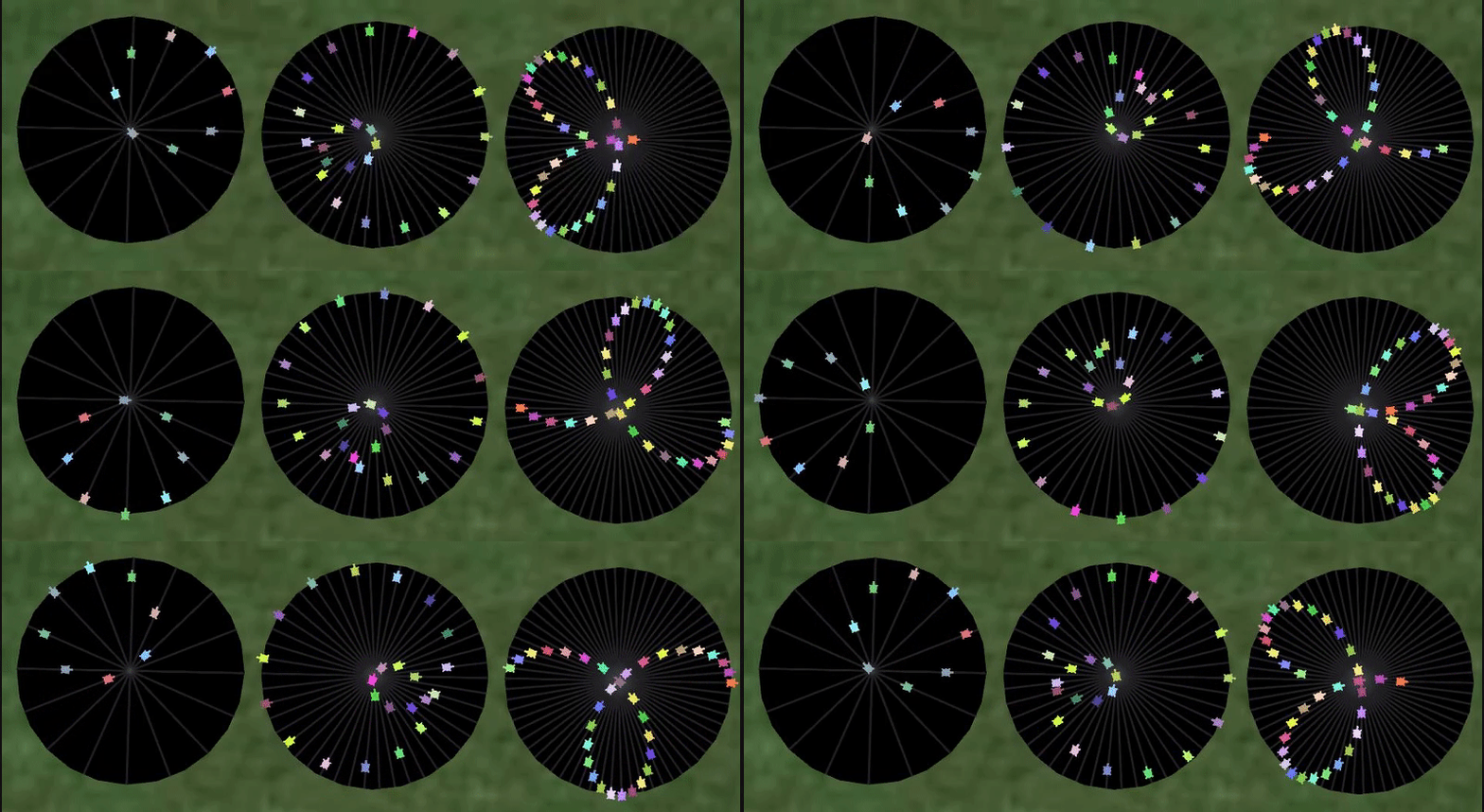
Using the turtle module. The turtles are different colours and they always face in the same direction, so they can be easily seen to be moving along straight lines by just focusing on one of them. Despite this the circle illusion is still strong.

The illusion still seems quite strong even with just 3 or 4 turtles:


The framerate is reduced considerably for all of these GIF examples, but it doesn't seem to detract from the illusion. Running the code locally gives a smoother animation.
import turtle
import time
from math import sin, pi
from random import random


def circle_dance(population=11, resolution=480, loops=1, flip=0, lines=0):
    population = int(population)
    resolution = int(resolution)
    radius = 250
    screen = turtle.Screen()
    screen.tracer(0)
    if lines:
        arrange_lines(population, radius)
    turtles = [turtle.Turtle() for i in range(population)]
    for i in range(population):
        dancer = turtles[i]
        make_dancer(dancer, i, population)
    animate(turtles, resolution, screen, loops, flip, radius)


def arrange_lines(population, radius):
    artist = turtle.Turtle()
    for n in range(population):
        artist.penup()
        artist.setposition(0, 0)
        artist.setheading(n / population * 180)
        artist.forward(-radius)
        artist.pendown()
        artist.forward(radius * 2)
    artist.hideturtle()


def make_dancer(dancer, i, population):
    dancer.setheading(i / population * 180)
    dancer.color(random_turtle_colour())
    dancer.penup()
    dancer.shape('turtle')
    dancer.turtlesize(2)


def random_turtle_colour():
    return random() * 0.9, 0.5 + random() * 0.5, random() * 0.7


def animate(turtles, resolution, screen, loops, flip, radius):
    delay = 4 / resolution      # 4 seconds per repetition
    while True:
        for step in range(resolution):
            timer = time.perf_counter()
            phase = step / resolution * 2 * pi
            draw_dancers(turtles, phase, screen, loops, flip, radius)
            elapsed = time.perf_counter() - timer
            adjusted_delay = max(0, delay - elapsed)
            time.sleep(adjusted_delay)


def draw_dancers(turtles, phase, screen, loops, flip, radius):
    population = len(turtles)
    for i in range(population):
        individual_phase = (phase + i / population * loops * pi) % (2*pi)
        dancer = turtles[i]
        if flip:
            if pi / 2 < individual_phase <= 3 * pi / 2:
                dancer.settiltangle(180)
            else:
                dancer.settiltangle(0)
        distance = radius * sin(individual_phase)
        dancer.setposition(0, 0)
        dancer.forward(distance)
    screen.update()


if __name__ == '__main__':
    import sys
    circle_dance(*(float(n) for n in sys.argv[1:]))
For contrast here are some that really do rotate:


...or do they?
The code can be run with 5 optional arguments: population, resolution, loops, flip and lines.
populationis the number of turtlesresolutionis the time resolution (number of animation frames per repetition)loopsdetermines how many times the turtles loop back on themselves. The default of 1 gives a standard circle, other odd numbers give that number of loops in the string of turtles, while even numbers give a string of turtles disconnected at the ends, but still with the illusion of curved motion.flipif non-zero causes the turtles to flip direction for their return trip (as suggested by aslum so that they are never moving backwards). As default they keep a fixed direction to avoid the visual distraction at the endpoints.linesif non-zero displays the lines on which the turtles move, for consistency with the example image in the question.
Examples with flip set, with and without lines. I've left my main example above without flip as I prefer not to have the sporadic jump, but the edge of the circle does look smoother with all the turtles aligned, so the option is there for people to choose whichever style they prefer when running the code.


It might not be immediately obvious how the images above were all produced from this same code. In particular the image further up which has a slow outer loop and a fast inner loop (the one that looks like a cardioid that someone accidentally dropped). I've hidden the explanation of this one below in case anyone wants to delay finding out while experimenting/thinking.
The animation with an inner and outer loop of different sizes was created by setting the number of loops to 15 and leaving the number of turtles at 23 (too low to represent 15 loops). Using a large number of turtles would result in 15 clearly defined loops. Using too few turtles results in aliasing (for the same reason as in image processing and rendering). Trying to represent too high a frequency results in a lower frequency being displayed, with distortion.
Trying out different numbers I found some of these distortions more interesting than the more symmetrical originals, so I wanted to include one here...
Mathematica
Here is a pretty straight-forward submission.
animateCircle[n_] := Animate[Graphics[
   Flatten@{
     Disk[],
     White,
     Map[
      (
        phase = #*2 \[Pi]/n;
        line = {Cos[phase], Sin[phase]};
        {Line[{-line, line}],
         Disk[Sin[t + phase]*line, 0.05]}
        ) &,
      Range[n]
      ]
     },
   PlotRange -> {{-1.1, 1.1}, {-1.1, 1.1}}
   ],
  {t, 0, 2 \[Pi]}
  ]
If you call animateCircle[32] you'll get a neat animation with 32 lines and circles.

It's completely smooth in Mathematica, but I had to limit the number of frames for the GIF a bit.
Now what happens if you put two discs on each line? (That is, add Disk[-Sin[t + phase]*line, 0.05] to the list within the Map.)

You can also put them 90° out of phase (use Cos instead of -Sin):

C
Result:

#include <stdio.h>
#include <Windows.h>
#include <Math.h>

int round (double r) { return (r > 0.0) ? (r + 0.5) : (r - 0.5); }
void print (int x, int y, char c) {
    COORD p = { x, y };
    SetConsoleCursorPosition(GetStdHandle(STD_OUTPUT_HANDLE), p);
    printf("%c", c);
}

int main ()
{
    float pi = 3.14159265358979323846;
    float circle = pi * 2;
    int len = 12;
    int hlen = len / 2;
    int cx = 13;
    int cy = 8;
    float w = 11.0;
    float h =  8.0;
    float step = 0.0;

    while (1)
    {
        system("cls"); // xD

        for (int i = 0; i < len; i++)
        {
            float a = (i / (float)len) * circle;
            int x = cx + round(cos(a) * w);
            int y = cy + round(sin(a) * h);
            print(x, y, 'O');

            if (i < hlen) continue;

            step -= 0.05;
            float range = cos(a + step);
            x = cx + round(cos(a) * (w - 1) * range);
            y = cy + round(sin(a) * (h - 1) * range);
            print(x, y, 'O');
        }

        Sleep(100);
    }

    return 0;
}
SVG (no Javascript)
<?xml version="1.0"?>
<svg xmlns="http://www.w3.org/2000/svg" xmlns:xlink="http://www.w3.org/1999/xlink" viewBox="0 0 380 380" width="380" height="380" version="1.0">
  <g transform="translate(190 190)">
    <circle cx="0" cy="0" r="190" fill="#000"/>
    <line x1="0" y1="-190" x2="0" y2="190" stroke="#fff" stroke-width="1.5"/>
    <line x1="72.71" y1="175.54" x2="-72.71" y2="-175.54" stroke="#fff" stroke-width="1.5"/>
    <line x1="134.35" y1="134.35" x2="-134.35" y2="-134.35" stroke="#fff" stroke-width="1.5"/>
    <line x1="175.54" y1="72.71" x2="-175.54" y2="-72.71" stroke="#fff" stroke-width="1.5"/>
    <line x1="190" y1="0" x2="-190" y2="0" stroke="#fff" stroke-width="1.5"/>
    <line x1="175.54" y1="-72.71" x2="-175.54" y2="72.71" stroke="#fff" stroke-width="1.5"/>
    <line x1="134.35" y1="-134.35" x2="-134.35" y2="134.35" stroke="#fff" stroke-width="1.5"/>
    <line x1="72.71" y1="-175.54" x2="-72.71" y2="175.54" stroke="#fff" stroke-width="1.5"/>
    <g transform="rotate(0)">
      <animateTransform attributeType="xml" attributeName="transform" type="rotate" from="0" to="360" begin="0" dur="8s" repeatCount="indefinite"/>
      <g transform="translate(0 90)">
        <g transform="rotate(0)">
          <animateTransform attributeType="xml" attributeName="transform" type="rotate" from="0" to="-360" begin="0" dur="4s" repeatCount="indefinite"/>
          <circle cx="0" cy="90" r="10" fill="#fff"/>
          <circle cx="63.64" cy="63.64" r="10" fill="#fff"/>
          <circle cx="90" cy="0" r="10" fill="#fff"/>
          <circle cx="63.64" cy="-63.64" r="10" fill="#fff"/>
          <circle cx="0" cy="-90" r="10" fill="#fff"/>
          <circle cx="-63.64" cy="-63.64" r="10" fill="#fff"/>
          <circle cx="-90" cy="0" r="10" fill="#fff"/>
          <circle cx="-63.64" cy="63.64" r="10" fill="#fff"/>
        </g>
      </g>
    </g>
  </g>
</svg>
intervaltime changes the FPS (FPS = 1000/intervaltime).
balls changes the # balls.
maxstep adjusts the # steps in a cycle, the larger the 'smoother' it is. 64 should be large enough where it appears smooth.
Modeled as a circle moving, instead of moving the balls along the lines, but the visual effect (should be?) the same. Some of the code is pretty verbose, but this isn't code golf, so...
var intervalTime = 40;
var balls = 8;
var maxstep = 64;

var canvas = $('#c').get(0); // 100% necessary jquery
var ctx = canvas.getContext('2d');
var step = 0;

animateWorld = function() {
    createBase();
    step = step % maxstep;
    var centerX = canvas.width/2 + 115 * Math.cos(step * 2 / maxstep * Math.PI);
    var centerY = canvas.height/2 + 115 * Math.sin(step * 2 / maxstep * Math.PI);

    for (var i=0; i<balls; i++) {
        drawCircle(ctx, (centerX + 115 * Math.cos((i * 2 / balls - step * 2 / maxstep) * Math.PI)), (centerY + 115 * Math.sin((i * 2 / balls - step * 2 / maxstep) * Math.PI)), 10, '#FFFFFF');
    }

    step++;
}

function createBase() {
    drawCircle(ctx, canvas.width/2, canvas.height/2, 240, '#000000');
    for(var i=0; i<balls*2; i++) {
        drawLine(ctx, canvas.width/2, canvas.height/2, canvas.width/2 + 240 * Math.cos(i / balls * Math.PI), canvas.height/2 + 240 * Math.sin(i / balls * Math.PI), '#FFFFFF');
    }
}

function drawLine(context, x1, y1, x2, y2, c) {
    context.beginPath();
    context.moveTo(x1,y1);
    context.lineTo(x2,y2);
    context.lineWidth = 3;
    context.strokeStyle = c;
    context.stroke();
}

function drawCircle(context, x, y, r, c) {
    context.beginPath();
    context.arc(x, y, r, 0, 2*Math.PI);
    context.fillStyle = c;
    context.fill();
}

function drawRect(context, x, y, w, h, c) {
    context.fillStyle = c;
    context.fillRect(x, y, w, h);
}

$(document).ready(function() {
    intervalID = window.setInterval(animateWorld, intervalTime);
});