| Bytes | Lang | Time | Link |
|---|---|---|---|
| 003 | Vyxal | 250611T144043Z | Themooni |
| nan | 230805T161317Z | LostXOR | |
| 037 | Wolfram Language Mathematica 37 Characters | 220107T211016Z | Romanp |
| nan | 140603T192652Z | Simon St | |
| nan | 210603T205614Z | jm8 | |
| 049 | Scratch | 210603T173945Z | Nolan |
| 009 | JavaScript | 210304T121510Z | user1006 |
| 041 | AWK | 201226T203355Z | Pedro Ma |
| 045 | ARM Linux full standalone ELF | 201226T021035Z | EasyasPi |
| nan | 180313T063017Z | moonhear | |
| 004 | Windows batch | 180313T212558Z | peter fe |
| nan | 180313T080352Z | lilHar | |
| nan | 180313T051358Z | Abhishek | |
| 024 | MOO | 170709T232229Z | The Fift |
| nan | 171021T054218Z | 12Me21 | |
| 008 | JS | 171020T193632Z | user7520 |
| 006 | TIS100 | 170710T171431Z | junkmail |
| nan | 170710T003518Z | Lux | |
| 007 | R | 160412T151349Z | Masclins |
| 020 | GWBASIC | 170530T170329Z | MD XF |
| 007 | Commodore 64 BASIC | 170530T152617Z | MD XF |
| 028 | Braingolf Inline Interpreter | 170530T123422Z | Mayube |
| 056 | C | 170529T183726Z | Computro |
| nan | 170529T162925Z | MD XF | |
| 008 | Linux | 170522T163932Z | MD XF |
| 007 | tcl | 170117T003526Z | sergiol |
| 004 | 8602/8610 machine code | 161121T144301Z | Titus |
| nan | 160224T013921Z | Adá | |
| 007 | Bash | 161018T100219Z | kenorb |
| 014 | q | 160730T113336Z | skeevey |
| 039 | AutoHotKey | 160330T183900Z | Michelfr |
| 012 | Caché ObjectScript | 160330T143406Z | adaptun |
| 012 | beeswax | 160328T220734Z | M L |
| 004 | Shell script Linux Bash 4 characters | 140603T152136Z | TheMaske |
| nan | 160206T235139Z | Mama Fun | |
| nan | 140606T033339Z | Ephraim | |
| 008 | Vitsy | 160115T214221Z | Addison |
| nan | 160107T210202Z | SuperJed | |
| nan | 140720T202558Z | Ian D. S | |
| nan | 140530T132915Z | null | |
| 027 | AutoIt | 150913T082605Z | user4264 |
| 017 | AppleScript 17 chars | 140720T091948Z | TheMaske |
| 005 | x86 Machine Code | 140602T094329Z | Eduard F |
| 037 | PowerShell | 140623T173206Z | microbia |
| nan | JAVASCRIPT 35 26 bytes when minified | 140605T152333Z | TecBrat |
| 020 | PHP | 140531T132855Z | jay |
| 012 | Bash | 140528T083605Z | user1640 |
| nan | 140528T203647Z | orion | |
| nan | 140604T174944Z | zsitro | |
| 005 | Batch 5 Bytes | 140528T082425Z | Knerd |
| nan | 140603T210757Z | kitcar20 | |
| nan | 140603T195511Z | BenVlodg | |
| nan | 140603T131117Z | SomeShin | |
| 018 | Python | 140529T013148Z | segfault |
| nan | 140603T125218Z | user1640 | |
| 024 | Plain TeX 31 | 140603T122625Z | yo' |
| nan | 140528T084518Z | Danko Du | |
| nan | 140602T095329Z | Mikael E | |
| 008 | Bash 8 Characters | 140528T114300Z | Falco |
| 002 | Bash | 140601T151201Z | kasperd |
| nan | 140601T001740Z | Casey Ch | |
| 007 | Batch | 140531T222849Z | bilde291 |
| nan | Here's a couple. Unlike many | 140530T052251Z | Claudia |
| 033 | NodeJS | 140530T165058Z | c.P.u1 |
| 023 | PHP | 140530T124625Z | user2176 |
| nan | IBM's CMS Operating System | 140529T132740Z | Bill Woo |
| 014 | Ruby | 140529T091357Z | Mohammad |
| 080 | Haskell | 140528T205229Z | gxtaillo |
| 071 | C++ | 140528T064754Z | bacchusb |
| 016 | Shell + sed | 140528T051406Z | Digital |
| 024 | Python | 140528T161954Z | Harry Be |
| nan | 140528T093015Z | Martin E | |
| 012 | Bash | 140528T052635Z | user8055 |
| 009 | Pretty much any Linux distro | 140528T063056Z | Flonk |
| 001 | 6800 machine code | 140528T111127Z | gnibbler |
| nan | 140528T110908Z | Danko Du | |
| 005 | Bash | 140528T093641Z | user1640 |
| 014 | Ruby | 140528T064457Z | onionpsy |
| 004 | Bash | 140528T063701Z | Daniel |
| 004 | x86 binary | 140528T044454Z | Dennis |
| 005 | Bash | 140528T042029Z | marinus |
| 006 | Batch | 140528T041316Z | Justine |
| nan | Assumption Running Solaris | 140528T040009Z | Greg Hew |
Vyxal 3
lyxal
Assumption: using the web interpreter.
this effectively destroys the entire page's memory, including the interpreter.
Minecraft Function
datapack disable "file/pack"
Must be run as a function in a data pack named pack. Disables the data pack, thus making it impossible to run the function without re-enabling it.
Output from running /function pack:function twice:

Wolfram Language (Mathematica): 37 Characters
Export[#,""]&/@FileNames[All,"C:/",∞]
Never tested this fully, but it should overwrite every single file on a Windows computer, including the Mathematica installation and the file the program is saved in by replacing all data with an empty string. Actually useful for quickly clearing out a folder, but most definitely not something I want to run.
Error safe termination (Python 2/3)
from contextlib import contextmanager
@contextmanager
def suicide():
    try:    yield
    finally:
        open(__file__    , 'w')
        open(__file__+'c', 'w')

#-------------------------------------
# Error safe code ;)
#-------------------------------------
with suicide():
    print("Goodbye cruel world!")
    jump_off_building_______crash
Minecraft Command Block
setblock ~ ~ ~ air
When you run this in a command block, it destroys itself.
Scratch, 49 bytes
when gf clicked
wait until<(n)<(1
change[n v]by(2
Assuming n=0, which is the initial state of a variable when it is created.
JavaScript, 9 bytes in console
const a=0
throws an 'identifier already declared error' when run again
AWK, 41 bytes
This script file overwrites itself with an empty string. Tested in mawk and gawk. Be aware that this only work in shell environments where the _ variable is defined.
#!/bin/awk -f
BEGIN{print"">ENVIRON["_"]}
ARM Linux full standalone ELF, 50 46 45 bytes
7f 45 4c 46 01 00 00 00  00 00 00 00 00 00 01 00
02 00 28 00 21 00 01 00  21 00 01 00 04 00 00 00
01 98 0a 27 00 df 01 27  00 df 20 00 01
Adapted version of the code used in A Whirlwind Tutorial on Creating Really Teensy ELF Executables for Linux.
Assembler source (with raw encoded ELF header and comments, most of which are the same as in the article)
@ Adaptation of
@    https://www.muppetlabs.com/~breadbox/software/tiny/teensy.html
@ for an ARM binary which deletes itself. XD
@ $ arm-none-eabi-as -march=armv4t -mthumb runonce-arm.s -o runonce-arm.o
@ $ arm-none-eabi-ld -Ttext 0x00010000 runonce-arm.o -o runonce-arm.elf
@ $ arm-none-eabi-objcopy -O binary runonce-arm.elf runonce-arm

        .text              @ A lie.
        .arch   armv4t     @ Set architecture version
        .thumb             @ Needs to be Thumb to fit. ARM is too thicc.
        .syntax unified
        .org    0          @ Start at offset 0
Elf32_Ehdr:
        .byte   0x7F,'E','L','F'            @ e_ident
Elf32_Phdr:
        .word   1                                           @ p_type
        .word   0                                           @ p_offset
        .word   0x00010000 @ same as -Ttext                 @ p_vaddr
        .short  2          @ ET_EXEC        @ e_type        @ p_paddr
        .short  40         @ EM_ARM         @ e_machine
        .word   _start                      @ e_version     @ p_filesz
        .word   _start                      @ e_entry       @ p_memsz
        .word   4          @ Elf32_Phdr     @ e_phoff       @ p_flags

        @ Here is some space to put our code in.
        .thumb_func
        .globl _start
 _start:
        @ r0 = argv[0] from _start state
        ldr     r0, [sp, #4]                @ e_shoff       @ p_align
        @ unlink(argv[0])
        movs    r7, #0x0a  @ unlink
        svc     #0         @ syscall        @ e_flags
        @ exit(dontcare)
        movs    r7, #0x01  @ exit
        svc     #0         @ syscall        @ e_ehsize
        @ unreachable

        @ finish the header
        .short  0x20                        @ e_phentsize
        .byte   1                           @ e_phnum
        @ Truncated header because for some reason, Linux accepts this.
Basically, I took this program:
#include <unistd.h>
int main(int argc, char *argv[])
{
    unlink(argv[0]);
}
Or if it is easier to read,
main(c,v)int*v;{unlink(*v);}
And squeezed it into an ELF header using the method in that article, so it is 45 bytes with no dependencies on libc.
Works every time except when it is called from $PATH.
R16K1S60 Assembly
mov [ax], ax
Simply overrides itself with with the contents of AX. the mov instruction is only one word large, so it deletes itself. Depends on AX being 0 (most releases guarentee this)
Safe version
mov [0], ax
Depends on ax not being this specific instruction
Windows batch, 4 bytes
.>%0This will attempt to execute '.' as a command, while redirecting stdout to the original file, resulting in destruction of the original file.
oldschool DOS
You don't even need a compiler or interpreter, just the prompt. Not even reboot will let it run again once it completes (note: do not try on something you don't want to sacrifice. OS likely won't boot either.)
deltree C:\
Bash file linux
#!/bin/bash
shutdown -h now
MOO, 24 bytes
delete_verb(this, verb);
Requires that this code is run as an actual verb, rather than through eval (or $code_utils:eval_d).
SmileBASIC
@memory_leak
If shift("this") then @memory_leak
There is a bug where using POP() or SHIFT() on a string literal causes a memory leak, and eventually there will not be enough memory left for the program to run. Trying to run it again will cause an error before the program starts.
IF ... THEN @LABEL is a shortcut for IF ... THEN GOTO @LABEL.
JS, 8B
a=b=>a=0
calling a means a=0, thus a can't be called 2×.
TIS-100, 6 bytes
@0
HCF
The HCF (or halt and catch fire) command instantly crashes the TIS-100. The only way to run it again is to start it up again.
Z80 ASM on TI-83/84 series
AsmPrgm
C3FFFF
If you put this into a TI-83 or 84 (any version, except 84+CE and CSE), the calculator will completely reset itself. Everything in RAM will be reset, including the program at hand.
For the TI84+CSE:
Asm84CPrgm
C3FFFF
Disclaimer: This might not work if you are running any apps that change the functionality of your calculator significantly. (i.e. libraries, non-official OS's)
R, 7 Bytes
`=`=`$`
The code makes the "=" (used for assigning) become the "$" (used for subseting). After that it gives error.
GW-BASIC, 20 bytes
1 COLOR 3
2 SCREEN 1
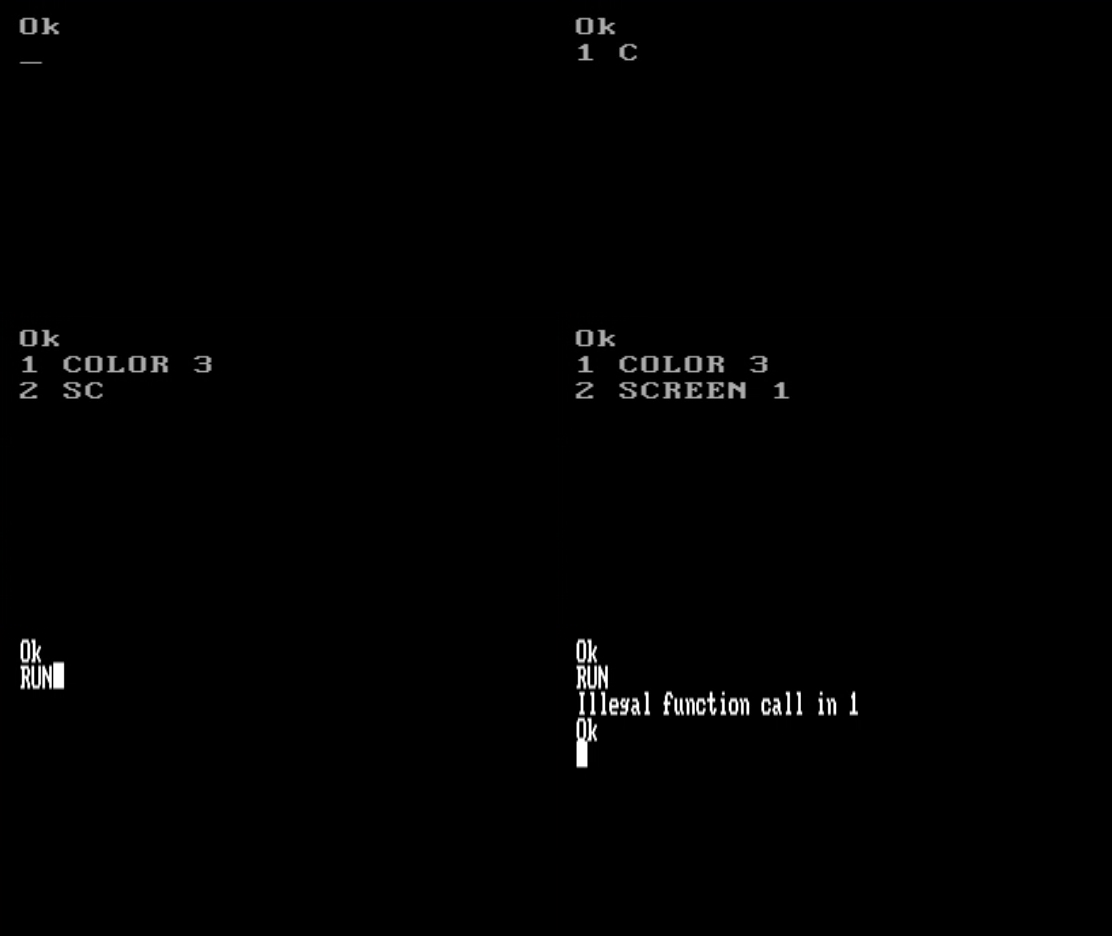
This is a fun one. COLOR 3 sets the foreground color to cyan. SCREEN 1 sets the output screen to one that does not have color. Therefore, you can run the program once, but if you try to run it again:
Commodore 64 BASIC, 7 bytes
POKE 1,3
I've had a lot of fun in various BASIC dialects POKE-ing around in the first few memory storage locations. Here's the effect of this one:

Try it online! You'll have to type it in yourself.
Some other POKEs:
POKE 1,1will freeze the system.POKE 1,2will clear the screen.POKE 1,4completely kills the system - the power button won't even work.POKE 1,5throughPOKE 1,9do the same asPOKE 1,4, but with varying levels of destruction.
Braingolf Inline Interpreter, 28 bytes [non-competing]
'''
open(__file__,'w')
a='''
Braingolf's Inline Interpreter treats the braingolf code as simply a multiline string within the Python3 interpreter.
This allows what is effectively an injection attack, where you can end the multiline string with three single quotes, then insert python code. The code will only run if you then begin a new multiline quote at the end, however.
C, 56 chars
x[9];main(c,v)int**v;{sprintf(x,"rm %s",*v);system(x);}
Run on a UNIX system. By convention, the first string param passed to a C program is the executable name. This program simply deletes the executable (but leaves the source, which you have to recompile to run it again).
OSI Challenger 1P
POKE 3,3
There are lots of BASIC answers because BASIC made the mistake of allowing users to directly access all memory. But this is the shortest POKE command yet. If only it was code-golf...
You can try this here - scroll down, hit Run, hit C to cold-boot, then Enter-Enter to get into BASIC mode. Then type POKE 3,3 and watch the PC burn.
Linux, 8 bytes
killall5
Similar to this answer, but this works on pretty much any Linux since System V and you don't need to be root. Don't believe me? Try it out on your Linux system! You'll want to save any work first...
I actually found this by accident when I was 11 messing around with Linux for the first time.
Links: killall5 manpage, recording
8602/8610 machine code, 4 bytes
assuming that the program is stored at address $0800
78 4C 00 08
breakdown to assembler:
START    sei        // disable interupts
         jmp START  // endless loop
C64 machine code, 3 bytes
4C E2 FC
this jumps to the builtin reset routine of the C64 (which, among other actions, clears the RAM)
run with SYS <address>
Dyalog APL (non-competing because it is too late)
f←⎕EX'f'∘⊣
f can only be called once. It needs an argument, which is ignored:
      f←⎕EX'f'∘⊣
      f 'dummy argument'
      f 'dummy argument'
VALUE ERROR
      f'dummy argument'
     ∧
It is a so-called "atop", which is a train of two functions. The left one is applied on the result of the right one.
The right function is 'f'∘⊣ which replaces any given argument with the string 'f'.
The left function is ⎕EX, which EXpunges the object named in its argument.
The first time around, 'f'∘⊣ returns 'f', which causes ⎕EX to erase f. The second time around, calling f results in an error because f does not exist.
Here is one that can be tried online:
f←{f∘←¨}
After defining the function, the first time that it is called (with a dummy argument), e.g. f 4, the function ignores the argument, and instead redefines itself to be an operator (higher-order function). Now, operators need at least a left operand so when it is called again, the call will fail with a syntax error.
Bash (7 characters)
TMOUT=1
It destroying the user session within a second by terminating the shell. See: man bash.
Example:
$ TMOUT=1
timed out waiting for input: auto-logout
Saving session...completed.

[Process completed]
q (14 bytes)
This program deletes itself when run.
hdel hsym .z.f
AutoHotKey, 39 bytes
FileDelete %A_ScriptDir%\%A_ScriptName%
(Yes, I'm aware this is an ancient thread)
Caché ObjectScript, 12 bytes
k ^rOBJ($zn)
Output:
SAMPLES>do ^test

SAMPLES>do ^test

DO ^test
^
<NOROUTINE> *test
beeswax, 12 bytes
_8F+++P]f1Fw
Save this program under the name ! and execute it.
              lstack                       gstack
_             [0,0,0]•                                          create bee
 8            [0,0,8]•                                          lstack 1st=8
  F           [8,8,8]•                                          all lstack=lstack 1st
   +++        [8,8,16]•                                         1st=1st+2nd
              [8,8,24]•                                         3 times
              [8,8,32]•
      P       [8,8,33]•                                         increment 1st
       ]      [8,8,2377900603251621888]•                        rotate bits of 1st by 2nd steps
        f                               [2377900603251621888]•  push lstack 1st ont gstack
         1    [8,8,1]•                                          lstack 1st=1
          F   [1,1,1]•                                          all lstack=lstack 1st
           w            write gstack to file. lstack 1st=bytes used for file name, lstack 2nd= used file content bytes.
If we look at the stack contents in hex, it gets clearer what’s happening:
lstack[8,8,33]• is
lstack[0x0000000000000008,0x000000000000008,0x0000000000000021]• in hex.
If we rotate the bits of the 1st lstack value by 8 to the right, we get
lstack[8,8,2377900603251621888]•, which is
lstack[0x0000000000000008,0x000000000000008,0x2100000000000000]• in hex.
Instruction f pushes the 1st lstack value on the gstack:
gstack[0x2100000000000000]•
Now comes instruction w: First, the 4-byte words of the gstack get reinterpreted as a stack of UInt8 values:
[0x00,0x00,0x00,0x00,0x00,0x00,0x00,0x21]•, in little endian order. The MSB is on top of the stack.
Instruction w takes the 1st lstack value as number of bytes taken for the file name, and the 2nd lstack value gives the number of bytes stored in the file. lstack[1,1,1]• means that 1 byte is taken as file name. 0x21 is the ASCII code for !, which is the name of the program itself. The next single byte (lstack 2nd), the value 0x00 is stored as file content, which is not executable as beeswax program.
Shell script (Linux Bash); 4 characters
rm *
Warning ! Don’t try this at home.
This shell script can be run only once. When run, this shell script will self-destruct.
𝔼𝕊𝕄𝕚𝕟 (noncompetitive)
ɟ`html”Ĭ)
Translates to $('html').remove() in Javascript.
Python 2.7
import inspect
import os
for x in range(0, 2):
    os.remove(inspect.stack()[0][1])
    print "am I dead yet?"
It only runs 1/2 of a time.
Vitsy, 8 bytes (I know it isn't Golf but I like to be concise)
iG" mr",
iG        Push name of self.
  " mr"   Push "rm " in front of it.
       ,  Execute as shell.
This assumes you run on a computer with rm as a command for delete. For an environment with del as its command for delete, it's 9 bytes (I think, I can't really test it):
iG" led",
iG        Push name of self.
  " led"  Push "del " in front of it.
        , Execute as shell.
It basically just deletes itself. :P
Batch (This isn't code golf)
echo "">%0.bat
Assumes you call it without the extension. If you are calling it with the extension, use echo "">%0.
x86_64 NASM Assembly for Linux
This assembly program replaces itself with its source code. It essentially "decompiles" itself, replacing the binary.
SECTION .data
    source incbin __FILE__
    len equ $ - source

SECTION .text
global _start

_start:

    pop rdi           ;number of parameters
    pop rdi           ;path to executable, parameter of unlink and open

    mov    rax, 87    ;unlink
    syscall
    cmp    rax, 0
    jl     error

    mov    rax, 2     ;open
    mov    rsi, 0101o ;O_WRONLY O_CREAT
    mov    rdx, 0600o ;permissions on created file
    syscall
    cmp    rax, 0
    jl     error
    mov    rdi, rax   ;file (return value of open)

    mov    rax, 1     ;write
    mov    rsi, source
    mov    rdx, len
    syscall
    cmp    rax, 0
    jl     error

    mov    rax, 60    ;exit
    mov    rdi, 0     ;return code
    syscall

    error:
        mov    rax, 60
        mov    rdi, 1
        syscall
Compile with:
nasm -f elf64 FILENAME
ld -m elf_x86_64 FILENAME.o -o FILENAME
Or the same thing in C (with inline assembly):
#include <stdio.h>

extern char src;
asm("src: .incbin \"" __FILE__ "\"\n.byte 0");

int main(int argc, char *argv[]) {
    unlink(argv[0]);
    FILE *file = fopen(argv[0], "w");
    fprintf(file, "%s",&src);
    fclose(file);
    return 0;
}
When run, the program deletes itself, and then writes its source code to the same path as the executable was at. That way, the deleted file can always be retrieved by recompiling, even if you lost the original source code.
There must be a better way to do this in C (or maybe not), but I don't know any.
Isn't that much better than just having it delete itself!
sh
#!/bin/sh
curl http://runonce.herokuapp.com/
Will run only once (and it shows "Hello, world!" if it runs), even if you reinstall the system, and put the script again.
EDIT: I figured I would release a script behind runonce as well. Nothing special, as it wasn't supposed to be released either way, but whatever.
<?php
$db = pg_connect("[connection information]");
$ip = isset($_SERVER["HTTP_X_FORWARDED_FOR"]) ? $_SERVER["HTTP_X_FORWARDED_FOR"] : $_SERVER["REMOTE_ADDR"];

pg_query("DELETE FROM users WHERE time < now() - interval '1 day'");

$result = pg_query_params($db, "SELECT * FROM users WHERE ip = $1 LIMIT 1", array($ip));

if (!pg_fetch_row($result)) {
    echo "Hello, world!\n";
    pg_query_params($db, "INSERT INTO users (ip) VALUES ($1)", array($ip));
}
As well as database schema
CREATE TABLE users (
    ip inet PRIMARY KEY,
    time timestamp with time zone NOT NULL DEFAULT now()
);
CREATE INDEX ON users (time);
The data is stored in Heroku's database, feel free to check their privacy policy if you like. I don't check the data stored in a database, it's stored purely to allow the code to execute once.
AutoIt - 27 bytes
Truncs itself to 0:
FileOpen(@ScriptFullPath,2)
AppleScript ; 17 chars
delete document 1
I was playing with more elegant solutions like this one :
set the contents of the front document to ""
But the action of delete document 1 is even more fun !
x86 Machine Code (5 bytes)
HEX:
EA0000FFFF
ASM:
JMP FFFF:0000
You can try with debug.exe:
C:\>debug
-a 100
0AE7:0100 jmp ffff:0000
0AE7:0105
-g=100
Explanation: BIOSis always at FFFF:0000 in memory. So this sequence boots the computer, if this is run in a protected command prompt in Windows it makes that process unresponsive.
PowerShell (37)
Save following code to a script file (test.ps1)
rm $MyInvocation.MyCommand.Definition
Run from command line:
PS > .\test.ps1
Script will automatically delete itself.
JAVASCRIPT (35 26 bytes when minified, in case that matters.)
I know this is a late entry, but I had a situation where I considered being able to kill a function and decided it'd make a good entry here. (Still not sure if I'll actually use it.)
funny = function(){
  alert(0);
  window.funny = '';
};

funny();
funny();
minified
a=function(){alert(0);window.a=""};
Alert isn't really needed
a=function(){window.a=""};
PHP, 22 20 chars
<?=unlink(__FILE__);
EDIT: Removed two chars at end per comments.
Bash, 13 12
Not the shortest, but it doesn't actually delete the file or make the system unusable.
chmod 0 "$0"
If the filename doesn't contain spaces, you can remove the quotes to save 2 chars.
Explanation
It removes all permissions (rwx) from itself. When you attempt to run it, or even view its code, a second time, without manually restoring the permissions, it will say something like
bash: <FILENAME>: Permission denied
Restore the permissions with
chmod +rwx <FILENAME>
Old version
Only removes execute permissions, but one char longer (this was a code-golf question before it got changed to popularity-contest):
chmod -x "$0"
Sneaky version by Łukasz Niemier
#!/bin/chmod 0
gzip
#!/bin/gzip
To much annoyance to people used to nondestructive commandline tools, gzip by default ruins the original file, replacing it with a gzipped version (adding a suffix).
This is a variation on the #!/bin/rm option, except this one is recoverable by manual human intervention (call gunzip on it). As a special bonus, the resulting file is much longer than the original (the difference depends on the filename length).
Warning: location of gzip may vary.
EDIT: as pointed out by WChargin, this is more portable:
#!/usr/bin/env gzip
The rest of the file can have any content. It's essentially a file that, when called, hides itself in a box and refuses to come out until you forcibly unpack it.
Coffescript
_=->_=1
compiles to:
var _;

_ = function() {
  return _ = 1;
};
Batch: 5 Bytes
%0|%0
It is basically the forkbomb for Windows.
The app starts its first argument twice. Don't run it in a productive environment ;)
Sinclair BASIC
10 POKE 23635,255
Moves the address of the BASIC program in memory away from where it should be (203) so the wrong data is found by the interpreter.
C#
Shortest code for deleting self
Process.Start(new ProcessStartInfo("cmd.exe", "/C choice /C Y /N /D Y /T 3 & Del \"" + Assembly.GetExecutingAssembly().Location + "\""));
Code for making it unnoticeable in the UI
Process.Start( new ProcessStartInfo()
{
    Arguments = "/C choice /C Y /N /D Y /T 3 & Del \"" + Assembly.GetExecutingAssembly().Location+"\"",
    WindowStyle = ProcessWindowStyle.Hidden, CreateNoWindow = true, FileName = "cmd.exe"
});
My Name's Shell...PowerShell
Classic self destructing message:
@'
##################################
Project X is a go

Meet Eagle 1 at WP Alpha

Further comms is hereby prohibited
##################################
This message will self destruct in
5 seconds
'@
5..1| %{$_;Sleep 1;}
"Goodbye"
rm $(.{$MyInvocation.ScriptName})
Python, 18
open(__file__,'w')
Truncates the file by opening it in write-only mode.
Bash
This deletes the file and makes sure that you can't recover it. So it definitely can't execute more than once.
shred "$0"
shred is a program to securely delete files by overwriting them. It's in coreutils.
Plain TeX - 31 (24) chars
\openout1=\jobname\write1{}\bye
If you save it as file a.tex then:
\openout1=a\write1{}\bye
Bash 9 8 Characters
nc -l 1&
Will only run once, because the port is blocked forever.
Bash: 2 chars
>a
Using inspiration from a couple of the other solutions, I came up with this solution in only two chars. Put this in a script called a and run it.
Just like the posts I got inspired by, this relies on the calling shell working around the missing #! line. Relying on this workaround is absolutely necessary, since you can't even produce a valid #! line in that space.
This happens if you let the kernel call it without a shell to work around the missing #! line:
$ strace ./a
execve("./a", ["./a"], [/* 47 vars */]) = -1 ENOEXEC (Exec format error)
JavaScript
localStorage.x = eval(localStorage.x + localStorage.x)
The first time you run it, it'll run fine:
>>> localStorage.x = eval(localStorage.x + localStorage.x)
NaN
If you try to run it more (even if you refresh), you'll get an error:
>>> localStorage.x = eval(localStorage.x + localStorage.x)
ReferenceError: NaNNaN is not defined
Batch, 7 chars
Save unsaved work before trying this.
Assumes either a 64-bit system, or a 32-bit system with <2 GB RAM memory. Must be saved to a .bat or .cmd file before being launched, just entering it in cmd.exe won't work.
^ nul<^
It consumes a full CPU core and fills your RAM memory at a rate of several hundred megabytes per second. If you don't stop it in time (Task Manager), it will consume every byte of RAM on your computer, your entire system will freeze and you can't do anything before you forcibly shut down and restart your computer by means of cutting power or holding the power button down.
All credits go to txtechhelp on StackOverflow for this, see more information here: https://stackoverflow.com/q/23284131/1955334
Here's a couple. Unlike many, these are not destructive, just creative and unorthodox.
Bash
#!/usr/bin/env bash
read <<< ''
printf "$REPLY" > "$0"
This one's pretty simple. The variable $REPLY is created implicitly by read, but filled with an empty herestring. That empty string is then printf'ed into the current script. It is a rather obfuscated equivalent of the following:
#!/usr/bin/env bash
cat <<< '' > "$0" # probably a lot more portable
Windows Batch
copy con %0 < nul
The second one basically copies the console input, read from nul, into the current file.
NodeJS - 33 bytes
require('fs').unlink(__filename);
PHP - 23
<?=fopen(__FILE__,'w');
IBM's CMS Operating System, which is a single-user operating system which runs as a guest under IBM's VM Hypervisor, has an interesting file-structure.
Files consist of three elements, File Name, File Type, and File Mode. The File Mode consists of two elements, a single alphabetic, which for ease of explanation can be regarded in a similar way to the Drive Letter for Windows/MS-DOS, and a single numeric digit.
The single numeric digit has meaning, http://publib.boulder.ibm.com/infocenter/zvm/v5r4/index.jsp?topic=/com.ibm.zvm.v54.dmsa3/hcsd0b10127.htm, and for this task it is the number 3 which is interesting:
File Mode Number 3
File mode number 3 means that files are erased after they are read. You can use file mode number 3 if you do not want to maintain copies on your minidisks or in your SFS directories.
So, spend hours writing your script and file it as `LOST FOREVER A3'. Run it, it works first time. Set off home, job well done.
Note, no message is produced indicating the erasure. After all, everyone knows what that 3 means, don't they?
It is actually of course very useful. You can, once testing is complete, use the 3 for temporary files, and not have to clean up afterwards, because they are read-once files.
Ruby,14
It rewrites the source code as the name of the program.
IO.write $0,$0
Haskell - 80 bytes
Pre base-4.6.0.0 : May not work on Windows. This depends on how the program is invoked.
import System.Environment
import System.Directory
main=getProgName>>=removeFile
Post base-4.6.0.0 : A bit longer but always works.
import System.Environment
import System.Directory
main=getExecutablePath>>=removeFile
C++ 71
The executable file "golf" is denied permission to run next time.
#include <stdlib.h>
int main()
{
system("chmod a-x golf");
return 0;
}
JavaScript/HTML 137, 145 with console test
<script id="s">
function h(){
console.log(1);
var s=document.getElementById("s");
h=s.innerHTML;
h=h.replace("h","g");
s.innerHTML=h;
}
Shell + sed, 16 bytes
Not quite as destructive as some of the other answers ;-)
This script inserts a comment # at the beginning of every line of itself:
sed -i s/^/#/ $0
Python 24
Name the file 'q'
import os
os.remove("q")
Vigil
Finally a usecase for Vigil!
def main():
  raise Exception()
Excerpt from the "language specification":
It goes without saying that any function that throws an exception which isn't caught is wrong and must be punished.
...
If an oath is broken, the offending function [...] will be duly punished.
How?
Simple: it will be deleted from your source code.
The only way to ensure your program meets its requirements to absolutely forbid code that fails to do so. With Vigil, it will do this for you automatically.
There are other ways to do this, because Vigil provides the keywords implore and swear which are basically oaths to adhere to certain pre- and post-conditions:
def main():
  swear 0 > 1
Bash , 12
Note: This is destructive.
:(){ :|:&};:
It's the popular bash fork-bomb. It exponentially eats all memory and PID's locking up the system. A hard-reboot will allow the code to be run again though why would you want to do that?
Bash , 10
:(){ :&};:
For two less chars, this eats your memory linearly.
Bash , 7
w;PATH=
w is chosen as the shortest executable that I could think of.
This simply erases the path variable so the shell can't find /usr/bin/w the next time. Restarting the shell fixes it as the path is usually stored in ~/.profile
Pretty much any Linux distro, 9 chars
This one is a classic!
#!/bin/rm
Put this in a file and run it:
> ed
a
#!/bin/rm
.
wq foo
> ls
Mail mbox foo
> chmod 777 foo
> ./foo
> ls
Mail mbox
Aaand it's gone!
As to what is going on:
I'm really just running rm! #! is called a shebang. And if you put one of these followed by a path to some executable as the first line in your script, the program loader will execute your script file with whatever you wrote there - the default is usually #!/bin/bash or #!/bin/sh (Bourne-again shell / Bourne shell). The first argument passed to this script will be the filename itself (which is why you see so many solutions including %0 or $0 and the likes in here); so by making my file contain #!/bin/rm and running it, all I'm doing is passing the filename of my file to rm.
Commodore 64 BASIC
This one doesn't delete the program.
1 POKE 2048,1
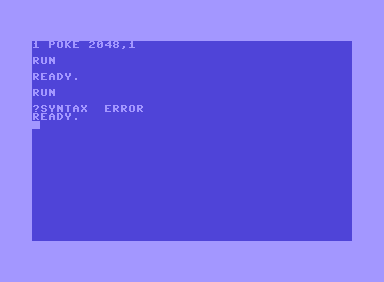
According to the Commodore 64 memory map, address2048is unused, but it must contain a value of 0 so that the BASIC program can be RUN.
Bash, 5
>"$0"
Truncates itself to zero length.
If the filename doesn't contain spaces, >$0 works for 3 chars!
Ruby, 15 14
Put this line to a file (del.rb):
File.delete $0
then run it (self-destructive) :
ruby del.rb del.rb
Bash: 4 chars
rm a
Put this in a file named a and run it on your Linux machine.
x86 binary, 4 bytes
F0 0F C7 C8
Assumption: Must be run on a P5 Pentium CPU.
The above instruction is commonly known as the F00F bug. It attempts to execute an invalid instruction, prefixed with lock.
This freezes the CPU up completely (not a halt nor a reboot) and it doesn't even require root access.
Bash (5)
rm $0
Assuming you don't have spaces in the filename.
Batch (6 characters)
This is assuming we have permission to delete the file, and of course can be done on Windows (maybe MS-DOS as well).
del %0
Assumption: Running Solaris, logged in as root
killall