| Bytes | Lang | Time | Link |
|---|---|---|---|
| 068 | C# .NET 6+ | 241011T193412Z | Mayube |
| 081 | Python 3 | 240930T185226Z | Íca |
| 037 | Perl 5 | 240929T223805Z | Kjetil S |
| 014 | 05AB1E | 240930T075546Z | Kevin Cr |
| 024 | Bash + coreutils | 240927T235348Z | Digital |
| 017 | Charcoal | 240928T095502Z | Neil |
| 010 | Jelly | 240928T183657Z | Jonathan |
| 027 | Retina | 240928T073856Z | Neil |
| 045 | Arturo | 240927T234406Z | chunes |
| 027 | J | 240927T233938Z | south |
| 032 | Google Sheets | 240927T153907Z | doubleun |
| 043 | ><> Fish | 240927T163730Z | value1 |
| 044 | Bash | 240927T142931Z | Themooni |
C# (.NET 6+), 68 bytes
for(int i=1;i<71;)System.Console.Write($"{i:00} {i*2-1},{i++*2}\n");
Maybe one day System.Range will implement IEnumerable
Python 3, 57 Bytes 61 Bytes 81 Bytes
print("\n".join([f"{n}{' 'if n<10 else ''} {2*n-1},{2*n}" for n in range(1,71)]))
05AB1E, 14 bytes
Left space padding for 1-9:
ƵdL2ôā2jøí',ý»
Prepended 0s for 1-9 (15 bytes):
ƵdL2ôāT‰Jøí',ý»
Without additional formatting (9 bytes):
ƵdL2ôāøí»
Explanation:
Ƶd              # Push compressed integer 140
  L             # Pop and push a list in the range [1,140]
   2ô           # Split it into pairs
     ā          # Push a list in the range [1,length] (without popping)
      2j        # Pad leading spaces to make all values of length 2
        ø       # Pair the items in the two lists together
         í      # Reverse each pair, so the [1,70] are leading
          ',ý  '# Join each inner-most pair by ","-delimiter
             »  # Then join each pair by spaces, and then all strings by newlines
                # (after which the result is output implicitly)

      T‰        # Divmod each integer by 10
        J       # Join each pair together
See this 05AB1E tip of mine (section How to compress large integers?) to understand why Ƶd is 140.
Bash + coreutils, 24
seq 140|paste -d, - -|nl
MacOS Shell and utilities, 20
seq 140|rs 70|nl -s,
Here, the paired-round delimiter is whitespace and the round number delimiter is ,.
rs is a default tool in the MacOS shell. It can also be installed on Linux, after which this answer will work there just as well.
Charcoal, 17 bytes
E⁷⁰⁺⁺⁺⁺⊕ι ⊕⊗ι,⊗⊕ι
Try it online! Link is to verbose version of code. Explanation:
 ⁷⁰                 Literal integer `70`
E                   Map over implicit range
        ι           Current value
       ⊕            Incremented
                    Literal space
            ι       Current value
           ⊗        Doubled
          ⊕         Incremented
             ,      Literal string `,`
                ι   Current value
               ⊕    Incremented
              ⊗     Doubled
   ⁺⁺⁺⁺             All concatenated together
                    Implicitly print
18 bytes on TIO to align the second column:
E⁷⁰⁺⁺⁺◨I⊕ι³⊕⊗ι,⊗⊕ι
Try it online! Link is to verbose version of code. Explanation: Instead of appending a space to the first number, it is converted to string and then padded to length 3.
17 bytes on ATO to align the second column:
E⁷⁰⁺⁺⁺◨⊕ι³⊕⊗ι,⊗⊕ι
Attempt This Online! Link is to verbose version of code. Explanation: As above except that Pad implicitly casts to string.
Jelly, 10 bytes
140s2ĖṾ€€G
A full program that takes no arguments and prints the table where 1-9 are padded with a space on their right and the delimiters are five spaces and ,.
How?
140s2ĖṾ€€G - Main Link: no arguments
140        - 140
   s2      - split into twos
               -> [[1,2],[3,4],[5,6],...,[139,140]]
     Ė     - enumerate
               -> [[1,[1,2]],[2,[3,4]],[3,[5,6]],...,[70,[139,140]]
      Ṿ€€  - un-evaluate each of each
               -> [["1","1,2"],["2","3,4"],["3","5,6"],...,["70","139,140"]
         G - format as a grid
               (pads with spaces to left-align each of the two columns, giving both
                columns equal width)
               -> "1      1,2\n2      3,4\n3      5,6\n...\n70     138,140"
                    (6)         (6)         (6)               (5)
           - implicit print
Retina, 27 bytes
70*$(ab
L$`b
$>:& $.`,$.>`
Try it online! Explanation:
70*$(ab
Insert 70 copies of the string ab.
L$`b
For each b...
$>:& $.`,$.>`
... output its 1-based index, the number of characters to its left, and the number of characters up to and including it.
32 bytes in Retina 0.8.2:
70$*
1
$`1 $`$`1,$`1$`1
1+
$.&
Try it online! Explanation:
70$*
Insert 70 1s.
1
$`1 $`$`1,$`1$`1
Replace each 1 with the characters up to and including it, then a separator, then the characters to its left, then the characters up to and including it, then another separator, then the characters up to and including it twice, all on its own line.
1+
$.&
Convert to decimal.
J, 27 bytes
1(":,TAB,<:@+:":@,+:)@+i.70
Formats n with 2*n-1 and 2*n using left justify for the round numbers and tab and space for the delimiters.
1(":,TAB,<:@+:":@,+:)@+i.70
                       i.70   NB. 0..69
1                     +       NB. add 1
                     @        NB. apply using rank of +, so for each item
                  +:          NB. double
         <:@":                NB. double then decrement
              ":@,            NB. concat then stringify
     TAB,                     NB. prepend a tab
  ":                          NB. stringify
    ,                         NB. concat
Google Sheets, 32 bytes
=sort(row(1:70)*{1,2,2}-{0,1,0})
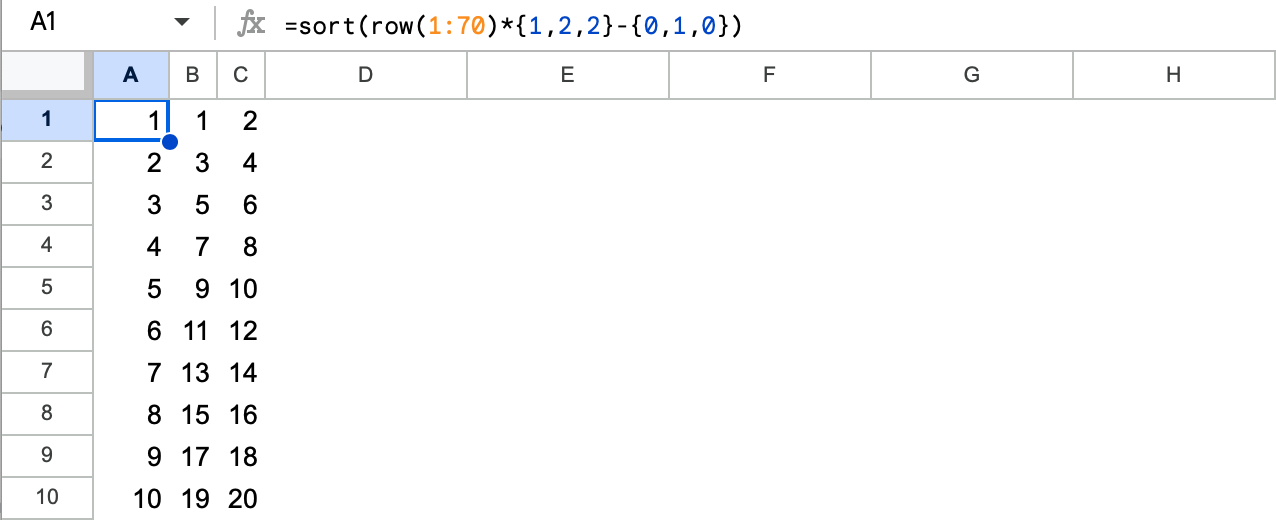
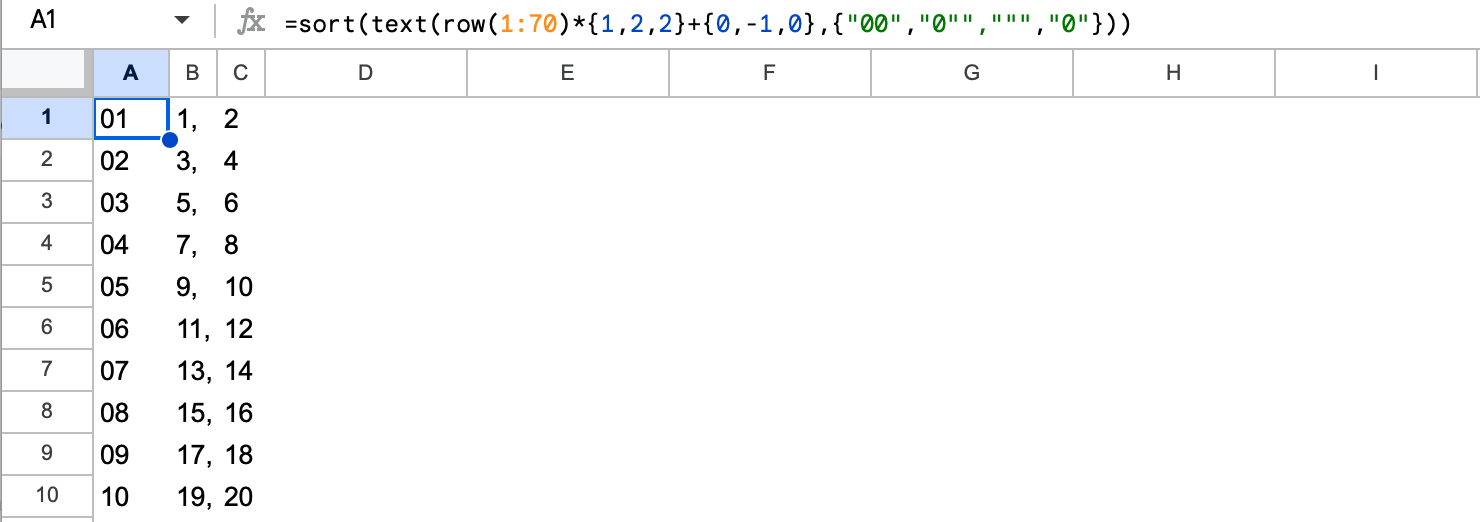
The result is unformatted. To get a formatted result (58 bytes):
=sort(text(row(1:70)*{1,2,2}-{0,1,0},{"00","0"",""","0"}))
><> (Fish), 43 bytes
1:::::"G"=?;n" "{a(?:{a(?oo2*:1-n","onao1+!
Might be able to be improved, but I couldn't find anything right now.
Starts with the counter as 1 and loops until exiting on 71. Adds a space if the counter is less than 10, then makes two copies of the counter times two, then prints that minus one, a comma, the remaining copy, then a newline.