| Bytes | Lang | Time | Link |
|---|---|---|---|
| 012 | UiuaSBCS | 240829T083517Z | Europe20 |
| 070 | ExcelVBA | 190417T141457Z | i_saw_dr |
| 194 | Chipmunk Basic | 240901T051314Z | roblogic |
| 350 | gnuplot 6.0.1 | 240829T052914Z | roblogic |
| 153 | JavaScript + HTML Canvas | 221117T110358Z | CreaZyp1 |
| 043 | x8616 machine code | 190416T182143Z | 640KB |
| 3161 | Processing 3 161 Bytes | 201019T015901Z | TheCoder |
| 060 | PostScript | 190507T183534Z | Thomas F |
| 161 | APL dzaima/APL | 200828T124259Z | Razetime |
| 113 | Ruby | 200805T173926Z | Razetime |
| 229 | Java 10 | 200805T133448Z | Kevin Cr |
| 123 | Python | 191211T013053Z | Joe Habe |
| 208 | Tcl/Tk | 190619T001751Z | sergiol |
| 111 | Javascript | 190417T090352Z | jdt |
| 152 | Racket BSL + 2htdp/image | 190507T212902Z | sporkl |
| 058 | [C64 Assembly] | 190501T214827Z | Natural |
| 042 | [x86 Assembly] | 190425T014703Z | Natural |
| 106 | BASIC C64 | 190501T065148Z | jdt |
| 210 | Processing | 190423T162234Z | Robert S |
| 089 | Ruby with Shoes | 190424T142811Z | manatwor |
| 019 | MATL | 190416T211501Z | flawr |
| 157 | GeoGebra Script | 190420T092111Z | leo3065 |
| 705 | Factorio Blueprint String | 190420T083938Z | IQuick 1 |
| 120 | HTML + CSS | 190417T193258Z | IQuick 1 |
| 047 | Python 2 | 190417T175237Z | Beefster |
| nan | TIBasic | 190417T162416Z | Benjamin |
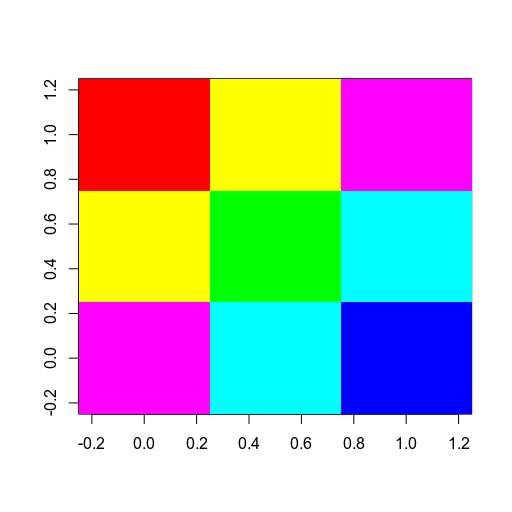
| 048 | R | 190416T213021Z | anjama |
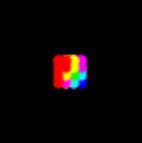
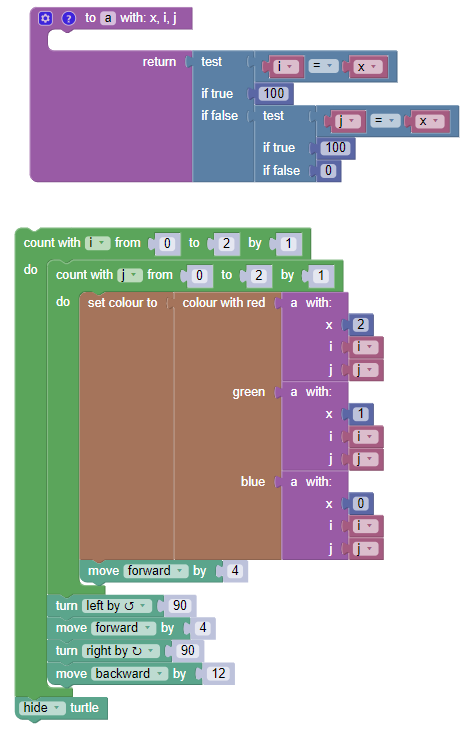
| 045 | Blockly turtle | 190419T074238Z | IQuick 1 |
| 039 | x86 machine code | 190418T224228Z | anatolyg |
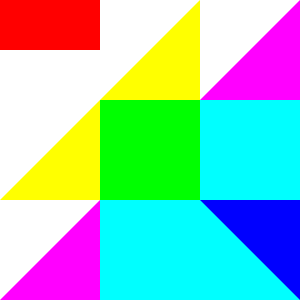
| 182 | SVG | 190418T203645Z | SE - sto |
| 108 | HTML GIF | 190416T203843Z | darrylye |
| 212 | SVG | 190418T194241Z | darrylye |
| 138 | CSS | 190416T203016Z | darrylye |
| 139 | CSS | 190417T193308Z | Neil |
| 080 | Excel VBA Immediate Window | 190417T020527Z | dana |
| 093 | ffplay ffmpeg | 190417T045408Z | Gyan |
| 202 | Python Turtle | 190418T154627Z | SolarFac |
| 137 | HTML/CSS | 190416T172143Z | Mayube |
| 025 | Pyth | 190418T011333Z | RK. |
| 044 | Bash | 190417T041126Z | Digital |
| 183 | Lua + LÖVE/Love2D | 190417T084021Z | Sheepolu |
| nan | I don't know if this is allowed. turtle is a builtin | 190417T191938Z | Aaron F |
| 064 | dc on xterm | 190417T173932Z | brhfl |
| 198 | C# | 190417T112722Z | jdt |
| 036 | Raw PPM image | 190417T122817Z | Neo |
| nan | \$\Large{\mathbf{\TeX} \left\text{MathJax}\right} | 190417T064752Z | Nat |
| 216 | Python 2 | 190417T081304Z | Henry T |
| 102 | JavaScript | 190416T200908Z | Neil |
| 150 | HTML | 190417T080320Z | TheCopyr |
| 040 | Octave/MATLAB | 190416T205933Z | flawr |
| 038 | Octave | 190417T070749Z | Expired |
| 038 | 80386 machine code | 190417T001426Z | Iłya Bur |
| 079 | Node.js | 190417T035314Z | Mwr247 |
| 195 | PostScript | 190417T022439Z | Phelype |
| 118 | ditaa | 190416T233924Z | adl |
| 177 | C++ | 190416T221827Z | HatsuPoi |
| 016 | Jelly | 190416T215711Z | Nick Ken |
| 048 | GFA Basic 2.02 Atari ST | 190416T162422Z | Arnauld |
| 031 | Perl 6 and probably similar for many languages | 190416T165839Z | user0721 |
| 041 | Wolfram Language Mathematica | 190416T163737Z | alephalp |
| 072 | Wolfram Language Mathematica | 190416T162857Z | ZaMoC |
UiuaSBCS, 12 bytes
&ims⊞↥.⊞=.⇡3
Actual 3x3 result:

Scaled 100x100 result:

Explanation
Code         | Desc                      | Stack
&ims⊞↥.⊞=.⇡3 |                           |
           3 | 3                         | 3
       ⊞=.⇡  | identity matrix           | [1_0_0 0_1_0 0_0_1]
    ⊞↥.      | outer product with itself | [[1_0_0 1_1_0 1_0_1] [1_1_0 0_1_0 0_1_1] [1_0_1 0_1_1 0_0_1]]
&ims         | show the image            |
Excel-VBA, 89 73 72 70 bytes
Edit: You can use the immediate window and dispense with the Sub/End Sub to save 16 bytes:
For i=1To 9:[A:C].Cells(i).Interior.ColorIndex=Mid(367648785,i,1):Next
Original answer:
Sub a()
For i=1To 9
[A1:C3].Cells(i).Interior.ColorIndex=Mid(367648785,i,1)
Next
End Sub
This was inspired by Neil's suggestion on this answer, and is my first submission!
Result:
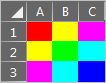
-2 bytes: Removal of cell row numbers - thanks to Taylor Raine!
Chipmunk Basic, 194 bytes
data 3,0,0,3,3,0,3,0,3,3,3,0,0,3,0,0,3,3,3,0,3,0,3,3,0,0,3
k=33:graphics 0
for i=1 to 99 step k
for j=1 to 99 step k
read a,b,c
graphics color a*k,b*k,c*k
graphics fillrect i,j,i+k,j+k
next:next

gnuplot 6.0.1, 350 bytes
se label 1 at 0,.1 '#' tc rgb "magenta"
se label 2 at 1,.1 '#' tc rgb "cyan"
se label 3 at 2,.1 '#' tc rgb "blue"
se label 4 at 0,.2 '#' tc rgb "yellow"
se label 5 at 1,.2 '#' tc rgb "green"
se label 6 at 2,.2 '#' tc rgb "cyan"
se label 7 at 0,.3 '#' tc rgb "red"
se label 8 at 1,.3 '#' tc rgb "yellow"
se label 9 at 2,.3 '#' tc rgb "magenta"
plot 0
Installed to my Mac via Homebrew, and run with gnuplot -persist rgbgrid.plot.
* I had a solution using lots of set object n rect but se label is golfier.
* A heatmap using with image might be better but I couldn't make it work.
Output: https://i.sstatic.net/jt1TD3cF.png

gnuplot with terminal dumb, 452 bytes
se terminal dumb size 9,7 ansi
se label 1 at 0,1 '#' tc rgb "magenta"
se label 2 at 1,1 '#' tc rgb "cyan"
se label 3 at 2,1 '#' tc rgb "blue"
se label 4 at 0,2 '#' tc rgb "yellow"
se label 5 at 1,2 '#' tc rgb "green"
se label 6 at 2,2 '#' tc rgb "cyan"
se label 7 at 0,3 '#' tc rgb "red"
se label 8 at 1,3 '#' tc rgb "yellow"
se label 9 at 2,3 '#' tc rgb "magenta"
se tics scale 0
se yrange [1:4]
unset border
unset xtics
unset ytics
p [0:3] 0 notitle
Longer program but better output.

JavaScript + HTML Canvas, 153 bytes
c=c.getContext`2d`;for(i=0;i<9;i++){x=i/3|0;y=i%3;c.fillStyle=`rgb(${(!x|!y)*255},${(x==1|y==1)*255},${(x>1|y>1)*255})`;c.fillRect(x,y,1,1)}<canvas id=c>x86-16 machine code, IBM PC DOS, 43 bytes
00000000: be22 01b9 0100 ac8a d83c 10b8 db09 cd10  .".......<......
00000010: b403 cd10 7204 7809 b2ff 42b4 02cd 10eb  ....r.x...B.....
00000020: e2c3 0c0e 1d0e 0a1b 0d0b 91              ...........
Listing:
BE 0122     MOV  SI, OFFSET CT      ; load color bar table into [SI]
        LOOP_COLOR:
B9 0001     MOV  CX, 1              ; display 1 char and clear CH (changed by INT 10H:3)
AC          LODSB                   ; load next color byte
8A D8       MOV  BL, AL             ; move new color to BL
3C 10       CMP  AL, 010H           ; if this is third color in row: SF=0, CF=0
                                    ; else if last color: SF=1, CF=0
                                    ; else continue on same row: CF=1
B8 09DB     MOV  AX, 09DBH          ; AH=9 (write char with attr), AL=0DBH (block char)
CD 10       INT  10H                ; call PC BIOS, display color block
B4 03       MOV  AH, 3              ; get cursor position function
CD 10       INT  10H                ; call PC BIOS, get cursor
72 04       JC   NEXT_COL           ; if not last in row, move to next column
78 09       JS   EXIT               ; if last color, exit
B2 FF       MOV  DL, -1             ; otherwise move to first column and next row
        NEXT_COL:
42          INC  DX                 ; move to next column (and/or row)
B4 02       MOV  AH, 2              ; set cursor position function
CD 10       INT  10H                ; call PC BIOS, set cursor position
EB E2       JMP  LOOP_COLOR         ; loop to next color byte
        EXIT:
C3          RET                     ; return to DOS
        CT  DB   0CH, 0EH, 1DH      ; color table
            DB   0EH, 0AH, 1BH
            DB   0DH, 0BH, 91H
This uses the IBM PC BIOS INT 10H video services to write the color grid to the screen. Unfortunately the only way to write a specific color attribute requires also writing code to place the cursor in the next correct location, so there's a lot of extra code for that.
Here's the output running on an IBM PC CGA (in 40x25 text mode to make it bigger).

TL;DR
Here's a more verbose explanation, with more detail of what some of these machine code instructions do.
Color table
The colors are stored as bytes in the color table (CTBL) with the 4-bit color value in the low nibble and a flag value in the high nibble. A 1 in the high nibble signals the end of the row and a 9 signals the end of the list.
This is checked using a single CMP instruction which subtracts 0x10 from the color values and sets the result flags. These operands are treated as 8-bit signed values, so the sign flag (positive or negative result) and carry flag (a subtractive borrow was required, meaning the color byte is less than 0x10) are the interesting ones here. These flags are then checked further down for the conditional logic of whether to advance the row, the column or end the program.
Examples:
High nibble 0 means not the last in the row and not the last in the list:
0x0C - 0x10 = 0xFC-- Result is negative and a carry (borrow) was required
High nibble 1 means it is the last color in the row and not the last in the list:
0x1D - 0x10 = 0x0D-- Result is positive and no borrow
High nibble 9 means it is the last color of the list:
0x91 - 0x10 = 0x81-- Result is negative and no borrow
Cursor movement
Using the PC BIOS or DOS API for output, the function that allows setting a character color does not automatically advance the cursor, so that has to be done by the program. The cursor position must be fetched each time since the registers are overwritten later by the other functions. The "get" function puts these into the 8-bit registers DL for the column, and DH for the row. These same registers are what is used by the "set" function to move the cursor to a new location.
We can take advantage of the fact that, on x86 architecture DH and DL can be manipulated as a single 16-bit register (DX). To advance to the next column, we increment DX which effectively only increments DL (column position). To advance to the next column we would need to instead increment the row number and set the column to 0. We can do this in only one additional instruction by setting the low nibble (DL) to 0xFF and then continuing the normal program flow incrementing DX. Since we're now looking at DH/DL as a 16-bit value, DL becomes 0 and the carry from 0xFF + 1 is added to DH.
Examples:
Advance to next column:
DH   DL   DX
 1    1   0101   ; at row 1, column 1
 1    2   0102   ; add one to DX
Advance to next row, first column:
DH   DL   DX
 1    2   0102   ; at row 1, column 2
 1   FF   01FF   ; +set DL to 0xFF
 2    0   0200   ; add one to DX
Processing 3: 191 178 161 Bytes
int l=0;void setup(){size(33,33);}void draw(){int i=l%33;int j=l/33;stroke((i%3==0||j%3==0)?255:0,(i%3==1||j%3==1)?255:0,(i%3==2||j%3==2)?255:0);point(i,j);l++;}
PostScript, 77 61 60 bytes
Code:
3 3 1[.1 0 0 .1 0 0]<AC80C9809A8>false 3 colorimage showpage
Result:

APL (dzaima/APL), 186 161 bytes
Uses dzaima's Processing integration.
G←P5.G
P5.draw←{p←G.pt
G.stroke←'00f'
p 3 3
G.stroke←'0ff'
p 2 3 3 2
G.stroke←'f0f'
p 1 3 3 1
G.stroke←'0f0'
p 2 2
G.stroke←'ff0'
p 1 2 2 1
G.stroke←'f00'
p 1 1}
-25 bytes after applying some of dzaima's suggestions and 3 character color codes.
Grid (Heavily Magnified):

Actual size:

Ruby, 113 bytes (Ubuntu Terminal)
a=[[91,93,95],[93,32,96],[95,96,34]]
for b,c,d in a do puts"\e[#{b}m█\e[0m\e[#{c}m█\e[0m\e[#{d}m█\e[0m" end
In Terminal.app, the colors do not display properly:

According to Wikipedia, this program should fit the spec if it's run on Ubuntu, which is the only terminal which has the colors as per specifications. Can someone help me out with this?
Java 10, 229 bytes
import java.awt.*;v->new Frame(){{add(new Panel(){public void paint(Graphics g){var G=(Graphics2D)g;for(int i=9;i-->0;G.fillRect(i%3*4,i/3*4,4,4))G.setColor(new Color(i<4|i==6?255:0,i%2>0|i==4?255:0,i>4|i==2?255:0));}});show();}}
Screenshot of the actual 12x12 pixels result:

Screenshot of the 10 times larger 120x120 pixels result (the 4 in the fillRect are replaced with 40):

Explanation:
import java.awt.*;                // Required import for almost everything
v->                               // Method with empty unused parameter and Frame return
  new Frame(){                    //  Create the Frame
   {                              //   In an inner code-block:
     add(new Panel(){             //    Add a Panel we can draw on:
       public void paint(Graphics g){
                                  //     Overwrite its paint method:
         for(int i=9;i-->0        //      Loop `i` in the range (9,0]:
             ;                    //        After every iteration:
              G.fillRect(i%3*4,i/3*4,4,4))
                                  //         Draw a 4x4 pixel rectangle at coordinate
                                  //         x=i%3*4, y=i//3*4
           G.setColor(new Color(  //       Set the current RGB color to:
             i<4|i==6?255:0,      //        Red: 255 if `i` is 0,1,2,3,6; 0 otherwise
             i%2>0|i==4?255:0,    //        Green: 255 if `i` is 1,3,4,5,7; 0 otherwise
             i>4|i==2?255:0));}});//        Blue: 255 if `i` is 2,5,6,7,8; 0 otherwise
     show();}}                    //    And show the Frame when we're done
Python 123 bytes
from matplotlib.pyplot import*;r=0,1,2;imshow([[[2.if i==j==k else 1if(i==k)|(j==k)else 0for k in r]for j in r]for i in r])

Seeing no one took advantage of matplotlib in a graphical-output challenge I figured it had to be done for completion.
Explanation
We can take advantage of the fact that matplotlib will autolevel our colors if we give it floating point data instead of integer data. This means we don't have to worry about specifying specific color values, just the correct ratios. So a red pixel we can define as (2, 0 ,0) and a yellow pixel we can define as (1, 1, 0). All we have to do is make sure at least one of these elements is a float, and matplotlib will automatically scale it to the proper 255-bit color for us.
Ungolfed code for clarity.
from matplotlib.pyplot import *
r = (0, 1, 2)
image = [[[0 for i in r] for i in r] for i in r]
for i in r:
    for j in r:
        for k in r:
            if i==j==k: #matching pixel for diagonal element
                image[i][j][k] = 2.
            elif i==k or j==k: #matching pixel for partial component
                image[i][j][k] = 1
imshow(image)
Tcl/Tk, 208 bytes
gri [can .c]
proc O {x y z w C\ #FF0} {.c cr o $x $y $z $w -f $C}
O 2 2 5 5 red
O 8 2 11 5
O 14 2 17 5 #F0F
O 2 8 5 11
O 8 8 11 11 #0F0
O 14 8 17 11 #0FF
O 2 14 5 17 #F0F
O 8 14 11 17 #0FF
O 14 14 17 17 #00F
Notes:
- There is an Enter on bottom
- Ran in interactive shell to have commands' abbreviations enabled by default.

Javascript, 134 131 111 bytes
for(n=0,i=12;--i;)document.write(i%4?'<font color=#'+'f00ff0f0fff00f00fff0f0ff00f'.substr(n++*3,3)+'>█':'<br>')Racket (BSL + 2htdp/image), 152 bytes
(define(s q)(star 9 'solid q))(above(beside(s 'red)(s 'yellow)(s 'magenta))(beside(s 'yellow)(s 'green)(s 'cyan))(beside(s 'magenta)(s 'cyan)(s 'blue)))
Ungolfed:
(define (s q) (star 9 'solid q))
(above
 (beside (s 'red) (s 'yellow) (s 'magenta))
 (beside (s 'yellow) (s 'green) (s 'cyan))
 (beside (s 'magenta) (s 'cyan) (s 'blue)))

star was the shortest shape. Overall a pretty boring answer. I'll try to come up with a more interesting one when time permits.
[C64 Assembly], 58 bytes
Machine code:
01 08 0b 08 e3 07 9e 32 30 35 39 20 a2 03 ca
a9 a0 9d 20 04 9d 28 04 9d 50 04 bd 30 08 9d
20 d8 bd 33 08 9d 28 d8 bd 36 08 9d 50 d8 d0
e0 4c 2d 08 02 07 04 07 05 03 04 03 06
Assembly code:
*=$0801
    .word (+), 2019     ;line number
    .null $9e, ^+       ;sys <start>
+
    ldx #$03
    loop:
        dex
        lda #$a0
        sta $0400,x
        sta $0428,x
        sta $0450,x

        lda tabcol+0,x
        sta $d800,x
        lda tabcol+3,x
        sta $d828,x
        lda tabcol+6,x
        sta $d850,x
    bne loop
    jmp *

tabcol:
.byte $02,$07,$04,$07,$05,$03,$04,$03,$06

[x86 Assembly], 42 bytes
org 100h
   mov al,13h
   int 10h
   push 40960
   pop es
   xor di,di
   mov bp,8
L: mov eax,[C+bp]
   stosd
   add di,316
   sub bp,4
jnc L

ret
C: dd 00203424h, 0034302ch, 00242c28h

Dump:
00000000  B013              mov al,0x13
00000002  CD10              int 0x10
00000004  6800A0            push word 0xa000
00000007  07                pop es
00000008  31FF              xor di,di
0000000A  BD0800            mov bp,0x8
0000000D  668B861E01        mov eax,[bp+0x11e]
00000012  66AB              stosd
00000014  81C73C01          add di,0x13c
00000018  83ED04            sub bp,byte +0x4
0000001B  73F0              jnc 0xd
0000001D  C3                ret
0000001E  0024              add [si],ah
00000020  3420              xor al,0x20
00000022  002C              add [si],ch
00000024  3034              xor [si],dh
00000026  0028              add [bx+si],ch
00000028  2C24              sub al,0x24
BASIC C64, 106 bytes
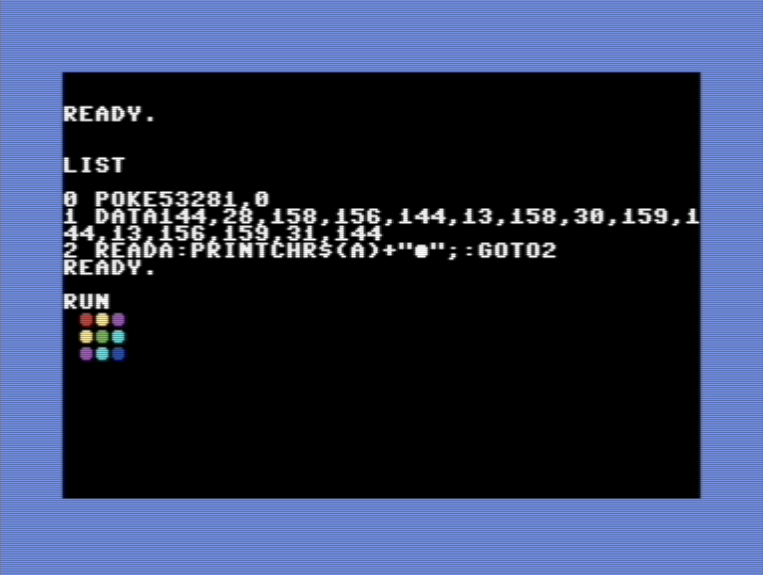
0 POKE53281,0
1 DATA144,28,158,156,144,13,158,30,159,144,13,156,159,31,144
2 READA:PRINTCHR$(A)+"o";:GOTO2
Processing, 225 210 chars/bytes
Exhilarating code, I know.
fill(#FF0000);
rect(0,0,4,4);
fill(#FFFF00);
rect(0,4,4,4);
rect(4,0,4,4);
fill(#FF00FF);
rect(0,8,4,4);
rect(8,0,4,4);
fill(#00FF00);
rect(4,4,4,4);
fill(#00FFFF);
rect(4,8,4,4);
rect(8,4,4,4);
fill(#0000FF);
rect(8,8,4,4);

Ruby with Shoes, 89 characters
Shoes.app{n=0..2
n.map{|i|n.map{|j|fill n.map{|e|i==e||j==e ?:F:0}*''
rect i*9,j*9,9,9}}}
Sample output:

MATL, 44 23 21 20 19 bytes
A direct port of my Octave answer with the suggestions from @ExpiredData and @LuisMendo.
126973007Bo7B3*e0YG
GeoGebra Script, 157 bytes
Execute[Flatten[Sequence[Sequence[{"P"+i+j+"=("+j*.2+","+i*.2+")","SetColor[P"+i+j+","+(i==2∨j==0)+","+(i==1∨j==1)+","+(i==0∨j==2)+"]"},i,0,2],j,0,2]]]
Output:

Factorio Blueprint String, 705 bytes
I admit, I'm just pushing the limits of what counts as a solution.
0eNrdWNGOqyAQ/ReedeNo0daH/ZHNTYOW7ZJFNAi91zT99wua7ZpdaaT1pb40oQ6HOecwA3pGBde0kUwolJ8RK2vRovztjFp2FITb/1TXUJQjpmiFAiRIZUdtzYkMGyIoR5cAMXGg/1AOlz8BokIxxegA0w+6vdBVQaUJuAKQstSV5kTV0qA2dWvm1MKuZ3FecIA6lIf4BV8uwS+YeDKPXzBhPKAkUxjJPAy4AbG5QljZFBEqLOuqYGKa1Vc6YAQzE5Ss+b6gH+TETLQJeWdcUemQ/8Sk0oSPHOgjQkkPqMfT1kEYWzEsI2hpc2gtFtgfO2NkDTMjbIKnCOLv1SrCechJ1UzwSm7zKpksNVN78+xwnffOZKv2s2kS0akPJo4D10FslEd2UDVE9oLn6NU+1i01S/HaKqmkpvNl2DhkSGfJEK1Eha1DhWyWCmvZCzuHCtu7aj5asuQ7ynn99/GqT0f07BjAwXnnx3kohEW7XMPE5+OEs5+EUwdhiL4T0IVh3LNzHlMwfUoB+LTPeK19A2LPkoGbety1f46SUvH4BoLExTHxOCKe3mmIXTJ43ogGp5MlnS47soTR+GeryFyUscex+PzOu65IkPr0OrzW2wFkHn0Ar3c3eN6S4pt63NUH7GvtAn3AafTOo+yf3+jhbDcv9/1XgHz00SBAJ+NNn3uWRJDiDcDWXIf+Aya7oEk=
Produced output when placed in-game (low graphics settings used):
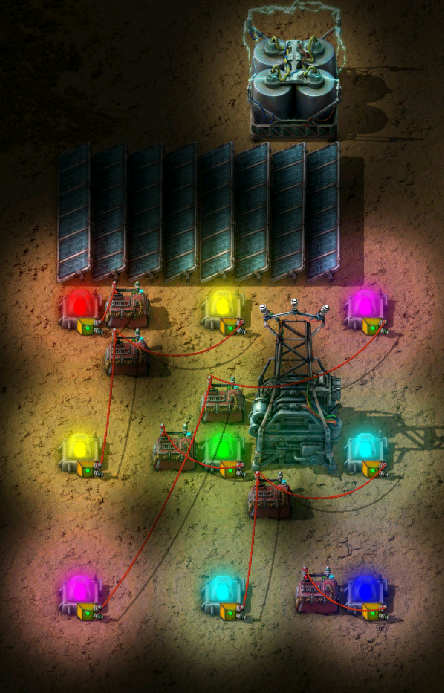
To prove that it is a valid solution you need to sample this grid of pixels which do match the specification exactly:
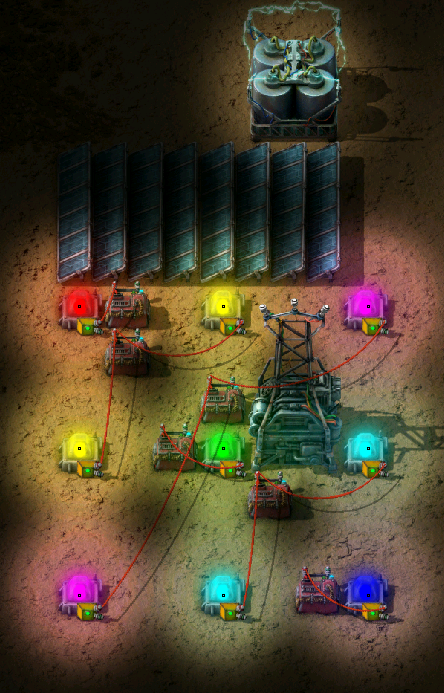
The rest of the image is classified as a border or a spacing which, as said in the question, doesn't matter.
HTML + CSS, 121 120 bytes
Worst piece of HTML I've ever wrote. One byte save thanks to @Gust van de Wal
b{color:#ff0}a{color:cyan}i{color:lime}u{color:blue<pre><body bgcolor=#f0f text=red>█<b>█
█<i>█<a>█
█<u>█HTML + CSS, 114 bytes (semi valid)
I'm putting this as semi-valid because the blue is not exactly #0000FF blue and also relies on not having clicked the link.
Thanks to @Lynn for the idea
b{color:#ff0}i{color:lime}c{color:cyan<pre><body bgcolor=#f0f text=red>█<b>█
█<i>█<c>█
█<a href=x>█Python 2, 74 48 47 bytes
print('\033[9%sm#'*3+'\n')*3%tuple('135326564')
Depends on system colors (this assumes 'bright' colors are pure RGB values), but works by modifying the foreground color of #s in the terminal.
-26 bytes thanks to xnor
-5 bytes by realizing the color blocks don't need to be rectangles, +4 bytes from miscounting
TI-Basic, x bytes (will score when I can)
Note: content filter is blocking me from looking up the token sizes for each of these commands. If anyone wants to score for me, go for it.
TextColor(11
Text(0,0,"0"
TextColor(19
Text(0,2,"0"
Text(2,0,"0"
TextColor(13
Text(4,0,"0"
Text(0,4,"0"
TextColor(14
Text(2,2,"0"
TextColor(18
Text(2,4,"0"
Text(4,2,"0"
TextColor(17
Text(4,4,"0"
This look really bad on my little calculator screen. But hey, shape doesn't matter :^)
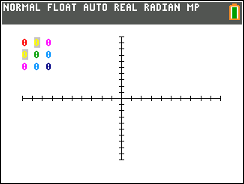
Golf output:
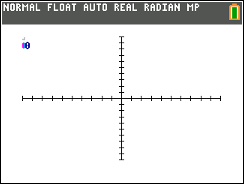
Modified for 8x larger output:
TI-BASIC, x bytes
Using Pxl-On instead of Text:
Pxl-On(0,0,11
Pxl-On(0,1,19
Pxl-On(0,2,13
Pxl-On(1,0,19
Pxl-On(1,1,14
Pxl-On(1,2,18
Pxl-On(2,0,13
Pxl-On(2,1,18
Pxl-On(2,2,17
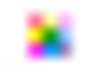
Output:
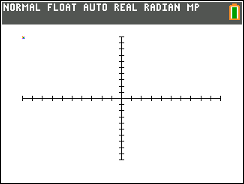
Blown up ~11x:
R, 89 50 48 bytes
Newest version:
image(matrix(c(6,4,5,2:4,1,2),3),col=rainbow(6))
Not enough elements in the vector to fill the 3x3 matrix, so it wraps around and reuses the first element.
Old versions:
image(matrix(c(6,4,5,2:4,1,2,6),3),col=rainbow(6))

image(matrix(c(3,5,6,2,4,5,1:3),3),col=c('red','yellow','magenta','green','cyan','blue'))
Blockly turtle, 45 blocks
How about we play a little game of finding the most ridiculous tool for the job?
Output:
The program (as a screenshot for additional heresy):
Note: The grayed out blocks are also counted towards the metric.
x86 machine code, 16-bit, MS-DOS, EGA display, 40 39 bytes
Hexdump:
68 80 b8 07 31 ff be 1e 01 b9 09 00 2e 8a 24 46
b0 db d0 ec ab 73 04 81 c7 9a 00 e2 ef c3 18 1c
1b 1c 14 17 1a 16 02
Execution log:

It writes the "bar" character █ with various attributes to display memory, starting from address b8800 (display memory starts at b8000; I added an offset to move the output to a better place on the screen).
I could use the fact that display memory is filled with space characters, and change their background instead of overwriting them with the bar character, but for best match I needed bright colours, and they are not supported as background.
I developed the code using debug.com in a DOS emulator here. Source code:
; the following should read "push b880" but debug.com cannot emit this instruction
db 68, 80, b8
pop es
xor di, di
mov si, 11e
mov cx, 9
; 10c (loop target)
cs:
mov ah, [si]
inc si
mov al, db
shr ah, 1
stosw
jnc 11b
add di, 9a
; 11b (jump target)
loop 10c
ret
db 18, 1c, 1b, 1c, 14, 17, 1a, 16, 02
SVG, 210 182 bytes
<svg><path d="h3v3h-3" fill=#f0f/><path d="h2v2h-2" fill=#ff0/><path d="m1 1h2v2h-2" fill=#0ff/><line x2=1 stroke=red/><path d="m1 1h1v1h-1" fill=#0f0/><path d="m2 2h1v1" fill=#00f/>
Since the size or shape of the colour blocks doesn't matter, quite a few bytes can be golfed off with this slightly odd layout:
HTML (GIF), 108 bytes
It's the battle of the web-based image formats! (Any TIF or JPG contenders out there?)
Answer by @A C.
<img src=data:image/gif;base64,R0lGODdhAwADAMIGAAAA//8AAP8A/wD/AAD/////AAAAAAAAACwAAAAAAwADAAADBhglNSQEJAA7>HTML (BMP), 116 115 bytes
Answer by @ASCII-only.
<img src=data:image/bmp;base64,Qk0+AAAAQVNDTxoAAAAMAAAAAwADAAEAGAD/AP///wD/AAAAAAAA//8A/wD//wAAAAAAAP8A////AP8AAAA>HTML (WebP), 116 bytes
Answer by @Hohmannfan.
<img src=data:image/webp;base64,UklGRjYAAABXRUJQVlA4TCoAAAAvAoAAAC8gEEjaH3qN+RcQFPk/2vwHH0QCg0I2kuDYvghLcAoX0f/4Hgc>HTML (PNG), 151 136 135 bytes
-15 bytes thanks to @Hohmannfan.
<img src=data:image/png;base64,iVBORw0KGgoAAAANSUhEUgAAAAMAAAADCAIAAADZSiLoAAAAFElEQVR4AWP4z8Dw/z8DEIIodB4A4D0O8pOGuTgAAAAASUVORK5CYII>SVG, 212 bytes
Uses the CSS property mix-blend-mode: lighten.
<svg><g fill=red><path d="M0 0h3v1H0z"/><path d="M0 0h1v3H0z"/><g fill=lime><path d="M0 1h3v1H0z"/><path d="M1 0h1v3H1z"/><g fill=blue><path d="M0 2h3v1H0z"/><path d="M2 0h1v3H2z"/><style>*{mix-blend-mode:lightenSVG, 276 240 bytes
Previous answer using <rect> instead of <path>.
<svg><g fill=red><rect width=3 height=1 /><rect width=1 height=3 /><g fill=lime><rect width=3 height=1 y=1 /><rect width=1 height=3 x=1 /><g fill=blue><rect width=3 height=1 y=2 /><rect width=1 height=3 x=2 /><style>*{mix-blend-mode:lightenCSS, 147 138 bytes
Uses the box-shadow and background properties.
html{width:1em;height:1em;background:#f0f;box-shadow:red 0 1em,#ff0 1em 1em,#ff0 0 2em,#0f0 1em 2em,#0ff 2em 2em,#0ff 1em 3em,#00f 2em 3em-9 bytes (Gust van de Wal): Make background magenta to cover for two pixels instead of one.
CSS, 157 155 147 139 bytes
html{height:100%;background-blend-mode:screen;--:red 33%,#0f0 0 67%,blue 0;background:linear-gradient(90deg,var(--)),linear-gradient(var(--Unlike @darrylyeo's answer no zooming is required (or possible!) I just wanted to show off background-blend-mode, despite it being far too long a keyword for code golf. Edit: Saved 2 10 bytes with help from @GustvandeWal. Saved a further 8 bytes thanks to @darrylyeo.
Excel VBA (Immediate Window), 80 bytes
For i=1To 9:Cells(i Mod 3+1,(i+1)/3).Interior.ColorIndex=Mid(673486857,i,1):Next
Excel VBA (Function), 96 bytes
Sub g()
For i=1To 9
Cells(i Mod 3+1,(i+1)/3).Interior.ColorIndex=Mid(673486857,i,1)
Next
End Sub
Not a horrible tool for the job... I appreciate the fact that Excel already shows a grid so it is a matter of setting the background color.
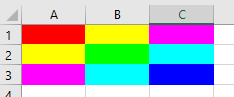
Credit to @Neil for suggesting I use ColorIndex instead of Color leading to a 43 byte savings.
-21 bytes thanks to @Keeta
-16 bytes thanks to @Chronocidal for suggesting the "Immediate Window"
-2 bytes thanks to @i_saw_drones
Lots of changes from my original submission :)
ffplay (ffmpeg), 93 bytes
ffplay -f rawvideo -s 3x3 -pix_fmt rgb24 "data:/;base64,/wAA//8A/wD///8AAP8AAP///wD/AP//AAD/"
Old:
ffplay -f lavfi -i testsrc=s=3x3,geq=r=255*not(X*Y):g=255*not((X-1)*(Y-1)):b=255*not((X-2)*(Y-2))
Python Turtle, 202 bytes, inspired by Aaron F's answer
import turtle as m
t=m.Turtle()
t.shape("square")
l=t.left
i=0
y=["#ff0","#f0f","cyan"]
for c in["red"]+y+["#0f0"]+y:t.color(c);t.stamp();a={2:270,5:90}.get(i,0);l(a);t.fd(21);l(a);i+=1
t.color("blue")
HTML/CSS, 278 141 137 bytes
r{color:red}y{color:#ff0}m{color:#f0f}g{color:#0f0}c{color:#0ff}l{color:#00f<pre><r>█<y>█<m>█
<y>█<g>█<c>█
<m>█<c>█<l>█-137 bytes thanks to commenters, most notably @data
-4 bytes thanks to @Einacio
Uses Unicode █ (U+2588) for the "blocks", and uses CSS classes/inline style to color them.
I think the <font> tags could be golfed more, however changing them to a shorter tag such as <a> breaks the color attribute
Pyth, 25 bytes
.wm.eXbk;mX*3]Zd=k255G=G3
The online interpreter doesn't show generated images, so this program must be run locally. It generates a 3x3 pixel image like the one in the question.
Bash, 44
- 2 bytes saved thanks to @NahuelFouilleul
- 2 bytes saved thanks to @manatwork
printf "${f=^[[3%dm.}$f$f
" 1 3 5 3 2 6 5 6 4
Here, blocks are . characters. ^[ is a literal ASCII escape character (0x1b).
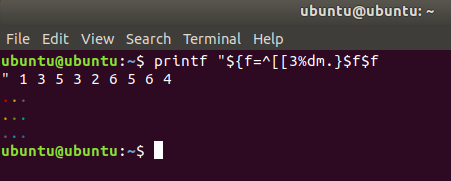
You can recreate this script as follows:
base64 -d <<< cHJpbnRmICIke2Y9G1szJWRtLn0kZiRmCiIgMSAzIDUgMyAyIDYgNSA2IDQ= > rgbgrid.sh
Lua + LÖVE/Love2D, 186 183 bytes
t={[0>1]=0,[0<1]=1}l=love g=l.graphics function l.draw()for i=1,3 do for j=1,3 do g.setColor(t[i<2 or j<2],t[i==2 or j==2],t[i>2 or j>2])g.rectangle('fill',j*10,i*10,10,10)end end end

My first code golf entry!
I don't know if this is allowed. turtle is a built-in, but it relies on TK, which might not always be available (eg. TIO doesn't like this).
Anyway, it was fun to do. Tried to get it as small as possible while still using Turtle. (269 bytes because those spaces aren't spaces, they're tabs!)
Python 2 or 3, 269 bytes
import turtle
t=turtle.Turtle()
t.shape("square")
l=t.left
i=0
y=["yellow","magenta","cyan"]
for c in ["red"]+y+["green"]+y+["blue"]:
    i+=1
    t.color(c)
    t.stamp()
    if i==9:
        break
    elif i%3==0:
        a=90 if i==6 else 270
    else:
        t.fd(21)
        continue
    l(a)
    t.fd(21)
    l(a)
dc (on xterm), 64 bytes
Fi16[AP]sF36dD6r31 101dD6rD1[1CP61P[38;5;]Pn[mX]Pz3%0=Fz0<M]dsMx
You'll just get a bunch of wacky escape codes instead of colors, but you can still try it online!
By my understanding, the 16 basic ANSI colors are free to be interpreted however the terminal wants. On the other hand, the 216 colors in the xterm color cube have explicit RGB values. I am using these codes and printing a grid of Xs:
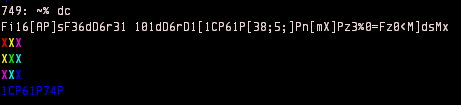
First we set the input radix to base 15 with Fi. This costs two bytes, but gives back three, so... a net gain of a byte (and a big ol' loss in readability). Next we're trying to get our color values onto the stack. In decimal, this would be 21 51 201 51 46 226 201 226 196, but we're in wacky mode so it's going to be 16 36 D6 36 31 101 D6 101 D1. We eliminate one of the spaces by slotting in a macro we need to define at some point, [AP]sF (which simply prints a line feed). We can shrink 36 D6 36 and 101 D6 101 by placing the first value on the stack, duplicating it, placing the second, and then swapping (36dD6r, 101dD6r).
Macro M handles the printing and whatnot. 1CP prints the escape character. Brackets are used to delimit strings, and as far as I know are not escapable, so we need to print the bracket with an ASCII value as well, 61P. [38;5;]P is the 'set foreground color from the numbered list' code. n prints the value from the top of the stack w/o a newline, popping it. [mX]P ends the code and prints an 'X'. z3%0=F checks the stack depth mod 3, running our line feed macro F when necessary. z0<M keeps M running as long as there's stuff on the stack. dsMx to run.
Note that if you run this in dc in an xterm, it'll leave your foreground color blue. 1CP61P74P (input shown in the screenshot) should reset this.
C#, 248 204 198 bytes
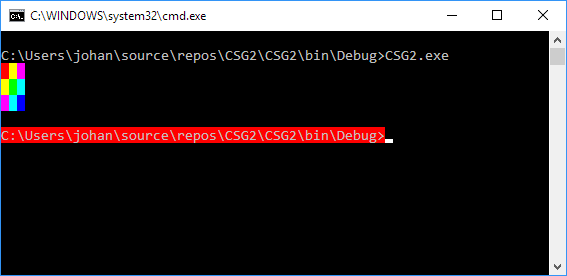
class P{static void Main(){for(int i=0;i<12;i++){foreach(dynamic n in Enum.GetValues(typeof(ConsoleColor)))if((""+n)[0]=="RYMRYGCRMCBR"[i])Console.BackgroundColor=n;Console.Write(i%4<3?" ":"\n");}}}
Output:
Raw PPM image, 36 bytes
$ xxd image.ppm
00000000: 5036 2033 2033 2031 0a01 0000 0101 0001  P6 3 3 1........
00000010: 0001 0101 0000 0100 0001 0101 0001 0001  ................
00000020: 0100 0001
It might not fit the requirements, but it's fun to include anyway as a benchmark.
\$\Large{\mathbf{\TeX} \left(\text{MathJax}\right)},~122\,\text{bytes}\$
$$ \def\c#1{\color{#1}{\rule{5em}{5em}}} \c{red} \c{yellow} \c{fuchsia} \\ \c{yellow} \c{lime} \c{aqua} \\ \c{fuchsia} \c{aqua} \c{blue} $$
Golf'd:
$\def\c#1{\color{#1}{\rule{5em}{5em}}}\c{red}\c{yellow}\c{fuchsia}\\\c{yellow}\c{lime}\c{aqua}\\\c{fuchsia}\c{aqua}\c{blue}$
Ungolf'd:
$$
\def\coloredBox#1{\color{#1}{\rule{5em}{5em}}}
\coloredBox{red}
\coloredBox{yellow}
\coloredBox{fuchsia} \\
\coloredBox{yellow}
\coloredBox{lime}
\coloredBox{aqua}    \\
\coloredBox{fuchsia}
\coloredBox{aqua}
\coloredBox{blue}
$$
Edits:
Thanks to @flawr for pointing out how to fix the colors!
Could shave off \$14\,\text{bytes}\$ by replacing
\rule{5em}{5em}with▉, which'd look like$$ \def\d#1{\color{#1}{▉}} \d{red} \d{yellow} \d{fuchsia} \\ \d{yellow} \d{lime} \d{aqua} \\ \d{fuchsia} \d{aqua} \d{blue} $$, but just doesn't look quite the same.
Could probably shave off a few more bytes by finding color names that acceptably resemble the intended colors.
Just to show what a decently \$\mathrm{\TeX}\text{'d}\$ version of this would look like:$$ {\newcommand{\rotate}[2]{{\style{transform-origin: center middle; display: inline-block; transform: rotate(#1deg); padding: 50px}{#2}}}} {\def\place#1#2#3{\smash{\rlap{\hskip{#1em}\raise{#2em}{#3}}}}} {\def\placeBox#1#2#3{\place{#1}{#2}{\color{#3}{\rule{5em}{5em}}}}} {\def\placeLabelTop#1#2#3{\place{#1}{#2}{\large{\textbf{#3}}}}} {\def\placeLabelLeft#1#2#3{\place{#1}{#2}{\rotate{-90}{\large{\textbf{#3}}}}}} \placeLabelTop{1.1}{15.5}{Red} \placeLabelTop{5.5}{15.5}{Green} \placeLabelTop{11.2}{15.5}{Blue} \placeLabelLeft{-6.2}{13.6}{Red} \placeLabelLeft{-7.1}{8.5}{Green} \placeLabelLeft{-6.5}{3.5}{Blue} \placeBox{0}{10}{red} \placeBox{5}{10}{yellow} \placeBox{10}{10}{fuchsia} \placeBox{0}{5}{yellow} \placeBox{5}{5}{lime} \placeBox{10}{5}{aqua} \placeBox{0}{0}{fuchsia} \placeBox{5}{0}{aqua} \placeBox{10}{0}{blue} \place{15.1}{0}{\large{.}} \phantom{\rule{15em}{16.5em}} $$
Python 2, 216 bytes
l=[41,43,45,43,42,46,45,46,44]
print(''.join(['\033[0;37;'+`l[i+j*3]`+'m \033[0m'+'\n'*(j==2)for i in range(3)for j in range(3)]))
Unfortunately, this code does not work well with TIO, but here is a link regardless: Try it online!
JavaScript, 108 102 bytes
console.log(`%c█%c█%c█
`.repeat(3),...[...`320251014`].map(c=>`color:#`+`f0ff00f0`.substr(c,3)))
No snippet because this only works in a real browser console and not the snippet's console. Edit: Thanks to @AJFaraday for the screenshot. Explanation: Browsers allow the first parameter of console.log to include substitutions. The %c substitution takes a parameter and applies it as (sanitised) CSS. Each █ block is therefore coloured using the appropriate substring of f0ff00f0 interpreted as a three-hex-digit colour code.

HTML, 150 bytes
<table bgcolor=#0ff><td bgcolor=red><td bgcolor=#ff0><td bgcolor=#f0f><tr><td bgcolor=#ff0><td bgcolor=#0f0><tr><td bgcolor=#f0f><td><td bgcolor=#00f>HTML, 151 bytes
<table bgcolor=#0ff><td bgcolor=#f00><td bgcolor=#ff0><td bgcolor=#f0f><tr><td bgcolor=#ff0><td bgcolor=#0f0><tr><td bgcolor=#f0f><td><td bgcolor=#00f>Octave/MATLAB, 57 56 40 bytes
-17 byte thanks to @ExpiredData! Check out their even golfier solution!
image(reshape(de2bi(126973007),[3,3,3]))
80386 machine code, IBM PC DOS, 38 bytes
hex:
B0 13 CD 10 68 00 A0 1F 66 C7 06 00 00 28 2C 24
00 66 C7 06 40 01 2C 30 34 00 66 C7 06 80 02 24
34 20 00 CD 16 C3
asm:
mov al,13h
int 10h ; initialize vga 13h mode (320x200x256 colors)
push 0a000h
pop ds ; push video buffer address to ds
mov dword ptr ds:0, 242c28h ; print 3 pixels
mov dword ptr ds:320, 34302ch ; print 3 pixels
mov dword ptr ds:640, 203424h ; print 3 pixels
int 16h ; wait for any keypress
ret ; exit to os
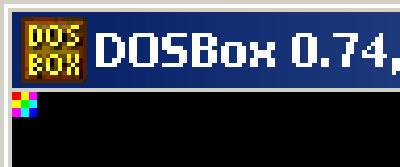
scaled output from dosbox:
Node.js, 79 bytes
require('fs').writeFile(a='P',a+[...'3331100110101110010011101011001'].join` `)
Produces a file named "P" in the PPM format containing the color grid.
PostScript, 195 bytes
Output look closer: 
%!PS
/r{rlineto}def/s{newpath moveto 0 1 r 1 0 r 0 -1 r closepath setrgbcolor fill}def
1 0 0 0 2 s
1 1 0 1 2 s
1 0 1 2 2 s
1 1 0 0 1 s
0 1 0 1 1 s
0 1 1 2 1 s
1 0 1 0 0 s
0 1 1 1 0 s
0 0 1 2 0 s
To test just paste the code in a blank file and save as something.ps and open in a pdf viewer.
To enlarge the output add 50 50 scale (or some other number) on the second line of the file.
ditaa, 118 bytes
/----+----+----\
|cF00|cFF0|cF0F|
+----+----+----+
|cFF0|c0F0|c0FF|
+----+----+----+
|cF0F|c0FF|c00F|
\----+----+----/
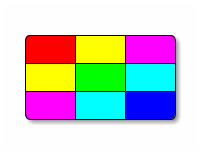
This is the output using -E option:
C++, SFML, 177 bytes
#include<SFML/Graphics.hpp>
int d[]={255,65535,0xFF00FF,65535,65280,0xFFFF00,0xFF00FF,0xFFFF00,0xFF0000};void f(){sf::Image g;g.create(3,3,(sf::Uint8*)d);g.saveToFile("a.jpg");}
Uses sf::Image::create(int,int,unsigned char*) method to create an image with rgb values in it
Jelly, 16 bytes
“IỤỵ7ỤĖm8’b4K”P;
Niladic link or full program that produces a portable pixmap format image of the desired grid.
GFA Basic 2.02 (Atari ST), 48 bytes
A manually edited listing in .LST format. Includes many non-printable characters, whose codes are shown within brackets.
?"[ESC]c[SOH] [ESC]c[ETX] [ESC]c[ENQ] "[CR]
?"[ESC]c[ETX] [ESC]c[STX] [ESC]c[ACK] "[CR]
?"[ESC]c[ENQ] [ESC]c[ACK] [ESC]c[EOT] "[CR]
The operating system of the Atari ST defines extended VT52 commands which are used here.
Output
The output is a block of \$24\times24\$ pixels (9 space characters of \$8\times8\$ pixels).
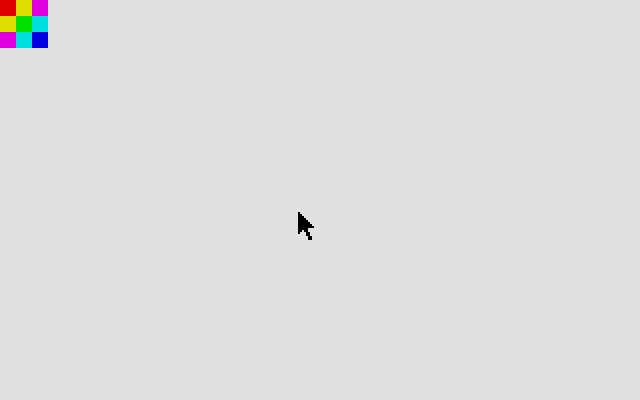
screenshot from Steem SSE
Perl 6 (and probably similar for many languages) (31 bytes)
{'ÿ   ÿÿÿ ÿ ÿÿ  ÿ ÿÿÿ ÿ ÿÿ  ÿ'}   # replace spaces with ASCII 00
                                  # which I can't seem to enter
This outputs a headless TIFF file, which used to be generated by Photoshop with the file extension .raw and is presumed to be square unless otherwise specified at the time of opening. Playing around with the color depth (if allowed) could reduce this down further.
Wolfram Language (Mathematica), 41 bytes
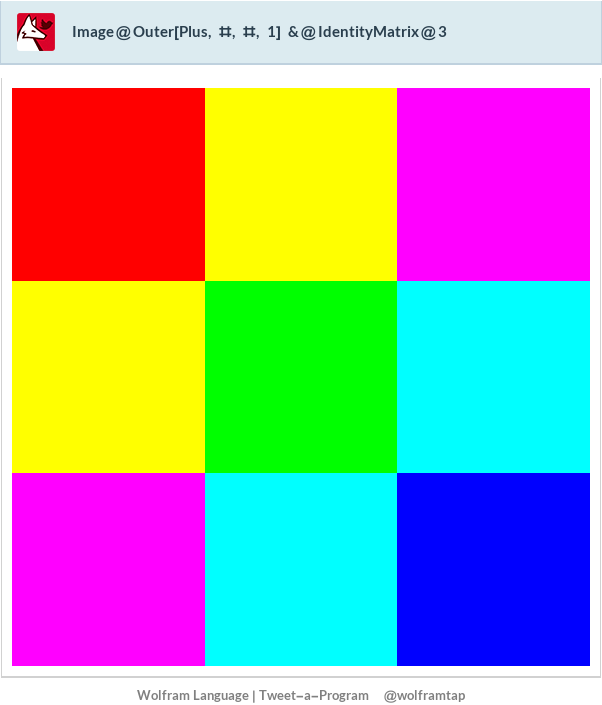
Image@Outer[Plus,#,#,1]&@IdentityMatrix@3
Wolfram Language (Mathematica), 68 bytes
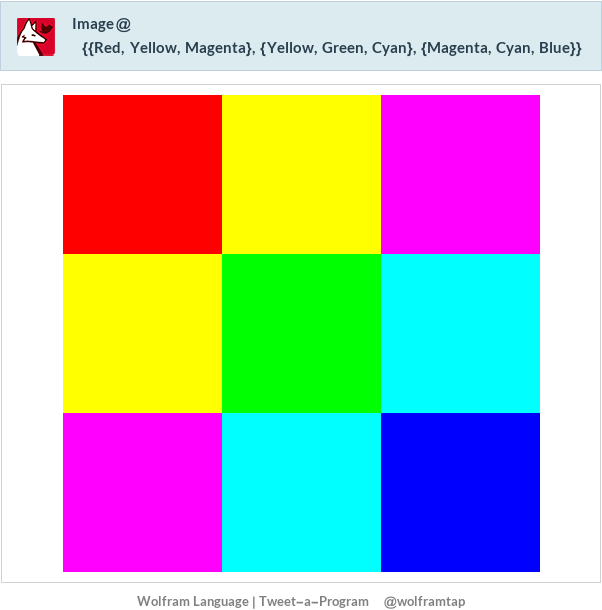
Mathematica has built-ins for all these colors.
Image@{{Red,Yellow,Magenta},{Yellow,Green,Cyan},{Magenta,Cyan,Blue}}
Wolfram Language (Mathematica), 72 bytes
Grid@Partition[RGBColor/@Unitize[Total/@Tuples[IdentityMatrix@3,{2}]],3]
