| Bytes | Lang | Time | Link |
|---|---|---|---|
| 020 | CASIO BASIC CASIO fx9750GIII | 241120T174144Z | madeforl |
| 031 | HTML with Javascript | 170713T143538Z | V. Court |
| 034 | PowerShell | 181202T203251Z | GMills |
| nan | C gcc + Win32 | 170717T152522Z | Keyu Gan |
| 156 | WinApi C gcc | 170718T153946Z | Sir Rand |
| 026 | AutoHotkey | 170715T194658Z | phil294 |
| 019 | TIBASIC | 170715T150356Z | bearacud |
| 021 | Bash with X.org | 170713T142659Z | enedil |
| 191 | C and Win32 | 170714T021040Z | MooseBoy |
| 022 | Tcl/Tk | 170714T115353Z | manatwor |
| 028 | x86 machine code | 170713T211329Z | Margaret |
| 228 | Java 7 or Higher | 170713T143845Z | Magic Oc |
| 279 | Scala 2.10+ | 170713T163155Z | V. Court |
| nan | C# | 170713T140958Z | TheLetha |
| 369 | Java OpenJDK 8 | 170713T143441Z | musicman |
CASIO BASIC (CASIO fx-9750GIII), 20 bytes
Lbl A
Getkey
Ans⇒Locate 1,1,Ans
Goto A
Displays the key code of the key you pressed. Kinda cheating, but it would be VERY tedious if I made it output the name of the key.
examples:
- EXE: 31
- DEL: 44
- MENU: 48
HTML (with Javascript), 46 31 chars, 46 31 bytes
Using this to differentiate numpad enter and return, LControl and RControl... Not anymore since apsillers found a way to do it with a single function call.
<body onkeyup=alert(event.code)
Specific outputs:
Outputs that are still with the numbers are those I can’t test on my laptop. Please wait for me to have access to those keys.
| description of key | printed output |
|---|---|
| PrtScn | PrintScreen |
| Scroll Lock | ScrollLock |
| Pause | Pause |
| left Shift | ShiftLeft |
| right Shift | ShiftRight |
| left Ctrl | ControlLeft |
| right Ctrl | ControlRight |
| Caps Lock | CapsLock |
| Tab | Tab |
| Enter | Enter |
| Enter on the number pad | NumpadEnter |
| Num Lock | NumLock |
| Insert | Insert |
| Ins on the number pad | Numpad0 |
| Backspace | Backspace |
| Del | Delete |
| F1 … F12 | F1 to F12 |
| Esc | Escape |
| left Windows key | MetaLeft |
| right Windows key | MetaRight |
| Alt | AltLeft |
| AltGr | AltRight (kind of buggy, it detects ControlLeft and then AltRight, but it is indeed AltRight) |
| application key (context menu) | ContextMenu |
Edits:
- 1 byte saved on
;after func call - 18 bytes saved thanks to Lil’ Bits and ETHproductions, they noticed I forgot to shorten func and var names.
- 32 bytes saved thanks to RogerSpielker, he noticed I was doing separated code for no reason; and again −2 bytes:
onkeydown→onkeyup - 1 byte saved: no need for final slash
- 2 bytes saved thanks to CraigAyre:
with()function - 2 bytes saved thanks to ASCII‐only:
keyin place ofwhich - 4 bytes saved, since we have text, there is no need for
'-'+(every identifier is unique without this) - 1 byte saved thanks to ASCII‐only (again): no more closing symbol
> - 15 bytes saved thanks to apsillers, as said at the top of my answer
<body onkeyup=alert(event.code)PowerShell, 34 bytes
$Host.UI.RawUI.ReadKey().Character
Outputs on the same line as the input, which can be a tad confusing.
C (gcc) + Win32, 94 95 98 105 107 110 bytes
#import"d3d.h"
j;f(){for(;;)for(j=191;j--;)GetAsyncKeyState(j)&(j<16||j>18)?printf("%d",j):0;}
The code captures keys even after focus is lost.
The following screenshots are recorded adding spaces between outputs (printf("%d ",j); +1 byte) for better readibility:

Left-ctrl Left-win Left-alt Space Right-alt Right-win Right-menu Right-ctrl Left-shift Z X C Right-shift Left-shift 1 2 3 Num 1 Num 2 Num 3 Left-shift +/= (on the main part) Num + Left-alt PrtScn
The code uses GetAsyncKeyState to query key state without checking message queue, usually more real-time than other user-mode approaches (except DirectInput). This approach is widely used in keyloggers.
(j<16||j>18) filters regular Ctrl/Alt/Shift. 16/17/18 is triggered whenever left or right one is pressed, along with location-specified vkey value.
WinApi C (gcc), 156 bytes
#include <d3d.h>
#define b GetStdHandle(-10)
BYTE i[20];main(){SetConsoleMode(b,0);a:ReadConsoleInput(b,i,1,i+5);*i^1||*(i+4)||printf("%X\n",i[10]);goto a;}
This program prints out the Windows Virtual-Key Code assciocated with each keyboard key of input. The \n in the printf format-string is optional (but makes output human-friendly) and can be dropped for a total score of 154 bytes. An easy way to kill the program (without taskmgr) is with CTRL + PAUSE. If you have a keyboard with a Fn key, this program cannot pick it up since it isn't even noticed by Windows.
- Credit to MooseBoys's answer for the
#include <d3d.h>trick and inspiration for theBYTEarray.
The program with local variables, readability, and without compiler warnings looks like this:
#include <windows.h>
#include <stdio.h>

int main(void)
{
    HANDLE conIn = GetStdHandle(STD_INPUT_HANDLE);
    INPUT_RECORD ir;
    DWORD useless;

    SetConsoleMode(conIn, 0);

    for(;;)
    {
        ReadConsoleInput(conIn, &ir, 1, &useless);

        if(ir.EventType == KEY_EVENT && !ir.Event.KeyEvent.bKeyDown)
            printf("%X\n", ir.Event.KeyEvent.wVirtualKeyCode);
    }

    return 0;
}
AutoHotkey, 26 Bytes
loop{
input,x,L1M
send %x%
}
Can't test (win-only), but the M option says
M: Modified keystrokes such as Control-A through Control-Z are recognized and transcribed if they correspond to real ASCII characters.
So it should do fine.
TI-BASIC, 19 bytes
PROGRAM:S
If Ans
Disp Ans
getKey
prgmS
- Enter: 105,
- Left key: 24,
- Right key: 26,
- Ins[ert] is a little different because it would normally take two key presses to get to, but those would be 21 followed by 23.
Here's an illustration of the rest of the keys:

Explanation:
PROGRAM:S The editor displays the name at the top apart from the code; the name is "S"
If Ans    // If the last input isn't zero
Disp Ans  // Display the last input
getKey    // Input a key press
prgmS     // Call the same program in a recursive fashion
This, unfortunately, isn't possible to do in Arnold C, so I had to stick to TI-BASIC.
Bash with X.org, 21 bytes
xev|awk 'NR%2&&/\(k/'
Unfortunately, I can't test it since I'm on MacBook on Linux - no PrntScr, no numeric keyboard &all.
xev is a tool that outputs mouse and keyboard events under X.org. I pipe it to awk, filter even lines (since every key is shown when key is pressed, and then when it's released), and select only those that contain (k - this string is in every line that describes pressed key.
C and Win32, 240 224 216 205 202 194 191 bytes
#include<d3d.h>
#include<stdio.h>
w[9];p(x,y,a,b){printf("%X",a^b);}main(){w[1]=p;w[9]=p;CreateWindow(RegisterClass(w),0,1<<28,0,0,0,0,0,0,0,0);for(;GetMessage(w,0,16,0);)DispatchMessage(w);}
Outputs
TAB: F0008C00F0008
PAUSE: 450012C0450012
ENTER: 1C000CC01C000C
NUMPAD-ENTER: 11C000CC11C000C
WINDOWS-LEFT: 15B005AC15B005A
WINDOWS-RIGHT: 15C005DC15C005D
INSERT: 152002CC152002C
NUMPAD-INSERT: 52002CC052002C
Explanation
#include <d3d.h> // shortest built-in header that includes windows.h
#include <stdio.h> // for printf

w[9]; // space for wndclass-data array

// function castable to the signature of WNDPROC
p(x,y,a,b)
{
    // key and state are encoded in the last two 4-byte arguments to wndproc
    printf("%X",a^b);
}

main(m)
{
    // set minimal window class equivalent data pointing to wndproc above
    w[1]=p;w[9]=p;

    // create the window using the class, with WS_VISIBLE flag
    CreateWindow(RegisterClass(w),0,1<<28,0,0,0,0,0,0,0,0)
    for(;GetMessage(w,0,16,0);) // filter messages 15 and lower, which fire without input
        DispatchMessage(w);
}
Edits
-16 thanks to @ugoren
-8: changed WNDCLASS to int array since all 10 members are 4 bytes
-11: partial initialization of wndclass-data array, reduced to 9 elements
-3: use implicit int decl for wndclass-data array
-8: remove newline from output format (not required in spec and printf flushes immediately without it); move RegisterClass into CreateWindow arg, using returned ATOM; set wndclass name to m which just needs a zero-byte in it to be a valid string.
-3: reuse w var for MSG data
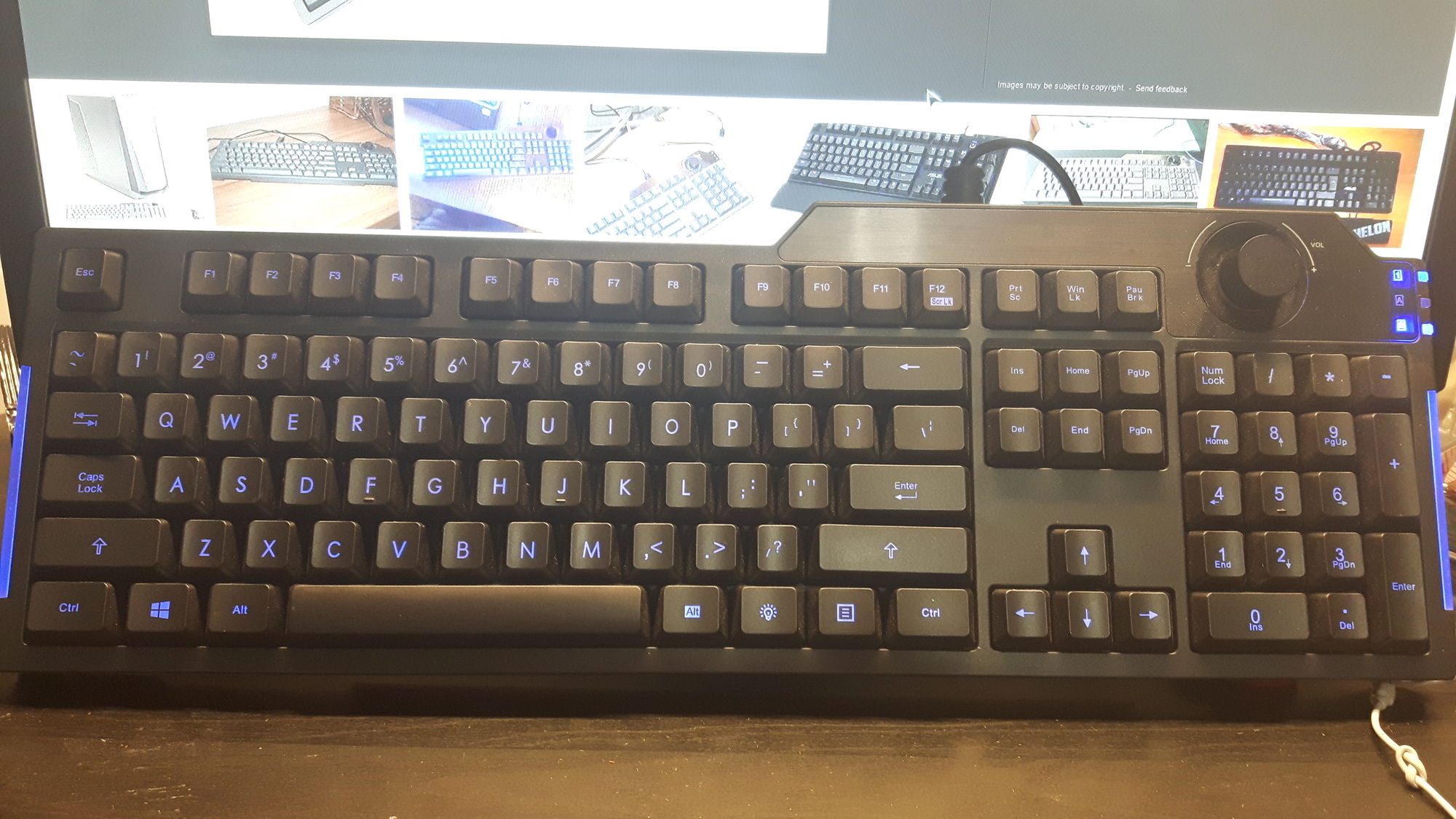
Tcl/Tk, 22 characters
bind . <Key> {puts %K}
Sample run:

Notes:
- No right Windows key on my keyboard ☹ (
cleverdesigner put the backlight switch in its place) - The numeric pad's Insert generates different code based on NumLock's status
- The volume knob generates X.org specific codes, all other are just regular keysyms
x86 machine code, DOS executable, 29* 28 bytes
FAE464D0E873FAE460D0E073F4D41005212192B402CD2188F2CD21EBE3
This is a COM executable for MS-DOS, it requires a IBM PC compatible hardware.
Particularly an 8042 PS/2 controller or more likely an emulation of it through SMM.
Long story short, it should work out of the box in any mainstream PC.
The source code is
BITS 16

 ;Disable the interrupts so we don't compete with the IRQ 1 (the 8042 main
 ;device IRQ) handler (the ISR n. 9 by default) for the reading of the codes.
 cli

_wait:

 ;Is 'Output buffer full (OBF)' bit set?

 in al, 64h                ;Read the 8042 status register
 shr al, 1                 ;Move bit 0 (OBF) into the carry flag

jnc _wait                  ;Keep spinning if CF = OBF not set

 ;Read the scan code S
 in al, 60h

 ;Is S a break code?

 shl al, 1                 ;Bit 7 is set if it is
jnc _wait

 ;PART 2

 ;AL = S mod 10h := y, AH = S / 10h := x
 aam 16
 add ax, 2121h             ;Make both quantities in the printable ASCII range (skip space though)

 ;Print y
 xchg dx, ax
 mov ah, 02h
 int 21h                   ;int 21/ah=02 prints the char in DL

 ;DH is still valid here, it holds x. We print it now
 mov dl, dh
 int 21h

 ;Never terminate
jmp _wait
I've divided the program into two parts.
The first part deals with the reading of the scancodes. Scancodes are numeric values associated with every key.
Note that these are hardware code, they don't depend on the OS or the charset. They are like an encoded pair (column, row) of the key.
Every key has a scancode, even those non-standard weird function keys found on some keyboard (e.g. the "open calc" key).
Some key has multi-byte scancode, they have prefixes designed to make the stream decodificable by just looking at the sequence of bytes.
So each key gets its unique identifier, even CTRL, SHIFT, WinKeys and so on.
Only the "break codes", sent when a key is released, are processed, the "make codes" are ignored.
The formers have the higher bit (bit 7 for a byte) set, so it's easy to recognise them.
The second part deals with the printing of a byte.
Printing is always lengthy in assembly, we have no builtins.
To keep it short, and since it was required to write an identifier of the key, I abandoned decimal or hex numerals in favour of a personal encoding.
A byte xy, where x is the higher nibble and y the lower is printed as two successive chars c0 and c1 defined as:
c0 = 0x21 + y
c1 = 0x21 + x
Note that the lower nibble is printed first (this spared me a swap).
The rationale is to map the each one of the 16 possible values of a nibble into consecutive ASCII characters from '!'.
Simply put this is a hex numeral but with
- The nibbles swapped
!"#$%&'()*+,-./01as digit(als) instead of0123456789abcdef
Running it in DOSBox and pressing some random key (some of which is a special key but note that as a Windows process DOSBox can't capture all the keys) yields

Note that this program never terminates (further, it takes complete control of the PC by disabling the interrupts) as I believe was intended by the question (simply there is no killing of processes in DOS).
* Reduced thank to CodyGray.
Java 7 or Higher, 246 228 bytes
import java.awt.event.*;class K{public static void main(String[]a){new java.awt.Frame(){{addKeyListener(new KeyAdapter(){public void keyPressed(KeyEvent e){System.out.println(e);}});show();setFocusTraversalKeysEnabled(0<0);}};}}
Ungolfed:
import java.awt.event.*;
class K{
    static void main(String[]a){
        new java.awt.Frame(){
            {
                addKeyListener(new KeyAdapter(){
                    public void keyPressed(KeyEvent e){
                        System.out.println(e);
                    }
                });
                show();
                setFocusTraversalKeysEnabled(0<0);
            }
        };
    }
}
-18 thanks to @OlivierGrégoire for show(), 0<0 and import java.awt.event.*;
Which results in:

Even handles shift-presses for capitalized characters, the windows key, cap locks, etc... You can see it printing the 'modifiers' as well, which are 'held keys'.
java.awt.event.KeyEvent[KEY_PRESSED,keyCode=27,keyText=Escape,keyChar=Escape,keyLocation=KEY_LOCATION_STANDARD,rawCode=27,primaryLevelUnicode=27,scancode=1,extendedKeyCode=0x1b] on frame0
java.awt.event.KeyEvent[KEY_PRESSED,keyCode=192,keyText=Back Quote,keyChar='`',keyLocation=KEY_LOCATION_STANDARD,rawCode=192,primaryLevelUnicode=96,scancode=41,extendedKeyCode=0xc0] on frame0
java.awt.event.KeyEvent[KEY_PRESSED,keyCode=9,keyText=Tab,keyChar=Tab,keyLocation=KEY_LOCATION_STANDARD,rawCode=9,primaryLevelUnicode=9,scancode=15,extendedKeyCode=0x9] on frame0
java.awt.event.KeyEvent[KEY_PRESSED,keyCode=20,keyText=Caps Lock,keyChar=Undefined keyChar,keyLocation=KEY_LOCATION_STANDARD,rawCode=20,primaryLevelUnicode=0,scancode=58,extendedKeyCode=0x14] on frame0
java.awt.event.KeyEvent[KEY_PRESSED,keyCode=16,keyText=Shift,keyChar=Undefined keyChar,modifiers=Shift,extModifiers=Shift,keyLocation=KEY_LOCATION_LEFT,rawCode=16,primaryLevelUnicode=0,scancode=42,extendedKeyCode=0x10] on frame0
java.awt.event.KeyEvent[KEY_PRESSED,keyCode=17,keyText=Ctrl,keyChar=Undefined keyChar,modifiers=Ctrl,extModifiers=Ctrl,keyLocation=KEY_LOCATION_LEFT,rawCode=17,primaryLevelUnicode=0,scancode=29,extendedKeyCode=0x11] on frame0
java.awt.event.KeyEvent[KEY_PRESSED,keyCode=524,keyText=Windows,keyChar=Undefined keyChar,keyLocation=KEY_LOCATION_LEFT,rawCode=91,primaryLevelUnicode=0,scancode=91,extendedKeyCode=0x20c] on frame0
java.awt.event.KeyEvent[KEY_PRESSED,keyCode=18,keyText=Alt,keyChar=Undefined keyChar,modifiers=Alt,extModifiers=Alt,keyLocation=KEY_LOCATION_LEFT,rawCode=18,primaryLevelUnicode=0,scancode=56,extendedKeyCode=0x12] on frame0
java.awt.event.KeyEvent[KEY_PRESSED,keyCode=32,keyText=Space,keyChar=' ',keyLocation=KEY_LOCATION_STANDARD,rawCode=32,primaryLevelUnicode=32,scancode=57,extendedKeyCode=0x20] on frame0
java.awt.event.KeyEvent[KEY_PRESSED,keyCode=18,keyText=Alt,keyChar=Undefined keyChar,modifiers=Alt,extModifiers=Alt,keyLocation=KEY_LOCATION_RIGHT,rawCode=18,primaryLevelUnicode=0,scancode=56,extendedKeyCode=0x12] on frame0
java.awt.event.KeyEvent[KEY_PRESSED,keyCode=17,keyText=Ctrl,keyChar=Undefined keyChar,modifiers=Ctrl,extModifiers=Ctrl,keyLocation=KEY_LOCATION_RIGHT,rawCode=17,primaryLevelUnicode=0,scancode=29,extendedKeyCode=0x11] on frame0
java.awt.event.KeyEvent[KEY_PRESSED,keyCode=37,keyText=Left,keyChar=Undefined keyChar,keyLocation=KEY_LOCATION_STANDARD,rawCode=37,primaryLevelUnicode=0,scancode=75,extendedKeyCode=0x25] on frame0
java.awt.event.KeyEvent[KEY_PRESSED,keyCode=16,keyText=Shift,keyChar=Undefined keyChar,modifiers=Shift,extModifiers=Shift,keyLocation=KEY_LOCATION_RIGHT,rawCode=16,primaryLevelUnicode=0,scancode=42,extendedKeyCode=0x10] on frame0
java.awt.event.KeyEvent[KEY_PRESSED,keyCode=38,keyText=Up,keyChar=Undefined keyChar,keyLocation=KEY_LOCATION_STANDARD,rawCode=38,primaryLevelUnicode=0,scancode=72,extendedKeyCode=0x26] on frame0
java.awt.event.KeyEvent[KEY_PRESSED,keyCode=39,keyText=Right,keyChar=Undefined keyChar,keyLocation=KEY_LOCATION_STANDARD,rawCode=39,primaryLevelUnicode=0,scancode=77,extendedKeyCode=0x27] on frame0
java.awt.event.KeyEvent[KEY_PRESSED,keyCode=96,keyText=NumPad-0,keyChar='0',keyLocation=KEY_LOCATION_NUMPAD,rawCode=96,primaryLevelUnicode=48,scancode=82,extendedKeyCode=0x60] on frame0
java.awt.event.KeyEvent[KEY_PRESSED,keyCode=110,keyText=NumPad .,keyChar='.',keyLocation=KEY_LOCATION_NUMPAD,rawCode=110,primaryLevelUnicode=46,scancode=83,extendedKeyCode=0x6e] on frame0
java.awt.event.KeyEvent[KEY_PRESSED,keyCode=10,keyText=Enter,keyChar=Enter,keyLocation=KEY_LOCATION_NUMPAD,rawCode=13,primaryLevelUnicode=13,scancode=28,extendedKeyCode=0xa] on frame0
java.awt.event.KeyEvent[KEY_PRESSED,keyCode=107,keyText=NumPad +,keyChar='+',keyLocation=KEY_LOCATION_NUMPAD,rawCode=107,primaryLevelUnicode=43,scancode=78,extendedKeyCode=0x6b] on frame0
java.awt.event.KeyEvent[KEY_PRESSED,keyCode=109,keyText=NumPad -,keyChar='-',keyLocation=KEY_LOCATION_NUMPAD,rawCode=109,primaryLevelUnicode=45,scancode=74,extendedKeyCode=0x6d] on frame0
java.awt.event.KeyEvent[KEY_PRESSED,keyCode=106,keyText=NumPad *,keyChar='*',keyLocation=KEY_LOCATION_NUMPAD,rawCode=106,primaryLevelUnicode=42,scancode=55,extendedKeyCode=0x6a] on frame0
java.awt.event.KeyEvent[KEY_PRESSED,keyCode=34,keyText=Page Down,keyChar=Undefined keyChar,keyLocation=KEY_LOCATION_STANDARD,rawCode=34,primaryLevelUnicode=0,scancode=81,extendedKeyCode=0x22] on frame0
java.awt.event.KeyEvent[KEY_PRESSED,keyCode=33,keyText=Page Up,keyChar=Undefined keyChar,keyLocation=KEY_LOCATION_STANDARD,rawCode=33,primaryLevelUnicode=0,scancode=73,extendedKeyCode=0x21] on frame0
java.awt.event.KeyEvent[KEY_PRESSED,keyCode=35,keyText=End,keyChar=Undefined keyChar,keyLocation=KEY_LOCATION_STANDARD,rawCode=35,primaryLevelUnicode=0,scancode=79,extendedKeyCode=0x23] on frame0
java.awt.event.KeyEvent[KEY_PRESSED,keyCode=36,keyText=Home,keyChar=Undefined keyChar,keyLocation=KEY_LOCATION_STANDARD,rawCode=36,primaryLevelUnicode=0,scancode=71,extendedKeyCode=0x24] on frame0
java.awt.event.KeyEvent[KEY_PRESSED,keyCode=127,keyText=Delete,keyChar=Delete,keyLocation=KEY_LOCATION_STANDARD,rawCode=46,primaryLevelUnicode=0,scancode=83,extendedKeyCode=0x7f] on frame0
java.awt.event.KeyEvent[KEY_PRESSED,keyCode=155,keyText=Insert,keyChar=Undefined keyChar,keyLocation=KEY_LOCATION_STANDARD,rawCode=45,primaryLevelUnicode=0,scancode=82,extendedKeyCode=0x9b] on frame0
java.awt.event.KeyEvent[KEY_PRESSED,keyCode=123,keyText=F12,keyChar=Undefined keyChar,keyLocation=KEY_LOCATION_STANDARD,rawCode=123,primaryLevelUnicode=0,scancode=88,extendedKeyCode=0x7b] on frame0
java.awt.event.KeyEvent[KEY_PRESSED,keyCode=122,keyText=F11,keyChar=Undefined keyChar,keyLocation=KEY_LOCATION_STANDARD,rawCode=122,primaryLevelUnicode=0,scancode=87,extendedKeyCode=0x7a] on frame0
java.awt.event.KeyEvent[KEY_PRESSED,keyCode=121,keyText=F10,keyChar=Undefined keyChar,keyLocation=KEY_LOCATION_STANDARD,rawCode=121,primaryLevelUnicode=0,scancode=68,extendedKeyCode=0x79] on frame0
java.awt.event.KeyEvent[KEY_PRESSED,keyCode=120,keyText=F9,keyChar=Undefined keyChar,keyLocation=KEY_LOCATION_STANDARD,rawCode=120,primaryLevelUnicode=0,scancode=67,extendedKeyCode=0x78] on frame0
java.awt.event.KeyEvent[KEY_PRESSED,keyCode=119,keyText=F8,keyChar=Undefined keyChar,keyLocation=KEY_LOCATION_STANDARD,rawCode=119,primaryLevelUnicode=0,scancode=66,extendedKeyCode=0x77] on frame0
java.awt.event.KeyEvent[KEY_PRESSED,keyCode=118,keyText=F7,keyChar=Undefined keyChar,keyLocation=KEY_LOCATION_STANDARD,rawCode=118,primaryLevelUnicode=0,scancode=65,extendedKeyCode=0x76] on frame0
java.awt.event.KeyEvent[KEY_PRESSED,keyCode=117,keyText=F6,keyChar=Undefined keyChar,keyLocation=KEY_LOCATION_STANDARD,rawCode=117,primaryLevelUnicode=0,scancode=64,extendedKeyCode=0x75] on frame0
java.awt.event.KeyEvent[KEY_PRESSED,keyCode=116,keyText=F5,keyChar=Undefined keyChar,keyLocation=KEY_LOCATION_STANDARD,rawCode=116,primaryLevelUnicode=0,scancode=63,extendedKeyCode=0x74] on frame0
java.awt.event.KeyEvent[KEY_PRESSED,keyCode=115,keyText=F4,keyChar=Undefined keyChar,keyLocation=KEY_LOCATION_STANDARD,rawCode=115,primaryLevelUnicode=0,scancode=62,extendedKeyCode=0x73] on frame0
java.awt.event.KeyEvent[KEY_PRESSED,keyCode=114,keyText=F3,keyChar=Undefined keyChar,keyLocation=KEY_LOCATION_STANDARD,rawCode=114,primaryLevelUnicode=0,scancode=61,extendedKeyCode=0x72] on frame0
java.awt.event.KeyEvent[KEY_PRESSED,keyCode=113,keyText=F2,keyChar=Undefined keyChar,keyLocation=KEY_LOCATION_STANDARD,rawCode=113,primaryLevelUnicode=0,scancode=60,extendedKeyCode=0x71] on frame0
java.awt.event.KeyEvent[KEY_PRESSED,keyCode=112,keyText=F1,keyChar=Undefined keyChar,keyLocation=KEY_LOCATION_STANDARD,rawCode=112,primaryLevelUnicode=0,scancode=59,extendedKeyCode=0x70] on frame0
Scala 2.10+, 279 chars, 279 bytes
Now this is a scala response :) even though it feels like I'm doing Java. Anyway we can't test it on TIO.
import scala.swing._
import java.awt.event._
object M extends SimpleSwingApplication{def top=new MainFrame{this.peer.addKeyListener(new KeyListener(){def keyPressed(e:KeyEvent){print(e.getKeyCode+"-"+e.getKeyLocation)}
def keyReleased(e:KeyEvent){}
def keyTyped(e:KeyEvent){}})}}
It's sad we need to declare all inherited methods even if we don't use them :l can I remove them from byte count, since some compiler flags can permit not declaring them?
This prints (as for my html-js response) the keyPressed, "-" and then its "location".
For instance :
PrtScn -> not verifyable
Scroll Lock -> 145-1
Pause -> 19-1
left Shift -> 16-2
right Shift -> 16-3
left Ctrl -> 17-2
right Ctrl -> 17-3
Caps Lock -> 20-1
Tab -> not verifyable
Enter -> 10-1
Enter on the number pad -> 10-4
Num Lock -> 144-4
Insert -> 96-1
Ins on the number pad -> 96-4
Backspace -> 8-1
Del -> 127-1
F1...F12 -> 112-1 to 123-1
Esc -> 27-1
left Windows key -> 524-2
right Windows key -> 524-3
Alt -> 18-2
AltGr -> 18-3 (kind of buggy, it detects 17-2 and then 18-3, but it is indeed 18-3)
application key (context menu) -> 525-1
Though I think it depends on the computer :/ I'm on an azerty laptop right now.
C#, 144 + 601 = 745 bytes
Consists of two classes, I couldn't manage to successfully combine them into one class.
Main class:
namespace System.Windows.Forms{class P:Form{static void Main(){Application.Run(new P());}P(){new Reflection.M().U+=k=>Console.Write(k.f+k.v);}}}
Hook class:
namespace System.Reflection{using Runtime.InteropServices;public class M{public delegate void d(s s);event d u;public event d U{add{if(h<1){j=m;h=SetWindowsHookEx(13,j,Marshal.GetHINSTANCE(Assembly.GetExecutingAssembly().GetModules()[0]),0);}u+=value;}remove{u-=value;}}public struct s{public int v;public int c;public int f;}[DllImport("user32.dll")]static extern int SetWindowsHookEx(int idHook,p lpfn,IntPtr hMod,int dwThreadId);delegate int p(int c,int w,IntPtr l);p j;int h;int m(int c,int w,IntPtr l){if(c>=0&u!=null&(w==257|w==261))u.Invoke((s)Marshal.PtrToStructure(l,typeof(s)));return -1;}}}
Outputs:
- Tab:
137 - Pause:
147 - Enter:
141 - NumPad Enter:
142 - Left Windows:
220 - Right Windows:
221 - Insert:
174 - NumPad Insert:
224
Java (OpenJDK 8), 369 bytes
import java.awt.event.*;import javax.swing.*;class F{public static void main(String[] a){JFrame f=new JFrame();f.addKeyListener(new KeyListener(){public void keyPressed(KeyEvent e){System.out.print(e.getKeyCode()*8+e.getKeyLocation());}public void keyTyped(KeyEvent e){}public void keyReleased(KeyEvent e){}});f.setVisible(true);f.setFocusTraversalKeysEnabled(false);}}
This cannot be run with TIO because it uses a graphical interface, but it works on my computer.
Pause: 153
Enter: 81
Enter on NumPad: 84
Left Super key: 193 (After disabling the Menu shortcut for my desktop)
Right Super key: 201
Insert: 241
Insert on Numpad: 522948 (I don't have one, but that's what you get when you press 5 with Num lock off. When Num lock is on, you get 812.)
Ungolfed / Explanation:
import java.awt.event.*; // KeyListener, KeyEvent
import javax.swing.*; // JFrame

class F implements KeyListener {

    public static void main(String[] a) {
        JFrame f=new JFrame(); // creates a new GUI frame
        f.addKeyListener(new KeyListener() {  // puts a KeyListener in the frame with the following properties:

            // Method that runs whenever a key is pressed
            public void keyPressed(KeyEvent e) {
                // getKeyCode returns an integer that uniquely identifies the key,
                // but not the location (e.g. LShift and RShift have the same key code)
                // To fix this, I scale up the key code by 8 and add the location,
                // which is always 0-4 (Standard, Left, Right, NumPad, or Unknown)
                // I could have scaled by 5 instead but I wasn't really thinking
                System.out.print(e.getKeyCode() * 8 + e.getKeyLocation());
                // If you want nicer-looking output, just change "print" to "println"
            }

            // Method that runs whenever a printable character is typed (does nothing)
            public void keyTyped(KeyEvent e){}

            // Method that runs whenever a keyboard key is released (does nothing)
            public void keyReleased(KeyEvent e){}
        });

        f.setVisible(true); // the frame will only except key presses if it is visible
        f.setFocusTraversalKeysEnabled(false); // disables "focus traversal" keys (such as Tab) from actually traversing focus
    }
}