| Bytes | Lang | Time | Link |
|---|---|---|---|
| 057 | VB6 | 210409T115916Z | l4m2 |
| 201 | VBScript | 210409T104231Z | Wasif |
| 123 | Batch | 170505T060136Z | Somethin |
| 110 | VBA 32Bit | 170816T190152Z | Taylor R |
| 073 | Racket | 170508T085223Z | Winny |
| 044 | Bash + xrandr | 170502T131206Z | manatwor |
| 090 | C# | 170503T135838Z | MetaColo |
| 206 | Batch | 170503T023449Z | stevefes |
| 010 | ZX Spectrum Basic | 170505T073410Z | Radovan |
| 032 | 8th | 170505T061807Z | Chaos Ma |
| nan | 170503T211801Z | Wondercr | |
| 042 | Javascript | 170504T043725Z | Will Bri |
| 035 | Bash + xdotool + tr | 170503T164607Z | Feldspar |
| 029 | TIBASIC | 170502T153600Z | Scott Mi |
| 086 | Clojure | 170504T152559Z | gacelita |
| 026 | Red | 170504T145831Z | Geeky I |
| 042 | MATLAB | 170504T145016Z | Sanchise |
| 046 | Javascript | 170504T083403Z | Ernest Z |
| 055 | PowerShell | 170502T131226Z | colsw |
| 089 | C# | 170502T145437Z | Kevin Cr |
| 032 | JavaScript ES6 | 170502T143003Z | SethWhit |
| 069 | PHP + GTK 2.0 | 170503T220335Z | Ismael M |
| 037 | Ruby + xrandr | 170503T024829Z | anna328p |
| 077 | C Windows | 170502T162850Z | Steadybo |
| 049 | Python 2 | 170502T212905Z | Kyle |
| 089 | C# | 170503T142520Z | TheLetha |
| 021 | Bash | 170503T130742Z | marcosm |
| 023 | xrandr and sh | 170503T140436Z | Jens |
| 060 | Python 2 | 170503T134706Z | Joseph |
| 025 | xrandr + awk | 170502T180252Z | Pandya |
| 114 | Java 7 | 170502T132218Z | Poke |
| 116 | Lua löve framework | 170503T122213Z | Lycea |
| 116 | Lithp | 170503T121519Z | Andrakis |
| 028 | xdpyinfo + awk | 170503T072644Z | Jens |
| 084 | C SDL2 library | 170502T152235Z | dieter |
| 032 | JavaScript ES6 | 170502T132043Z | Arjun |
| 023 | APL Dyalog | 170502T134617Z | Adá |
| 040 | Tcl/Tk | 170502T200315Z | sergiol |
| 052 | macOS | 170502T135345Z | zgrep |
| 031 | bash + xdpyinfo | 170502T151435Z | Abel Tom |
| 024 | Japt | 170502T151234Z | Oliver |
| 051 | Mathematica | 170502T163614Z | user6198 |
| 051 | Processing | 170502T152516Z | user4180 |
| 034 | AutoHotKey | 170502T145535Z | jmriego |
| 041 | Octave | 170502T132535Z | Luis Men |
| 073 | Python 2 | 170502T134802Z | Neil |
| 037 | Processing 3 | 170502T134711Z | dzaima |
| 036 | Javascript | 170502T125626Z | Leaky Nu |
VB6, 57 bytes
Sub a:Msgbox Screen.Width/15&"x"&Screen.Height/15:End Sub
VBScript, 201 bytes
For Each x in CreateObject("WbemScripting.SWbemLocator").ConnectServer(".","root\cimv2").ExecQuery("SELECT * FROM WIN32_VIDEOCONTROLLER")
a=Split(x.VideoModeDescription," x ")
msgbox a(0)&"x"&a(1)
Next
Connection to Local WMI is eating up all the bytes.....
Batch, 128 125 124 123 bytes
@for /f "tokens=1,2delims=x " %%A in ('wmic path Win32_VideoController get VideoModeDescription^|find "l"')do @echo %%Ax%%B
Basically the same thing as SteveFest's answer, except I grab a slightly shorter chunk of Wim32_VideoController and then I use something vaguely resembling regex to get the one line that contains the data that I want.
I have no idea why the I needed the quotes so that I didn't need to escape the pipe, but wmic string needs to be inside of double quotes to work^ is shorter than "", and I can't believe that I can't shorten the wmic command at all.
How It Works
Ordinarily, wmic path Win32_VideoController get VideoModeDescription will display something like this:
VideoModeDescription
3440 x 1440 x 4294967296 colors
I can use findstr's super rudimentary attempt at regexfind to find the letter "l," which only matches the line with the word "colors." From there, that line is delimited on spaces and the letter "x." %%A contains the first token and %%B contains the second token. After that, I just display the values.
VBA (32-Bit), 110 Bytes
Locally declared windows function and anonymous VBE immediate window function that takes no input and outputs to the VBE Immediate window.
Note: The below may be made into a 64-bit compatible function by the addition of PtrSafe following Declare
Declare Function GetSystemMetrics Lib"user32.dll"(ByVal i&)As Long
?GetSystemMetrics(0)&"x"&GetSystemMetrics(1)
Racket, 73 bytes
#!racket/gui
(let-values([(x y)(get-display-size #t)])(printf"~ax~a"x y))
Just discovered the (discouraged) shorthand for #lang. Saves a few bytes! Documentation for get-display-size.
Bash + xrandr, 44 characters
read -aa<<<`xrandr`
echo ${a[7]}x${a[9]::-1}
xrandr belongs to the X server, on Ubuntu is provided by x11-xserver-utils package.
Sample run:
bash-4.3$ read -aa<<<`xrandr`;echo ${a[7]}x${a[9]::-1}
1920x1080
xrandr + grep + util-linux, 30 characters
xrandr|grep -oP '\d+x\d+'|line
Thanks to:
- Markasoftware for the regular expression (-11 characters)
Sample run:
bash-4.3$ xrandr|grep -oP '\d+x\d+'|line
1920x1080
C#, 90 Bytes
()=>{var b=System.Windows.Forms.Screen.PrimaryScreen.Bounds;return b.Width+"x"+b.Height;};
This actually is quite a similiar answer to that one, which already exists, however, I'd like to add a few things. This solution acutally needs a reference to System.Windows.Forms and one to System.Drawing. Those references are not normally added for a console application, so I'm not sure wether it's valid. Therefore I wrote a solution without references, however this has 580 287 Bytes:
using System;using System.Runtime.InteropServices;class P{static void Main()=>Console.Write(G().Item1+"x"+G().Item2);static(int,int)G()=>(GetSystemMetrics(0),GetSystemMetrics(1));[DllImport("User32.dll",ExactSpelling=true,CharSet=CharSet.Auto)]static extern int GetSystemMetrics(int n);}
Here's the solution with line breaks:
using System;
using System.Runtime.InteropServices;

class P
{
    static void Main() => Console.Write(G().Item1 + "x" + G().Item2);
    static (int, int) G() => (GetSystemMetrics(0), GetSystemMetrics(1));

    [DllImport("User32.dll", ExactSpelling = true, CharSet = CharSet.Auto)]
    static extern int GetSystemMetrics(int n);
}
This solution was created with the huge help of AdamSchiavone on Stackoverflow.
I also wrote a C# Interactive programm with 123 Bytes, which automatically adds the references, so it can be executed on every machine without problems and without having the reference problems:
#r "System.Windows.Forms"
#r "System.Drawing"
var b=System.Windows.Forms.Screen.PrimaryScreen.Bounds;b.Width+"x"+b.Height
This basically is the same as the first one, but it adds the reference automatically and as it is executed in the interactive, you don't need the return statement, you can simply leave away the semicolon.
Batch, 218 208 206 bytes
I can't golf....
@for /f %%# in ('"@wmic path Win32_VideoController get CurrentHorizontalResolution,CurrentVerticalResolution /format:value"')do @set %%#>nul
@echo %CurrentHorizontalResolution%x%CurrentVerticalResolution%
ZX Spectrum Basic, 10 bytes
just for completeness:
PRINT "256x192"
outputs 256x192. The Spectrum has a fixed hardwired screen resolution.
8th, 32 bytes
0 hw:displaysize? swap . "x" . .
Returns the device's screen resolution of the first display (0) in pixels in the required format.
Output:
1536x864
Python 3, 54 bytes
Python 2, 52 51 bytes
from PIL.ImageGrab import*;print'%dx%d'%grab().size
Saved 2 bytes by executing in Python 2
Saved 1 byte by changing import
Javascript, 42 bytes
console.log((k=screen).width+'x'+k.height)
Bash + xdotool + tr, 35 bytes
-1 thanks to @manatwork
xdotool getdisplaygeometry|tr \ x
There are two spaces after the \
Gets geometry, then uses tr to replace spaces with x
TI-BASIC, 30 32 29 bytes (non-competing?)
*sigh* TI-BASIC takes an extra byte for every lowercase letter.
+2 thanks to @Timtech
-3 thanks to @Timtech
:If ΔX>.1
:Then
:Disp "96x64
:Else
:Disp "320x240
This only works because TI-BASIC can only be run on calculators with two different screen resolutions: 96 by 64 and 320 by 240. I just test to see which screen I have by setting the Zoom to something that is different depending on screen resolution then outputting the correct resolution.
I'm marking this as non-competing for now, since it is hard coded.
Clojure, 86 bytes
Shameless port of this Java answer
(#(str(.width %1)"x"(.height %1))(.getScreenSize(java.awt.Toolkit/getDefaultToolkit)))
Red, 26 Bytes
system/view/screens/1/size
Outputs for example:
1920x1080
The code is pretty self explanatory. The 1 refers to the first screen
MATLAB, 42 byte
a=get(0,'ScreenS');fprintf('%dx%d',a(3:4))
Uses property shortening. Other than that, this is a nice showcase of the inflexibility of MATLAB indexing, requiring a temporary variable a. fprintf prints to stdout by default.
Javascript, 46 bytes
var s=screen;console.log(s.width+'x'+s.height)
I wanted to write it in the comment but I don't have reputation yet. Can someone explain to me why other solutions don't count bytes for console.log()? If they were counted then this solution would be the shortest.
PowerShell, 67 60 55 Bytes
-7 thanks to Martin Ender
-5 (actually 12!) from Leaky Nun , Regex wizardry is beyond me.
This is long but not longer than the horrendous System.Windows.Forms.SystemInformation.PrimaryMonitorSize solution
(gwmi win32_videocontroller|% v*n)-replace" |x \d+\D+$"
first we Get-WmiObject(gwmi) to retrieve the Win32_VideoController object, which contains a member named VideoModeDescription, which is a string in the format of 1920 x 1080 x 4294967296 colors, then I run a regex replace to get correct format.
PS H:\> (gwmi win32_videocontroller|% v*n)-replace" |x \d+\D+$"
1920x1080
C#, 101 95 89 bytes
_=>{var s=System.Windows.Forms.Screen.PrimaryScreen.Bounds;return s.Width+"x"+s.Height;};
-6 bytes thanks to @TheLethalCoder by reminding me OP didn't mention about printing, so returning a string is also fine. And an additional -6 bytes by changing it to a lambda.
JavaScript (ES6), 32 bytes
_=>(s=screen).width+'x'+s.height
console.log((_=>(s=screen).width+'x'+s.height)())PHP + GTK 2.0, 69 bytes
This whole answer was written based on http://php-gtk.eu/en/code-hints/grabbing-a-screenshot-with-gdk
<?list($W,$H)=Gdk::get_default_root_window()->get_size();echo$W,x,$H;
Basically, fetches the "root" window (entire screen) and gets it's size.
Another way (based on http://www.kksou.com/php-gtk2/sample-codes/get-the-size-of-display-screen.php):
<?$w=(new GtkWindow())->get_screen();echo$w->get_width(),x,$w->get_height();
Gets the screen where the window was created, displaying it's dimentions.
Ruby + xrandr, 37 bytes
puts `xrandr`.split[7..9].join[0..-2]
Alternate solution (52 bytes):
puts `xrandr`.match(/t (\d+) (x) (\d+),/)[1..3].join
C (Windows), 79 78 77 bytes
Thanks to @Johan du Toit for saving a byte!
#import<windows.h>
#define G GetSystemMetrics
f(){printf("%dx%d",G(0),G(1));}
Python 2, 61 49 bytes
Thanks @Jonathan-allan, @felipe-nardi-batista
from Tkinter import*
print'%sx%s'%Tk().maxsize()
For single display setups, this matches the output from the site. This gives entire resolution for multiple displays.
C#, 89 bytes
_=>{var s=System.Windows.Forms.Screen.PrimaryScreen.Bounds;return s.Width+"x"+s.Height;};
Bash, 21 bytes
tr , x</*/*/*/fb0/v*
If the device has frame buffer you can query /sys/class/graphics/fb0/virtual_size to get resolution.
Width and Height are delimited by , so tr translates to x.
Path to the file is shortened by using * to the point there are no ambiguities.
xrandr and sh, 23 bytes
$ set `xrandr`;echo $6x$8
3360x1050
Tested on a CentOS 5 box with display redirected to a Cygwin machine with two monitors. Here the full xrandr output is
$ xrandr
 SZ:    Pixels          Physical       Refresh
*0   3360 x 1050   ( 889mm x 278mm )  *0
Current rotation - normal
Current reflection - none
Rotations possible - normal
Reflections possible - none
Python 2, 60 bytes
from win32api import*
u=GetSystemMetrics
print u(0),'x',u(1)

Java 7, 123 114 bytes
String f(){java.awt.Dimension s=java.awt.Toolkit.getDefaultToolkit().getScreenSize();return s.width+"x"+s.height;}
This method will not work in a headless installation of Java (like on TIO) because it uses the awt libraries. Under the hood, calling getScreenSize uses the Java Native Interface to call out (typically into a C library) for the screen width and screen height.
-9 bytes thanks to Olivier Grégoire for reminding me that I can return the string instead of printing it.
Lua (löve framework),116 bytes
f,g=love.window.setFullscreen,love.graphics function love.draw()f(1)w,h=g.getDimensions()f(0>1)g.print(w.."x"..h)end
The programm changes first to fullscreen then it gets the width and height and prints it then :)
Lithp, 116 bytes
((import html-toolkit)
(htmlOnLoad #::((var S(index(getWindow)screen))
(print(+(index S width)"x"(index S height))))))
(Line breaks added for readability)
Finally, my html-toolkit module gets some use! Only works in the Try it Online link, will not work from command line.
A few bytes could be saved if 1024 x 768 could be valid output. We just use (+ .. "x" .. ) to avoid print's implicit spacing.
xdpyinfo + awk, 28 bytes
$ xdpyinfo|awk /dim/{print\$2}
3360x1050
Tested on Cygwin with dual heads.
C (SDL2 library) 113 88 84
(-4 chars due to @AppleShell 's help)
Yes. it compiles.
m[3];main(){SDL_Init(32);SDL_GetDesktopDisplayMode(0,m);printf("%dx%d",m[1],m[2]);}
Run with : gcc snippet.c -lSDL2 && ./a.out
JavaScript (ES6), 32 bytes
(_=screen)=>_.width+"x"+_.height
Outputs as function return. Add f= at the beginning and invoke like f(). Uses parameter-initializing to initialize the parameter _ to screen object. The rest is self-explanatory.
f=(_=screen)=>_.width+"x"+_.height
console.log(f())
Note: Passing an argument to this function will cause it to fail.
JavaScript (Previous Solution), 35 bytes
with(screen)alert(width+"x"+height)Never thought I will one day use with! I don't think this can be golfed further.
APL (Dyalog), 23 bytes
' '⎕R'x'⍕⌽⊃⎕WG'DevCaps'
⎕WG'DevCaps' Window Get Device Capabilities
⊃ pick the first property (height, width)
⌽ reverse
⍕ format as text
' '⎕R'x' Replace spaces with "x"s
Tcl/Tk, 40
puts [winfo screenw .]x[winfo screenh .]
macOS, bash, awk, grep, tr, 51 52 bytes
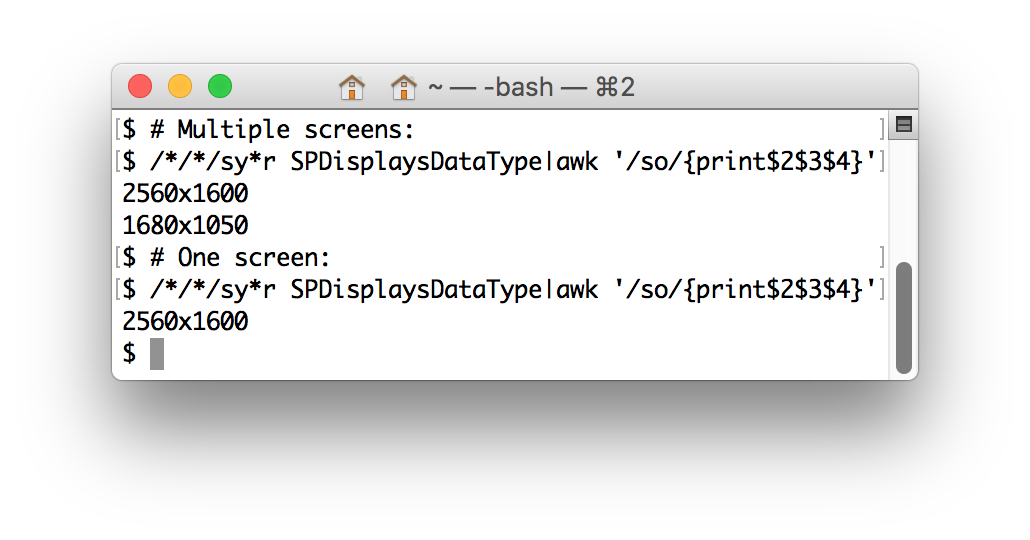
/*/*/sy*r SPDisplaysDataType|awk '/so/{print$2$3$4}'
Runs system_profiler, gets the SPDisplaysDataType information, searches for the first so in Resolution, and prints the screen resolution. For multiple screens, this prints all resolutions.
The prior, malcompliant variant:
/*/*/sy*r SPDisplaysDataType|grep so|tr -d 'R :a-w'
bash + xdpyinfo 42 31 bytes
xdpyinfo|grep dim|cut -d' ' -f7
From man page:
xdpyinfo - is a utility for displaying information about an X server.
@Floris @manatwork Thanks for saving a few bytes!
Japt, 24 bytes
Ox`ØP(s×Çn)±d+"x"+ight
The compressed string represents with(screen)width+"x"+height. Ox evaluates this as JavaScript, and the result is implicitly printed.
Mathematica, 51 bytes
SystemInformation[][[1,5,2,1,2,1,2,2,;;,2]]~Infix~x
This may not work for you depending on what devices you have connected (I don't know). This should always work (assuming you have at least one screen hooked up):
Infix[Last/@("FullScreenArea"/.SystemInformation["Devices","ScreenInformation"][[1]]),x]
Explanation
SystemInformation[] returns an expression of the form
SystemInformationData[{
  "Kernel" -> {__},
  "FrontEnd" -> {__},
  "Links" -> {__},
  "Parallel" -> {__},
  "Devices" -> {__},
  "Network" -> {__},
}]
We are interested in "Devices", which can be accessed directly as SystemInformation["Devices"] or as SystemInformation[][[1,5,2]]. The result will be a list of the form
{
  "ScreenInformation" -> {__},
  "GraphicsDevices" -> {__},
  "ControllerDevices" -> {__}
}
We want "ScreenInformation", which can be accessed either as SystemInformation["Devices","ScreenInformation"] or more succinctly as SystemInformation[][[1,5,2,1,2]]. The result will be of the form
{
  {
  "ScreenArea" -> {__},
  "FullScreenArea" -> {{0,w_},{0,h_}},
  "BitDepth" -> _,
  "Resolution" -> _
  },
  ___
}
The length of the list will be the number of screens you have connected. The first screen is SystemInformation[][[1,5,2,1,2,1]] and the width and height can be extracted as SystemInformation[][[1,5,2,1,2,1,2,2,;;,2]] Then we just insert an Infix x for the output format.
Processing, 51 bytes
void setup(){fullScreen();print(width+"x"+height);}
This outputs in this format: width height. Also, the program creates a window that is the size of the screen you are using (because every Processing program creates a window by default) and this program just outputs the height and the width of this window/sketch.
AutoHotKey, 34 bytes
SysGet,w,0
SysGet,h,1
Send,%w%x%h%
Save this in a file with extension .AHK and run it from a command prompt
Octave, 41 bytes
Thanks to @Arjun and @StephenS for corrections.
fprintf('%ix%i',get(0,'ScreenSize')(3:4))
0 is a handle to the root graphics object. Its property 'ScreenSize' contains the coordinates of the screen in pixels. The third and fourth entries give the desired information.
Python 2, 73 bytes
from ctypes import*
u=windll.user32.GetSystemMetrics;
print u(0),'x',u(1)
Processing 3, 37 bytes
fullScreen();print(width+"x"+height);
fullScreen() causes the app to launch with the maximum dimensions - the display resolution.
One byte less than the obvious
print(displayWidth+"x"+displayHeight);
Javascript, 36 bytes
s=screen;alert(s.width+"x"+s.height)